
• Home
  • Site Aliases
    • www.cloud-native.info
  • About
    • Background
    • Presenting Activities
    • Internet Profile
      • LinkedIn
    • About
  • Books & Publications
    • Log Generator
    • Logs and Telemetry using Fluent Bit
      • Fluent Bit book
      • Book Resources in GitHub
      • Fluent Bit Classic to YAML Format configurations
    • Logging in Action with Fluentd, Kubernetes and More
      • Logging in Action with Fluentd – Book
      • Fluentd Book Resources
      • Fluentd & Fluent Bit Additional stuff
    • API & API Platform
      • API Useful Resources
    • Oracle Integration
      • Book Website
      • Useful Reading Sources
    • Publication Contributions
  • Resources
    • GitHub
    • Oracle Integration Site
    • Oracle Resources
    • Mindmaps Index
    • Useful Tech Resources
      • Fluentd & Fluent Bit Additional stuff
      • Recommended Tech Podcasts
      • Official Sources for Product Logos
      • Java and Graal Useful Links
      • Python Setup & related stuff
  • Music
    • Monster On Music
    • Music Listening
    • Music Reading

Phil (aka MP3Monster)'s Blog

~ from Technology to Music

Phil (aka MP3Monster)'s Blog

Tag Archives: mvn

Push Notifications with a Bit of Java

24 Saturday Jan 2015

Posted by mp3monster in Java Cloud, Oracle, Technology

≈ Leave a comment

Tags

12c, Apache Maven, archetype, Eclipse, IDE, IntelliJ, java, JDeveloper, jProwlAPI, maven, mvn, Oracle, Oracle Java Cloud, OTN, POM, prowl, ProwlAPI, sourceForge

So continuing from my previous posts:

  • Intro
  • Push Notifications Without Your Own Mobile App

We’re going to use the Prowl API and create the equivalent classic “Hello World” App using the push framework – but cutting out the need for Growl etc.  For this blog post we’re not going to use the Oracle Java Cloud as we need to see the code working locally and get ready to promote the code to the cloud.  Once we’ve got some code working we can look at setting up the Java Cloud environment, package and promote what we have here using our IDE into the cloud environment.

As we’re cutting Java code now – you can obviously use your own preferred IDE, I’m going to use JDeveloper 12c if for no other reason than it being a huge improvement on 11g (download here) and I’ve become somewhat disappointed with Eclipse.  Whilst talking about IDEs;  you should be aware that Oracle provide an Oracle Cloud SDK which integrates with a number of IDEs to make some of the interactions with the cloud straight forward.

The SDK provides Ant and Maven scripts to help the build and deploy process – so we will be using those later, plus command line tools to help manage other activities, a number of code examples and HTML documentation.  To setup the SDK you will need to unpack the file into a folder and add that folder into your PATH environment variables. The bundle includes a readme that contains just enough to show what is required to get unpacked and make the command line tools work.

To download from Oracle you will need to setup an Oracle Technology Network (OTN) account – so if you don’t have one now is the time to create one – there is no cost to this, we’re going to need

We could use the REST based API that is provided by the ProwlApp, but at least to start with we’re going to follow the approach using a library to make using the API very simple. By using the API provided on SourceForge (jProwlAPI). Using an API will allow us to show the use of 3rd party libraries in the cloud deployment but also follows some of the Oracle ideas of offering ‘adaptors’ to simplify integration.

So you need to download:

  • JDeveloper 12c – http://www.oracle.com/technetwork/developer-tools/jdev/downloads/index.html (if you want to use JDeveloper as shown)
  • The jProwlAPI from SourceForge
  • Oracle Cloud SDK

So with this downloaded we are going to:

Setup an new Maven based project (or copy my file structure into place and import) using a maven quickstart archtetype (org.apache.maven.archetypes:maven-archetype-quickstart) . We will probably need to modify this later to leverage the full cloud capable archetype. This will build your project environment and retrieve a bunch of plugins you might need.

Next lets take a peak inside of the jProwlAPI download. You’ll see an example bit of java that shows how to fire the API.  Rather than tinker with this we have created a small package and JUnit test as we would if writing a proper solution created with the maven archetype.
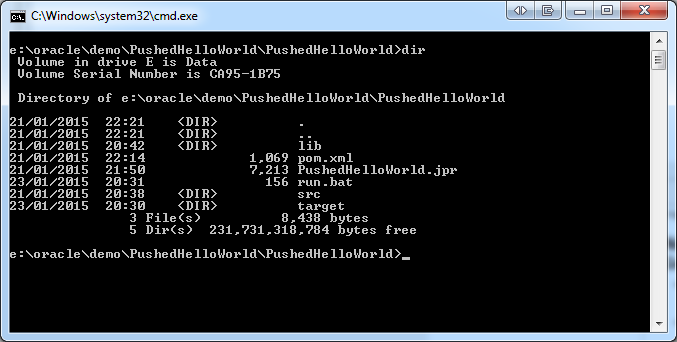
PushedHelloWorld directory structure

We also need to make the JProwlAPI jar file available to the project. So we use maven pattern, and create a folder called lib and copy the jar file into it. We then add the lib folder to project setup.


pushedhello-RunConfig

To be able to create the deployable artefact we need to load the jar file into the local repository, which we can do with a command line instruction (presuming maven is also available by your PATH variable).

mvn install:install-file -Dfile=./lib/JProwlAPI-0.5.jar -DgroupId=prowl -DartefactId=JProwlAPI -Dversion=12.1.3-0-0 -Dpackage=jar

We’ll come back to the command line in a bit, but within JDeveloper the code I have provided needs 1 change from yourself – replace the references to –YourAPIKey– in the run execute command and in the JUnit class with your own key.

JDEveloper 12c Run Config

In the the ProwlProcessor class I have included a man in method so we can just execute the class to see things working. So having done that we can then repeat by running the class via the JUnit test. You should see the same result. When we we’ve deployed or class to the cloud we can use the JUnit test to invoke the cloud.

ProwlProcessor - main method

The last step, within the IDE we have been compiling to get the class, but not creating a deployable jar file. We could do this with the IDE but we would also in a real development condition be creating artefacts via a Continuous Integration tooling which will effectively fire the maven command line like interface. So let’s do that to create the jar files, using the following command:

mvn clean package

You should then see a folder created if not already there and a jar file reflecting the values in the POM file, that we can see below.

JDeveloper 12C - view of a simple POM

So we have enough now we could in theory deploy a jar to a weblogic container and fire it from a Unit test. In the next post we’ll deploy and execute the unit test, and throw a crude front end into the mix.

Share this:

  • Click to share on Facebook (Opens in new window) Facebook
  • Click to share on X (Opens in new window) X
  • Click to share on Pocket (Opens in new window) Pocket
  • Click to share on Reddit (Opens in new window) Reddit
  • Click to email a link to a friend (Opens in new window) Email
  • Click to share on WhatsApp (Opens in new window) WhatsApp
  • Click to print (Opens in new window) Print
  • Click to share on Tumblr (Opens in new window) Tumblr
  • Click to share on Mastodon (Opens in new window) Mastodon
  • Click to share on Pinterest (Opens in new window) Pinterest
  • More
  • Click to share on Bluesky (Opens in new window) Bluesky
  • Click to share on LinkedIn (Opens in new window) LinkedIn
Like Loading...

    I work for Oracle, all opinions here are my own & do not necessarily reflect the views of Oracle

    • About
      • Internet Profile
      • Music Buying
      • Presenting Activities
    • Books & Publications
      • Logging in Action with Fluentd, Kubernetes and More
      • Logs and Telemetry using Fluent Bit
      • Oracle Integration
      • API & API Platform
        • API Useful Resources
        • Useful Reading Sources
    • Mindmaps Index
    • Monster On Music
      • Music Listening
      • Music Reading
    • Oracle Resources
    • Useful Tech Resources
      • Fluentd & Fluent Bit Additional stuff
        • Logging Frameworks and Fluent Bit and Fluentd connectivity
        • REGEX for BIC and IBAN processing
      • Java and Graal Useful Links
      • Official Sources for Product Logos
      • Python Setup & related tips
      • Recommended Tech Podcasts

    Oracle Ace Director Alumni

    TOGAF 9

    Logs and Telemetry using Fluent Bit


    Logging in Action — Fluentd

    Logging in Action with Fluentd


    Oracle Cloud Integration Book


    API Platform Book


    Oracle Dev Meetup London

    Blog Categories

    • App Ideas
    • Books
      • Book Reviews
      • manning
      • Oracle Press
      • Packt
    • Enterprise architecture
    • General
      • economy
      • ExternalWebPublications
      • LinkedIn
      • Website
    • Music
      • Music Resources
      • Music Reviews
    • Photography
    • Podcasts
    • Technology
      • AI
      • APIs & microservices
      • chatbots
      • Cloud
      • Cloud Native
      • Dev Meetup
      • development
        • languages
          • java
          • node.js
      • drone
      • Fluentbit
      • Fluentd
      • logsimulator
      • mindmap
      • OMESA
      • Oracle
        • API Platform CS
          • tools
        • Helidon
        • ITSO & OEAF
        • Java Cloud
        • NodeJS Cloud
        • OIC – ICS
        • Oracle Cloud Native
        • OUG
      • railroad diagrams
      • TOGAF
    • xxRetired
    • AI
    • API Platform CS
    • APIs & microservices
    • App Ideas
    • Book Reviews
    • Books
    • chatbots
    • Cloud
    • Cloud Native
    • Dev Meetup
    • development
    • drone
    • economy
    • Enterprise architecture
    • ExternalWebPublications
    • Fluentbit
    • Fluentd
    • General
    • Helidon
    • ITSO & OEAF
    • java
    • Java Cloud
    • languages
    • LinkedIn
    • logsimulator
    • manning
    • mindmap
    • Music
    • Music Resources
    • Music Reviews
    • node.js
    • NodeJS Cloud
    • OIC – ICS
    • OMESA
    • Oracle
    • Oracle Cloud Native
    • Oracle Press
    • OUG
    • Packt
    • Photography
    • Podcasts
    • railroad diagrams
    • Technology
    • TOGAF
    • tools
    • Website
    • xxRetired

    Enter your email address to subscribe to this blog and receive notifications of new posts by email.

    Join 2,555 other subscribers

    RSS

    RSS Feed RSS - Posts

    RSS Feed RSS - Comments

    December 2025
    M T W T F S S
    1234567
    891011121314
    15161718192021
    22232425262728
    293031  
    « Nov    

    Twitter

    Tweets by mp3monster

    History

    Speaker Recognition

    Open Source Summit Speaker

    Flickr Pics

    Turin Brakes Acoustic Tour 24 @ The Maltings FarnhamTurin Brakes Acoustic Tour 24 @ The Maltings FarnhamTurin Brakes Acoustic Tour 24 @ The Maltings FarnhamTurin Brakes Acoustic Tour 24 @ The Maltings Farnham
    More Photos

    Social

    • View @mp3monster’s profile on Twitter
    • View philwilkins’s profile on LinkedIn
    • View mp3monster’s profile on GitHub
    • View mp3monster’s profile on Flickr
    • View mp3muncher’s profile on WordPress.org
    • View philmp3monster’s profile on Twitch
    Follow Phil (aka MP3Monster)'s Blog on WordPress.com

    Blog at WordPress.com.

    • Subscribe Subscribed
      • Phil (aka MP3Monster)'s Blog
      • Join 233 other subscribers
      • Already have a WordPress.com account? Log in now.
      • Phil (aka MP3Monster)'s Blog
      • Subscribe Subscribed
      • Sign up
      • Log in
      • Report this content
      • View site in Reader
      • Manage subscriptions
      • Collapse this bar
     

    Loading Comments...
     

    You must be logged in to post a comment.

      Privacy & Cookies: This site uses cookies. By continuing to use this website, you agree to their use.
      To find out more, including how to control cookies, see here: Our Cookie Policy
      %d