Fluent Bit’s processors were introduced in version 3. But we have seen the capability continue to advance, with the introduction of the ability to conditionally execute processors. Until the ability to define conditionality directly with the processor, the control has had to be fudged around (putting processors further downstream and controlling it with filters and routing, etc).
In the Logs and Telemetry book, we go through the basic Processor capabilities and constraints, such as:
Configuration file constraints
Performance differences compared to using filter plugins
So we’re not going to revisit those points here.
We can chain processors to run in a sequence by directly defining the processors in the order in which they need to be executed. You can see the chaining in the example below.
Scenario
In the following configuration, we have created several input plugins using both the Dummy plugin and the HTTP plugin. Using the HTTP plugin makes it easy for us to control execution speed and change test data values, which helps us see different filter behaviours. To make life easy we’ve provided several payloads, and a simple caller.[bat|sh] script which takes a single parameter [1, 2, 3, …] which identifies the payload file to send.
All of these resources are available in the Book’s GitHub repository as part of the extras folder, which can be found here. This saves us from embedding everything into this blog.
Filters as Processors and Chaining
Filters can be used as processors as well as the dedicated processor types such as SQL asnd content modifier. The Filters just need to be referenced using the name attribute e.g. name: regex would use the REGEX filter.
Processor Conditions
If you’re familiar with Kubernetes selectors syntax, then the definition conditions for a processor will feel familiar. The condition is made up of a condition (#–A–) and the condition will contain one or more rules (#–B–). The rule defines an expression which will yield a Boolean outcome by identifying:
An element of the payload (for example, a field/element in the log structure, or a metric, etc).
The value to evaluate the field against
The evaluation operator, which can be one of the typical operators e.g eq (equals), (see below for the full list).
Since the rules are a list, you can include as many as needed. The condition, in addition to the rule , has its own operator (#–C–), which tells the condition how to combine the results of each of the rules together. As we need a Boolean value, we can only use a logical and or a logical or. When we have a single rule then the operation is tested with itself.
In the following example, we have two inputs with processors to help demonstrate the different behavior. In the dummy source, we can see how a nested element can be accessed (i.e. $<element name>[‘<child element name>‘]), performing a string comparison. Here we’re using a normal filter plugin as a processor.
With our HTTP source, we’re demonstrating that we can have two processors with their own conditions. The first processor is interesting, as it illustrates an exception to the convention; we can express conditionality within the Lua code (#–D–), but it ignores the condition construct. It is obviously debatable as to the value of a condition for the Lua processor, but it is worth considering, as there is an overhead when calling the LuaJIT if the condition can be quickly resolved internally.
To run the demonstration, we’ve provided several test payloads and a simple script that will call the Fluent Bit HTTP input plugin with the correct file. We just need to pass the number associated with the log file e.g. <Log>1<.json> is caller.[bat|sh] 1, and so on. The script is a variation of:
set fn=log%1%.json
echo %fn
curl -X POST --location 127.0.0.1:9881 --header Content-Type:application/json --data @%fn%
With KubeCon North America just wrapped up, the team behind Fluent Bit has announced a new major release -version 4.2. According to the release notes, there are some interesting new features for routing strategies in Fluent Bit. We also have a Dead Letter Queue (DLQ) mechanism to handle some operational edge scenarios. As with all releases, there are continued improvements in the form of optimizations and feature additions to exploit the capabilities of the connected technology. The final aspect is ensuring that any dependencies are up to date to exploit any improvements and ensure that there are no unnecessary vulnerabilities.
At the time of writing, the Fluent Bit document website is currently only showing 4.1, but I think at least some of the 4.2 details have been included. So we’re working out what exactly is or isn’t part of 4.2.
Dead Letter Queue
Ideally, we should never need to use the DLQ feature as it is very much focused on ensuring that in the event of errors processing the chunks of events in the buffer, the chunks are not lost, so the logs, metrics, and traces can be recovered. The sort of scenarios that could trigger the use of the DLQ are, for example:
The buffer is being held in storage, and the storage is corrupted for some reason (from a mount failure, to failing to write a full chunk because storage has been exhausted).
A (custom) plugin has a memory pointer error that corrupts chunks in the buffer. I mention customer plugins, anecdotally, they will not have been exercised as much as the standard plugins; therefore, a higher probability of an unexpected scenario occurring.
The control of the DLQ is achieved through the configuration of several service configuration attributes …
storage.keep.rejected – this enables the DLQ behavior and needs to be set to On (by default, it is Off).
storage.path – is used to define where the storage of streams and chunks is handled. This is not specific to the DLQ. But by default a DLQ is created as a folder called rejected as a child of this location.
storage.rejected.path allows us to define an alternate subfolder for the DLQ to use based on storage.path.
Trying to induce behavior that needs this feature to trigger is not going to be trivial, for example if we dynamically set a tag, and there is no corresponding match this won’t get trapped in the DLQ. Although arguably this is just as good a scenario for using the DLQ (if you receive events with tags that you don’t wish to retain, it would be best to be matched to a null output plugin, so it is obvious from the configuration that dropping events is a deliberate action).
Other 4.2 (and 4.x) features
As we work out exactly what and how the new features work we’ll add additional posts. For example, we have a well-developed post to illustrate 4.x features for conditional control of processors (with demo configurations etc).
Kube Con Content
While there isn’t a huge amount of technical content from sessions at Kube Con available yet, particularly in the Telemetry and Fluent space, one blog article resulting from the conference did catch my eye: New Stack covering OpenAI’s use of Fluent Bit. The figures involved are staggering, such as the 10 petabytes of logs being handled daily.
18th Nov Update
More content showing up – will update the list below as we encounter more:
With vibe coding (an expression now part of the Collins Dictionary) and tools like Cline, which are penetrating the development process, I thought it would be worthwhile to see how much can be done with an LLM for building configurations. Since our preference for a free LLM has been with Grok (xAI) for development tasks, we’ve used that. We found that beyond the simplest of tasks, we needed to use the Expert level to get reliable results.
This hasn’t been a scientific study, as you might find in natural language-to-SQL research, such as the Bird, Archer, and Spider benchmarks. But I have explained below what I’ve tried and the results. Given that LLMs are non-deterministic, we tried the same question from different browser sessions to see how consistent the results were.
Ask the LLM to list all the plugins it knows about
To start simply, it is worth seeing how many plugins the LLM might recognize. To evaluate this, we asked the LLM to answer the question:
list ALL fluent bit input plugins and a total count
Grok did a pretty good job of saying it counted around 40. But the results did show some variation: on one occasion, it identified some plugins as special cases, noting the influence of compilation flags; on another attempt, no references were made to this. In the first attempts, it missed the less commonly discussed plugins such as eBPF. Grok has the option to ask it to ‘Think Harder’ (which switches to Exper mode) when we applied this, it managed to get the correct count, but in another session, it also dramatically missed the mark, reporting only 28 plugins.
Ask the LLM about all the attributes for a Plugin
To see if the LLM could identify all the attributes of a plugin, we used the prompt:
list all the known configuration attributes for the Fluent Bit Tail plugin
Again, here we saw some variability, with the different sessions providing between 30 and 38 attributes (again better results when in Expert mode). In all cases, the main attributes have been identified, but what is interesting is that there were variations in how they have been presented, some in all lowercase, others with leading capitalization.
Ask the LLM to create a regular expression
Regular expressions are a key way of teasing out values that may appear in semi-structured or unstructured logs. To determine if the LLM could do this, we used the following prompt:
Create a regular expression that Fluent Bit could execute that will determine if the word fox appears in a single sentence, such as 'the quick brown fox jumped over the fence'
The result provided offered variations on the expression \bfox\b (sometimes allowing for the possibility that Fox might be capitalized). In each of the cases where we went back to the LLM and added to the prompt that Note that the expression should be case sensitive – It was consistently correct.
The obvious takeaway here is that to avoid any errors, we do need to be very explicit.
Ask the LLM to create a simple filter and output
Given that we can see the LLM understands the most commonly used Fluent Bit plugins, let’s provide a simple scenario with a source log that will have some rotation, and see how it processes it. The prompt provided is:
create a classic configuration for fluent bit that will read an input from a file called myApp which has a post fix with the date. The input needs to take into account that the file extension will change at midnight. Any log entries that show an error and reference an IP need to be filtered to go to a CSV file with columns in the order tag, IP, log, timestamp
The handling of this question differed significantly across sessions: one response implemented filtering and output structuring via a Lua function, while another maximized the use of multiple filters. None of the solutions recognized that the output could reference standard Fluent Bit attributes for the tag and timestamp.
What was interesting was that the LLM also picked up on the possibility of externalizing the parser expressions, such as finding the IP. Interestingly, Fluent Bit includes a predefined set of filters, including an IPv4 filter.
Ask the LLM to use a stream processor
Stream Processors are a less commonly used feature of Fluent Bit, so it would be interesting to see how well the LLM can handle such use cases.
create a Fluent Bit YAML configuration which takes an NGINX log file input and uses a SQL stream processor to count the number of calls identified and the average time between these calls as coming from IP addresses starting 10. every minute. The NGINX logs need to be forwarded to a fluent bit node on the server named ops.myCorp.com and the output of the stream processing needs to go to a local log file called counter.txt and written to a Prometheus end point called ops_prometheus.myCorp.com
The result of this prompt comes in two parts. A main configuration:
The configuration for the second node provided is:
service:
  log_level: info

pipeline:
  inputs:
    - name: tail
      path: /path/to/nginx/access.log  # Adjust to your NGINX access log path
      tag: nginx
      db: /var/log/fluent-bit-tail.db  # For position tracking

  outputs:
    - name: forward
      match: nginx
      host: ops.myCorp.com
      port: 24224
As you can see, while the configuration is well-formed, the LLM has confused the input and output requirements. This is because we have not been explicit enough about the input. The thing to note is that if we tweak the prompt to be more explicit and resubmit it, we get the same mistake, but submitting the same revised prompt produces the correct source. We can only assume that this is down to the conversational memory yielding a result that takes precedence over anything older. For transparency, here is the revised prompt with the change underlined.
create a Fluent Bit YAML configuration which takes an NGINX log file as an input. The NGINX input uses a SQL stream processor to count the number of calls identified and the average time between these calls as coming from IP addresses starting 10. every minute. The input NGINX logs need to be output by forwarding them to a fluent bit node on the server named ops.myCorp.com and the output of the stream processing needs to go to a local log file called counter.txt and written to a Prometheus end point called ops_prometheus.myCorp.com
The other point of note in the generated configuration provided is that there doesn’t appear to be a step that matches the nginx tag, but results in events with the tag ip10.stats. This is a far more subtle problem to spot.
What proved interesting is that, with a simpler calculation for the stream, the LLM in an initial session ignored the directive to use the stream processor and instead used the logs_to_metrics filter, which is a simpler, more maintainable approach.
Creating Visualizations of Configurations
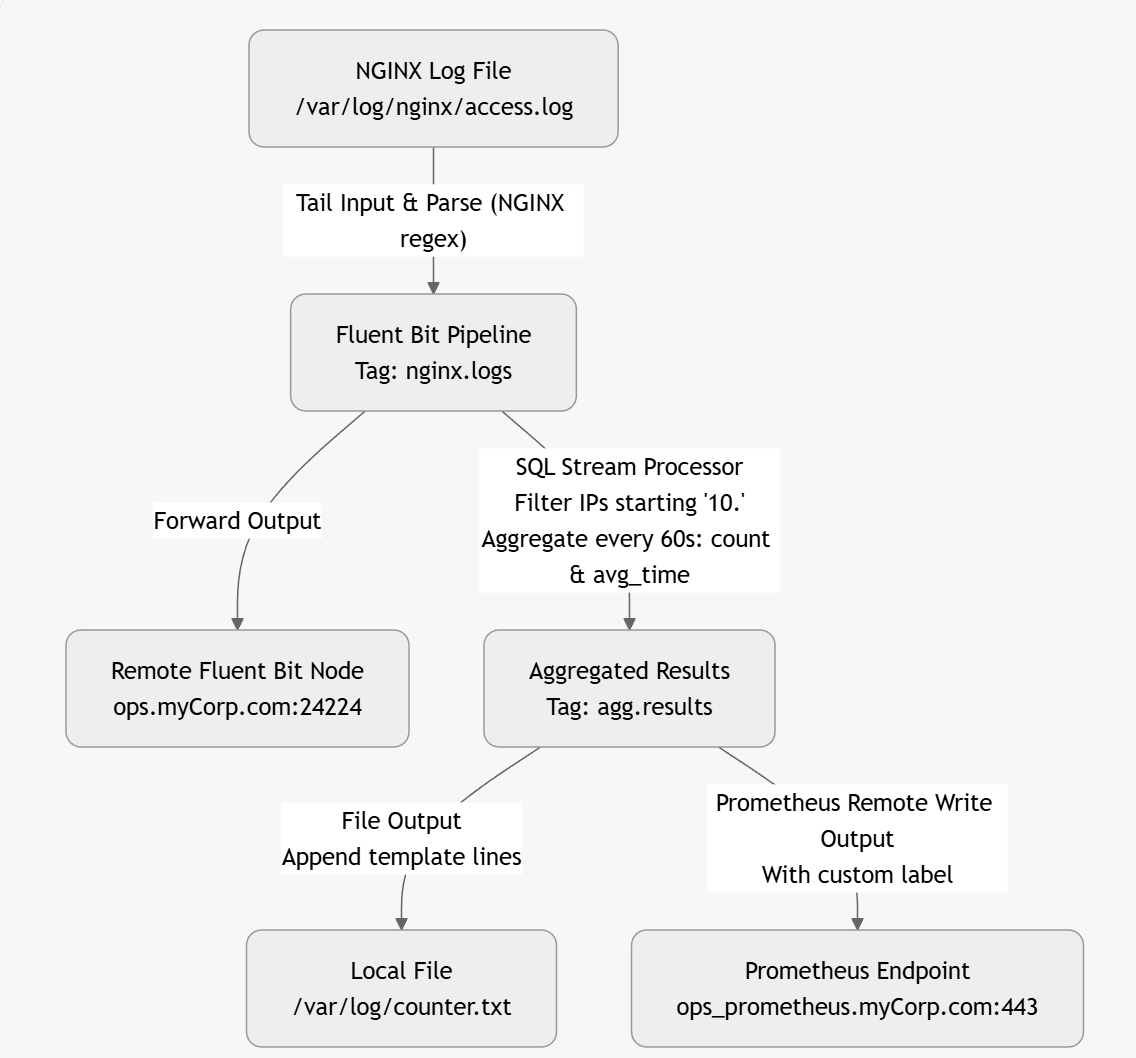
One of the nice things about using an LLM is that, given a configuration, it can create a visual representation (directly) or in formats such as Graphviz, Mermaid, or D2. This makes it easier to follow diagrams immediately. Here is an example based on a corrected Fluent Bit configuration:
The above diagram was created by the LLM as a mermaid file as follows
graph TD
A[NGINX Log File
/var/log/nginx/access.log] -->|"Tail Input & Parse (NGINX regex)"| B[Fluent Bit Pipeline
Tag: nginx.logs]
B -->|Forward Output| C[Remote Fluent Bit Node
ops.myCorp.com:24224]
B -->|"SQL Stream Processor
Filter IPs starting '10.'
Aggregate every 60s: count & avg_time"| D[Aggregated Results
Tag: agg.results]
D -->|"File Output
Append template lines"| E[Local File
/var/log/counter.txt]
D -->|"Prometheus Remote Write Output
With custom label"| F[Prometheus Endpoint
ops_prometheus.myCorp.com:443]
Lua and other advanced operations
When it comes to other advanced features, the LLM appears to handle this well, but given that there is plenty of content available on the use of Lua, the LLM could have been trained on. The only possible source of error would be the passing of attributes in and out of the Lua script, which it handled correctly.
We experimented with handling open telemetry traces, which were handled without any apparent issues. Although advanced options like compression control weren’t included (and neither were they requested).
We didn’t see any hallucinations when it came to plugin attributes. When we tried to ‘bait’ the LLM into hallucinating an attribute by asking it to use an attribute that doesn’t exist, it responded by adding the attribute along with a configuration comment that the value was not a valid Fluent Bit attribute.
General observations
One thing that struck me about this is that describing what is wanted with sufficient detail for the LLM requires a higher level of focus (albeit for a shorter period) than manually creating the configuration. The upside is that we are, in effect, generating part of a detailed design document. Today, I’d go so far as to suggest including the prompt(s) used in the configuration header(s) to help people understand what is needed from the configuration.
When the LLM generates the configuration, there will be no escaping the need to understand what the plugins do and the options they offer to determine whether the LLM has got it right. If the LLM gets it wrong, we would recommend starting a fresh session.
This does raise a bit of an interesting challenge. If you need to have a fair handle on how Fluent Bit works and common ways plugins work, then actually writing your own configuration files may be better anyway, as that approach will provide more reinforcement to learning. We, of course, can use the LLM to help ‘peer review’ our configurations in the sense of checking syntax, and generating visual representations can help confirm the configuration is as we expect.
This may be a personal thing, as I find myself working with Fluent Bit in small bursts rather than continually. As a result, I remember what I can do with a plugin, but I often forget the exact names of the less commonly used attributes to effect the desired behavior. Looking up, and keying in the attribute names can take time. One thing that we have tried was to include in the prompt statements, such as:
In the configuration include all the attributes even if they are only populated with their default or example values. Add a comment for each attribute to show its surpose and whether it is mandatory or not.
What you get then is all the possible options, with the correct names (something that is easy for the LLM, as it is essentially asking it to reformat the documentation for you). Then it becomes a case of removing the attributes that aren’t needed line by line—a lot quicker and easier than manually adding them.
LLM generated plugin with all attributes described (slightly modified output to make the point clearer).
[INPUT]
   Name tail
     # Purpose: Specifies the input plugin to use. Mandatory: yes
   buffer_chunk_size 32k
     # Purpose: Set the initial buffer size to read file data. The value must be according to the Unit Size specification. Mandatory: no
   buffer_max_size 32k
    # Purpose: Set the limit of the buffer size per monitored file. If reading a file exceeds this limit, the file is removed from the monitored file list. The value must be according to the Unit Size specification. Mandatory: no
   path /var/log/blah.txt
    # Purpose: Pattern specifying a specific log file or multiple ones through the use of common wildcards. Allows multiple patterns separated by commas. Mandatory: yes
    path_key filename
     # Purpose: If enabled, it appends the name of the monitored file as part of the record. The value assigned becomes the key in the map. Mandatory: no
  exclude_path *.gz,*.zip
     # Purpose: Set one or multiple shell patterns separated by commas to exclude files matching certain criteria, e.g., *.gz,*.zip. Mandatory: no
  offset_key offset
     # Purpose: If enabled, Fluent Bit appends the offset of the current monitored file as part of the record. The value assigned becomes the key in the map. Mandatory: no
  read_from_head false
    # Purpose: For new discovered files on start (without a database offset/position), read the content from the head of the file, not tail. Mandatory: no
  refresh_interval 60
    # Purpose: The interval of refreshing the list of watched files in seconds. Mandatory: no
  rotate_wait 5
    # Purpose: Specify the number of extra time in seconds to monitor a file once it is rotated in case some pending data is flushed. Mandatory: no
  ignore_older 1d
    # Purpose: Ignores files older than ignore_older. Supports m, h, d (minutes, hours, days) syntax. Mandatory: no
  ignore_active_older_files  false
    # Purpose: Ignore files that are older than the value set in ignore_older even if the file is being ingested. Mandatory: no
  skip_long_lines off
    # Purpose: When a monitored file reaches its buffer capacity due to a very long line (buffer_max_size), the default behavior is to stop monitoring that file. skip_long_lines alters that behavior and instructs Fluent Bit to skip long lines and continue processing other lines that fit into the buffer size. Mandatory: no
  skip_empty_lines off
    # Purpose: Skips empty lines in the log file from any further processing or output. Mandatory: no
  db /fluent-bit/tail/blah.db
    # Purpose: Specify the database file to keep track of monitored files and offsets. Recommended to be unique per plugin. Mandatory: no
  db.sync normal
    # Purpose: Set a default synchronization (I/O) method. Affects how the internal SQLite engine synchronizes to disk. Values: extra, full, normal, off. Mandatory: no
  db.locking false
    # Purpose: Specify that the database will be accessed only by Fluent Bit. Enabling this increases performance but restricts external tools from querying the content. Mandatory: no
  db.journal_mode wal
    # Purpose: Sets the journal mode for databases (wal). Enabling wal provides higher performance. Not compatible with shared network file systems. Mandatory: no
  db.compare_filename false
    # Purpose: Determines whether to review both inode and filename when retrieving stored file information from the database. true verifies both; false checks only the inode. Mandatory: no
  mem_buf_limit 10MB
    # Purpose: Set a memory limit that the Tail plugin can use when appending data to the engine. If the limit is reached, it will be paused. When the data is flushed, it resumes. Mandatory: no
  exit_on_eof false
    # Purpose: When reading a file, exit as soon as it reaches the end of the file. Used for bulk load and tests. Mandatory: no
  parser none
    # Purpose: Specify the name of a parser to interpret the entry as a structured message. Mandatory: no
  key log
   # Purpose: When a message is unstructured (no parser applied), it's appended as a string under the key name log. This option lets you define an alternative name for that key. Mandatory: no
  inotify_watcher true
   # Purpose: Set to false to use file stat watcher instead of inotify. Mandatory: no
  tag blah.logs
   # Purpose: Set a tag with regexextract fields that will be placed on lines read. Supports tag expansion: if the tag includes an asterisk (*), that asterisk will be replaced with the absolute path of the monitored file, with slashes replaced by dots. Mandatory: no
  tag_regex (?<pod_name>[a-z0-9](?:[-a-z0-9]*[a-z0-9])?(?:\\.[a-z0-9]([-a-z0-9]*[a-z0-9])?)*)_(?<namespace_name>[^_]+)_(?<container_name>.+)-(?<container_id>[a-z0-9]{64})\.log$
    # Purpose: Set a regular expression to extract fields from the filename. Mandatory: no
  static_batch_size 50M
    # Purpose: Set the maximum number of bytes to process per iteration for the monitored static files (files that already exist upon Fluent Bit start). Mandatory: no
  file_cache_advise on
    # Purpose: Set the posix_fadvise in POSIX_FADV_DONTNEED mode. This reduces the usage of the kernel file cache. This option is ignored if not running on Linux. Mandatory: no
  threaded false
    # Purpose: Indicates whether to run this input in its own thread. Mandatory: no
  Unicode.Encoding none
    # Purpose: Set the Unicode character encoding of the file data. Requests two-byte aligned chunk and buffer sizes. Supported values: UTF-16LE, UTF-16BE, and auto. Mandatory: no
  Generic.Encoding none
    # Purpose: Set the non-Unicode encoding of the file data. Supported values: ShiftJIS, UHC, GBK, GB18030, Big5, Win866, Win874, Win1250, Win1251, Win1252, Win1254, Win1255, Win1256. Mandatory: no
  multiline.parser docker,cri
    # Purpose: Specify one or multiple Multiline Parser definitions to apply to the content. When using a new multiline.parser definition, you must disable the old configuration from your tail section (e.g., parser, parser_firstline, parser_N, multiline, multiline_flush, docker_mode). Mandatory: no
  multiline off
    # Purpose: If enabled, the plugin will try to discover multiline messages and use the proper parsers to compose the outgoing messages. When this option is enabled, the parser option isn't used. Mandatory: no
  multiline_flush 4
    # Purpose: Wait period time in seconds to process queued multiline messages. Mandatory: no
  parser_firstline none
    # Purpose: Name of the parser that matches the beginning of a multiline message. The regular expression defined in the parser must include a group name (named capture), and the value of the last match group must be a string. Mandatory: no
  parser_1 example_parser
    # Purpose: Optional. Extra parser to interpret and structure multiline entries. This option can be used to define multiple parsers. For example, parser_1 ab1, parser_2 ab2, parser_N abN. Mandatory: no
  docker_mode off
    # Purpose: If enabled, the plugin will recombine split Docker log lines before passing them to any parser. This mode can't be used at the same time as Multiline. Mandatory: no
  docker_mode_flush 4
   # Purpose: Wait period time in seconds to flush queued unfinished split lines. Mandatory: no
  docker_mode_parser none
    # Purpose: Specify an optional parser for the first line of the Docker multiline mode. The parser name must be registered in the parsers.conf file. Mandatory: no

[OUTPUT]
  Name   stdout
  Match  *
  Format json_lines
[OUTPUT] Name stdout Match * Format json_lines
I would also suggest it is worth trying the same prompt is separate conversations/sessions to see how much variability in approach to using Fluent Bit is thrown up. If the different sessions yield very similar solutions, then great. If the approaches adopted are different, then it is worth evaluating the options, but also considering what in your prompt might need clarifying (and therefore the problem being addressed).
Generating a diagram to show the configuration is also a handy way to validate whether the flow of events through it will be as expected.
The critical thing to remember is that the LLM won’t guarantee that what it provides is good practice. The LLM is generating a configuration based on what it has seen, which can be both good and bad. Not to mention applying good practice demands that we understand why a particular practice is good, and when it is to our benefit. It is so easy to forget that LLMs are primarily exceptional probability engines with feedback loops, and their reasoning is largely probabilities, feedback loops, and some deterministic tooling.
Podcasts come out more frequently than we’d like sometimes, and in 2018, I blogged about some of the more interesting sources (here). Since then, we’ve discovered some new ones that we like and think are worth sharing. Most of the links are to the Podtails tracker website or Podbean, no hunting for the RSS feed. So, here we go …
Rockenteurs with Gary Kemp and Guy Pratt – Rockenteurs has built a tremendous following, its success comes from the fact they personally know have worked with (or revolve in similar circles) many of the guests. This produces an immediate familiarity and a sense you’re part of a casual group conversation and everyone is relaxed and unhurried. For those less in the know Gary Kemp was part of Spandau Ballet, but since those days has performed as guitarist for higher. Guy Pratt, while not such as house hold name, is a highly respected bassist, session musician and essentially Pink Floyd’s bassist since Roger Water’s departure.
Alan Cross gives two for the money with the Ongoing History of New Music and Uncharted crime and mayhem in the music industry – Alan Cross is a Canadian music journalist, radio presenter and pod and videocaster. His primary output is the Ongoing History of New Music, which focusses on the Indie / Rock scene. But he has a second fortnightly podcast with a wider perspective. What really works here, is the depth of his knowledge, and the love of his subject (desire to see musicians do well and share the stories behind and around the music).
Bureau of Lost Culture – I came to Stephen Coates’ podcast as a result of hearing about Bone Music and reading his book, by that title. Stephen’s podcasts tend to gravitate to all aspects of music, but his focus is ‘count culture’. The subjects can look a little academic, but the way the stories are told is very human centered and explorers the impacts his subjects have had.
BBC provides a vast library of podcasts, some are regular, some are more episodic, but all are worth checking out …
This Cultural Life – Best described as a successor to Mastertapes, as the presenter, John Wilson, has moved on to this show. Although the podcast goes beyond music to a broader cultural portfolio of guests/subjects.
Eras – A more mainstream look at big-name artists such as Sting, Abba, Kylie with 4-6 episodes per artist in an episodic release.
Legend – A bit like Eras, but covers artists like Joni Mitchell and Springsteen.
Artist own podcasts can be a bit hit a miss, but these have some great episodes …
Moby Pod – Moby’s self deprecation, and history has resulted in some fascinating podcasts, both looking at music broadly (and personally) as he is as much an interviewee as interviewer on these podcasts. His name and reputation has meant he has also had some more influential names on the podcast, but these tend to be aligned with his animal rights and vegan passions. But these aren’t presented in a preaching manner, as is Moby’s way he recognizes these are his beliefs and not everyone may agree.
Norah Jones is Playing Along – This has been an interesting podcast as Norah talks with a musician and records material with them. After the 1st season (we saw some of those recordings released as an album). There has been a cvouple of years gap between the the first series and the second once started recently (Octob ’25).
James Lavelle (Living In My Headphones) aka Unkle – A monthly slot on Soho Radio, this is very much a DJ mix session, but the diversity of music used is fascinating.
Broken Record – Part of Malcolm Gladwell’s growing Pushkin empire of podcasts. These can be a bit hit and miss, but when they hit – the insightful, interesting and enjoyable to listen to, and among the best there is.
So when you’re not dialed in with your latest vinyl/CD/download I’d recommend checking these out.

 Phil (aka MP3Monster)'s Blog
You must be logged in to post a comment.