Last week saw the Open Source Observability Day (OSOD) during which I presented on the subject of the Open Agent Management Protocol, covering the underlying protocol that forms the foundation of a wider capability we have been building along with a demo of what is available.
If you want to see the presentation, and hear the full story not only of the core protocol but how it can help with the ideas around ChatOps and AIOps head over to the OSOD website (and previous years can be seen on YouTube with playlists for each year e.g. OSOD 2025). Of course if you have been following my blog posts you’ll know this.
The demo is recorded against a version prior to the 0.6 release.
Running the demo yourself
If you want to try this out for yourself, you can do so. You’ll need to:
There are several things that separate the turn-key/commercial observability solutions from the pure open source options. The most visible of these are:
Fleet management of you agents, particularly when working outside of a Kubernetes ecosystem
Deployed services and applications with default monitoring configuration
Prebuilt dashboards
While the issue of fleet management is a subject I’ve covered at length with OpAMP. We’ve not looked so closely at the discovery and automation. While the OpAMP server (and standalone option) provides schema driven editor, the key separation is to drive the configuration based on finding what solutions are deployed.
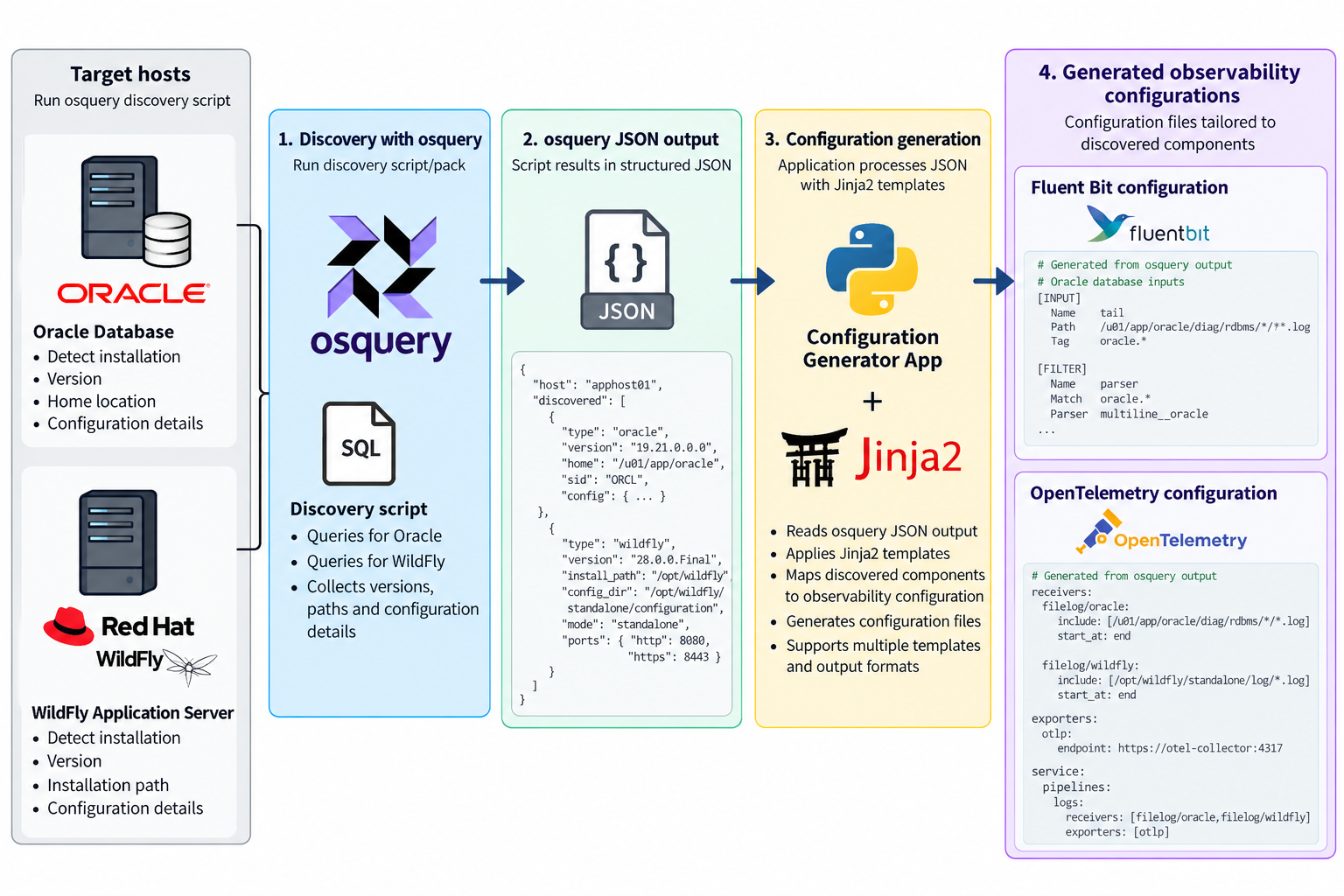
This process can look very sophisticated, but there are a number of open source tools that can help address it pretty easily. By bringing therse tools together we can achieve the same effect of detect and configure agents. At this stage we’re not looking at the backend of creating out of the box dashboards, but the potential to evolve the approach is there.
Detecting and Generating Configuration
The process we need has the following steps:
find the deployed solution(s)
Understand how they are deployed
Generate a configuration based on the detection
Push the configuration out to agents
Detect and capture config
One of the more active solutions that provides a means to detect deployments, and find configurations in this space is OSQuery, which is used by some serious players (Airbnb, Dropbox, Netflix, Palantir, Etsy, and Uber are just a few). OSQuery is particularly appealing solution because of its ease of use. All the information OSQuery can make available is accessible through the use of SQL including all the power SQL provides to mix data together.
While SQL is powerful, we do want to return the results in an easily consumable manner, so the CLI tool allows us to ask for the result to be returned in JSON. This makes the result easy to work with and we can use it with technologies such as JSONPath, particularly if we can impose a defined schema on the output, something that can be done as we know the queries being run, and can use constructs such as select … as …
As we can query the JSON output to retrieve the relevant parts of the output, for example the result of the queries to look for an Oracle Database or a RedHat/IBM WildFly application server. We can then combine that data with a template, such as the templating capabilities of Jinja2. The template defines the configuration that we would want to use, for example we want to tail log files, we want to establish a Prometheus metrics pull. Then the values are pulled from the JSON to create an instance of the file.
Templates make the result reusable
By using templates, known queries and their result structures we can generate reusable configurations on a product by product basis. The last step is stitching it together. To be reusable each template is discrete for an application or standard stack. So we up with multiple configuration files that need to be combined. This could be addressed by simply merging all the files together, but a lot of the observability tools such as Fluent Bit and Fluentd provide the ability to include files. Obviously you still need to work out what to include to combine, but this pretty straight forward.
There are limits
So this brings together all the sources, for destination side for the turn key solutions is known as the backend is the core product. In the open source solution you’re probably going to run multiple tools, so you need to have a more advanced routing. You can create a standard backend routing and include it.
Convenience as a weakness?
While having turn-key solutions, makes setup so much easier, could it also be a weakness? As we can see with our automation, we’ve not got tailoring to filter data in the pipeline, or park it out of the way. Which ratchets up the costs, because of the retention costs, and greater computational effort to trawl the data. Nor can we derive new signals through correlation inflight. But then our approach with templating creates the same challenge, BUT this approach doesn’t preclude you from incorporating into the solution such smarts.
Backend Bootstrapping
Rapid configuration of the backend is going to be a bit harder because the chances are you’re wanting to mix and match the backend tools (one of the strengths of not going down a turnkey adoption). We’ll explore the possibilities of making this step easier in another post.
Another aspect of OpenTelemetry’s OpAMP protocol is the ability to share connections details, not just between the server side of the OpAMP protocol, but with other connections a collector like Fluent Bit could be using such as an OTel consumer for logs, traces and metrics that are being collected that could be a managed Grafana service or another Fluent Bit if you’re using a concentrator network.
This is includes Observability data generated by the collector I.e. Fluent Bit in our case.
Yes, but Fluent Bit doesn’t push its own OTel signals
It is true that out of the box Fluent Bit doesn’t push OTel signals for itself. But this is easily fixed. We can control logging, and metrics that are exposed (and today no traces are produced). The solution is simple, we use Fluent Bit itself to collect the logs and metrics and route them to using an OTel output plugin.
While creating a configuration for sharing seems onerous, once you’ve done it once, you can simply include the config file in every deployment. Further more, if you backend for any of the signals is not Fluent Bit conversant, just use a different Fluent Bit plugin.
Config walkthrough
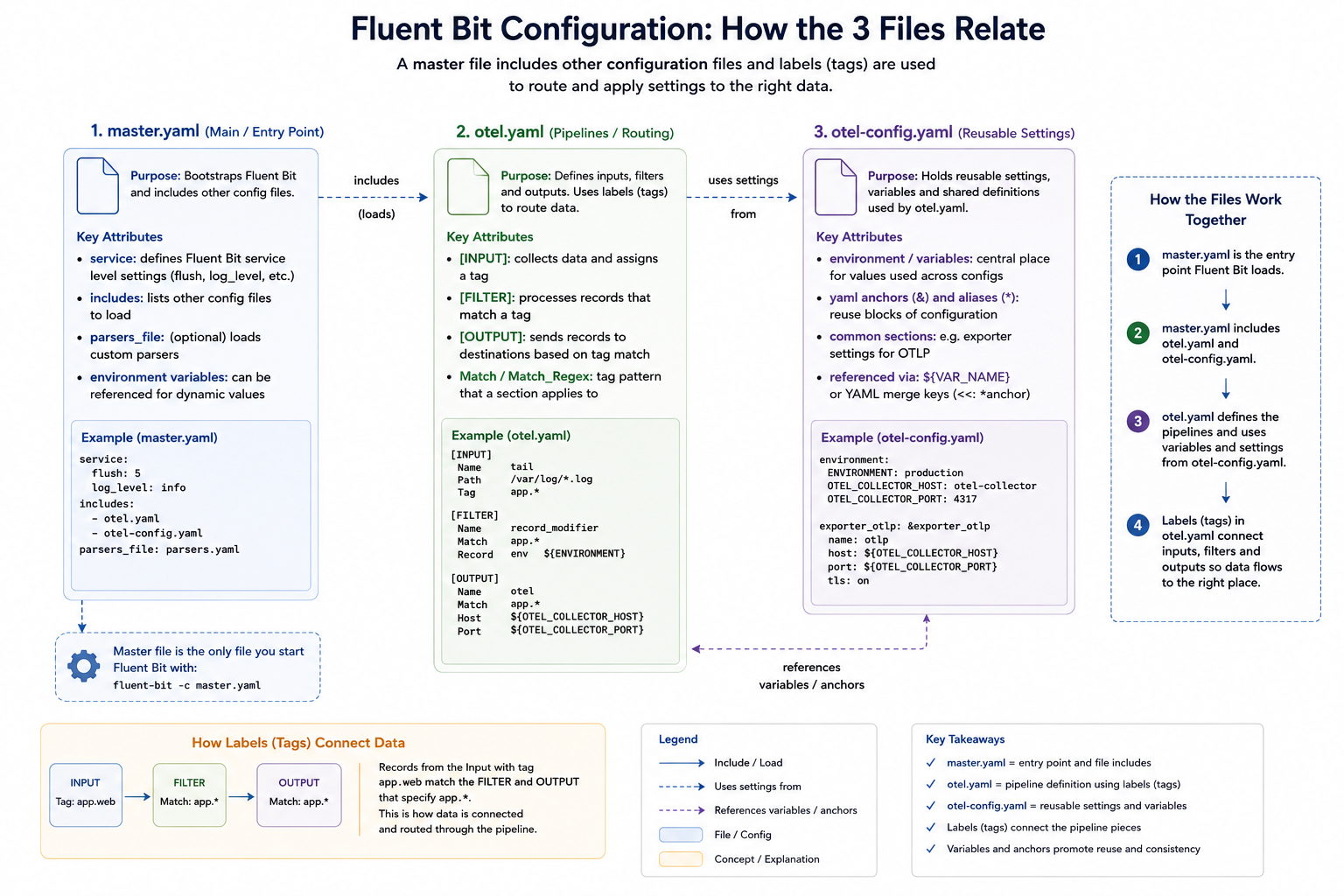
Our configuration consists of several files, which we’ll explain. We’ve adopted a multi-file setup, which works through the use of Fluent Bit’s includes capability so we can separate out the application-level observability configuration (master.yaml), the configuration to allow us to observe Fluent Bit itself (otel.yaml), and the configuration for the connection parameters (otel-config.yaml).
Master.yaml
The master.yaml contains our application observability settings and is the configuration file we pass to Fluent Bit. In this case, we’re simply using a dummy input that’s fed to a file output; we’ve also got a wildcard stdout configuration to make it easy to observe what’s going on from the command line.
There are at this level, two telltale signs of self-monitoring at this level:
The includes declaration picks up otel.yaml, which includes additional inputs and outputs, as well as service configurations.
The service settings that switch on the HTTP server. It is controlled via environment variables, so you could switch this off easily. We have to implement these settings here, as within the full set of file inclusions, there can only be a single service block.
The service declaration also specifies where we want the log file that the Fluent Bit setup needs to go.
otel.yaml
We’ve separated the pipeline definitions for Fluent Bit observability to reuse the configuration across many deployments. As different deployments may need to talk to different instances of the observability backend (for example, when operating in a multi-cloud arrangement we have defined the environment variables that provide the credentials and target address).
We have defined additional environment variables at this level, so that anyone needing to understand master settings and the service values needs only look here. How this layer (or layers) is established is, to an extent, concealed. It also means we can use OpAMP to generate a configuration file, but we’ll come back to that.
The environment variables that we define to be used by the master.yaml switch the HTTP server on, and indicate which ports to use. Making this easy to check for the person or people defining the master.yaml makes it easier to avoid port collisions.
We also tell Fluent Bit where to write its logs through the service setting. To consolidate the configuration, that value references a different environment variable, so we can put all of our configurations together. Even if we didn’t have this level of redirection, it is worthwhile setting the value using an environment variable as the file location is needed both as our output for the service and the input for a plugin.. As you can see, we’ve just named the file. So the file created will be relative to wherever we run Fluent Bit from.
Let’s look at the inputs and outputs being used, and what they do:
Tail – this is the input that reads Fluent Bit’s logs, as we set Fluent Bit to log at debug level, we’ll see plenty of activity. Having Fluent Bit write to the file system, only for a thread in the same process to read it, is obviously inefficient. It can be optimised by using a RAMFS-like filesystem on Linux and a RAMDisk-like filesystem on Windows, so everything is in memory.
Fluentbit_metrics – this is the active collection of metrics, which we simply point to the server part of Fluent Bit. If you’re using Fluent Bit as a sidecar in a pod, this has to be done carefully because of how networking for containers within a pod is handled.
opentelemetry – This takes our different input signals we’ve been collecting and pushes them to the OTel-compliant service. If we had different backend products for different types of signals, then we’d need different or multiple plugins defined. Although OpAMP does infer an OTel-compliant backend.
That is the hard bit done. As a result of these inputs, we get the metrics and logs (and no traces are available). We now just need an OpenTelemetry output plugin to direct all the OTLP-represented signals. For simplicity, we’ve made use of a free account on Grafana Cloud.
otel-config.yaml
This configuration file is simple, which is key to making it easy for us to manage the connections setup using OpAMP. It simply defines the connection-based attributes needed, as shown:
While populating credentials in a file isn’t ideal, it makes it pretty straightforward for an OpAMP Client (observer or supervisor) to receive the credentials for the management side of the protocol, make them available to Fluent Bit quickly, and have Fluent Bit pick them up dynamically via hot-deploy functionality. This is precisely what we have implemented in our OpAMP. This approach works for both Fluent Bit and Fluentd configurations and we can even apply a similar approach for driving clients such as Elastic Beats.
This configuration file is simple enough that we can rewrite it whenever the configuration values are amended; there is no complexity in inserting such settings into the broader configuration. Furthermore, if Fluent Bit were running as an observed process rather than a supervised (i.e., child) process, setting environment variables could become problematic.
We can mitigate credential-related challenges in the file system by restricting filesystem permissions to the file being written, so only certain users and processes can access it. When working with containers, we can also keep this part of the file system within the image by using a transient storage layer.
Alternative strategy for securing credentials
An alternative approach would be for the client to receive the credentials and store them in an encrypted method, such as a credentials vault, and then the launcher for the process would read and decrypt the file as it launches Fluent Bit or another collector. The way we have implemented the client for our OpAMP certainly makes this possible, but it also complicates the process and suggests that the mechanics of credential management would be better handled by a distributed vault solution.
OpAMP’s assumption
The only niggle, is that when passing the connections, the protocol assumes that connection details are only needed for the collector. That’s fine if the collector includes the client side of the protocol. But as we know, the collector may be managed with a supervisor or observer process. We could use the connection for the collector and our supervisor, but that may not be what is wanted.
Visualising the configuration
We can visualise the relationships, like this:
Unpacking the server-side aspects
As you start to think about the server aspect of this, it gets potentially very complex. In simple scenarios, sending everything to a single Observability backend isn’t an issue.
But if you’re managing a multi-cloud, hybrid, or managed client setup, you’re likely to want separate backend instances for different collectors. In our setup, that means passing the different connection details to the client to populate otel-config.yaml. Understanding this deployment will require understanding the distribution. We will also need to manage potentially a concentrated catalogue of credentials, which will need to map to the collector nodes, and a means for the user to define the mapping. Creating a means to visualise the mapping, and ideally to allow the server to apply rules or infer assignments for more complex use cases such as multi-cloud, isn’t going to be simple.
Conclusion
We have a simple means to deploy configuration and observe our collector and the supervisor/observer process. Making server-side management in a large-scale environment easy to work with will require some consideration and potentially additional optional metadata. But the protocol supports all of this, but doesn’t mandate specifics. Which does mean that either the server has to be smart enough to know when what to do if it interacts with a client that has been built or configured to work with this server – which is an essential requirement, otherwise we lose the value of the
Something that vendors like Microsoft have been really good at is reducing the friction on getting started – from simplifying installations with MSI files and defaulted options through to very informative error messages in Excel when you’ve got a function slightly wrong. Apple is another good example of this; while no two Android phones are the same, my experience is that setting up an iPhone is just so much easier than setting up an Android phone. It is also the setup/configuration where most friction comes from.
Open-Source Software (OSS), as a generalisation, tend to be a bit weaker at minimising friction – this comes from several factors:
When OSS is part of a business model, vendors can reduce that friction, making their enhanced version more attractive.
OSS contributors are typically focused on the core problem space and are usually close enough to the fine details to not need those fancy features to keep the rest of us out of trouble.
The expectation is that tools to make configuration easy are embedded in the application, making it heavier, when the aim is to keep things as light as possible.
Occasionally, a little bit of intellectual snobbery can creep in
The common challenge
The issue that I have observed is that we often go through cycles of working with a technology. For example, you’re building a microservice. Chances are, you’ll start writing and running it locally, without worrying about containerization. Once you’re pretty happy with things, you’ll Dockerize the service, start testing it locally, and then you’ll be ready to deploy it to a cluster. Now you’ll need your YAML. It may well be weeks since you last looked at Helm charts. You end up cutting and pasting your last configuration. But now you need to use another feature of Helm, can you remember the exact settings for the feature. So now you’re trawling the net for documentation, and then it takes several tries to get it right.
AI may well step in to help developers in this area, where solutions and products are well-documented. But with the wrong model or insufficient detail in the prompt, it’s easy to make a mistake. Personally, I’d turn to AI when it becomes necessary to trawl code to better understand the configuration and its behaviour, and to set options.
Experimental Solution
Solution – well, that depends upon the configuration syntax. We have been experimenting with RJSF (React JSON Schema Form), which provides a React-based UI that can be dynamically driven by a JSON schema and validate data with AJV (an alternative stack considered would have been around JSON Forms).
{
"type":"object",
"title":"Dummy",
"properties":{
"name":{
"type":"string",
"const":"dummy",
"title":"Plugin"
},
"copies":{
"type":"integer",
"description":"Number of messages to generate each time messages are generated.",
The above fragment shows part of the Schema definition for the Dummy plugin for Fluent Bit.
By then creating a schema that defines the different plugins, attributes, etc., we can drive validation and menu items easily in the UI. Admittedly, the config file is significant given all the plugins and configuration options, but it is a fair price to pay for a UI that validates the data. Establishing the schema to start with, we’ve covered it through scripting the retrieval and scraping of the Fluent Bit pages, which are pretty consistent in structure.
We have added some custom elements into the definition, for example, x-doc-reference, which allows us to extend the React components to provide features such as a link back to the original documentation as you select attributes or plugins.
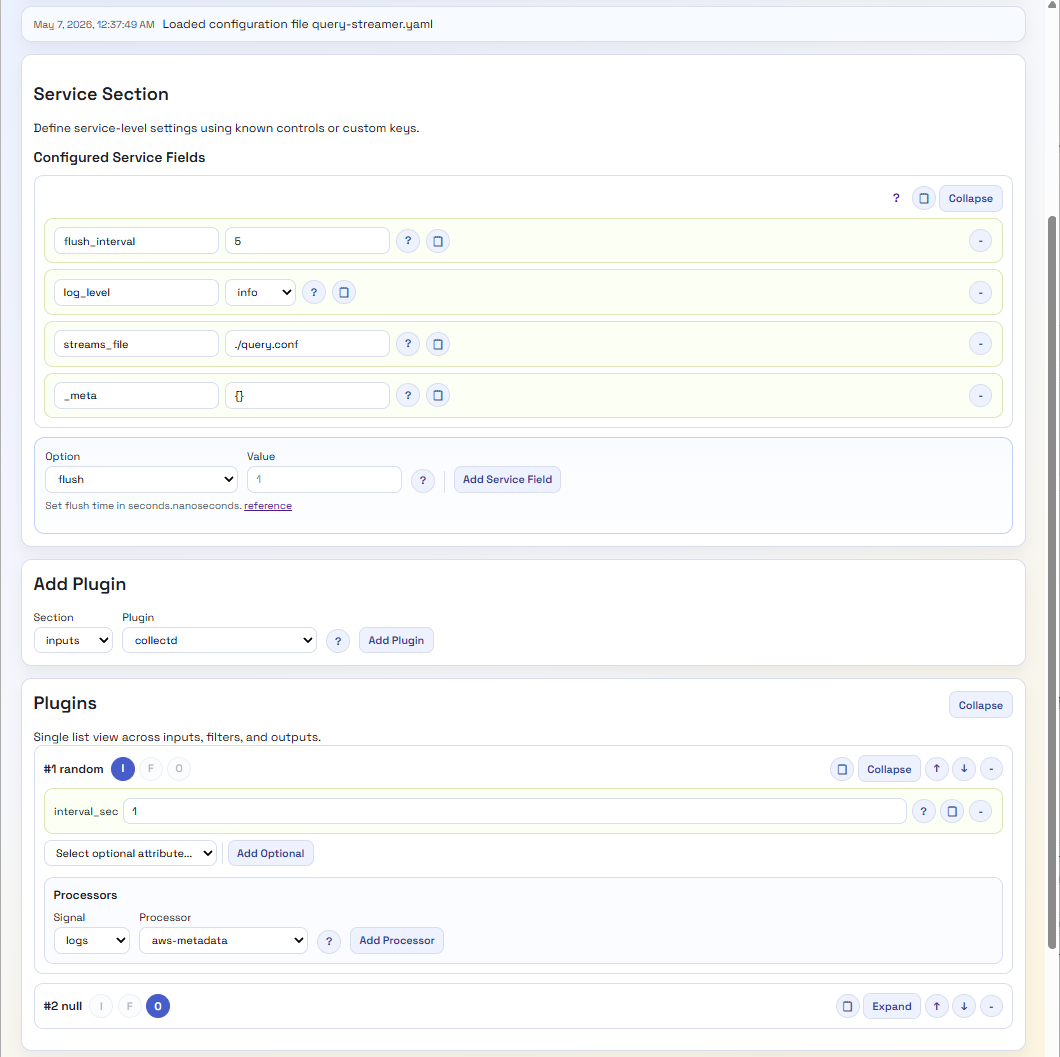
As a result, we very quickly have a UI that can look like this:
A lot easier to view and tweak, with no need to hunt for valid options. Even if we want more information, we’re just a button click away from the open-source data. Perhaps we should provide a version that hyperlinks to the Manning Live Books on Fluent Bit, etc.
There are a few other factors to consider; for example, Fluent Bit configuration is YAML, not JSON, which can be easily resolved given the relationship between the two standards. Then there are processors that can embed Lua code or a SQL-like syntax. As we’ve chosen to provide a Python backend, we’ve addressed this by providing REST endpoints which can query out of the JSON the code or SQL and perform validation using the Python Lua Parser, and the SQL syntax can be addressed using the Lark library for processing the SQL, as the syntax is simple enough to define and maintain the syntax.
Outstanding Gaps for Fluent Bit
We still need to address several features that Fluent Bit has, specifically:
Environment variables
Includes
These issues should be straightforward to overcome, although dynamically including the included elements into the UI view elements can be done. The challenge is: if any changes need to go into something that has been included, how do we push them back to the included file? Particularly if there are multiple layers of inclusion.
What about Fluentd?
Fluentd configuration isn’t JSON-based notation, but it is structured. So, to apply the same mechanism, we’ll need to define a schema and a mapping mechanism. The tricky part of the schema is that Fluentd supports nesting plugins, since the way pipelines are defined for routing differs. While JSON schema will enable this with constructs such as anyOf, oneOf, object nesting, and bounded object arrays, the structure will be more complex.
The second challenge will be the transformer/renderer, so we don’t introduce issues from having to escape and unescape characters, since JSON Schema is stricter about character use.
Then What?
Well, if we get this going, we’ll probably incorporate the capability into our OpAMP project and maybe create a build that lets the configuration tool run independently. Lastly, perhaps we should look to see if we can make the different layers a little more abstract, so we can plug in editors for other configurations, such as OTel Collectors or the ELK Stack.
As a bonus, perhaps transform the Schema into a quick reference web document?
Fluent Bit’s processors were introduced in version 3. But we have seen the capability continue to advance, with the introduction of the ability to conditionally execute processors. Until the ability to define conditionality directly with the processor, the control has had to be fudged around (putting processors further downstream and controlling it with filters and routing, etc).
In the Logs and Telemetry book, we go through the basic Processor capabilities and constraints, such as:
Configuration file constraints
Performance differences compared to using filter plugins
So we’re not going to revisit those points here.
We can chain processors to run in a sequence by directly defining the processors in the order in which they need to be executed. You can see the chaining in the example below.
Scenario
In the following configuration, we have created several input plugins using both the Dummy plugin and the HTTP plugin. Using the HTTP plugin makes it easy for us to control execution speed and change test data values, which helps us see different filter behaviours. To make life easy we’ve provided several payloads, and a simple caller.[bat|sh] script which takes a single parameter [1, 2, 3, …] which identifies the payload file to send.
All of these resources are available in the Book’s GitHub repository as part of the extras folder, which can be found here. This saves us from embedding everything into this blog.
Filters as Processors and Chaining
Filters can be used as processors as well as the dedicated processor types such as SQL asnd content modifier. The Filters just need to be referenced using the name attribute e.g. name: regex would use the REGEX filter.
Processor Conditions
If you’re familiar with Kubernetes selectors syntax, then the definition conditions for a processor will feel familiar. The condition is made up of a condition (#–A–) and the condition will contain one or more rules (#–B–). The rule defines an expression which will yield a Boolean outcome by identifying:
An element of the payload (for example, a field/element in the log structure, or a metric, etc).
The value to evaluate the field against
The evaluation operator, which can be one of the typical operators e.g eq (equals), (see below for the full list).
Since the rules are a list, you can include as many as needed. The condition, in addition to the rule , has its own operator (#–C–), which tells the condition how to combine the results of each of the rules together. As we need a Boolean value, we can only use a logical and or a logical or. When we have a single rule then the operation is tested with itself.
In the following example, we have two inputs with processors to help demonstrate the different behavior. In the dummy source, we can see how a nested element can be accessed (i.e. $<element name>[‘<child element name>‘]), performing a string comparison. Here we’re using a normal filter plugin as a processor.
With our HTTP source, we’re demonstrating that we can have two processors with their own conditions. The first processor is interesting, as it illustrates an exception to the convention; we can express conditionality within the Lua code (#–D–), but it ignores the condition construct. It is obviously debatable as to the value of a condition for the Lua processor, but it is worth considering, as there is an overhead when calling the LuaJIT if the condition can be quickly resolved internally.
To run the demonstration, we’ve provided several test payloads and a simple script that will call the Fluent Bit HTTP input plugin with the correct file. We just need to pass the number associated with the log file e.g. <Log>1<.json> is caller.[bat|sh] 1, and so on. The script is a variation of:
set fn=log%1%.json
echo %fn
curl -X POST --location 127.0.0.1:9881 --header Content-Type:application/json --data @%fn%
Recently, a question came up on the Fluent Bit Slack group about how the Fluentd Label feature and the associated relabel plugin map from Fluentd to Fluent Bit.
Fluentd Labels are a way to implement event routing, and we’ll look more closely at them in a moment. Both Fluent Bit and Fluentd support the control of which plugins respond to an event by using tags, which are based on a per-plugin basis.
To address this, let’s take a moment to see what Fluentd’s labels do.
What do Fluentd’s Labels Do?
Fluentd introduced the concept of labels, where one or more plugins could be grouped, creating a pipeline of plugins. Events can also be labeled, effectively putting them into a pipeline that can be defined with that label.
As a result, we would see something like:
<input>
  Label myLabel
</input>

<input>
  Label myOtherLabel
</input>

<label myLabel>
    <filter>
         -- do something to the log event
    </filter>

    <filter>
         -- do something to the log event
    </filter>

    <output>
    </output>
</label>

<label myOtherLabel>
    <filter>
         -- do something to the log event
    </filter>

    <output>
    </output>
</label>

<output tagName>
</output>
Fluentd’s labelling essentially tries to simplify the routing of events within a Fluentd deployment, particularly when multiple plugins are needed, aka a pipeline.
Fluent Bit’s routing
Fluent Bit doesn’t support the concept of labels. While both support tags can include wildcards within the tag name, Fluent Bit has an extension that adds power to the routing using tags. Rather than introducing an utterly separate routing control, it extended how tags can be used by allowing the matching to be achieved through regular expressions, which is far more flexible. This could look like (using classic format):
[INPUT]
    Name plugin-name
    Tag  myTag

[INPUT]
    Name another-plugin-name
    Tag  myOtherTag

[INPUT]
    Name alternate-plugin-name
    Tag  myAlternateTag

[OUTPUT]
    Name   output-plugin-name
    Match  myTag

[OUTPUT]
    Name   another-output-plugin
    Match_regex  my[Other|Alternate]Tag
The only downsides to processing regular expressions this way are the potentially greater computational effort (depending on the sophistication of the regular expression) and the use of the match on every plugin.
Migration options
The original question was prompted by the idea of migrating from Fluentd to Fluent Bit. When considering this, Labels don’t have a natural like-for-like transition path.
Often, tags originate from a characteristic or direct attribute of the event message (payload). Instead, treat a tag purely as a routing mechanism, design a hierarchical routing strategy based on domains, and then use your tags for just this purpose. Aligning tags to domains rather than technical characteristics will help.
This creates the opportunity to progressively refactor out the need for labels. this will then make the transition through
REGEX
An alternative to this is to adopt regular expressions to select appropriate tags regardless of their structure, naming convention, or use of case. While this is very flexible, the expressions can be harder to maintain, and if some tags are driven by event data, there is an element of risk (although likely small) of an unexpected event being caught and processed by a plugin as it unwittingly matches a regular expression.
Multiple Fluent Bit Instances
Fluent Bit’s footprint is very small, notably smaller than that of Fluentd, as no runtime components like Ruby are involved. This means we could deploy multiple instances, with each instance acting as an implicit pipeline for events to be processed. The downside is that the equivalent of relabelling is more involved, as you’ll have to have a plugin to explicitly redirect the event to another instance. We also need to ensure that the events start with the correct Fluent Bit node.
Conclusion
When we try to achieve the same behaviour in two differing products that do have feature differences, trying to force a new product to produce exactly the same behaviour can result in decisions that can feel like compromises. In these situations, we tend to forget that we may have made trade-off decisions that led to the use of a feature in the first place.
When we find ourselves in such situations, while it may feel more costly, it may be worth reflecting on whether it is more cost-effective to return to the original problem, design the solution based on the new product’s features, and maximize the benefit.
Fluentd to Fluent Bit Portability a possibility?
This may start to sound like Fluentd to Fluent Bit portability is impossible and requires us to build our monitoring stack from scratch. Based on my experiences, these tools are siblings, not direct descendants, so there will be differences. In the work on building a migration tool (a project I’ve not had an opportunity to conclude), I’d suggest there is an 85/15 match, and migration is achievable, and the bulk of such a task can be automated. But certainly not all, and just seeking a push-button cutover means you’ll miss the opportunity to take advantage of the newer features.
Do you need a migration?
Fluentd may not be on the bleeding edge feature-wise now, but if your existing systems aren’t evolving and demanding or able to benefit from switching to Fluent Bit, then why force the migration? Let your core product path drive the transition from one tool to another. Remember, the two have interoperable protocols – so a mixed estate is achievable, and for the most part will be transparent.
Among the exciting announcements for Fluent Bit 3.2 is the support for YAML configuration is now complete. Until now, there have been some outliers in the form of details, such as parser and streamer configurations, which hadn’t been made YAML compliant until now.
As a result, the definitions for parsers and streams had to remain separate files. That is no longer the case, and it is possible to incorporate parser definitions within the same configuration file. While separate configuration files for parsers make for easier re-use, it is more troublesome when incorporating the configuration into a Kubernetes deployment configuration, particularly when using a side-car deployment.
Parsers
With this advancement, we can define parsers like this:
Classic Fluent Bit
[PARSER]
    name myNginxOctet1
    format regex
    regex (?<octet1>\d{1,3})
As the examples show, we swap [PARSER] for a parsers object. Then, each parser is an array of attributes starting with the parser name. The names follow a one-to-one mapping in most cases. This does break down when it comes to parsers where we can define a series of values, which in classic format would just be read in order.
Multiline Parsers
When using multiline parsers, we must provide different regular expressions for different lines. In this situation, we see each set of attributes become a list entry, as we can see here:
In addition to how the rules are nested, we have moved from several parameters within a single attribute(rule) to each rule having several discrete elements (regex, next_state). In addition to this, we have also changed the use of single and double quote marks.
If you want to keep the configurations for parsers and streams separate, we can continue to do so, referencing the file and name from the main configuration file. While converting the existing conf to a YAML format is the bulk of the work, in all likelihood, you’ll change the file extension to be .YAML will means you must also modify the referencing parsers_file reference in the server section of the main configuration file.
Streams
Streams follow very much the same path as parsers. However, we do have to be a lot more aware of the query syntax to remain within the YAML syntax rules.
Classic Fluent Bit
[STREAM_TASK]
  name selectTaskWithTag
  exec SELECT record_tag(), rand_value FROM STREAM:random.0;

[STREAM_TASK]
  name selectSumTask
  exec SELECT now(), sum(rand_value)   FROM STREAM:random.0;

[STREAM_TASK]
  name selectWhereTask
  exec SELECT unix_timestamp(), count(rand_value) FROM STREAM:random.0 where rand_value > 0;
YAML Configuration
stream_processor:
  - name: selectTaskWithTag
    exec: "SELECT record_tag(), rand_value FROM STREAM:random.0;"
  - name: selectSumTask
    exec: "SELECT now(), sum(rand_value) FROM STREAM:random.0;"
  - name: selectWhereTask
    exec: "SELECT unix_timestamp(), count(rand_value) FROM STREAM:random.0 where rand_value > 0;"
Note, it is pretty common for Fluent Bit YAML to use the plural form for each of the main blocks, although stream definition is an exception to the case. Additionally, both stream_processor and stream_task are accepted (although stream_task is not recognized in the main configuration file)..
Incorporating Configuration directly into the core configuration file
To support directly incorporating these definitions into a single file, we can lift the YAML file contents and apply them as root elements (i.e., at the same level as the pipeline, and service, for example).
Fluent Bit book examples
Our Fluent Bit book (Manning, Amazon UK, Amazon US, and everywhere else) has several examples of using parsers and streams in its GitHub repo. We’ve added the YAML versions of the configurations illustrating parsers and stream processing to its repository in the Extras folder.
When I first heard about Fluent Bit introducing the support binary large objects (BLOBs) in release 3.2. I was a bit surprised; often, handling such data structures is typical, and some might see it as an anti-pattern. Certainly, trying to pass such large objects through the buffers could very quickly blow up unless buffers are suitably sized.
But rather than rush to judgment, the use cases for handling blobs became clear after a little thought. First of all, there are some genuine use cases. The scenarios I’d look to blobs to help are for:
Microsoft applications can create dump files (.dmp). This is the bundling of not just the stack traces but the state, which can include a memory dump and contextual data. The file is binary in nature, and guess what? It can be rather large.
While logs, traces, and metrics can tell us a lot about why a component or application failed, sometimes we have to see the payload that is being processed – is there something in the data we never anticipated? There are several different payloads that we are handling increasingly even with remote and distributed devices, namely images and audio. While we can compress these kinds of payloads, sometimes that isn’t possible as we lose fidelity through compression, and the act of compression can remove the very artifact we need.
Real-world use cases
This later scenario I’d encountered previously. We worked with a system designed to send small images as part of product data through a messaging system, so the data was disturbed by too many endpoints. A scenario we encountered was the master data authoring system, which didn’t have any restrictions on image size. As a result, when setting up some new products in the supply chain system, a new user uploaded the ultra-high-resolution marketing images before they’d been prepared for general use. As you can imagine, these are multi-gigabyte images, not the 10s or 100s of kilobytes expected. The messaging’s allocated storage structures couldn’t cope with the payload.
We had to remotely access the failure points at the time to see what was happening and realize the issue. While the environment was distributed, it wasn’t as distributed as systems can be today, so remote access wasn’t so problematic. But in a more distributed use case, or where the data could have been submitted to the enterprise more widely, we’d probably have had more problems. Here is a case where being able to move a blob would have helped.
A similar use case was identified in the recent Release Webinar presented by Eduardo Silva Pereira, and a use case with these characteristics was explained. With modern cars, particularly self-driving vehicles, being able to transfer imagery back in the event navigation software experiences a problem is essential.
Avoid blowing up buffers.
To move the Blob without blowing up the buffering, the input plugin tells the blob-consuming output plugin about the blob rather than trying to shunt the GBs through the buffer. The output plugin (e.g., Azure Blob) takes the signal and then copies the file piece by piece. By consuming their blob in parts, we reduce the possible impacts of network disruption (ever tried to FTP a very large file over a network for the connection to briefly drop, as a result needing to from scratch?). The sender and receiver use a database table to track the communication and progress of the pieces and reassemble the blob. Unlike other plugins, there is a reverse flow from the output plugin back to the blob plugin to enable the process to be monitored. Once complete, the input plugin can execute post-transfer activities.
This does mean that the output plugin must have a network ‘line of sight’ to the blob when this is handled within a single Fluent Bit node – but it is something to consider if you want to operate in a more distributed model.
A word to the wise
Binary objects are known to be a means by which malicious code can easily be transported within an organization. This means that while observability tooling can benefit from being able to centralize problematic data for us to examine further, we could unwittingly help a malicious actor.
We can protect ourselves in several ways. Firstly, we must first understand and ensure the source location for the blob can only contain content that we know and understand. Secondly, wherever the blob is put, make sure it is ring-fenced and that the content is subject to processes such as malware detection.
Limitations
As the blob is handled with a new payload type, the details transmitted aren’t going to be accessible to any other plugins, but given how the mechanism works, trying to do such things wouldn’t be very desirable.
Input plugin configuration
At the time of writing, the plugin configuration details haven’t been published, but with the combination of the CLI and looking at the code, we do know the input plugin has these parameters:
Attribute Name
Description
path
Location to watch for blob files – just like the path for the tail plugin
exclude_pattern
We can define patterns that exclude files other than our blob files. The pattern logic, is the same as all other Fluent Bit patterns.
database_file
These are the same options as upload_success_action but are applied if the upload fails.
scan_refresh_interval
These are the same options as upload_success_action but are applied if the upload fails.
upload_success_action
This is a value that tells the plugin what to do, when successful. The options are: 0. Do nothing – the default action if no option is provided. delete (1). Delete the blob file add_suffix (2). Emit a Fluent Bit log record emit_log (3). Add suffix to the file – as defined by upload_success_suffix
upload_success_suffix
If the upload success_action is set to use a suffix, then the value provided here will be used as the suffix.
upload_success_message
This text will be incorporated into the Fluent Bit logs
upload_failure_action
These are the same options as upload_success_action but applied if the upload fails.
upload_failure_suffix
This is the failure version of upload_success_suffix
upload_failure_message
This is the failure version of upload_success_message
Output Options
Currently, the only blob output option is for the Azure Blob output plugin that works with the Azure Blob service, but support through using the Amazon S3 standard is being worked on. Once this is available, the feature will be widely available as the S3 standard is widely supported, including all the hyperscalers.
Note
The configuration information has been figured out by looking at the code. We’ll return to this subject when the S3 endpoint is provided and use something like Minio to create a local S3 storage capability.
Fluent Bit supports both a classic configuration file format and a YAML format. The support for YAML reflects industry direction. But if you’ve come from Fluentd to Fluent Bit or have been using Fluent Bit from the early days, you’re likely to be using the classic format. The differences can be seen here:
[SERVICE]
    flush 5
    log_level debug
[INPUT]
   name dummy
   dummy {"key" : "value"}
   tag blah
[OUTPUT]
   name stdout
   match *
#
# Classic Format
#
Beyond having a consistent file format, the driver is that some new features are not supported by the classic format. Currently, this is predominantly for Processors; it is fair to assume that any other new major features will likely follow suit.
Migrating from classic to YAML
The process for migrating from classic to YAML has two dimensions:
Change of formatting
YAML indentation and plugins as array elements
addressing any quirks such as wildcard (*) being quoted, etc
Addressing constraints such as:
Using include is more restrictive
Ordering of inputs and outputs is more restrictive – therefore match attributes need to be refined.
None of this is too difficult, but doing it by hand can be laborious and easy to make mistakes. So, we’ve just built a utility that can help with the process. At the moment, this solution is in an MVP state. But we hope to have beefed it up over the coming few weeks. What we plan to do and how to use the util are all covered in the GitHub readme.
A quick update to say that we now have a container configuration in the repository to make the tool very easy to use. All the details will be included in the readme, along with some additional features.
Update 7th July
We’ve progressed past the MVP state now. The detected include statements get incorporated into a proper include block but commented out.
We’ve added an option to convert the attributes to use Kubernetes idiomatic form, i.e., aValue rather than a_value.
The command line has a help option that outputs details such as the control flags.
Update 12th July
In the last couple of days, we pushed a little too quickly to GitHub and discovered we’d broken some cases. We’ve been testing the development a lot more rigorously now, and it helps that we have the regression container image working nicely. The Javadoc is also generating properly.
We have identified some edge cases that need to be sorted, but most scenarios have been correctly handled. Hopefully, we’ll have those edge scenarios fixed tomorrow, so we’ll tag a release version then.
I’ve written about how railroad syntax diagrams (see here) are great for helping write code (or configuration files). Following the track through the diagram will give you the correct statement syntax, and generally, the diagrams don’t require you to jump around like BNF or eBNF representations.
As you may have seen, I’m currently writing a book on Fluent Bit, and guess what? We’re on the Stream Processor chapter. Looking broaching the use of syntax, it just felt right to have a railroad diagram. As the diagram is fairly large, it won’t print well, so here are the diagrams.
The master content is in GitHub here. If you want a quick reference to how the diagrams work, check here.
Stream Processor Configuration
Fluent Bit Stream Processor Configuration Syntax
While Fluent Bit’s core syntax is pretty straightforward, the syntax for the stream processing is a bit more complex, with a strong resemblance to SQL. As SQL is declarative in nature and can contain iterative and nested elements, RailRoad diagrams can really help.
The original BNF definition of the Stream SQL syntax is here.
Fluent Bit Configuration RailRoad Diagrams
When it comes to the core configuration files, RailRoad diagrams aren’t as effective because the configuration is more declarative in nature. But we’ve tried to capture the core essence here. The only issue is that representing things like the use of @include, which can show up in most parts of the file – arent so easy, and a list of attributes for each possible standard plugin would make the diagram enormously large and unwieldy.
Fluent Bit Classic Format Configuration
We know there are gaps in the current diagrams, which will be addressed. Including:
YAML format
@include
We should show that environment variables can be references as attributes
A better way to show the required indentation and line separation



You must be logged in to post a comment.