• Home
  • Site Aliases
    • www.cloud-native.info
  • About
    • Background
    • Presenting Activities
    • Internet Profile
      • LinkedIn
    • About
  • Books & Publications
    • Log Generator
    • Logs and Telemetry using Fluent Bit
      • Fluent Bit book
      • Book Resources in GitHub
      • Fluent Bit Classic to YAML Format configurations
    • Logging in Action with Fluentd, Kubernetes and More
      • Logging in Action with Fluentd – Book
      • Fluentd Book Resources
      • Fluentd & Fluent Bit Additional stuff
    • API & API Platform
      • API Useful Resources
    • Oracle Integration
      • Book Website
      • Useful Reading Sources
    • Publication Contributions
  • Resources
    • GitHub
    • Oracle Integration Site
    • Oracle Resources
    • Mindmaps Index
    • Useful Tech Resources
      • Fluentd & Fluent Bit Additional stuff
      • Recommended Tech Podcasts
      • Official Sources for Product Logos
      • Java and Graal Useful Links
      • Python Setup & related stuff
  • Music
    • Monster On Music
    • Music Listening
    • Music Reading

Phil (aka MP3Monster)'s Blog

~ from Technology to Music

Phil (aka MP3Monster)'s Blog

Tag Archives: diagram

Fluent Bit config – Railroad Diagrams

13 Wednesday Dec 2023

Posted by mp3monster in Fluentbit, General, railroad diagrams, Technology

≈ Leave a comment

Tags

configuration, diagram, FluentBit, railroad, stream processor, syntax

I’ve written about how railroad syntax diagrams (see here) are great for helping write code (or configuration files). Following the track through the diagram will give you the correct statement syntax, and generally, the diagrams don’t require you to jump around like BNF or eBNF representations.

As you may have seen, I’m currently writing a book on Fluent Bit, and guess what? We’re on the Stream Processor chapter. Looking broaching the use of syntax, it just felt right to have a railroad diagram. As the diagram is fairly large, it won’t print well, so here are the diagrams.

The master content is in GitHub here. If you want a quick reference to how the diagrams work, check here.

Stream Processor Configuration

Fluent Bit Stream Processor Configuration Syntax

While Fluent Bit’s core syntax is pretty straightforward, the syntax for the stream processing is a bit more complex, with a strong resemblance to SQL. As SQL is declarative in nature and can contain iterative and nested elements, RailRoad diagrams can really help.

The original BNF definition of the Stream SQL syntax is here.

Fluent Bit Configuration RailRoad Diagrams

When it comes to the core configuration files, RailRoad diagrams aren’t as effective because the configuration is more declarative in nature. But we’ve tried to capture the core essence here. The only issue is that representing things like the use of @include, which can show up in most parts of the file – arent so easy, and a list of attributes for each possible standard plugin would make the diagram enormously large and unwieldy.

Fluent Bit Classic Format Configuration

We know there are gaps in the current diagrams, which will be addressed. Including:

  • YAML format
  • @include
  • We should show that environment variables can be references as attributes
  • A better way to show the required indentation and line separation

Share this:

  • Click to share on Facebook (Opens in new window) Facebook
  • Click to share on X (Opens in new window) X
  • Click to share on Pocket (Opens in new window) Pocket
  • Click to share on Reddit (Opens in new window) Reddit
  • Click to email a link to a friend (Opens in new window) Email
  • Click to share on WhatsApp (Opens in new window) WhatsApp
  • Click to print (Opens in new window) Print
  • Click to share on Tumblr (Opens in new window) Tumblr
  • Click to share on Mastodon (Opens in new window) Mastodon
  • Click to share on Pinterest (Opens in new window) Pinterest
  • More
  • Click to share on Bluesky (Opens in new window) Bluesky
  • Click to share on LinkedIn (Opens in new window) LinkedIn
Like Loading...

Interpreting Railroad diagrams

16 Friday Sep 2022

Posted by mp3monster in General, railroad diagrams, Technology

≈ 1 Comment

Tags

diagram, newbie, railroad, railroad diagram, syntax

Having previously blogged about being a fan of Railroad diagrams (here) as a means to communicate language syntax, I have been asked about some of the ways details should be represented. I’ve looked around and not actually found an easy-to-read for ‘newbies’ guide to reading railroad diagrams. A lot of content either focuses on the generator tools or how the representation compares to BNF (Backus Naur Form) – all very distracting. So, I thought as an advocate, I should help address the gap (the documentation with TabAkins tool does a good job of explaining things, but its focus is on the features provided rather than understanding the notation).

Reading Railroad Diagrams

The following table provides all the information to help you interpret the Railroad Diagrams, and create syntax representations.

  • If you’re only interested in understanding the notation, read just the first two columns.
  • If you want to see examples of how to create the diagram, then the 3rd column will help.

Note: Clicking on the diagrams will result in a bigger version of the image being displayed.

How to Interpret the RailroadRailroad RepresentationCode using tabakins tool
The start and end of an expression are shown with vertical bars.
The expression is read from left to right following a path defined by the line(s).
Diagram(
Terminal('This '),
Terminal(' is '),
Terminal(' a '),
Terminal(' mp3monster '),
Terminal(' blog ')
)
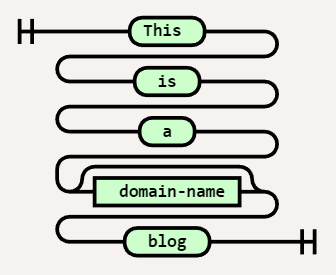
Larger diagrams may need to be read both across and down the page to make it sensibly fit a page like this.Diagram( Stack(
Terminal('This '),
Terminal(' is '),
Terminal(' a '),
Terminal(' mp3monster '),
Terminal(' blog '))
)
We can differentiate between literal values and ‘variables’ by shape. A square shape should denote a variable, and a lozenge represents a literal.
I have to admit to sometimes getting these the wrong way around, but as long as the notation is used consistently in an expression, it isn’t too critical. In this example, we have replaced mp3monster with the name of a variable called domain-name. So if I set the variable domain-name = mp3monster then I’d read the same result.
Diagram( Stack(
Terminal('This '),
Terminal(' is '),
Terminal(' a '),
NonTerminal(' domain-name'),
Terminal(' blog '))
)
We can make parts of an expression optional. This can be seen by following an alternate path around the optional element.
In this case, we’ve made the domain-name optional. Assuming domain-name = mp3monster, we could get either:
– This is a mp3monster blog OR
– This is a blog
Diagram( Stack(
Terminal('This '),
Terminal(' is '),
Terminal(' a '),
Optional(

NonTerminal(' domain-name')),
Terminal(' blog '))
)
We can represent optionality by having the flow split to multiple values. Those values could be either literal values or variables. In this case, we now have several possible names in the blog with the choices being mp3monster, phil-wilkins, cloud-native, or the contents of the variable domain-name. So the expression here could resolve to (assuming domain-name = something-else):
– This is a mp3monster blog OR
– This is a phil-wilkins blog OR
– This is a cloud-native blog OR
– This is a something-else blog
It is typical for the option most likely to be selected to be the value that is directly in line with the choice. Here that would mean the default would be phil-wilkins
Diagram( Stack(
Terminal('This '),
Terminal(' is '),
Terminal(' a '),
Choice(1,

' mp3monster',
' phil-wilkins ',
' cloud-native ',
NonTerminal('domain-name')),
Terminal(' blog '))
)
We can have variations on a choice where we can express the choice as being any of the options (one or more e.g. mp3monster and cloud-native) or all of the choices. These scenarios are differentiated by the additional symbols before and after the choice.
Diagram( Stack(
Terminal('This '),
Terminal(' is '),
Terminal(' a '),
MultipleChoice(1,

'any',' mp3monster',
' phil-wilkins ',
' cloud-native ',
NonTerminal('domain-name')),
Terminal(' blog '))
)
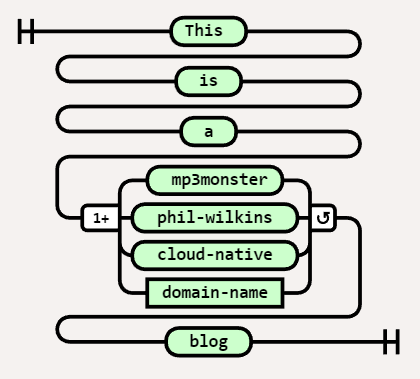
We can represent the looping with the inclusion of an additional literal(s) or variable(s) by having a second line from the right (exit) of a literal or variable and flowing back into the left (entry) of a literal or variable. Then in the loop of the flow below are the variable(s) or literal(s) that go around between each occurrence of the loop. If our variable was a list now i.e. domain-name = [‘ mp3monster’, ‘cloud-native’] then this would resolve to :
This is a mp3monster and cloud-native blog
Diagram( Stack(
Terminal('This '),
Terminal(' is '),
Terminal(' a '),
OneOrMore(

NonTerminal('domain-name'),
[' and '])),
Terminal(' blog ')
)
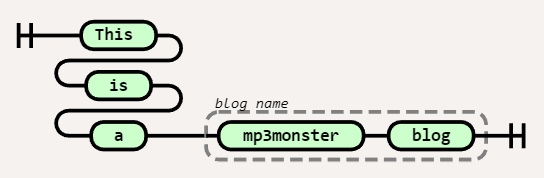
We can group literals and variables together with a label. These groupings are denoted with a dashed line and usually include some sort of label. In our example, we’ve grouped two literal values together and called that group the blog name.Diagram( Stack(
Terminal('This '),
Terminal(' is '),
Terminal(' a '),),
Group(Sequence(

Terminal(' mp3monster '),
Terminal(' blog ')),

['blog name'])
)

All of these constructs can be combined so you can do things like making choices optional, and iterate over multiple variables and literals.

Tips & Tricks to Consider

TipsRailroad RepresentationCode using tabakins tool
Sometimes the number of options in a choice can get impractically large to show in a Railroad diagram. One way to overcome this is to show the first and last options and an ellipsis.
We can then wrap it with a comment that directs the reader to the complete list of choices.
This way the diagram continues to be readable – the most valuable part of the diagram and easy to locate the specific fine details.
Diagram( Stack(
Terminal(‘This ‘),
Terminal(‘ is ‘),
Terminal(‘ a ‘),
Group(Choice(1,
‘ mp3monster’,
‘ … ‘,
‘ cloud-native ‘), [‘ See Section X for full list’]),
Terminal(‘ blog ‘))
)

Share this:

  • Click to share on Facebook (Opens in new window) Facebook
  • Click to share on X (Opens in new window) X
  • Click to share on Pocket (Opens in new window) Pocket
  • Click to share on Reddit (Opens in new window) Reddit
  • Click to email a link to a friend (Opens in new window) Email
  • Click to share on WhatsApp (Opens in new window) WhatsApp
  • Click to print (Opens in new window) Print
  • Click to share on Tumblr (Opens in new window) Tumblr
  • Click to share on Mastodon (Opens in new window) Mastodon
  • Click to share on Pinterest (Opens in new window) Pinterest
  • More
  • Click to share on Bluesky (Opens in new window) Bluesky
  • Click to share on LinkedIn (Opens in new window) LinkedIn
Like Loading...

Railroad diagram for OCI Policies

01 Friday Jul 2022

Posted by mp3monster in General, Oracle, railroad diagrams, Technology

≈ 1 Comment

Tags

diagram, OCI, Oracle, policies, railroad, syntax

I’ve been a fan of Railroad syntax diagrams for a long time. I’ve always found them an easy way to understand the syntactical options and the reserved/keywords in an efficient manner.

Example of Railroad Syntax diagram

I have been digging around in the documentation to find a keyword in the OCI Policies syntax that the common cases don’t use. After a bit of rooting around, I found what I needed. But a Railroad representation would have helped me get the expression correct effortlessly and without so much effort.

The policy documentation can be found at:

  • https://docs.oracle.com/en-us/iaas/Content/Identity/Concepts/policysyntax.htm
  • https://docs.oracle.com/en-us/iaas/Content/Identity/Reference/policyreference.htm
  • https://docs.oracle.com/en-us/iaas/Content/Identity/policyreference/policyreference.htm

Once I solved my problem, I decided to see if I could find something that could easily create the railroad diagrams and encountered a fantastic bit of code on GitHub from Tab Atkins Jr. It’s a neat bit of JavaScript, which can even be run from their GitHub pages – go here. Tab has taken the time to document the tool well, so working out the syntax to define the diagram is straightforward (not that you need to read it much as the tool is well written).

The following diagrams show the syntax for writing OCI Policies in a single image and with the full syntax broken into 2 images to make it a little easier to read on the screen. But also address the fact often you don’t need the Where clause.

If the diagrams need to be updated the source to use with the tools is in my GitHub repository. But a really cool feature of the utility is that the information to populate the editor view is included in the URL (does make for a long URL) but it means this link will take you directly to the view & editor if you want to tinker with the definition. So the links are:

  • Single diagram
  • Two Part diagram
    • Part 1
    • Part 2

Single diagram View

OCI Policies syntax

Split (2 Part) View

1st part of the expression – not optional
2nd Part covers the Where clause

Share this:

  • Click to share on Facebook (Opens in new window) Facebook
  • Click to share on X (Opens in new window) X
  • Click to share on Pocket (Opens in new window) Pocket
  • Click to share on Reddit (Opens in new window) Reddit
  • Click to email a link to a friend (Opens in new window) Email
  • Click to share on WhatsApp (Opens in new window) WhatsApp
  • Click to print (Opens in new window) Print
  • Click to share on Tumblr (Opens in new window) Tumblr
  • Click to share on Mastodon (Opens in new window) Mastodon
  • Click to share on Pinterest (Opens in new window) Pinterest
  • More
  • Click to share on Bluesky (Opens in new window) Bluesky
  • Click to share on LinkedIn (Opens in new window) LinkedIn
Like Loading...

    I work for Oracle, all opinions here are my own & do not necessarily reflect the views of Oracle

    • About
      • Internet Profile
      • Music Buying
      • Presenting Activities
    • Books & Publications
      • Logging in Action with Fluentd, Kubernetes and More
      • Logs and Telemetry using Fluent Bit
      • Oracle Integration
      • API & API Platform
        • API Useful Resources
        • Useful Reading Sources
    • Mindmaps Index
    • Monster On Music
      • Music Listening
      • Music Reading
    • Oracle Resources
    • Useful Tech Resources
      • Fluentd & Fluent Bit Additional stuff
        • Logging Frameworks and Fluent Bit and Fluentd connectivity
        • REGEX for BIC and IBAN processing
      • Java and Graal Useful Links
      • Official Sources for Product Logos
      • Python Setup & related tips
      • Recommended Tech Podcasts

    Oracle Ace Director Alumni

    TOGAF 9

    Logs and Telemetry using Fluent Bit


    Logging in Action — Fluentd

    Logging in Action with Fluentd


    Oracle Cloud Integration Book


    API Platform Book


    Oracle Dev Meetup London

    Blog Categories

    • App Ideas
    • Books
      • Book Reviews
      • manning
      • Oracle Press
      • Packt
    • Enterprise architecture
    • General
      • economy
      • ExternalWebPublications
      • LinkedIn
      • Website
    • Music
      • Music Resources
      • Music Reviews
    • Photography
    • Podcasts
    • Technology
      • AI
      • APIs & microservices
      • chatbots
      • Cloud
      • Cloud Native
      • Dev Meetup
      • development
        • languages
          • java
          • node.js
      • drone
      • Fluentbit
      • Fluentd
      • logsimulator
      • mindmap
      • OMESA
      • Oracle
        • API Platform CS
          • tools
        • Helidon
        • ITSO & OEAF
        • Java Cloud
        • NodeJS Cloud
        • OIC – ICS
        • Oracle Cloud Native
        • OUG
      • railroad diagrams
      • TOGAF
    • xxRetired
    • AI
    • API Platform CS
    • APIs & microservices
    • App Ideas
    • Book Reviews
    • Books
    • chatbots
    • Cloud
    • Cloud Native
    • Dev Meetup
    • development
    • drone
    • economy
    • Enterprise architecture
    • ExternalWebPublications
    • Fluentbit
    • Fluentd
    • General
    • Helidon
    • ITSO & OEAF
    • java
    • Java Cloud
    • languages
    • LinkedIn
    • logsimulator
    • manning
    • mindmap
    • Music
    • Music Resources
    • Music Reviews
    • node.js
    • NodeJS Cloud
    • OIC – ICS
    • OMESA
    • Oracle
    • Oracle Cloud Native
    • Oracle Press
    • OUG
    • Packt
    • Photography
    • Podcasts
    • railroad diagrams
    • Technology
    • TOGAF
    • tools
    • Website
    • xxRetired

    Enter your email address to subscribe to this blog and receive notifications of new posts by email.

    Join 2,555 other subscribers

    RSS

    RSS Feed RSS - Posts

    RSS Feed RSS - Comments

    December 2025
    M T W T F S S
    1234567
    891011121314
    15161718192021
    22232425262728
    293031  
    « Nov    

    Twitter

    Tweets by mp3monster

    History

    Speaker Recognition

    Open Source Summit Speaker

    Flickr Pics

    Turin Brakes Acoustic Tour 24 @ The Maltings FarnhamTurin Brakes Acoustic Tour 24 @ The Maltings FarnhamTurin Brakes Acoustic Tour 24 @ The Maltings FarnhamTurin Brakes Acoustic Tour 24 @ The Maltings Farnham
    More Photos

    Social

    • View @mp3monster’s profile on Twitter
    • View philwilkins’s profile on LinkedIn
    • View mp3monster’s profile on GitHub
    • View mp3monster’s profile on Flickr
    • View mp3muncher’s profile on WordPress.org
    • View philmp3monster’s profile on Twitch
    Follow Phil (aka MP3Monster)'s Blog on WordPress.com

    Blog at WordPress.com.

    • Subscribe Subscribed
      • Phil (aka MP3Monster)'s Blog
      • Join 233 other subscribers
      • Already have a WordPress.com account? Log in now.
      • Phil (aka MP3Monster)'s Blog
      • Subscribe Subscribed
      • Sign up
      • Log in
      • Report this content
      • View site in Reader
      • Manage subscriptions
      • Collapse this bar
     

    Loading Comments...
     

    You must be logged in to post a comment.

      Privacy & Cookies: This site uses cookies. By continuing to use this website, you agree to their use.
      To find out more, including how to control cookies, see here: Our Cookie Policy
      %d