• Home
  • Site Aliases
    • www.cloud-native.info
  • About
    • Background
    • Presenting Activities
    • Internet Profile
      • LinkedIn
    • About
  • Books & Publications
    • Log Generator
    • Logs and Telemetry using Fluent Bit
      • Fluent Bit book
      • Book Resources in GitHub
      • Fluent Bit Classic to YAML Format configurations
    • Logging in Action with Fluentd, Kubernetes and More
      • Logging in Action with Fluentd – Book
      • Fluentd Book Resources
      • Fluentd & Fluent Bit Additional stuff
    • API & API Platform
      • API Useful Resources
    • Oracle Integration
      • Book Website
      • Useful Reading Sources
    • Publication Contributions
  • Resources
    • GitHub
    • Oracle Integration Site
    • Oracle Resources
    • Mindmaps Index
    • Useful Tech Resources
      • Fluentd & Fluent Bit Additional stuff
      • Recommended Tech Podcasts
      • Official Sources for Product Logos
      • Java and Graal Useful Links
      • Python Setup & related stuff
  • Music
    • Monster On Music
    • Music Listening
    • Music Reading

Phil (aka MP3Monster)'s Blog

~ from Technology to Music

Phil (aka MP3Monster)'s Blog

Tag Archives: Plugin

OpenLens or Lens app

17 Monday Apr 2023

Posted by mp3monster in Cloud Native, development, General, Technology

≈ Leave a comment

Tags

K8s, Kubernetes, lens, OpenLens, openlens-node-pod-menu, Plugin

I wrote about how much I like the lens app K8s dashboard capability without needing to deploy K8s dashboard. Sadly recently, there has been some divergence from K8sLens being a pure open source to a licensed tool with an upstream open-source version called Open Lens (article here). It has fallen to individual contributors to maintain the open-lens binary (here) and made it available via Chocolatey and Brew. The downside is that one of the nice features of K8sLens has been removed – the ability to look at container logs. If you read the Git repo issue on this matter – you’ll see that a lot of people are not very happy about this.

If you read through all the commentary on the ticket, you’ll eventually find the following part of the post that describes how the feature can be reintroduced.

In short, if you use the extensions feature and provide the URL of the extension as @alebcay/openlens-node-pod-menu then the option will be reintroduced. The access to the extension is here:

The details …
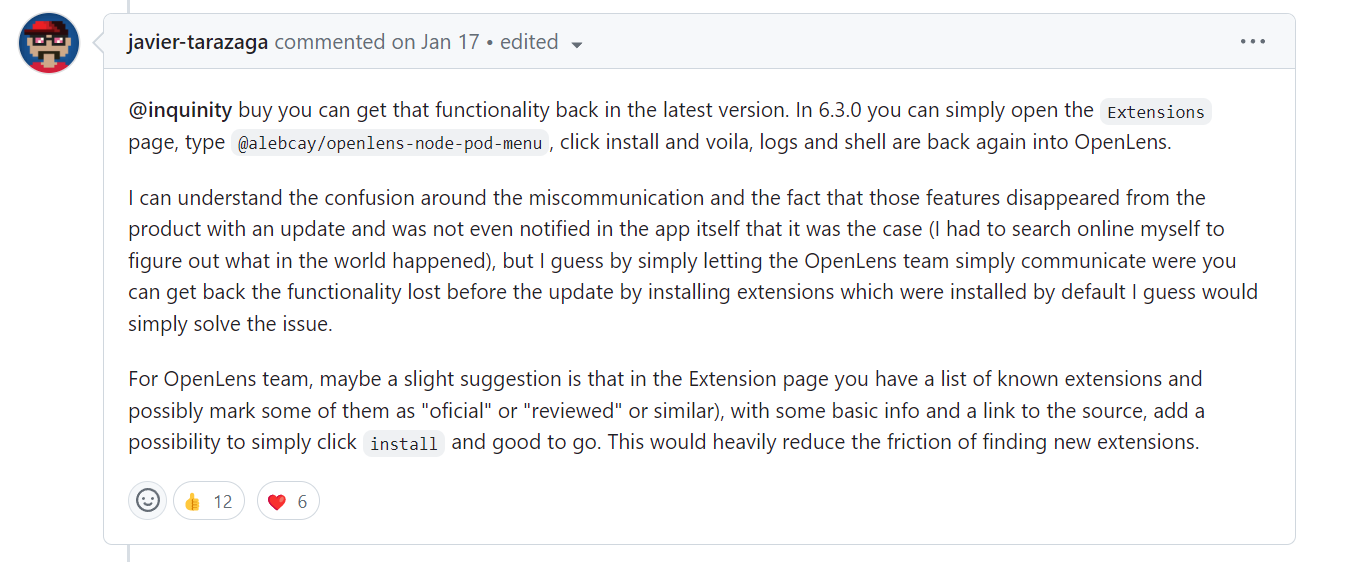
The extension identified is detailed here.

I’m not sure why, but I did find the installation a little unstable, and needed to reinstall the plugin, restart OpenLens and reenable the plugin. But once we got past that, as you can see below the plugin delivered on its promise.

The problem with the licensing is that it doesn’t distinguish between me as an individual and using Lens for my own personal use vs. using Lens for commercial activities. The condition sets out:

ELIGIBILITY:You or your company have less than $10M in annual revenue or funding.

https://app.k8slens.dev/subscribe

Given this wording, I can’t use the licensed version, even if I was working on an open-source project and in a personal capacity, as the company I’m employed by has more than $10 million in revenue. For me, the issue is $200 per year is a lot for something I only need to use intermittently. While I get k8slens includes additional features such as Lens Security which performs vulnerability management, and Lens Teamwork, along with support, are features and services that are oriented to commercial use – these are features I don’t actually want or need. Lens Kubernetes sounds like an interesting proposition (a built-in distribution of K8s), but when many others already provide this freely – from Docker Desktop to Kind it seems rather limited in value.

We did try installing Komodor, given its claims for an always free edition. But on my Windows 11 Pro (developer early access) installation, it failed to install, as you can see:


Share this:

  • Share on Facebook (Opens in new window) Facebook
  • Share on X (Opens in new window) X
  • Share on Pocket (Opens in new window) Pocket
  • Share on Reddit (Opens in new window) Reddit
  • Email a link to a friend (Opens in new window) Email
  • Share on WhatsApp (Opens in new window) WhatsApp
  • Print (Opens in new window) Print
  • Share on Tumblr (Opens in new window) Tumblr
  • Share on Mastodon (Opens in new window) Mastodon
  • Share on Pinterest (Opens in new window) Pinterest
  • More
  • Share on Bluesky (Opens in new window) Bluesky
  • Share on LinkedIn (Opens in new window) LinkedIn
Like Loading...

Avoid creating an event storm when using social outputs with Fluentd

14 Thursday Apr 2022

Posted by mp3monster in Fluentd, General, Technology

≈ Leave a comment

Tags

Fluentd, logging, mail storm, monitoring, Plugin, social, supress

Fluentd has an incredible catalogue of plugins including notification and collaboration channels from good old-fashioned email through to slack, teams, and others.

The thing to remember if you use these channels is that if you’re sending errors, from application logs it isn’t unusual for there to be multiple error events as a root event can cause a cascade of related issues. For example, if your code is writing transactions to a database and the database goes down with no failover mechanism, then your code will most likely experience an error, roll back the transaction perhaps to some sort of queue, and then try to process the next event. Which will again fail. This is the classic situation where multiple errors will get reported for the same issue. This problem is often referred to as a mail storm given that there was a time when we didn’t have social collaboration tools and everyone used email.

There are several ways to overcome this problem. But the most simple and elegant of these is using the suppress plugin in its filter mode.

<filter **>
  @type suppress
  interval 60       # period in seconds when the condition to supress is triggered
  num 2             # number of occurences of a value before suppressing
  attr_keys source  # the element of the event to consider.
</filter>

In this example if we encounter an event with an attribute called source containing the same value twice then the suppression will kick in for 60 seconds. If you want the key to the valuebeing checked to be the tag then simply omit the attr_keys parameter.

Of course, we don’t want the suppression to kick in if the same value in the attribute keys occured once every few hours. To address this the occurence count is applied over not a time period, but a number of events received by the configuration of max_slot_num which defaults to 10k, but resets

In the filter mode, this plugin is best positionbed immediately before the match block. This means we don’t accidentally suppress messages before they are routed anywhere else.

For the purposes of a demo this is less of an issue. But for a realworld use case would probably benefit from some tuning. All the documentation for this plugin is at https://github.com/fujiwara/fluent-plugin-suppress

Share this:

  • Share on Facebook (Opens in new window) Facebook
  • Share on X (Opens in new window) X
  • Share on Pocket (Opens in new window) Pocket
  • Share on Reddit (Opens in new window) Reddit
  • Email a link to a friend (Opens in new window) Email
  • Share on WhatsApp (Opens in new window) WhatsApp
  • Print (Opens in new window) Print
  • Share on Tumblr (Opens in new window) Tumblr
  • Share on Mastodon (Opens in new window) Mastodon
  • Share on Pinterest (Opens in new window) Pinterest
  • More
  • Share on Bluesky (Opens in new window) Bluesky
  • Share on LinkedIn (Opens in new window) LinkedIn
Like Loading...

JDeveloper & Copying Formatted Text

13 Monday May 2013

Posted by mp3monster in General, Technology

≈ Leave a comment

Tags

JDeveloper, Plugin, Pretty formatting, XSD


I’ve started to use Oracle’s JDeveloper more and more, not just because I’m working with the AIA (Application Integration Architecture) Foundation Pack but also as an XSD Editor for designing interface definitions.

I’ve spent sometime trying to find a solution that can compete with XML Spy but without the huge price tag.  I’ve tried OxygenXML, Eclipse, Visual Studio among others and concluded that its very good for a free tool. Perhaps still not as good as XMLSpy – but thats the difference between an IDE and a dedicated XSD/XML tool.

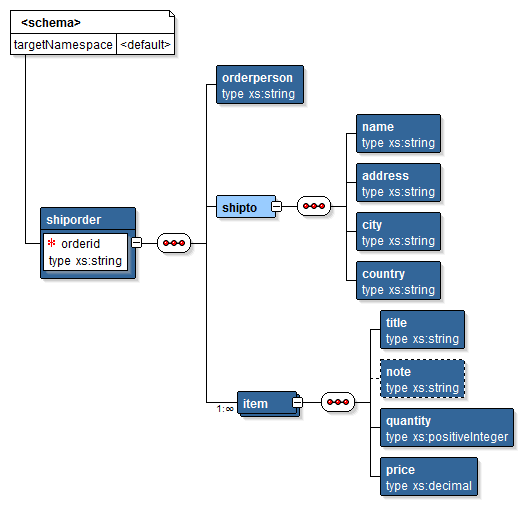
image JDeveloper design view- with a lot of similarities to XMLSpy in presentation

You might think, that to use JDeveloper I have to commit to using the Oracle technology stack (and the big price tag that comes with), but this isn’t the case.

Not to mention Oracle have very much caught up with the Open Source World of Maven, there is a growing library of plugins both Official and Open Source covering a plethora of things from JUnit integration to Python & Groovy language  syntaxes.

One of the nice things with XMLSpy and VisualStudio is the ability to copy into other documents the pretty formatted text (colour coded syntax etc) – making schemas or code fragments easier to look at in a document.  However out of the box JDeveloper doesn’t do this out of the box. But it would seem that this capability wasn’t just wanted by me, so an extension has been written Chris Hughes that solves this problem called jdev-copyashtml.


<?xmlversion="1.0"encoding="ISO-8859-1"?><xs:schemaxmlns:xs="http://www.w3.org/2001/XMLSchema"><xs:elementname="shiporder"><xs:complexType><xs:sequence><xs:elementname="orderperson"type="xs:string"/><xs:elementname="shipto"><xs:complexType><xs:sequence><xs:elementname="name"type="xs:string"/><xs:elementname="address"type="xs:string"/><xs:elementname="city"type="xs:string"/><xs:elementname="country"type="xs:string"/></xs:sequence></xs:complexType></xs:element><xs:elementname="item"maxOccurs="unbounded"><xs:complexType><xs:sequence><xs:elementname="title"type="xs:string"/><xs:elementname="note"type="xs:string"minOccurs="0"/><xs:elementname="quantity"type="xs:positiveInteger"/><xs:elementname="price"type="xs:decimal"/></xs:sequence></xs:complexType></xs:element></xs:sequence><xs:attributename="orderid"type="xs:string"use="required"/></xs:complexType></xs:element></xs:schema>


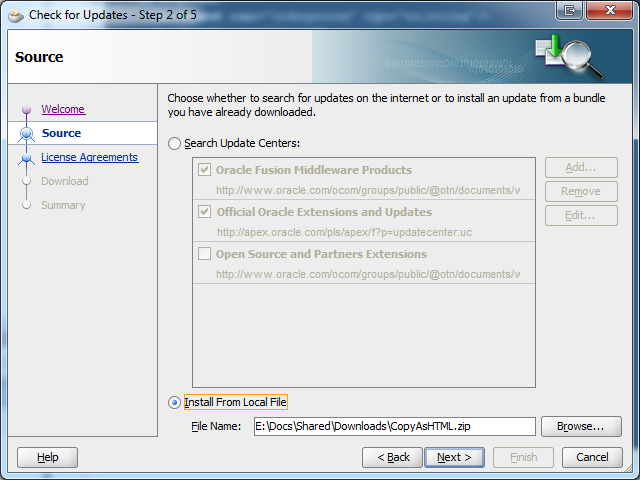
Once downloaded go to Help –> Check for Updates and step through so you can then choose your download – as shown.

image

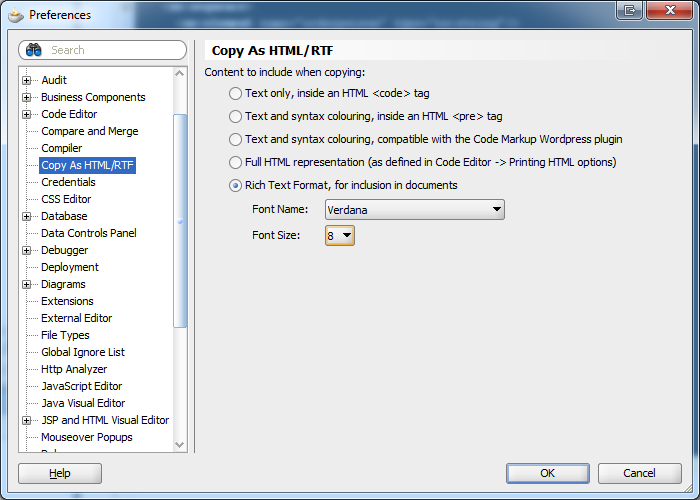
Once installed you’ll need to restart JDeveloper.  To then configure to plugin to work as you want go to Tools –> Preferences… Where you should be able to find Copy As HTML/RTF in the left menu tree to get the options to configure the plugin behaviour.

image

If you’re going from Windows application to another then you want the Rich Text Format setting.  After that rather than Ctrl+C its Ctrl+H to copy and carry the pretty formatting/colours etc.

Share this:

  • Share on Facebook (Opens in new window) Facebook
  • Share on X (Opens in new window) X
  • Share on Pocket (Opens in new window) Pocket
  • Share on Reddit (Opens in new window) Reddit
  • Email a link to a friend (Opens in new window) Email
  • Share on WhatsApp (Opens in new window) WhatsApp
  • Print (Opens in new window) Print
  • Share on Tumblr (Opens in new window) Tumblr
  • Share on Mastodon (Opens in new window) Mastodon
  • Share on Pinterest (Opens in new window) Pinterest
  • More
  • Share on Bluesky (Opens in new window) Bluesky
  • Share on LinkedIn (Opens in new window) LinkedIn
Like Loading...

    I work for Oracle, all opinions here are my own & do not necessarily reflect the views of Oracle

    • About
      • Internet Profile
      • Music Buying
      • Presenting Activities
    • Books & Publications
      • Logging in Action with Fluentd, Kubernetes and More
      • Logs and Telemetry using Fluent Bit
      • Oracle Integration
      • API & API Platform
        • API Useful Resources
        • Useful Reading Sources
    • Mindmaps Index
    • Monster On Music
      • Music Listening
      • Music Reading
    • Oracle Resources
    • Useful Tech Resources
      • Fluentd & Fluent Bit Additional stuff
        • Logging Frameworks and Fluent Bit and Fluentd connectivity
        • REGEX for BIC and IBAN processing
      • Java and Graal Useful Links
      • Official Sources for Product Logos
      • Python Setup & related tips
      • Recommended Tech Podcasts

    Oracle Ace Director Alumni

    TOGAF 9

    Logs and Telemetry using Fluent Bit


    Logging in Action — Fluentd

    Logging in Action with Fluentd


    Oracle Cloud Integration Book


    API Platform Book


    Oracle Dev Meetup London

    Blog Categories

    • App Ideas
    • Books
      • Book Reviews
      • manning
      • Oracle Press
      • Packt
    • Enterprise architecture
    • General
      • economy
      • ExternalWebPublications
      • LinkedIn
      • Website
    • Music
      • Music Resources
      • Music Reviews
    • Photography
    • Podcasts
    • Technology
      • AI
      • APIs & microservices
      • chatbots
      • Cloud
      • Cloud Native
      • Dev Meetup
      • development
        • languages
          • java
          • node.js
          • python
      • drone
      • Fluentbit
      • Fluentd
      • logsimulator
      • mindmap
      • OMESA
      • Oracle
        • API Platform CS
          • tools
        • Helidon
        • ITSO & OEAF
        • Java Cloud
        • NodeJS Cloud
        • OIC – ICS
        • Oracle Cloud Native
        • OUG
      • railroad diagrams
      • TOGAF
    • xxRetired
    • AI
    • API Platform CS
    • APIs & microservices
    • App Ideas
    • Book Reviews
    • Books
    • chatbots
    • Cloud
    • Cloud Native
    • Dev Meetup
    • development
    • drone
    • economy
    • Enterprise architecture
    • ExternalWebPublications
    • Fluentbit
    • Fluentd
    • General
    • Helidon
    • ITSO & OEAF
    • java
    • Java Cloud
    • languages
    • LinkedIn
    • logsimulator
    • manning
    • mindmap
    • Music
    • Music Resources
    • Music Reviews
    • node.js
    • NodeJS Cloud
    • OIC – ICS
    • OMESA
    • Oracle
    • Oracle Cloud Native
    • Oracle Press
    • OUG
    • Packt
    • Photography
    • Podcasts
    • python
    • railroad diagrams
    • Technology
    • TOGAF
    • tools
    • Website
    • xxRetired

    Enter your email address to subscribe to this blog and receive notifications of new posts by email.

    Join 2,555 other subscribers

    RSS

    RSS Feed RSS - Posts

    RSS Feed RSS - Comments

    January 2026
    M T W T F S S
     1234
    567891011
    12131415161718
    19202122232425
    262728293031  
    « Nov    

    Twitter

    Tweets by mp3monster

    History

    Speaker Recognition

    Open Source Summit Speaker

    Flickr Pics

    Gogo Penguin at the BarbicanGogo Penguin at the BarbicanGogo Penguin at the BarbicanGogo Penguin at the Barbican
    More Photos

    Social

    • View @mp3monster’s profile on Twitter
    • View philwilkins’s profile on LinkedIn
    • View mp3monster’s profile on GitHub
    • View mp3monster’s profile on Flickr
    • View mp3muncher’s profile on WordPress.org
    • View philmp3monster’s profile on Twitch
    Follow Phil (aka MP3Monster)'s Blog on WordPress.com

    Blog at WordPress.com.

    • Subscribe Subscribed
      • Phil (aka MP3Monster)'s Blog
      • Join 233 other subscribers
      • Already have a WordPress.com account? Log in now.
      • Phil (aka MP3Monster)'s Blog
      • Subscribe Subscribed
      • Sign up
      • Log in
      • Report this content
      • View site in Reader
      • Manage subscriptions
      • Collapse this bar
     

    Loading Comments...
     

    You must be logged in to post a comment.

      Privacy & Cookies: This site uses cookies. By continuing to use this website, you agree to their use.
      To find out more, including how to control cookies, see here: Our Cookie Policy
      %d