Last week saw the Open Source Observability Day (OSOD) during which I presented on the subject of the Open Agent Management Protocol, covering the underlying protocol that forms the foundation of a wider capability we have been building along with a demo of what is available.
If you want to see the presentation, and hear the full story not only of the core protocol but how it can help with the ideas around ChatOps and AIOps head over to the OSOD website (and previous years can be seen on YouTube with playlists for each year e.g. OSOD 2025). Of course if you have been following my blog posts you’ll know this.
The demo is recorded against a version prior to the 0.6 release.
Running the demo yourself
If you want to try this out for yourself, you can do so. You’ll need to:
There are several things that separate the turn-key/commercial observability solutions from the pure open source options. The most visible of these are:
Fleet management of you agents, particularly when working outside of a Kubernetes ecosystem
Deployed services and applications with default monitoring configuration
Prebuilt dashboards
While the issue of fleet management is a subject I’ve covered at length with OpAMP. We’ve not looked so closely at the discovery and automation. While the OpAMP server (and standalone option) provides schema driven editor, the key separation is to drive the configuration based on finding what solutions are deployed.
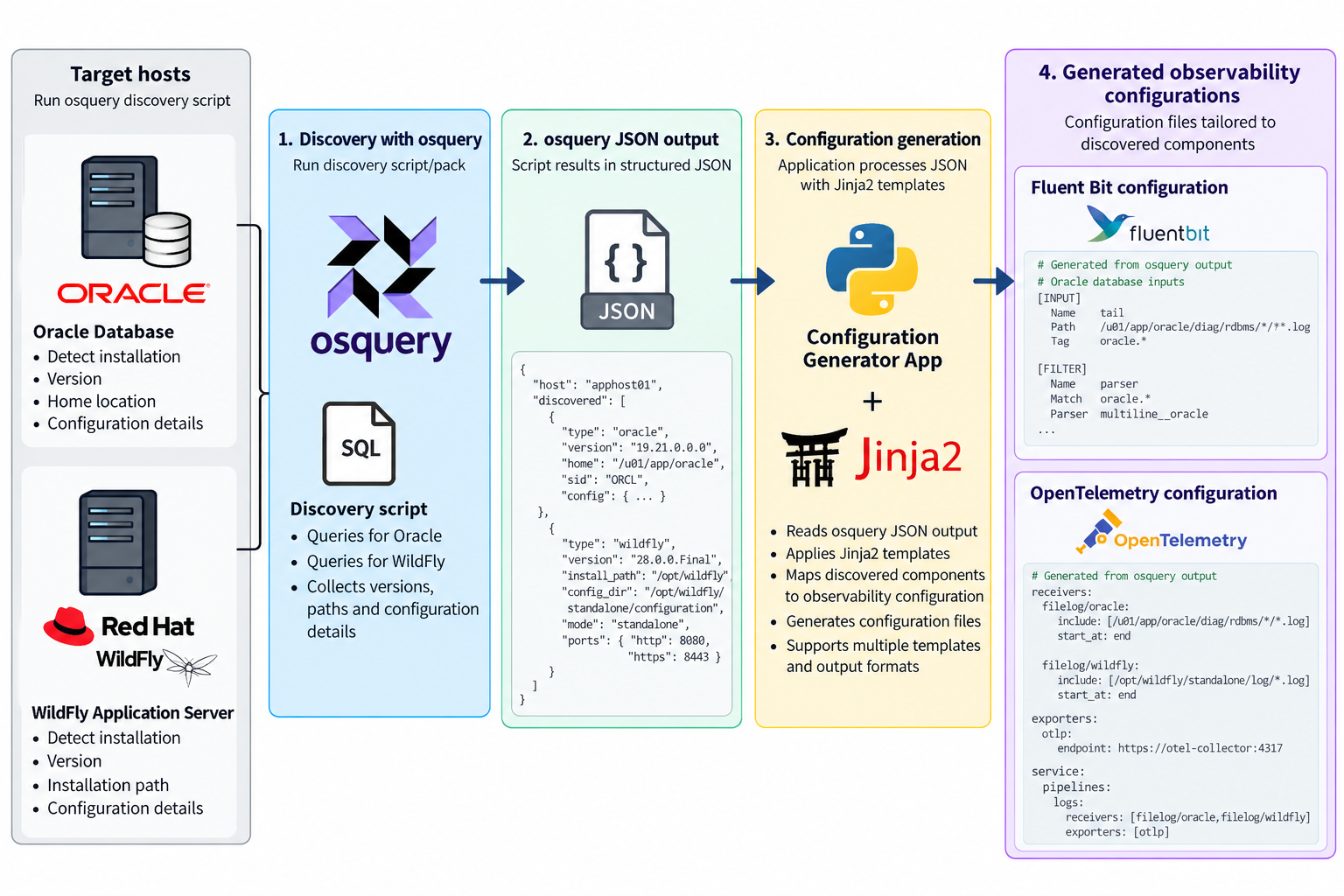
This process can look very sophisticated, but there are a number of open source tools that can help address it pretty easily. By bringing therse tools together we can achieve the same effect of detect and configure agents. At this stage we’re not looking at the backend of creating out of the box dashboards, but the potential to evolve the approach is there.
Detecting and Generating Configuration
The process we need has the following steps:
find the deployed solution(s)
Understand how they are deployed
Generate a configuration based on the detection
Push the configuration out to agents
Detect and capture config
One of the more active solutions that provides a means to detect deployments, and find configurations in this space is OSQuery, which is used by some serious players (Airbnb, Dropbox, Netflix, Palantir, Etsy, and Uber are just a few). OSQuery is particularly appealing solution because of its ease of use. All the information OSQuery can make available is accessible through the use of SQL including all the power SQL provides to mix data together.
While SQL is powerful, we do want to return the results in an easily consumable manner, so the CLI tool allows us to ask for the result to be returned in JSON. This makes the result easy to work with and we can use it with technologies such as JSONPath, particularly if we can impose a defined schema on the output, something that can be done as we know the queries being run, and can use constructs such as select … as …
As we can query the JSON output to retrieve the relevant parts of the output, for example the result of the queries to look for an Oracle Database or a RedHat/IBM WildFly application server. We can then combine that data with a template, such as the templating capabilities of Jinja2. The template defines the configuration that we would want to use, for example we want to tail log files, we want to establish a Prometheus metrics pull. Then the values are pulled from the JSON to create an instance of the file.
Templates make the result reusable
By using templates, known queries and their result structures we can generate reusable configurations on a product by product basis. The last step is stitching it together. To be reusable each template is discrete for an application or standard stack. So we up with multiple configuration files that need to be combined. This could be addressed by simply merging all the files together, but a lot of the observability tools such as Fluent Bit and Fluentd provide the ability to include files. Obviously you still need to work out what to include to combine, but this pretty straight forward.
There are limits
So this brings together all the sources, for destination side for the turn key solutions is known as the backend is the core product. In the open source solution you’re probably going to run multiple tools, so you need to have a more advanced routing. You can create a standard backend routing and include it.
Convenience as a weakness?
While having turn-key solutions, makes setup so much easier, could it also be a weakness? As we can see with our automation, we’ve not got tailoring to filter data in the pipeline, or park it out of the way. Which ratchets up the costs, because of the retention costs, and greater computational effort to trawl the data. Nor can we derive new signals through correlation inflight. But then our approach with templating creates the same challenge, BUT this approach doesn’t preclude you from incorporating into the solution such smarts.
Backend Bootstrapping
Rapid configuration of the backend is going to be a bit harder because the chances are you’re wanting to mix and match the backend tools (one of the strengths of not going down a turnkey adoption). We’ll explore the possibilities of making this step easier in another post.
As The New Stack regularly posts new extracts, we’re updating this page; accordingly, the date below reflects the last update.
With the publication of Logging Best Practices (for background to this, go here), more articles have been published through The New Stack, extending the original list we blogged about here.
The last couple of weeks have been pretty exciting. Firstly, we have Fluent Bit 3.1 released, which brings further feature development to Fluent Bit, making it even more capable with Fluent Bit handling of Open Telemetry (OTel).
We’ve been progressing the utility, testing and stabilizing it, and making several releases accordingly. The utility is packaged as a Docker image, and the regression test tool also runs as a Docker image.
Moving forward, we’ll start branching to develop significant changes to keep the trunk stable, including experimenting with the possibility of extending the tool to help port Fluentd to Fluent Bit YAML configurations. The tools won’t be able to do everything, but I hope they will help address the core structural challenges and flag differences needing manual intervention.
Book
The Fluent Bit book has moved into its last phase with the start of copy editing. We have also had a shift in the name to Logs and Telemetry using Fluent Bit, Kubernetes, streaming, and more, or just Logs and Telemetry using Fluent Bit. The book fundamentally hasn’t changed. There is still a lot of Kubernetes-related content, but it helps focus on what Fluent Bit is all about rather than being just another Kubernetes book.
Logs and Telemetry using Fluent Bit, Kubernetes, streaming and more
The hyper scaler cloud vendors all offer Logging and monitoring capabilities. But they tend to focus on supporting their native services. If you’re aware of Oracle’s Cloud (OCI) messaging, then you’ll know that there is a strong recognition of the importance of multi-cloud. This extends not only to connecting apps across clouds but also to be able to observe and manage cloud-spanning solutions. Ultimately, most organizations want to headline observability-related views of their solutions.
Late last year, I presented these ideas, illustrating the ideas with the use of Fluent Bit and OCI’s Observability and Management products to visualize and analyze what is happening. I finally found the time to write how the very basic demo was built from a clean sheet over on the Oracle Devs blog on Medium.
This also highlights the fact that the Fluent Bit book, while I believe, once completed, will be through, can’t cover everything – and certainly not build end-to-end use cases like the Oracle Observability & Management example. To help address this, the book includes an appendix of helpful additional information, some of which I have included here, along with other content that we encounter – all of which can be found at Fluentd & Fluent Bit Additional stuff.
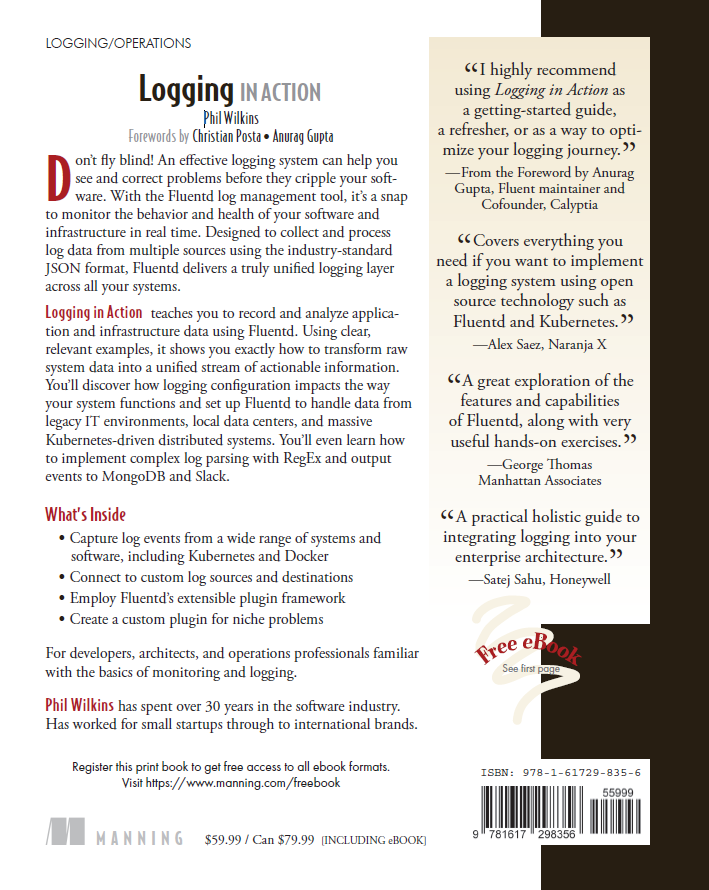
Those who have been using my Logging in Action book will know that to help test the configuration of monitoring tools including Fluentd we have built a LogGenerator that can very easily play and replay logging events into a variety of destinations and formats. all written in Groovy to make the utility easy to run as a script and extend without needing to set up a proper Java development environment.
With the number of different destinations built into the script and the logic to load the source log events and format them the utility is getting rather large for a single file. Rather than letting it continue to grow as we add more destinations to pump log events too, I’ve extended the implementation so you can point to a Groovy file that implements the logic to send the log events. It only requires three simple methods to be implemented.
To demonstrate the feature we have created a custom extension and fully documented it. The extension allows you to send log events to the OCI Logging service. This includes an optional crude aggregation mechanism as sending individual log events is a little inefficient over REST. By doing this we can send synthetic or playback logs as if we’re an application in real-life to ensure that any alerting or routing for the logging works properly before we get anywhere production and do not need to run the application and induce error events.
Beyond this, we’re also thinking about creating a plugin to fire log events at Prometheus so we can send events using the Prometheus pushgateway. As a result, we can tune Prometheus’ configuration.
More improvements – refactoring the existing code
We will refactor the existing code to use the same approach which should make the code more maintainable, but the changes won’t stop the utility from working as it always has (so we won’t break out the existing output channels from the core).
We have also started to improve the code commenting – so hopefully it will make the code a bit more navigable.
The 12 Factor App definition is now ten years old. In the world of software that is a long time. So perhaps it’s time to revisit and review what it says. As I have spent a lot of time around Logging – I’ve focussed on Factor 11 – Logging.
I have been fortunate enough to present at the hybrid JAX London conference on this subject. It was great to get out and see people at a conference rather than just with a screen and a chat console of online-only events.
Fluentd has an incredible catalogue of plugins including notification and collaboration channels from good old-fashioned email through to slack, teams, and others.
The thing to remember if you use these channels is that if you’re sending errors, from application logs it isn’t unusual for there to be multiple error events as a root event can cause a cascade of related issues. For example, if your code is writing transactions to a database and the database goes down with no failover mechanism, then your code will most likely experience an error, roll back the transaction perhaps to some sort of queue, and then try to process the next event. Which will again fail. This is the classic situation where multiple errors will get reported for the same issue. This problem is often referred to as a mail storm given that there was a time when we didn’t have social collaboration tools and everyone used email.
There are several ways to overcome this problem. But the most simple and elegant of these is using the suppress plugin in its filter mode.
<filter **>
  @type suppress
  interval 60       # period in seconds when the condition to supress is triggered
  num 2             # number of occurences of a value before suppressing
  attr_keys source  # the element of the event to consider.
</filter>
In this example if we encounter an event with an attribute called source containing the same value twice then the suppression will kick in for 60 seconds. If you want the key to the valuebeing checked to be the tag then simply omit the attr_keys parameter.
Of course, we don’t want the suppression to kick in if the same value in the attribute keys occured once every few hours. To address this the occurence count is applied over not a time period, but a number of events received by the configuration of max_slot_num which defaults to 10k, but resets
In the filter mode, this plugin is best positionbed immediately before the match block. This means we don’t accidentally suppress messages before they are routed anywhere else.
For the purposes of a demo this is less of an issue. But for a realworld use case would probably benefit from some tuning. All the documentation for this plugin is at https://github.com/fujiwara/fluent-plugin-suppress
The final leg of getting the book published has taken a lot longer than had been expected. But we’ve just been told that the book has been sent to the printers. This means:
final eBook will be available from Manning in about 1 week
Preordered print copies of the book will be dispatched in about 2 weeks
The alternative ebook formats for mobile readers e.g. kindle etc available in about 3 weeks
The book will become available to purchase from other book stores such as Amazon in 3-4 weeks
Safari Books Online and Apple stores will have the ebook in 4-5 weeks
It also means the project from a writing perspective is complete. But we’re starting to look at the additional examples we’ll add to the GitHub repo. These will be dependent upon the book.
The log simulator we’ve built and written about in the past has had a release made that lines up with the Logging In Action book (v0.1). I am now continuing to add improvements on the main line. Not best Git branching practice, but as I’m working on this solo it doesn’t represent a problem.
If you expect multi line events all you need to do, is add to the properties file a name value pair, with the name FIRSTOFMULTILINEREGEX and the value is a Java/Groovy regular expression which can be used to determine if a line in a log entry is the 1st line in a new log. Then all subsequent log lines are appended to the previous line until a line identifies as a new log entry. The log entry will be written with newline characters in the same place as the read.
In addition to this if the synthetic log events need to be set to be new line then using the ALLOWNL property to be set to true will result in any new line escape sequences (\n) to be made into proper new lines in the output.
The details are all included in the documentation in GitHub.









You must be logged in to post a comment.