Learning Ansible Review Part 1

Tags

, , , , , , ,

I was going to publish the first part of my review of the Packt book Learning Ansible after every couple of chapters, but the preface and 1st chapter are pretty substantive not mention starts to address some of my questions regarding Ansible compared to Puppet and Chef.

So the first thing that is sticking is that the author’s style is a very easy to read flowing style. It means that your entire focus is on the content, and you don’t feel like you’re being lectured.

The preface is carries a lot of really valuable content setting the context and capabilities into which Ansible is working. It openly identifies the other leading products covering the different aspects in which someone interested in the space would want to know about or may already understand. So the following areas are called out:

  • Configuration Management
  • Provisioning
  • Deployment
  • Orchestration
  • Monitoring and Alerting
  • Logging

Chapter 1 pretty much faces into the question of differentiating Ansible from Chef and Puppet. The key being that Ansible is not a master and distributed client model which Puppet and Chef offer (although both offer a Masterless models which just distribute the client). What is missing from this initial conversation is that consideration of security. In a master and client model security can be stronger because even if you compromise the master, you still have an intermediary in the agent to protect against malicious actions. Where as breaching the Ansible node means you will have obtained SSH access to all the nodes available for management as this is how Ansible interacts with the nodes it is managing.

Despite this, the arguments are simply laid out, particularly the other significant difference is that a lot of the client-agent approaches mean they offer an abstraction of the types of activities you might want for example install an application which are abstracted from the likes of msi, yum, Red Hat Network and so on. The argument for not having this is that to provide abstraction you potentially end up dropping to the lowest common denominator (unless the tool implements capabilities not naturally available on the platform). A very fair and valid argument. It is also likely in an enterprise environment you’re probably using a small set of different types of environment and potentially only type type of environment for different solutions I.e. Your website is unlikely to be hosted by servers running Red Hat, Debian, Ubuntu and Fedora.

The first chapter takes you through a series of simple examples derived from a classic variant of IT’s classic Hello World solution. This does make for a sizeable first chapter (about 1/5th of the book) but does introduce all the core principles, ideas and capabilities that are embodied and provided by Ansible. If you want to know whether Ansible is likely to meet what you want to do then reading just this chapter will probably give you a view on whether you’re likely to be able to do what you want.

Although the book makes references to the support of Windows, but this is still in Alpha phase (Ansible Windows is Coming).This does mean that the examples are Linux only. Additionally it appears from the ansible site (the book doesn’t provide any indication of this) the central Ansible node(s) will still have to be Linux. The book in this case appears to trying to future proof itself. We hope that the author will provide Windows equivalent downloadable demos.

The long and short of it, a great start to a book.

Another book review on the way

Tags

, , , , , ,

Packt Publishing have given me the opportunity to review their book on Learning Ansible – an IT environment/apps/deployment automation framework. Should be interesting to see how Ansible compares to the big names of Chef and Puppet.  Flicking through the book, there appear to be plenty of examples and illustrations using common open source tools such as MySQL and Apache.
We’ll blog as we go, so should have a post every few chapters, so watch this space.

Things are going to be busy as I am also technically reviewing another Camel Book for Packt as well.

Oracle Free EBook on Enterprise Mobility

Tags

, , , ,

Oracle a free Ebook about enterprise Mobility – it can be downloaded from https://blogs.oracle.com/imc/entry/free_oracle_special_edition_ebook1  The book focuses on the following areas:

  • Mobile Trends and Concepts
  • Mobile Architectures, Integration, Scalability, and Security
  • Exploring the Oracle Mobile Platform

Push Notifications with a Bit of Java

Tags

, , , , , , , , , , , , , , , , ,

So continuing from my previous posts:

We’re going to use the Prowl API and create the equivalent classic “Hello World” App using the push framework – but cutting out the need for Growl etc.  For this blog post we’re not going to use the Oracle Java Cloud as we need to see the code working locally and get ready to promote the code to the cloud.  Once we’ve got some code working we can look at setting up the Java Cloud environment, package and promote what we have here using our IDE into the cloud environment.
As we’re cutting Java code now – you can obviously use your own preferred IDE, I’m going to use JDeveloper 12c if for no other reason than it being a huge improvement on 11g (download here) and I’ve become somewhat disappointed with Eclipse.  Whilst talking about IDEs;  you should be aware that Oracle provide an Oracle Cloud SDK which integrates with a number of IDEs to make some of the interactions with the cloud straight forward.

The SDK provides Ant and Maven scripts to help the build and deploy process – so we will be using those later, plus command line tools to help manage other activities, a number of code examples and HTML documentation.  To setup the SDK you will need to unpack the file into a folder and add that folder into your PATH environment variables. The bundle includes a readme that contains just enough to show what is required to get unpacked and make the command line tools work.

To download from Oracle you will need to setup an Oracle Technology Network (OTN) account – so if you don’t have one now is the time to create one – there is no cost to this, we’re going to need

We could use the REST based API that is provided by the ProwlApp, but at least to start with we’re going to follow the approach using a library to make using the API very simple. By using the API provided on SourceForge (jProwlAPI). Using an API will allow us to show the use of 3rd party libraries in the cloud deployment but also follows some of the Oracle ideas of offering ‘adaptors’ to simplify integration.

So you need to download:

So with this downloaded we are going to:

Setup an new Maven based project (or copy my file structure into place and import) using a maven quickstart archtetype (org.apache.maven.archetypes:maven-archetype-quickstart) . We will probably need to modify this later to leverage the full cloud capable archetype. This will build your project environment and retrieve a bunch of plugins you might need.

Next lets take a peak inside of the jProwlAPI download. You’ll see an example bit of java that shows how to fire the API.  Rather than tinker with this we have created a small package and JUnit test as we would if writing a proper solution created with the maven archetype.

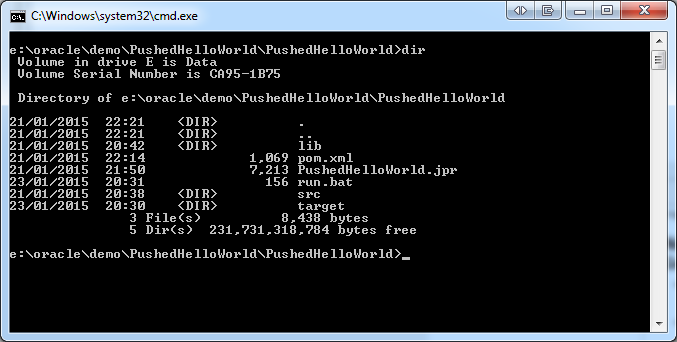
PushedHelloWorld directory structure

We also need to make the JProwlAPI jar file available to the project. So we use maven pattern, and create a folder called lib and copy the jar file into it. We then add the lib folder to project setup.


pushedhello-RunConfig

To be able to create the deployable artefact we need to load the jar file into the local repository, which we can do with a command line instruction (presuming maven is also available by your PATH variable).

mvn install:install-file -Dfile=./lib/JProwlAPI-0.5.jar -DgroupId=prowl -DartefactId=JProwlAPI -Dversion=12.1.3-0-0 -Dpackage=jar

We’ll come back to the command line in a bit, but within JDeveloper the code I have provided needs 1 change from yourself – replace the references to –YourAPIKey– in the run execute command and in the JUnit class with your own key.

JDEveloper 12c Run Config

In the the ProwlProcessor class I have included a man in method so we can just execute the class to see things working. So having done that we can then repeat by running the class via the JUnit test. You should see the same result. When we we’ve deployed or class to the cloud we can use the JUnit test to invoke the cloud.

ProwlProcessor - main method

The last step, within the IDE we have been compiling to get the class, but not creating a deployable jar file. We could do this with the IDE but we would also in a real development condition be creating artefacts via a Continuous Integration tooling which will effectively fire the maven command line like interface. So let’s do that to create the jar files, using the following command:

mvn clean package

You should then see a folder created if not already there and a jar file reflecting the values in the POM file, that we can see below.

JDeveloper 12C - view of a simple POM

So we have enough now we could in theory deploy a jar to a weblogic container and fire it from a Unit test. In the next post we’ll deploy and execute the unit test, and throw a crude front end into the mix.

Oracle Maven Repository – Index now available – more to come

The support for Maven in the Oracle ecosystem is ever improving as this shows

Mark Nelson's avatarRedStack

I am happy to announce that we now have an index available for the Oracle Maven Repository.  This is a standard Maven index, built with the Maven Core Indexer code (donated by Sonatype to Maven – thanks!) and is available at https://maven.oracle.com/.index/nexus-maven-repository-index.properties and https://maven.oracle.com/.index/nexus-maven-repository-index.gz.

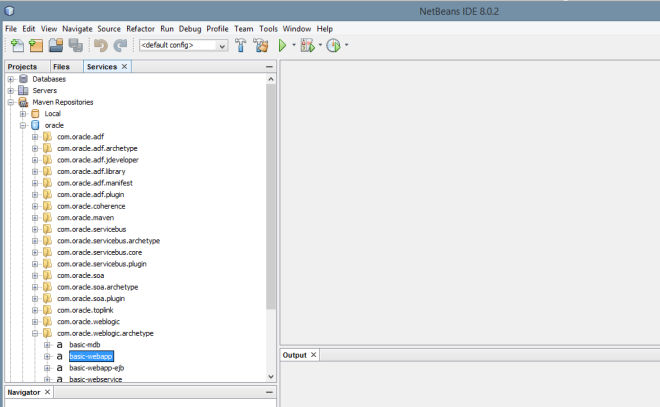
The easiest way to view it is to use an IDE like NetBeans, as shown below:

repo-index

We are actively working with Maven Repository Manager and IDE teams to make this work for you across a variety of common tools you may use.

View original post

Sending Push Notifications Without Your Own App

Tags

, , , , , , , ,

So in my opening blog entry I talked about creating mobile push notifications. So before we start playing with cloud solutions and developing anything, the best place to start is be able to push a notification.

We’re going to do this with the use of Prowl. Prowl offers both a mobile application and a cloud service with an API. So setting up an account on Prowl you can connect you mobile Prowl App to then through another app – for example Growl (which is how I came across Prowl) which can be extended by a plugin framework to use Prowl so potentially all your desktop alert can become push notifications if you want.

So if you hadn’t already noticed Prowl is presently an IOS only solution – however there is an Android equivalent called Notify My Android (NMA). I should also be upfront the Prowl App does cost a couple of pounds or dollars (depending upon your App Store).  But this is a small price to pay to avoid having to build an app (which needs to you to be a fully paid up IOS Developer Account holder to play with push notifications as we do).

So I will concentrate primarily on working from a Windows platform to an Apple device – but I will loop back to Android at points as well.  For those who bulk at the idea of Windows and swear only to live with Mac or a proper OS as many Linux fans will say – I will point out where to get the info you need and hack your Linux flavour into appropriate shape. Our goal is to see Oracle cloud in use.

Just as an aside quick detour – Growl is a Mac based notification consolidation tool, which has a Windows implementation as well called Growl For Windows.  The idea is all your applications and system notifications go via Growl which allows your to customise the notifications and route them to lots of different channels such as to browser plugin, push notifications and so on.

So lets get the first steps called out:

  1. Create an account on Prowl or NMA
  2. Install the Prowl App on your IOS device
  3. From the Prowl web app or NMA web send a message to your device

So we have proven notifications to our device from a central device. We are going to go one step further and use a local client to prove we can safely send events to the Prowl or NMA servers. We can do this several different ways – on the Prowl site are several browser plugins that you could use or combine prowl with Growl or Growl for Windows plus the Growl notifier.

So I assume that you have installed Growl or Growl for Windows as previously mentioned. Then the Growl notifier extension needs to be installed from http://www.growlforwindows.com/gfw/help/growlnotify.aspx. With the extension installed we need to make sure Growl sends its notifications to Prowl and send the notifications from a command line.

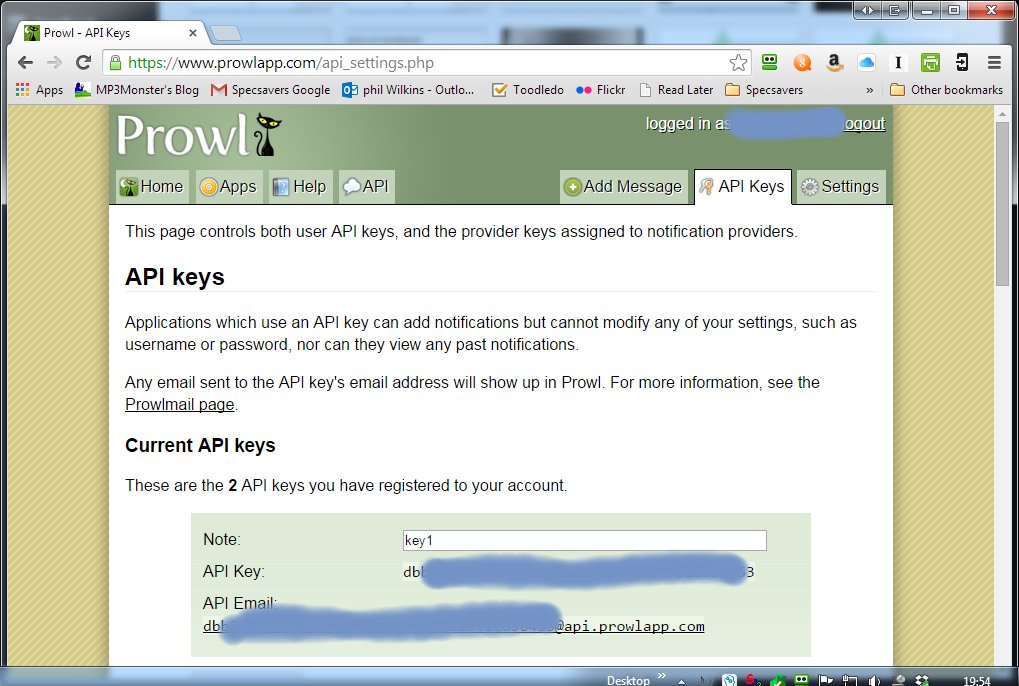
To do this you need to create a API Key on the Prowl website. Then in settings part of the app setup the key details as shown below (note I’ve hidden my account and key):
Prowl API Config
So this links the credentials of the account. You could impose local security constraints so the local notification is only accepted by Growl with good credentials.

Then you you need to configure the notifier to use the configured key as you can see below:

In The Network part of Growl's configuration you need to establish the Key

In The Network part of Growl’s configuration you need to establish the Key

The Plus key you can see provides a dialogue like the following where you select the type of notification and then complete the necessary details i.e.  copy in the API Key from the website:

In The Network part of Growl's configuration you need to establish the Key

In The Network part of Growl’s configuration you need to establish the Key

GrowlConfig- forward NotificationsGrowl-setKey

You’ll may have noticed – that the key name carries through from the website – this is more to make it convenient to track the key rather than a necessity.

With the API Key setup we can link the notification side of things via the Notifications section.  You’ll note the App extension is selected and in the notification type I have gone to the Choices menu which provides a popup

Selecting Notification


Selecting the key:

Selecting the Destination KeyThe final step is to then run a command line, which would look something like:


Growl Notifier Script

You’ll notice the command line is very simple as we’ve not setup an security in Growl the only security is around the API Key.

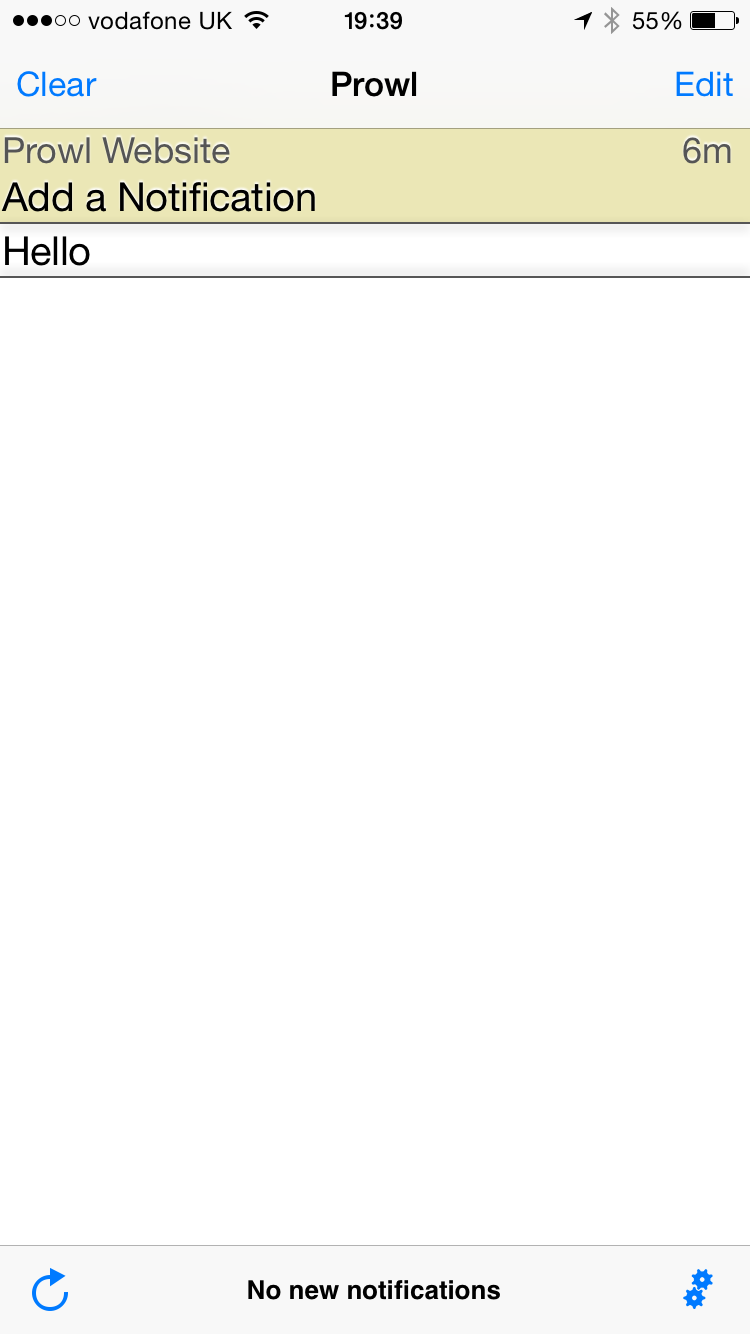
Then we get the pay off of the pushed notification and you can see your notification history as well in the Prowl app – as this shows:

IMG_1944

Prowl App View


So the steps just performed:

  • Created the API key on the ProwlAPI site
  • made sure we’ve got Growl and Growl Notifier installed
  • Established the link from Growl to Growl Web App via the API Key
  • Configured the notifications for GrowlNotifier to go through Growl and get pushed onto the Prowl API
  • Run the command line script
  • Seen the command line message go from the desktop shell through Growl onto the Prowl API and arrive on your smart phone.


Summary
So we have shown we can create push notifications without the distraction of building our own app. Not very exciting as we haven’t created anything but does show the art of the possible.

Next post we’ll cut some code to perform the same process using the Prowl API directly.

Oracle Java & Node.JS Cloud Blogs Coming

Tags

, , ,

Over the coming months I’m planning on running a series of blogs on getting setup and using Oracle’s Java Cloud and the upcoming Oracle Node.JS Cloud when we can get access to it.

In both cases we’re aiming to demo the capabilities, setup eyc around the classic Hello World – but with a bit of a twist. Rather than simply sending to the console we’re going to use a mobile push notification – without resorting to having to build a mobile app.

By taking this approach to hello world aside from keeping it simple we can see how to bring 3rd party APIs into the mix.  The first couple of posts wont need to much on the Oracle front – as we’ll walk through getting things setup and running a proof without the cloud stuff. As they say keep it simple stupid.

So that you can see the blog entries for each of this two stories, I specifically setup in my blog two entry categories:

A few posts will obviously be common to both.

Free Network Security eBook

Tags

, , , , , ,

I came across the following promotion via LinkedIn. The book isn’t that new, but looking at Amazon reviews suggests that there maybe some value still:

Network Security For Dummies — eBook (usually $22.99) FREE until January 1st!

Get quick, easy, low-cost solutions to all your network security concerns.

CNN is reporting that a vicious new virus is wreaking havoc on the world’s computer networks. Somebody’s hacked one of your favorite Web sites and stolen thousands of credit card numbers. The FBI just released a new report on computer crime that’s got you shaking in your boots. The experts will tell you that keeping your network safe from the cyber-wolves howling after your assets is complicated, expensive, and best left to them. But the truth is, anybody with a working knowledge of networks and computers can do just about everything necessary to defend their network against most security threats.

Whether your network consists of one computer with a high-speed Internet connection or hundreds of workstations distributed across dozens of locations, you’ll find what you need to confidently:

  • Identify your network’s security weaknesses
  • Install an intrusion detection system
  • Use simple, economical techniques to secure your data
  • Defend against viruses
  • Keep hackers at bay
  • Plug security holes in individual applications
  • Build a secure network from scratch

– Download from: http://opensourceuniverse.tradepub.com/free/w_wile145/?p=w_wile145#sthash.i4fHNQgA.dpuf

Oracle Press Celebrates 20 Years of Support for the Global Oracle Workforce – – Originally @UKOCN

Tags

, , ,

Oracle Press Celebrates 20 Years of Support for the Global Oracle Workforce  

Happy 20th Birthday, Oracle Press! Since 1994, McGraw-Hill Education has partnered with Oracle Corporation to help Oracle professionals develop the skills they need to be successful with Oracle’s products and technologies.

What started out as one book on Oracle’s groundbreaking database, Oracle: The Complete Reference, has grown to 120 titles covering the entire Oracle ecosystem-databases, middleware, applications, servers, and certification. Oracle Press titles have sold more than 3 million books in print around the world, with thousands of eBooks accessed via devices and platforms, including Safari, Books 24X7, and McGraw-Hill Education’s own McGraw-Hill Education eBookLibrary.

Working closely with Oracle’s internal product development teams, Oracle Press has developed rigorous best practices for producing the highest quality content on the topics most critical to our readers.

More than half of Oracle Press’s authors are Oracle employees–the technologists driving Oracle’s products forward. And we’re always looking for new book ideas, authors and technical advisors.

  • To get an amazing 20% off all Oracle Press titles from McGraw-Hill please Click here

Enterprise Architect Cloud

Tags

, , , , , , ,

With version 11 of Sparx‘ Enterprise Architect tool a new cloud feature was introduced to support team working, which previously had been achieved using a shared Database.

When we heard about EA Cloud, both myself and my colleagues got rather excited, thinking that this would be the opportunity to offload the effort of looking after a central DB (making sure backups happened, fine tuning the DB settings and so on) plus maintaining the platform’s patching for security etc. Not only that through the cloud capability we could host the repository that made it very easy for the team to access the repository on the move without needing to have another whole in our corporate firewall etc.

Unfortunately, EA Cloud provides all the software to establish a cloud based repository – which can be used through firewalls etc – HTTPS traffic rather than DB connectors on unusual ports but not the hosting.  This seems to a bit of a missed opportunity for Sparx who already have to deal with all of these points to host 3 demo cloud servers.  So the next step of instantiating a server for a regular on going fee doesn’t seem too challenging, not to mention promotes customer tie in, plus the ability to capture some potentially interesting metrics about its users (e.g. which modelling techniques are most popular etc).  Having looked at Sparx partners they don’t offer the capability either which is a shame.