• Home
  • Site Aliases
    • www.cloud-native.info
  • About
    • Background
    • Presenting Activities
    • Internet Profile
      • LinkedIn
    • About
  • Books & Publications
    • Log Generator
    • Logs and Telemetry using Fluent Bit
      • Fluent Bit book
      • Book Resources in GitHub
      • Fluent Bit Classic to YAML Format configurations
    • Logging in Action with Fluentd, Kubernetes and More
      • Logging in Action with Fluentd – Book
      • Fluentd Book Resources
      • Fluentd & Fluent Bit Additional stuff
    • API & API Platform
      • API Useful Resources
    • Oracle Integration
      • Book Website
      • Useful Reading Sources
    • Publication Contributions
  • Resources
    • GitHub
    • Oracle Integration Site
    • Oracle Resources
    • Mindmaps Index
    • Useful Tech Resources
      • Fluentd & Fluent Bit Additional stuff
      • Recommended Tech Podcasts
      • Official Sources for Product Logos
      • Java and Graal Useful Links
      • Python Setup & related stuff
  • Music
    • Monster On Music
    • Music Listening
    • Music Reading

Phil (aka MP3Monster)'s Blog

~ from Technology to Music

Phil (aka MP3Monster)'s Blog

Tag Archives: Azure

Binary Large Objects with Fluent Bit

16 Monday Dec 2024

Posted by mp3monster in Fluentbit, General, Technology

≈ Leave a comment

Tags

3.2.2, Azure, Binary object, BLOB, configuration, Fluent Bit, use cases

When I first heard about Fluent Bit introducing the support binary large objects (BLOBs) in release 3.2. I was a bit surprised; often, handling such data structures is typical, and some might see it as an anti-pattern. Certainly, trying to pass such large objects through the buffers could very quickly blow up unless buffers are suitably sized.

But rather than rush to judgment, the use cases for handling blobs became clear after a little thought. First of all, there are some genuine use cases. The scenarios I’d look to blobs to help are for:

  • Microsoft applications can create dump files (.dmp). This is the bundling of not just the stack traces but the state, which can include a memory dump and contextual data. The file is binary in nature, and guess what? It can be rather large.
  • While logs, traces, and metrics can tell us a lot about why a component or application failed, sometimes we have to see the payload that is being processed – is there something in the data we never anticipated? There are several different payloads that we are handling increasingly even with remote and distributed devices, namely images and audio. While we can compress these kinds of payloads, sometimes that isn’t possible as we lose fidelity through compression, and the act of compression can remove the very artifact we need.

Real-world use cases

This later scenario I’d encountered previously. We worked with a system designed to send small images as part of product data through a messaging system, so the data was disturbed by too many endpoints. A scenario we encountered was the master data authoring system, which didn’t have any restrictions on image size. As a result, when setting up some new products in the supply chain system, a new user uploaded the ultra-high-resolution marketing images before they’d been prepared for general use. As you can imagine, these are multi-gigabyte images, not the 10s or 100s of kilobytes expected. The messaging’s allocated storage structures couldn’t cope with the payload.

We had to remotely access the failure points at the time to see what was happening and realize the issue. While the environment was distributed, it wasn’t as distributed as systems can be today, so remote access wasn’t so problematic. But in a more distributed use case, or where the data could have been submitted to the enterprise more widely, we’d probably have had more problems. Here is a case where being able to move a blob would have helped.

A similar use case was identified in the recent Release Webinar presented by Eduardo Silva Pereira, and a use case with these characteristics was explained. With modern cars, particularly self-driving vehicles, being able to transfer imagery back in the event navigation software experiences a problem is essential.

Avoid blowing up buffers.

To move the Blob without blowing up the buffering, the input plugin tells the blob-consuming output plugin about the blob rather than trying to shunt the GBs through the buffer. The output plugin (e.g., Azure Blob) takes the signal and then copies the file piece by piece. By consuming their blob in parts, we reduce the possible impacts of network disruption (ever tried to FTP a very large file over a network for the connection to briefly drop, as a result needing to from scratch?). The sender and receiver use a database table to track the communication and progress of the pieces and reassemble the blob. Unlike other plugins, there is a reverse flow from the output plugin back to the blob plugin to enable the process to be monitored. Once complete, the input plugin can execute post-transfer activities.

This does mean that the output plugin must have a network ‘line of sight’ to the blob when this is handled within a single Fluent Bit node – but it is something to consider if you want to operate in a more distributed model.

A word to the wise

Binary objects are known to be a means by which malicious code can easily be transported within an organization. This means that while observability tooling can benefit from being able to centralize problematic data for us to examine further, we could unwittingly help a malicious actor.

We can protect ourselves in several ways. Firstly, we must first understand and ensure the source location for the blob can only contain content that we know and understand. Secondly, wherever the blob is put, make sure it is ring-fenced and that the content is subject to processes such as malware detection.

Limitations

As the blob is handled with a new payload type, the details transmitted aren’t going to be accessible to any other plugins, but given how the mechanism works, trying to do such things wouldn’t be very desirable.

Input plugin configuration

At the time of writing, the plugin configuration details haven’t been published, but with the combination of the CLI and looking at the code, we do know the input plugin has these parameters:

Attribute NameDescription
pathLocation to watch for blob files – just like the path for the tail plugin
exclude_patternWe can define patterns that exclude files other than our blob files. The pattern logic, is the same as all other Fluent Bit patterns.
database_fileThese are the same options as upload_success_action but are applied if the upload fails.
scan_refresh_intervalThese are the same options as upload_success_action but are applied if the upload fails.
upload_success_actionThis is a value that tells the plugin what to do, when successful. The options are:
0. Do nothing – the default action if no option is provided.
delete (1). Delete the blob file
add_suffix (2). Emit a Fluent Bit log record
emit_log (3). Add suffix to the file – as defined by upload_success_suffix
upload_success_suffixIf the upload success_action is set to use a suffix, then the value provided here will be used as the suffix.
upload_success_messageThis text will be incorporated into the Fluent Bit logs
upload_failure_actionThese are the same options as upload_success_action but applied if the upload fails.
upload_failure_suffixThis is the failure version of upload_success_suffix
upload_failure_messageThis is the failure version of upload_success_message

Output Options

Currently, the only blob output option is for the Azure Blob output plugin that works with the Azure Blob service, but support through using the Amazon S3 standard is being worked on. Once this is available, the feature will be widely available as the S3 standard is widely supported, including all the hyperscalers.

Note

The configuration information has been figured out by looking at the code. We’ll return to this subject when the S3 endpoint is provided and use something like Minio to create a local S3 storage capability.
Share this:

  • Click to share on Facebook (Opens in new window) Facebook
  • Click to share on X (Opens in new window) X
  • Click to share on Pocket (Opens in new window) Pocket
  • Click to share on Reddit (Opens in new window) Reddit
  • Click to email a link to a friend (Opens in new window) Email
  • Click to share on WhatsApp (Opens in new window) WhatsApp
  • Click to print (Opens in new window) Print
  • Click to share on Tumblr (Opens in new window) Tumblr
  • Click to share on Mastodon (Opens in new window) Mastodon
  • Click to share on Pinterest (Opens in new window) Pinterest
  • More
  • Click to share on Bluesky (Opens in new window) Bluesky
  • Click to share on LinkedIn (Opens in new window) LinkedIn
Like Loading...

JMESPath is represented using Railroad diagrams

31 Monday Oct 2022

Posted by mp3monster in development, General, railroad diagrams, Technology

≈ Leave a comment

Tags

AWS, Azure, diagrams, JMESPath, OCI, railroad, syntax

JMESPath is a mature syntax for traversing and manipulating JSON objects. The syntax is also supported with multiple language implementations available through GitHub (and other implementations exist). As a result, it has been very widely adopted; just a few examples include:

  • Azure CLI
  • AWS CLI and Lambda
  • Oracle Cloud WAF
  • Splunk

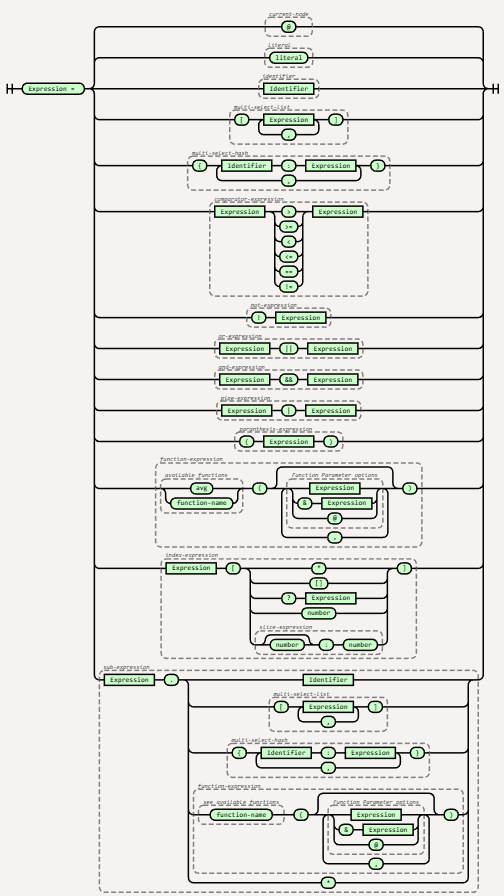
As the syntax is very flexible and recursive in its use following the documented notation can be a little tricky to start with. So following the syntax can be rather tricky. The complete definition runs to 97 lines, of which 32 lines focus on the syntactical structure. The others describe the base types such as numbers, characters, accepted escaped characters, and so on. Nothing wrong with this, as the exhaustive definition is necessary to build parsers. But for the majority of the time it is those 32 lines that we need to understand.

As the expression goes – ‘a picture says a thousand words’, there might not be a thousand words, but there is enough to suggest a visual representation will help. Even if the visual only helps us traverse the use of the detailed syntax. So we’ve use our favoured visual representation – the railroad diagram and the tool produced by Tab Akins to create the representation. We’ve put the code and created images for the syntax in my GitHub repository here, continuing the pattern previously adopted.

Here is the resulting diagram …

To make it easy to trace back to the original syntax document we’ve included groupings on the diagram that have names from the original speciofication.

Parts of the diagram make the expressions look rather simple, but you’ll note that it is possible for the sections to be iterative which allows for the expression to traverse a JSON object of undefined depth. But what can be really challenging is that an in many areas it is possible to nest expressions within expressions. Visually there is no simple way to represent the expression possibilities of this in a linear manner. Other than be clear about where the nesting can take place.

Share this:

  • Click to share on Facebook (Opens in new window) Facebook
  • Click to share on X (Opens in new window) X
  • Click to share on Pocket (Opens in new window) Pocket
  • Click to share on Reddit (Opens in new window) Reddit
  • Click to email a link to a friend (Opens in new window) Email
  • Click to share on WhatsApp (Opens in new window) WhatsApp
  • Click to print (Opens in new window) Print
  • Click to share on Tumblr (Opens in new window) Tumblr
  • Click to share on Mastodon (Opens in new window) Mastodon
  • Click to share on Pinterest (Opens in new window) Pinterest
  • More
  • Click to share on Bluesky (Opens in new window) Bluesky
  • Click to share on LinkedIn (Opens in new window) LinkedIn
Like Loading...

Development Standards for API Policies?

16 Monday Dec 2019

Posted by mp3monster in API Platform CS, General, tools

≈ Leave a comment

Tags

API, Azure, code, GitHub, Oracle, quality, regex, utility

When it comes to development, we have had coding standards for almost as long as we have been coding. We tend to look at coding standards for purposes of helping to promote good quality code and reduce the likelihood of bugs and so on. But they also help with readability, making it easy to navigate a code base and so on. This is sufficiently important that there is a vast choice of tools to help us ensure we align with good practices.

That readability etc, when it comes to code interfaces lends to making it easier to use an interface as it promotes consistency and as Don Norman would say avoids ‘cognitive load‘, in other words, the effort involved in performing actions with the interface. Any Java Developer will tell you, want to print out an object (any object) you get a string representation using the .toString() method and direct it using the io packages.

That consistency and predictability are important not just for code if you look at any API best practises documents you’ll encounter directly or indirectly the need to use conventions that drive consistency – use of singular or plural for the name of entities, application of case – camel case, snake case etc. Good naming etc and we’ll see related things appear together in the documentation. Products such as Apiary and SwaggerHub include tooling to help police this in our API design work.
But what about policies that we use to define how an API Gateway handles the receipt and routing of API invocations? Well yes, we should have standards here as well. Some might say, governance gone mad. But gateways are often shared services, so making it easy to see and logically group APIs together at very least by using a good naming convention will help as a minimum. If API management is being administered in a more DevOps fashion, then information security professionals will probably want assurance that developers are applying policies in a recommended manner.

Continue reading →

Share this:

  • Click to share on Facebook (Opens in new window) Facebook
  • Click to share on X (Opens in new window) X
  • Click to share on Pocket (Opens in new window) Pocket
  • Click to share on Reddit (Opens in new window) Reddit
  • Click to email a link to a friend (Opens in new window) Email
  • Click to share on WhatsApp (Opens in new window) WhatsApp
  • Click to print (Opens in new window) Print
  • Click to share on Tumblr (Opens in new window) Tumblr
  • Click to share on Mastodon (Opens in new window) Mastodon
  • Click to share on Pinterest (Opens in new window) Pinterest
  • More
  • Click to share on Bluesky (Opens in new window) Bluesky
  • Click to share on LinkedIn (Opens in new window) LinkedIn
Like Loading...

Costs in Multi-Cloud

28 Wednesday Aug 2019

Posted by mp3monster in General, Oracle, Technology

≈ Leave a comment

Tags

AWS, Azure, Cloud, costs, data, ExpressRoute, FastComnect, Oracle, OracleCloud

Over the last couple of years, we have seen growing references to multi-cloud. That is to say, people are recognizing that organisations, particularly larger ones are ending up with cloud services for many different vendors. This at least in part has come from where departments within an organization can buy meaningful resources within their local budgets.

Whilst there is a competitive benefit of the recent partnership agreement between Microsoft and Oracle given the market margin AWS has in comparison to everyone else. Irrespective of the positioning with AWS, this agreement has arisen because of the adoption of multi-cloud. It also provides a solution to the problem of running highly resilient Oracle database setups using RAC, DataGuard etc can be made available to Azure without risk to security and the all-important network performances that are essentially to DB operation. Likewise, Oracle’s SaaS offerings are sector leaders if not best in place, something Microsoft can’t compete with. But at the other end, regardless of Oracle’s offerings, often organisations will prefer Microsoft development ecosystem because of the alignment to office tooling, the ease of building solutions quickly.

Multi-cloud even with the agreements like the Microsoft and Oracle one (See here), doesn’t mean there won’t be higher costs in crossing clouds. Let’s see where the costs reside …

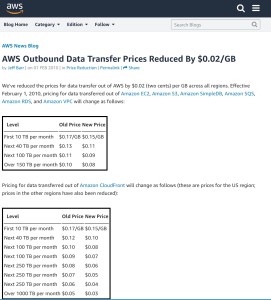
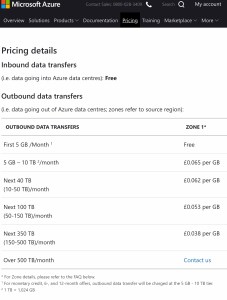
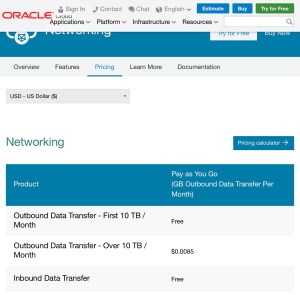
  • Data egress (and in some cases ingress as well) from clouds costs. Whilst the ingress costs have been eliminated because it can be seen as a barrier to selling services, particularly big data. Data egress can, however, be an issue. Oracle has made this cost very low to be almost negligible, but not necessarily others as the following comparison shows …


  • Establishing the high-performance connections That the agreement supports needed between Azure and Oracle cloud is the same tech for the cloud to the ground do incur a cost. In Oracle’s case, there is a fee for the connection (not a large cost, but one that exists none the less) plus any traffic fees the provider of the network connection spanning the data centre locations. This is because you’re leasing capacity on someone’s dedicated fibre or MPLS services. Now, this should prove to be small as part of the enabler of this offering is that both Oracle and Microsoft cloud DCs are often actually physically provided by the same provider or at-least the centres a physically pretty close, as a result of both companies gravitating to locations close together because of the optimal highly available infrastructure (power, telecommunications) legal and commercial factors along with the specialist skills needed.

If data egress is the key challenge to costs, what drives the data egress beyond the obvious content for user interfaces? …

  • Obviously, you have the business data flows, some of these flows will be understood by the business community. But not all, this is down to the way data from the cloud can be exposed to another. For example inefficient services with APIs that require frequent polling and not using expressing the request efficiently, rather than perhaps express the request using HTTP header attributes and other efficiencies or even utilize frameworks such as webhooks so data can be pushed.
  • High-speed data access, often drives data replication having databases in multiple clouds with mirror image data in each location even if the majority of the data is not necessarily needed. This can happen with technologies such as Kafka which for non compacted topics will mean every event can be replicated even if that event has a short lifetime.
  • One of the hidden costs is the operational tasks of gathering logs to a combined view so end to end insights can be obtained. A detailed log can actually yield more ‘data’ by volume than the business flows themselves because it is semi-structured, and intended to be very readable and at the most granular level there to help debug and test.

In addition to the data flows, you need to consider how other linkages in addition to the Oracle-Azure connection are involved. In the detailed documentation, it is not possible to get your on-premises location connected to one of the clouds (e.g. Oracle FastConnect, and then assume your traffic can hop to Azure via the bridge using FastConnect and Azure’s ExpressRoute.  To add performance to your solution parts in both Azure and Oracle Cloud, you still need to have FastConnect and ExpressRoute configured to your on-premises location. This, of course, may impact how bulk data for lift and shift app use cases such as EBS may be applied. For example, if you choose to regularly bulk data transfer between on-premise and EBS via the app/middleware tier rather than via direct DB, and that mid-tier is running in Azure – you will need both routes established.

Conclusion

There is no doubt that the Oracle-Azure cloud to cloud linkage is a step forward, but ‘the devil is in the details‘ as the saying goes. To optimize the benefits and savings we’d suggest that you;

  • you’ll need to think through your use cases – understand data flow and volume (someone bulk syncing application data with a data warehouse?),
  • define a cloud data strategy – to layout principles, approaches and identify compliance needs, this is particularly helpful for custom solution development, so the right level of log data is consolidated with the important details, data retention addresses compliance requirements and doesn’t ratchet up unnecessary costs (there is a tendency to horde data just in case – if this is really wanted, think about how its stored),
  • based on business common usage models define a simple forecasting formula – being able to quantify data costs will always make it easier to challenge back data hoarding tendency,
  • confirm the inter-cloud network vendor charges when working with multi-cloud.

Share this:

  • Click to share on Facebook (Opens in new window) Facebook
  • Click to share on X (Opens in new window) X
  • Click to share on Pocket (Opens in new window) Pocket
  • Click to share on Reddit (Opens in new window) Reddit
  • Click to email a link to a friend (Opens in new window) Email
  • Click to share on WhatsApp (Opens in new window) WhatsApp
  • Click to print (Opens in new window) Print
  • Click to share on Tumblr (Opens in new window) Tumblr
  • Click to share on Mastodon (Opens in new window) Mastodon
  • Click to share on Pinterest (Opens in new window) Pinterest
  • More
  • Click to share on Bluesky (Opens in new window) Bluesky
  • Click to share on LinkedIn (Opens in new window) LinkedIn
Like Loading...

Oracle High Availability on Azure – What & Why

19 Saturday Mar 2016

Posted by mp3monster in General, Oracle, Technology

≈ Leave a comment

Tags

Azure, Cloud, dataguard, Microsoft, Oracle, rac

Many organisations come to cloud from an approach of ‘not my computer’. This is occurs for a number of reasons but considerations such as:

  • OPEX (operational spend) over CAPEX (capital spend)- converting significant upfront expenditure into an outlay on more regular intervals. Some years ago this might have been approached through lease agreements once you got into the server space
  • Flexibility in sizing (although many forget that this flexibility does come at a premium)
  • Ability to host the kit – many organisations won’t have he appropriate physical infrastructure necessary to house servers to a standard that offers the desirable levels of security and assurance for always on capabilities.everest-group-cloud-chart

But cloud by which I mean IaaS (Infrastructure as a Service), does not really equate to someone housing my computer, or potentially even as simple as virtualising my computer. This comes from several factors:

  • Really big cloud providers such as Amazon with AWS, Microsoft with Azure, Google, Dropbox are not using run of the mill servers, but build their own servers so they can optimise the design to allow the best VM to server densities
  • Ability to make hardware be very cost effective, for example Google is well known for by commodity storage and using data distribution techniques to give performance and. Failure resilience.

So how does this relate to Oracle and High Availability? Well when you want to make you data tier of an oracle solution both highly available as well as scaling through scale out you end up using Real Application Cluster (RAC) at the database. Simply providing VM resilience will not give sufficient availability for continuously on conditions, you need the software tier to continuously pickup demand, and availability of servers to do that is handled by the virtualisation tier so if you have a node failure then you will have at least 1 remaining whilst the virtualisation launches another instance.

cloud-azureThe problems start because RAC has some platform requirements (disk sharing either virtual or physical) that can’t be offered by all cloud (IaaS) that can be typically established with on premise hardware such as a SAN. Microsoft Azure has one of these very issues meaning it presently can’t run RAC (see here).  Amazon doesn’t have this issue (details here) and obviously not be a problem for Oracle cloud (see here).

mapThe second consideration that tends to get overlooked is data centre level DR. It is very easy to forget regardless how good the data centre is with precautions and redundancy there are some events that can bring a centre down. Even the most sophisticated monitoring and live VM movement can’t avoid the data centre level problems. There are well published illustrations of such issues, the best known are those Amazon have had (probably because it has hit some many customers – Amazon’s own analysis of one event here). So if you want a truly resilient always on, you need Dataguard replicating to another data centre if possible. You can of course use Dataguard within a data centre as well to offset the possibility on not having RAC, but it does mean scaling is limited to what you can do vertically (I.e. More CPU cores, more memory, or disk). It will also place different demands on the design of you application  tiers.

Share this:

  • Click to share on Facebook (Opens in new window) Facebook
  • Click to share on X (Opens in new window) X
  • Click to share on Pocket (Opens in new window) Pocket
  • Click to share on Reddit (Opens in new window) Reddit
  • Click to email a link to a friend (Opens in new window) Email
  • Click to share on WhatsApp (Opens in new window) WhatsApp
  • Click to print (Opens in new window) Print
  • Click to share on Tumblr (Opens in new window) Tumblr
  • Click to share on Mastodon (Opens in new window) Mastodon
  • Click to share on Pinterest (Opens in new window) Pinterest
  • More
  • Click to share on Bluesky (Opens in new window) Bluesky
  • Click to share on LinkedIn (Opens in new window) LinkedIn
Like Loading...

Single Vendor Cloud

20 Thursday Nov 2014

Posted by mp3monster in General, Oracle, Technology

≈ 1 Comment

Tags

Amazon, Azure, chaos, IoT, Microsoft, monkey, nextflix, Oracle, PaaS, SaaS, SQS

The recent outage of Microsoft Azure, raises some interesting questions. This isn’t the first big vendor cloud service outage, Amazon AWS and others have had their moments. Of course this had lead to the recommendation that to ensure your service has continuity that a DR arrangement with a different provider be in place. This works with Platform as a Service. But what we have been seeing is move from PaaS up the value stack to vendors offering their own rich ecosystem to build on – from Amazon SQS to Oracle’s latest announcement Oracle Internet of Things platform.

These solutions, can be built with open standards etc but ultimately when used create vendor lock-in as no one else will have an equivalent capability with the same APIs. So how do you mitigate these outages, or even the risk of such an outage? Well Oracle do claim you can actually run all their cloud capabilities on premise. But is that practical? As cloud is adopted organisations are going to wind back their hardware capital outlay, after all that is one of the value points of cloud.

So where does that leave us? Accepting the risk and trying to mitigate the risks in our own commercial agreements? What about the fact in an IoT solution where you’re event stream processing and using period on period comparisons to set thresholds which means the likely data loss from an outage will have both ‘echos’ as you period analysis has holes in data plus false thresholds as the data hole will skew the data when that period is being used for period comparison.

Difficult questions with no obvious answers, other than you mitigate you things commercially and push Microsoft and others to make things more robust – time for Netflix Chaos monkey?

Share this:

  • Click to share on Facebook (Opens in new window) Facebook
  • Click to share on X (Opens in new window) X
  • Click to share on Pocket (Opens in new window) Pocket
  • Click to share on Reddit (Opens in new window) Reddit
  • Click to email a link to a friend (Opens in new window) Email
  • Click to share on WhatsApp (Opens in new window) WhatsApp
  • Click to print (Opens in new window) Print
  • Click to share on Tumblr (Opens in new window) Tumblr
  • Click to share on Mastodon (Opens in new window) Mastodon
  • Click to share on Pinterest (Opens in new window) Pinterest
  • More
  • Click to share on Bluesky (Opens in new window) Bluesky
  • Click to share on LinkedIn (Opens in new window) LinkedIn
Like Loading...

    I work for Oracle, all opinions here are my own & do not necessarily reflect the views of Oracle

    • About
      • Internet Profile
      • Music Buying
      • Presenting Activities
    • Books & Publications
      • Logging in Action with Fluentd, Kubernetes and More
      • Logs and Telemetry using Fluent Bit
      • Oracle Integration
      • API & API Platform
        • API Useful Resources
        • Useful Reading Sources
    • Mindmaps Index
    • Monster On Music
      • Music Listening
      • Music Reading
    • Oracle Resources
    • Useful Tech Resources
      • Fluentd & Fluent Bit Additional stuff
        • Logging Frameworks and Fluent Bit and Fluentd connectivity
        • REGEX for BIC and IBAN processing
      • Java and Graal Useful Links
      • Official Sources for Product Logos
      • Python Setup & related tips
      • Recommended Tech Podcasts

    Oracle Ace Director Alumni

    TOGAF 9

    Logs and Telemetry using Fluent Bit


    Logging in Action — Fluentd

    Logging in Action with Fluentd


    Oracle Cloud Integration Book


    API Platform Book


    Oracle Dev Meetup London

    Blog Categories

    • App Ideas
    • Books
      • Book Reviews
      • manning
      • Oracle Press
      • Packt
    • Enterprise architecture
    • General
      • economy
      • ExternalWebPublications
      • LinkedIn
      • Website
    • Music
      • Music Resources
      • Music Reviews
    • Photography
    • Podcasts
    • Technology
      • AI
      • APIs & microservices
      • chatbots
      • Cloud
      • Cloud Native
      • Dev Meetup
      • development
        • languages
          • java
          • node.js
      • drone
      • Fluentbit
      • Fluentd
      • logsimulator
      • mindmap
      • OMESA
      • Oracle
        • API Platform CS
          • tools
        • Helidon
        • ITSO & OEAF
        • Java Cloud
        • NodeJS Cloud
        • OIC – ICS
        • Oracle Cloud Native
        • OUG
      • railroad diagrams
      • TOGAF
    • xxRetired
    • AI
    • API Platform CS
    • APIs & microservices
    • App Ideas
    • Book Reviews
    • Books
    • chatbots
    • Cloud
    • Cloud Native
    • Dev Meetup
    • development
    • drone
    • economy
    • Enterprise architecture
    • ExternalWebPublications
    • Fluentbit
    • Fluentd
    • General
    • Helidon
    • ITSO & OEAF
    • java
    • Java Cloud
    • languages
    • LinkedIn
    • logsimulator
    • manning
    • mindmap
    • Music
    • Music Resources
    • Music Reviews
    • node.js
    • NodeJS Cloud
    • OIC – ICS
    • OMESA
    • Oracle
    • Oracle Cloud Native
    • Oracle Press
    • OUG
    • Packt
    • Photography
    • Podcasts
    • railroad diagrams
    • Technology
    • TOGAF
    • tools
    • Website
    • xxRetired

    Enter your email address to subscribe to this blog and receive notifications of new posts by email.

    Join 2,555 other subscribers

    RSS

    RSS Feed RSS - Posts

    RSS Feed RSS - Comments

    December 2025
    M T W T F S S
    1234567
    891011121314
    15161718192021
    22232425262728
    293031  
    « Nov    

    Twitter

    Tweets by mp3monster

    History

    Speaker Recognition

    Open Source Summit Speaker

    Flickr Pics

    Turin Brakes Acoustic Tour 24 @ The Maltings FarnhamTurin Brakes Acoustic Tour 24 @ The Maltings FarnhamTurin Brakes Acoustic Tour 24 @ The Maltings FarnhamTurin Brakes Acoustic Tour 24 @ The Maltings Farnham
    More Photos

    Social

    • View @mp3monster’s profile on Twitter
    • View philwilkins’s profile on LinkedIn
    • View mp3monster’s profile on GitHub
    • View mp3monster’s profile on Flickr
    • View mp3muncher’s profile on WordPress.org
    • View philmp3monster’s profile on Twitch
    Follow Phil (aka MP3Monster)'s Blog on WordPress.com

    Blog at WordPress.com.

    • Subscribe Subscribed
      • Phil (aka MP3Monster)'s Blog
      • Join 233 other subscribers
      • Already have a WordPress.com account? Log in now.
      • Phil (aka MP3Monster)'s Blog
      • Subscribe Subscribed
      • Sign up
      • Log in
      • Report this content
      • View site in Reader
      • Manage subscriptions
      • Collapse this bar
     

    Loading Comments...
     

    You must be logged in to post a comment.

      Privacy & Cookies: This site uses cookies. By continuing to use this website, you agree to their use.
      To find out more, including how to control cookies, see here: Our Cookie Policy
      %d