Last week saw the Open Source Observability Day (OSOD) during which I presented on the subject of the Open Agent Management Protocol, covering the underlying protocol that forms the foundation of a wider capability we have been building along with a demo of what is available.
If you want to see the presentation, and hear the full story not only of the core protocol but how it can help with the ideas around ChatOps and AIOps head over to the OSOD website (and previous years can be seen on YouTube with playlists for each year e.g. OSOD 2025). Of course if you have been following my blog posts you’ll know this.
The demo is recorded against a version prior to the 0.6 release.
Running the demo yourself
If you want to try this out for yourself, you can do so. You’ll need to:
There are several things that separate the turn-key/commercial observability solutions from the pure open source options. The most visible of these are:
Fleet management of you agents, particularly when working outside of a Kubernetes ecosystem
Deployed services and applications with default monitoring configuration
Prebuilt dashboards
While the issue of fleet management is a subject I’ve covered at length with OpAMP. We’ve not looked so closely at the discovery and automation. While the OpAMP server (and standalone option) provides schema driven editor, the key separation is to drive the configuration based on finding what solutions are deployed.
This process can look very sophisticated, but there are a number of open source tools that can help address it pretty easily. By bringing therse tools together we can achieve the same effect of detect and configure agents. At this stage we’re not looking at the backend of creating out of the box dashboards, but the potential to evolve the approach is there.
Detecting and Generating Configuration
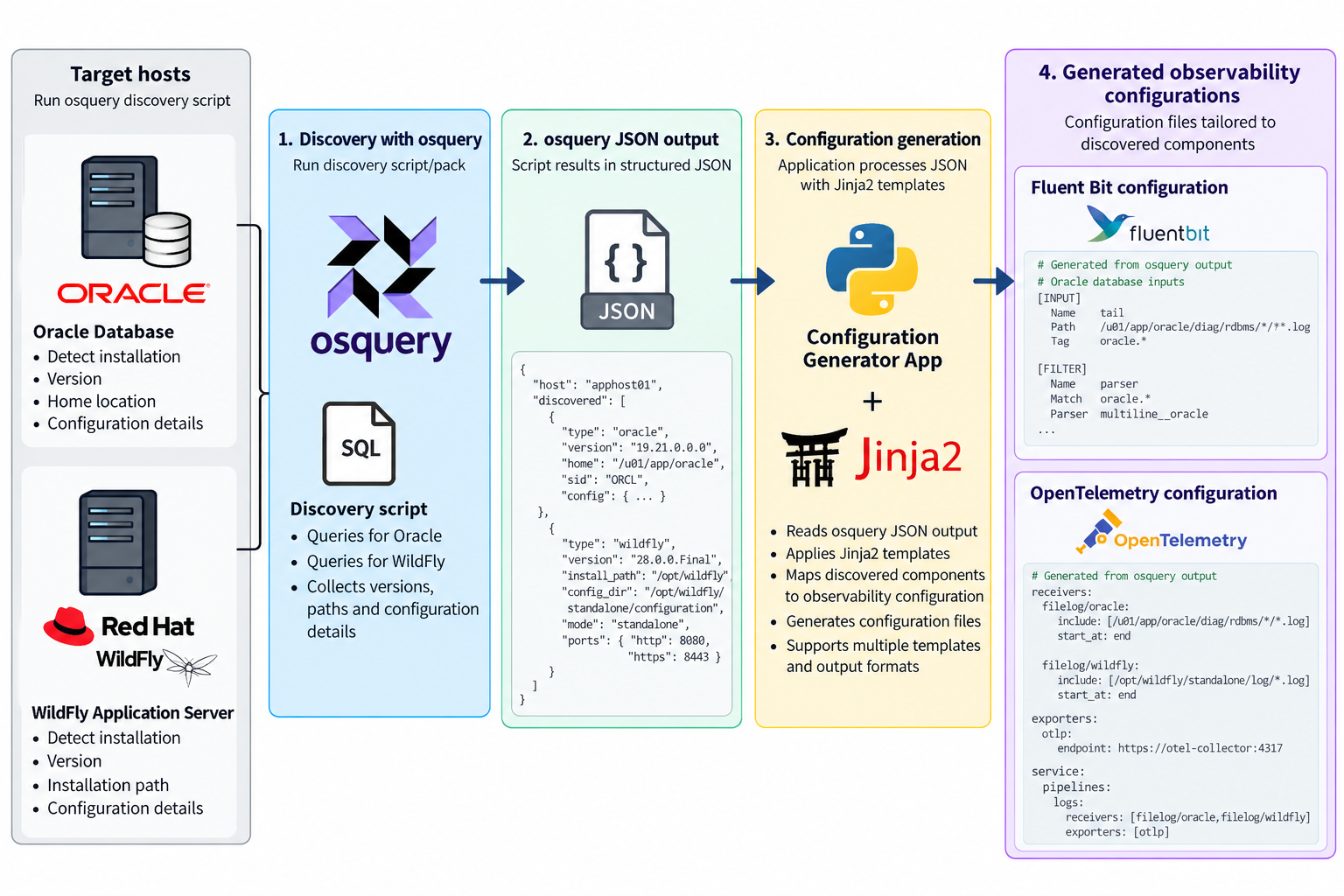
The process we need has the following steps:
find the deployed solution(s)
Understand how they are deployed
Generate a configuration based on the detection
Push the configuration out to agents
Detect and capture config
One of the more active solutions that provides a means to detect deployments, and find configurations in this space is OSQuery, which is used by some serious players (Airbnb, Dropbox, Netflix, Palantir, Etsy, and Uber are just a few). OSQuery is particularly appealing solution because of its ease of use. All the information OSQuery can make available is accessible through the use of SQL including all the power SQL provides to mix data together.
While SQL is powerful, we do want to return the results in an easily consumable manner, so the CLI tool allows us to ask for the result to be returned in JSON. This makes the result easy to work with and we can use it with technologies such as JSONPath, particularly if we can impose a defined schema on the output, something that can be done as we know the queries being run, and can use constructs such as select … as …
As we can query the JSON output to retrieve the relevant parts of the output, for example the result of the queries to look for an Oracle Database or a RedHat/IBM WildFly application server. We can then combine that data with a template, such as the templating capabilities of Jinja2. The template defines the configuration that we would want to use, for example we want to tail log files, we want to establish a Prometheus metrics pull. Then the values are pulled from the JSON to create an instance of the file.
Templates make the result reusable
By using templates, known queries and their result structures we can generate reusable configurations on a product by product basis. The last step is stitching it together. To be reusable each template is discrete for an application or standard stack. So we up with multiple configuration files that need to be combined. This could be addressed by simply merging all the files together, but a lot of the observability tools such as Fluent Bit and Fluentd provide the ability to include files. Obviously you still need to work out what to include to combine, but this pretty straight forward.
There are limits
So this brings together all the sources, for destination side for the turn key solutions is known as the backend is the core product. In the open source solution you’re probably going to run multiple tools, so you need to have a more advanced routing. You can create a standard backend routing and include it.
Convenience as a weakness?
While having turn-key solutions, makes setup so much easier, could it also be a weakness? As we can see with our automation, we’ve not got tailoring to filter data in the pipeline, or park it out of the way. Which ratchets up the costs, because of the retention costs, and greater computational effort to trawl the data. Nor can we derive new signals through correlation inflight. But then our approach with templating creates the same challenge, BUT this approach doesn’t preclude you from incorporating into the solution such smarts.
Backend Bootstrapping
Rapid configuration of the backend is going to be a bit harder because the chances are you’re wanting to mix and match the backend tools (one of the strengths of not going down a turnkey adoption). We’ll explore the possibilities of making this step easier in another post.
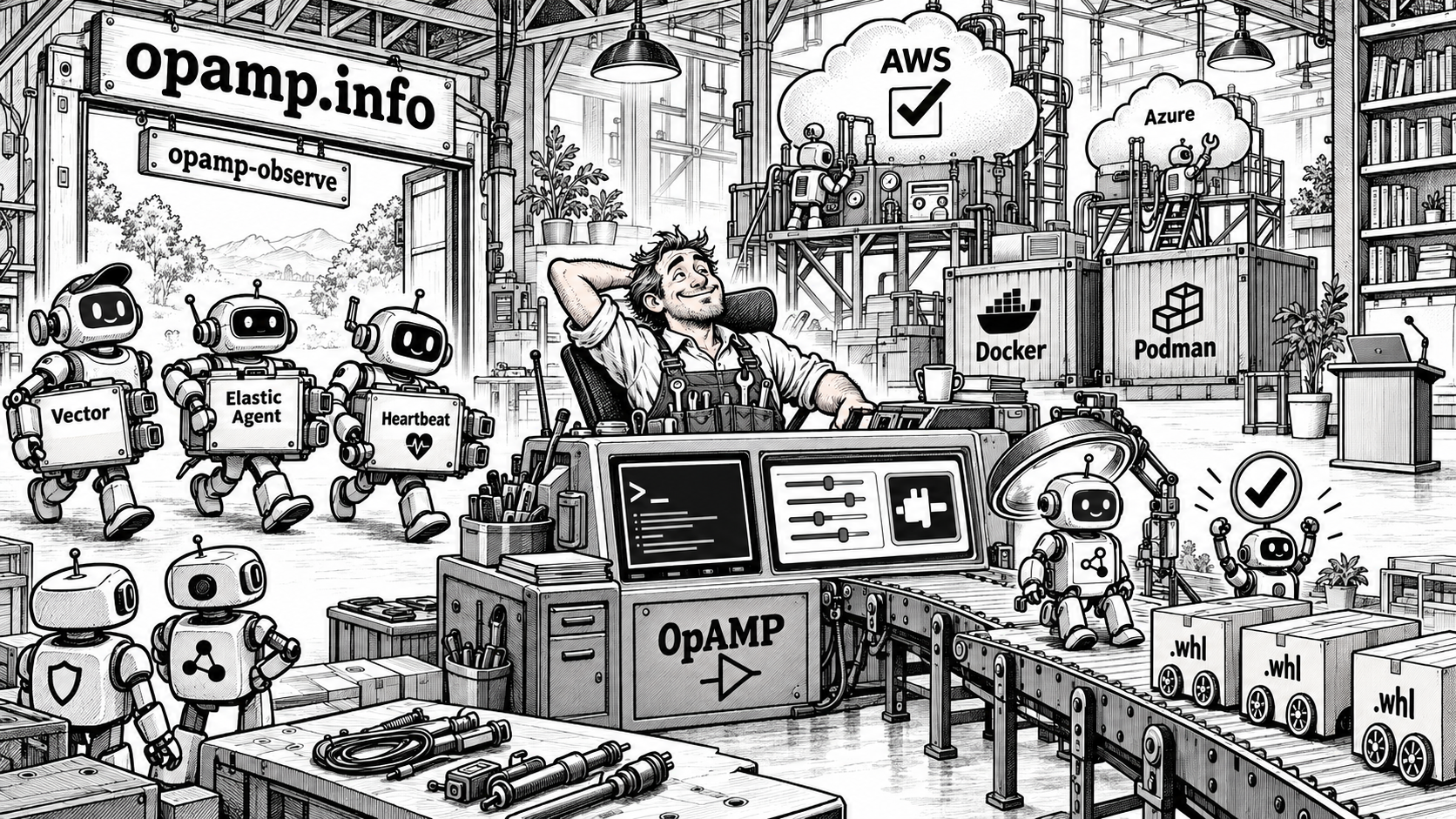
We’ve made the latest version of our implementation of the OpAMP specification available. It has taken longer to ready than the previous versions, but there is a lot been included, both in the core functionality, but also capabilities supporting the use and setup. Here are the headlines…
Automated regression from clean to deployed and running a series of end-to-end tests as well as producing a guaranteed fresh set of artefacts has been implemented. This can be run against AWS (currently in use) or Azure (needs refining). These are triggered on changes to the main branch.
GitHub pages with links all the documentation are established now.
The Python wheel release artefacts are no incorporated into the release assets.
The client/consumer side has been refactored so it is easy to build your own observability agent controls and independently deploy them (not supported by the config editor).
The CLI has been enhanced so it can help quickly spin up more advanced configurations – helpful for demos and real deployments.
The Dev CLI has been improved.
The server side now has a basic client side (Supervisor/Observer) configuration editor UI. Which can be deployed as a plugin.
Improvements around the use of Podman and Docker for the containerization.
What next?
We’ve added to the documentation pages for the roadmap, initially we’re working to fill out the regression test sets at the moment. Other possibilities:
Expand the client types
Extend the client types to exploit more features.
Perhaps the most interesting idea, we’re thinking about is can we exploit tools like Netdata to discover what solutions are deployed and generate a requirements/configuration definition which can be used to generate a suitable agent configuration file.
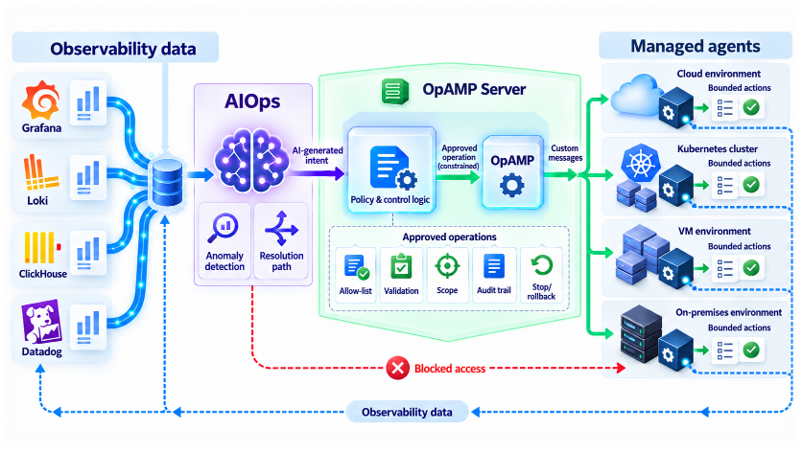
Not only will I be going through the what the spec enables, and the value it aims to support we’ll be touching on how OpAMP can be used to support ChatOps and AIOps. While the idea of unleashing AI Agents onto a production may look pretty scared given all the recent news coming from OpenAI, Anthropic and others on how their latest models are escaping and hacking other web sites. I’ll show how among other things how mixing AIOps nd OpAMP can offer the AI smarts while training deterministic controls.
The session isn’t just slideware, we’ll demo our Open Source OpAMP implementation which gives the foundations for using AIOps. If you want to try the demo yourself we’re in the process of making available in GitHub.
A FIPS safe mode to ensure things are safe during start and restart.
Ensuring timestamps will work beyond 2038.
TLS handling refinements such as certificate reloading
Management of the internal buffers can be made more dynamic now.
Improvements across a number of plugins for input and output.
Dynamic flushing to allow dynamic optimization within configured boundaries.
Packaging improvements for Windows Nano and Debian deployments.
New root section called Extensions.
A lot of these gains are great, and will really pay off for high volume deployments, where small savings, cumulative can really payoff economically. It is the new extensions feature that I’m most interested in as it open up some capabilities when managing the observability domain.
Extensions
The extension structure (first identified as a useful feature with issue 11863) doesn’t impact Fluent Bit behavior but is retained and accepted as YAML configuration values. This means that any tools being used to manage Fluent Bit configuration can now add YAML key value pairs (including nested values) without causing Fluent Bit a problem, and can therefore be used by management tools. For example we can track what version of a configuration is being handled by Fluent Bit by injecting a Git version identifier (just as you see in the Fluent Bit output at startup). This simple change means that it is now possible to understand which version of configuration is being executed. When you’re rolling out to a large estate (particularly outside of containerized environments) it is easy to know what has been rolled out.
extensions:
opamp:
endpoint: 127.0.0.1:4318
insecure: true
deployment:
config_version: 12345
If you’re using Fleet Management capabilities such as OpAMP (a specification developed as part of the Open Telemetry project) you can embed the client side controller/supervisor configuration within the Fluent Bit configuration (as long as the controller supervisor understand where to get the values from within a YAML file).
It also means that you’re allowing more dynamic changes, it becomes easy to notate such dynamic changes., for example:
extensions:
deployment:
changeDTG: 2026.08.05.16.25
notes:
- changed flush interval
- moved plugin x output
Personally I’d not advocate changes without using configuration control tooling, but it certainly is better than no record.
Next steps
If you follow this blog regularly, they’ll be aware of the OpAMP project which implements the protocol, and provides a server that includes fleet management and configuration editing and validation for Fluent Bit server side, and a client supervisor/observer on client client/consumer side which can manage Fluent Bit instances. These changes mean that the project will need:
New configuration and validation settings (the UI is entirely meta-data driven) for the new properties.
The configuration catalogue viewer will need to be updated to exploit the extensions feature for showing versioning.
The client/consumer side can be extended to become Fluent Bit aware and exploit the embeddable extensions capability.
We may also offer the dynamic change recording possibility as an optional feature (from a product view – we shouldn’t force specific ways of working, but from a personal view it isn’t a way I’d recommend working)
The Elastic toolset for monitoring and observability with the Beats tools (heartbeat, filebeat etc) and more recently an integrated OTel compliant agent have been attractive because of the strength of the analysis capabilities of Elasticsearch, Logstash and Kibana. All the products are available as open source and can be extended (although with 3rd party constraints as a result of licensing) and with enterprise extensions.
Kibana while focused on data visualisation, also provides the fleet management layer to control the remote agents. Kibana’s communication with the agents now makes use of protobuf. With clear commenting discouraging the use.
This is great if your entire ecosystem is aligned to the Elastic stack, but that is rarely the case. If we’re not already in the era of polyglot, then pervasive use of AI to power development, both at departmental level (shadow/gray IT) and even citizen development.
Managing distributed instances of the Elastic Agent outside of Kibana has to be done using the agent’s command line interface. The only publicly documented web interface allows the retrieval of status information. This does feel rather poor as a means to drive the adoption of Kibana (and encourage the use of Elastic Cloud).
This leads us to the question of whether to use the Supervisor or Observer model of using the OpAMP standard, or should we try to embed the OpAMP client directly into the Elastic Agent. Having studied the documentation and some of the code base it feels like these sort of customisations are not encouraged, and emphasis for extensions are about adding the means to monitor different protocols or products. Incorporating socket or HTTP handling that also needs to interact with lifecycle logic would be very invasive.
Further more, invasive changes may prove to be more problematic if you switch from a forked open-source version to an enterprise licensed version, where you’d want both the benefits of OpAMP and the licensed extras.
The way we have designed and implemented our client so that it is easy to implement specific logic for different observability tool, and the development of the elastic agent logic, meant we took the final step of adopting a fully pluggable mechanism – we’ll come back to those details shortly..
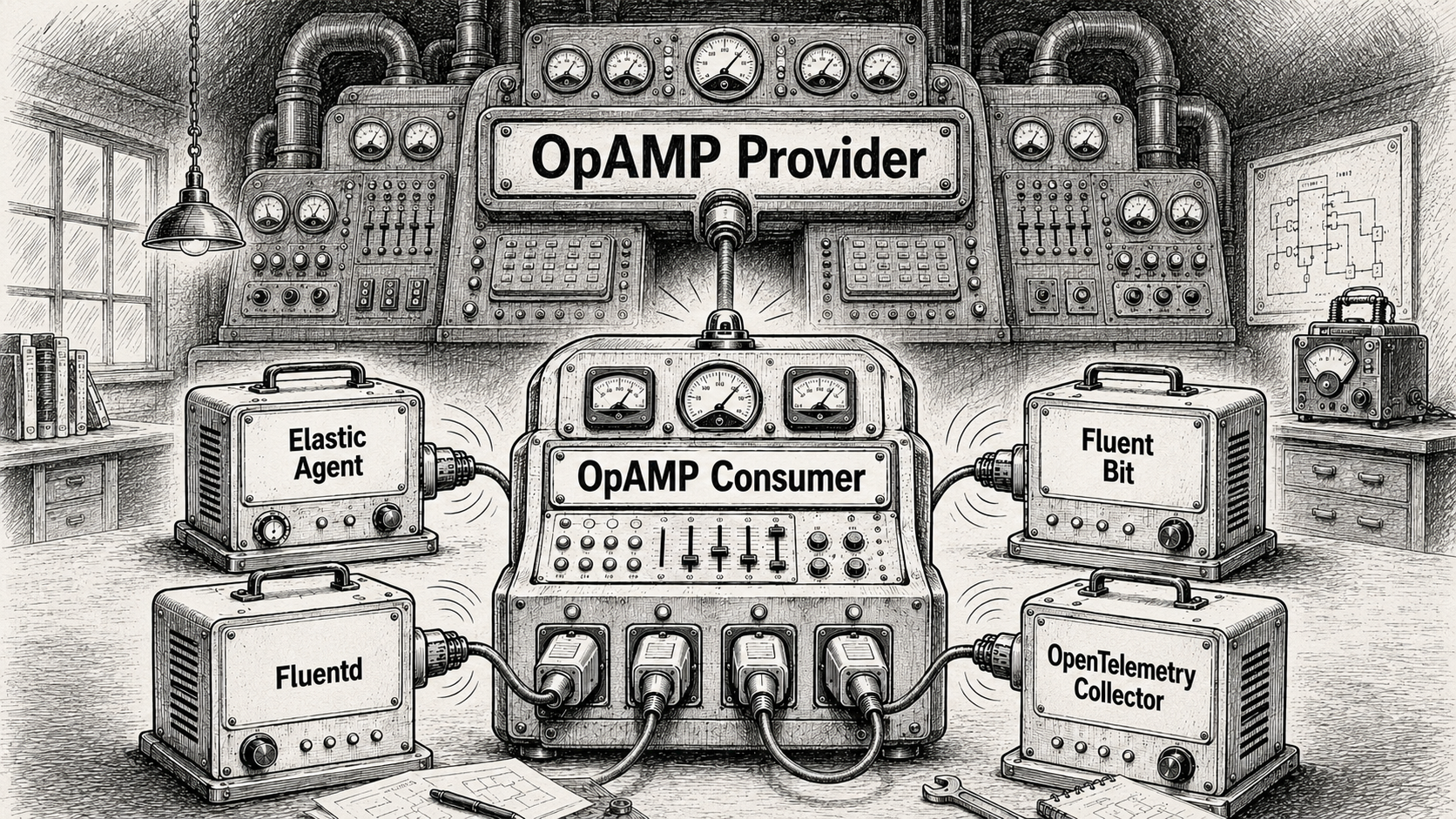
Our implementation of the Elastic Agent management supports both models of supervisor or observer, but we would err towards using it in an observer mode. The control aspects of the agent are mapped onto using creating commands and using the CLI, as with Fluent Bit basic health can be retrieved via the agents REST endpoint.
The command line does allow for more diagnostic information. But we’ll look at that later.
What’s new as a result of the modifications
The improvements are being incorporated into a branch in the repo while we do regression testing, once we’re happy we’ll merge into main, and label.
Starting with the simple things:
We have a simple validation setup that can be run to ensure you have the elastic agent and a containerised Logstash that can talk to each other. The agent is configured to monitor itself to generate traffic to Logstash.
That configuration has been mapped into the example setup of the agent being managed by the OpAMP consumer.
We’ve enhanced the OpAMP-CLI tool so it can launch the containers using Docker or Podman. This makes it quick and easy to configure and launch demos and end-to-end regression tests. There are also some convenience tweaks to the way the CLI works.
New documentation explaining how to implement and deploy the management of your own Observability product.
We’ve refactored part of the consumer code to explicitly separate the specific code for the agent being managed be that Fluent Bit, Fluentd, Elastic Agent etc. the test code reflects the same structure.
The linkage to the Observability tools is dynamic now. Rather than have a central package which imports all the plugins.
There are a few things we haven’t done,..
We’ve only provided support for operations such as start and stop, so the server side of the product only works with the core server features. There is no configuration editor.
The MCP broker hasn’t been enhanced to understand differences between the client types. This is also true with the Slack interfacing. We will return these areas, but the most valuable thing that can be done is to make the OpAMP solution cover a variety of Observability agents.
We still need to improve the automated regression testing.
Extend to cover the individual beats components.
All these improvements will start arriving in the GitHub repo in the next couple of days. Once we think everything is good, we’ll up issue the release number – sdo watch the github repo 🙂
Over the years we’ve created a number of GitHub repos with tools and associated content that can help us in the Observability space, such as log generation and replay, to help validation Fluentd and Fluent Bit configurations (or an OTel collector of choice). This extends to the most recent efforts with imp,eating the OpAMP capabilities and configuration UI.
Tools are good, but documentation that is easy to work with is a key to helping users be successful. To support that we have established a consolidated set of pages using GitBook which can be found at:
The nice thing about GitBook, is that it brings together the various resources such as markdown , HTML etc and creates a friendlier experience. It also keeps in sync with the GitHub repos.
New logos
As we’ve established the GitBook content, and using AI makes us less artistically able people to create graphics and logos, we’ve created a couple of logos for the older repos as well:
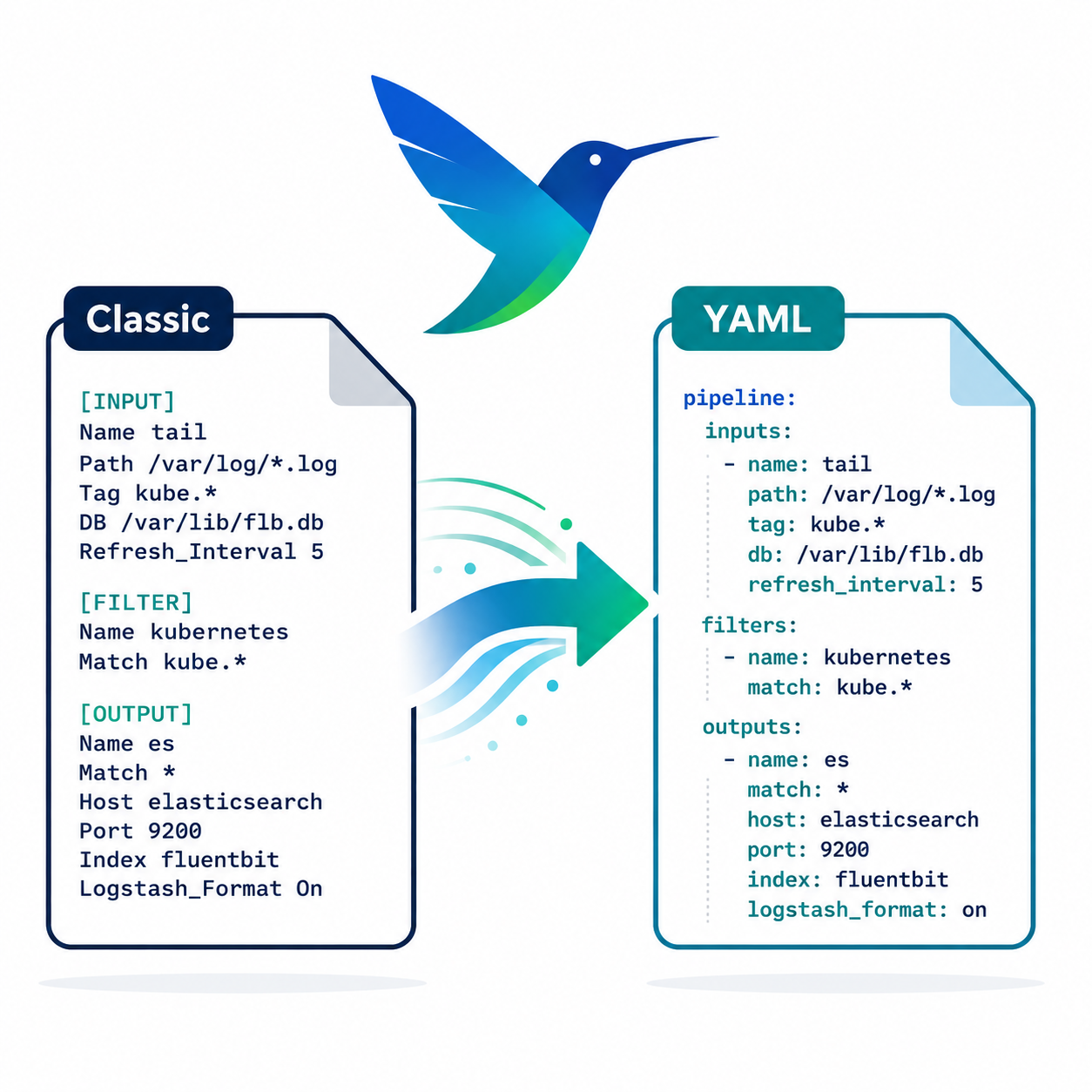
Fluent Bit Classic configuration to YAML conversion tool.
Log Generator can create synthic logs, or replay application logs to simulator a real system logging.
Another aspect of OpenTelemetry’s OpAMP protocol is the ability to share connections details, not just between the server side of the OpAMP protocol, but with other connections a collector like Fluent Bit could be using such as an OTel consumer for logs, traces and metrics that are being collected that could be a managed Grafana service or another Fluent Bit if you’re using a concentrator network.
This is includes Observability data generated by the collector I.e. Fluent Bit in our case.
Yes, but Fluent Bit doesn’t push its own OTel signals
It is true that out of the box Fluent Bit doesn’t push OTel signals for itself. But this is easily fixed. We can control logging, and metrics that are exposed (and today no traces are produced). The solution is simple, we use Fluent Bit itself to collect the logs and metrics and route them to using an OTel output plugin.
While creating a configuration for sharing seems onerous, once you’ve done it once, you can simply include the config file in every deployment. Further more, if you backend for any of the signals is not Fluent Bit conversant, just use a different Fluent Bit plugin.
Config walkthrough
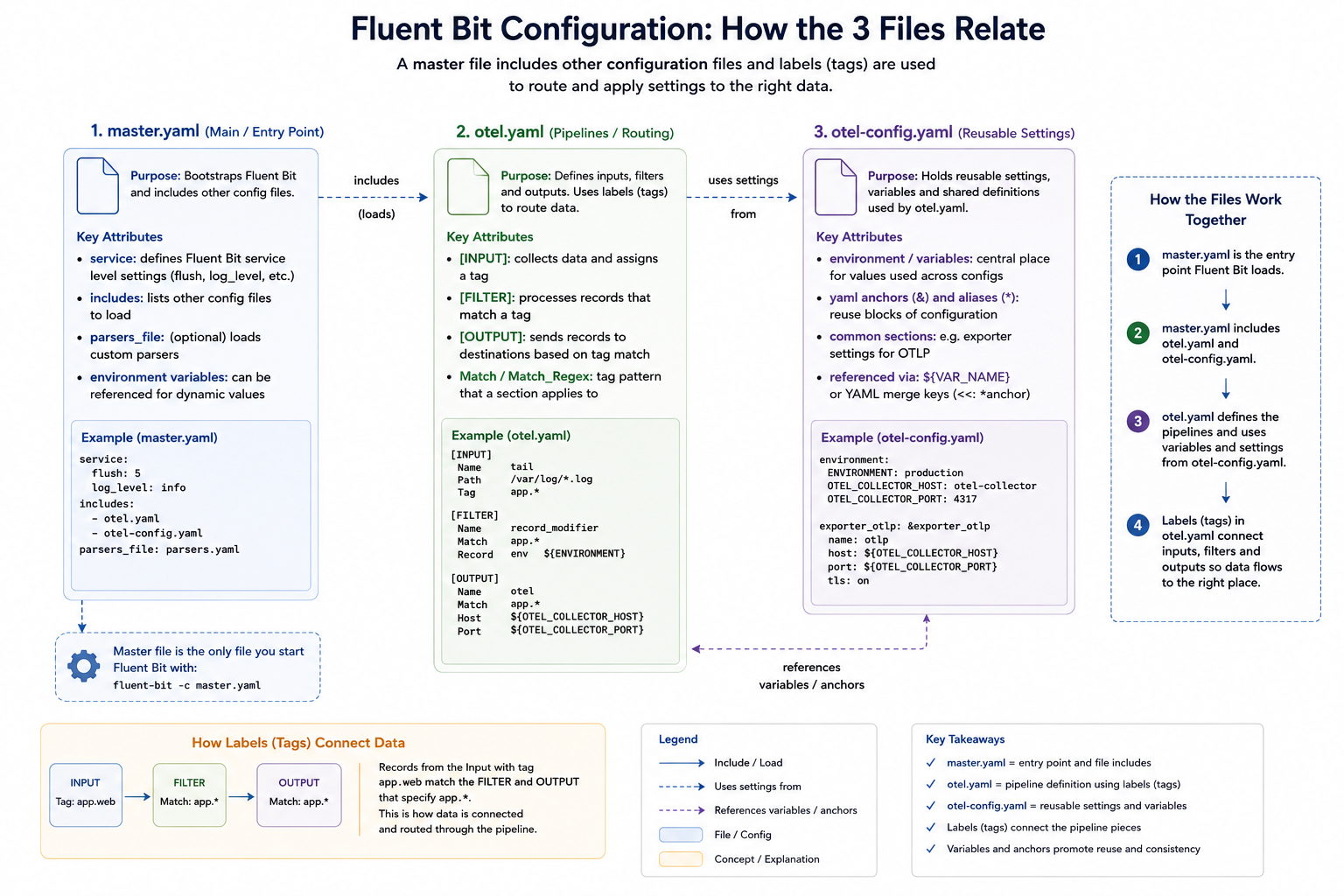
Our configuration consists of several files, which we’ll explain. We’ve adopted a multi-file setup, which works through the use of Fluent Bit’s includes capability so we can separate out the application-level observability configuration (master.yaml), the configuration to allow us to observe Fluent Bit itself (otel.yaml), and the configuration for the connection parameters (otel-config.yaml).
Master.yaml
The master.yaml contains our application observability settings and is the configuration file we pass to Fluent Bit. In this case, we’re simply using a dummy input that’s fed to a file output; we’ve also got a wildcard stdout configuration to make it easy to observe what’s going on from the command line.
There are at this level, two telltale signs of self-monitoring at this level:
The includes declaration picks up otel.yaml, which includes additional inputs and outputs, as well as service configurations.
The service settings that switch on the HTTP server. It is controlled via environment variables, so you could switch this off easily. We have to implement these settings here, as within the full set of file inclusions, there can only be a single service block.
The service declaration also specifies where we want the log file that the Fluent Bit setup needs to go.
otel.yaml
We’ve separated the pipeline definitions for Fluent Bit observability to reuse the configuration across many deployments. As different deployments may need to talk to different instances of the observability backend (for example, when operating in a multi-cloud arrangement we have defined the environment variables that provide the credentials and target address).
We have defined additional environment variables at this level, so that anyone needing to understand master settings and the service values needs only look here. How this layer (or layers) is established is, to an extent, concealed. It also means we can use OpAMP to generate a configuration file, but we’ll come back to that.
The environment variables that we define to be used by the master.yaml switch the HTTP server on, and indicate which ports to use. Making this easy to check for the person or people defining the master.yaml makes it easier to avoid port collisions.
We also tell Fluent Bit where to write its logs through the service setting. To consolidate the configuration, that value references a different environment variable, so we can put all of our configurations together. Even if we didn’t have this level of redirection, it is worthwhile setting the value using an environment variable as the file location is needed both as our output for the service and the input for a plugin.. As you can see, we’ve just named the file. So the file created will be relative to wherever we run Fluent Bit from.
Let’s look at the inputs and outputs being used, and what they do:
Tail – this is the input that reads Fluent Bit’s logs, as we set Fluent Bit to log at debug level, we’ll see plenty of activity. Having Fluent Bit write to the file system, only for a thread in the same process to read it, is obviously inefficient. It can be optimised by using a RAMFS-like filesystem on Linux and a RAMDisk-like filesystem on Windows, so everything is in memory.
Fluentbit_metrics – this is the active collection of metrics, which we simply point to the server part of Fluent Bit. If you’re using Fluent Bit as a sidecar in a pod, this has to be done carefully because of how networking for containers within a pod is handled.
opentelemetry – This takes our different input signals we’ve been collecting and pushes them to the OTel-compliant service. If we had different backend products for different types of signals, then we’d need different or multiple plugins defined. Although OpAMP does infer an OTel-compliant backend.
That is the hard bit done. As a result of these inputs, we get the metrics and logs (and no traces are available). We now just need an OpenTelemetry output plugin to direct all the OTLP-represented signals. For simplicity, we’ve made use of a free account on Grafana Cloud.
otel-config.yaml
This configuration file is simple, which is key to making it easy for us to manage the connections setup using OpAMP. It simply defines the connection-based attributes needed, as shown:
While populating credentials in a file isn’t ideal, it makes it pretty straightforward for an OpAMP Client (observer or supervisor) to receive the credentials for the management side of the protocol, make them available to Fluent Bit quickly, and have Fluent Bit pick them up dynamically via hot-deploy functionality. This is precisely what we have implemented in our OpAMP. This approach works for both Fluent Bit and Fluentd configurations and we can even apply a similar approach for driving clients such as Elastic Beats.
This configuration file is simple enough that we can rewrite it whenever the configuration values are amended; there is no complexity in inserting such settings into the broader configuration. Furthermore, if Fluent Bit were running as an observed process rather than a supervised (i.e., child) process, setting environment variables could become problematic.
We can mitigate credential-related challenges in the file system by restricting filesystem permissions to the file being written, so only certain users and processes can access it. When working with containers, we can also keep this part of the file system within the image by using a transient storage layer.
Alternative strategy for securing credentials
An alternative approach would be for the client to receive the credentials and store them in an encrypted method, such as a credentials vault, and then the launcher for the process would read and decrypt the file as it launches Fluent Bit or another collector. The way we have implemented the client for our OpAMP certainly makes this possible, but it also complicates the process and suggests that the mechanics of credential management would be better handled by a distributed vault solution.
OpAMP’s assumption
The only niggle, is that when passing the connections, the protocol assumes that connection details are only needed for the collector. That’s fine if the collector includes the client side of the protocol. But as we know, the collector may be managed with a supervisor or observer process. We could use the connection for the collector and our supervisor, but that may not be what is wanted.
Visualising the configuration
We can visualise the relationships, like this:
Unpacking the server-side aspects
As you start to think about the server aspect of this, it gets potentially very complex. In simple scenarios, sending everything to a single Observability backend isn’t an issue.
But if you’re managing a multi-cloud, hybrid, or managed client setup, you’re likely to want separate backend instances for different collectors. In our setup, that means passing the different connection details to the client to populate otel-config.yaml. Understanding this deployment will require understanding the distribution. We will also need to manage potentially a concentrated catalogue of credentials, which will need to map to the collector nodes, and a means for the user to define the mapping. Creating a means to visualise the mapping, and ideally to allow the server to apply rules or infer assignments for more complex use cases such as multi-cloud, isn’t going to be simple.
Conclusion
We have a simple means to deploy configuration and observe our collector and the supervisor/observer process. Making server-side management in a large-scale environment easy to work with will require some consideration and potentially additional optional metadata. But the protocol supports all of this, but doesn’t mandate specifics. Which does mean that either the server has to be smart enough to know when what to do if it interacts with a client that has been built or configured to work with this server – which is an essential requirement, otherwise we lose the value of the
Something that vendors like Microsoft have been really good at is reducing the friction on getting started – from simplifying installations with MSI files and defaulted options through to very informative error messages in Excel when you’ve got a function slightly wrong. Apple is another good example of this; while no two Android phones are the same, my experience is that setting up an iPhone is just so much easier than setting up an Android phone. It is also the setup/configuration where most friction comes from.
Open-Source Software (OSS), as a generalisation, tend to be a bit weaker at minimising friction – this comes from several factors:
When OSS is part of a business model, vendors can reduce that friction, making their enhanced version more attractive.
OSS contributors are typically focused on the core problem space and are usually close enough to the fine details to not need those fancy features to keep the rest of us out of trouble.
The expectation is that tools to make configuration easy are embedded in the application, making it heavier, when the aim is to keep things as light as possible.
Occasionally, a little bit of intellectual snobbery can creep in
The common challenge
The issue that I have observed is that we often go through cycles of working with a technology. For example, you’re building a microservice. Chances are, you’ll start writing and running it locally, without worrying about containerization. Once you’re pretty happy with things, you’ll Dockerize the service, start testing it locally, and then you’ll be ready to deploy it to a cluster. Now you’ll need your YAML. It may well be weeks since you last looked at Helm charts. You end up cutting and pasting your last configuration. But now you need to use another feature of Helm, can you remember the exact settings for the feature. So now you’re trawling the net for documentation, and then it takes several tries to get it right.
AI may well step in to help developers in this area, where solutions and products are well-documented. But with the wrong model or insufficient detail in the prompt, it’s easy to make a mistake. Personally, I’d turn to AI when it becomes necessary to trawl code to better understand the configuration and its behaviour, and to set options.
Experimental Solution
Solution – well, that depends upon the configuration syntax. We have been experimenting with RJSF (React JSON Schema Form), which provides a React-based UI that can be dynamically driven by a JSON schema and validate data with AJV (an alternative stack considered would have been around JSON Forms).
{
"type":"object",
"title":"Dummy",
"properties":{
"name":{
"type":"string",
"const":"dummy",
"title":"Plugin"
},
"copies":{
"type":"integer",
"description":"Number of messages to generate each time messages are generated.",
The above fragment shows part of the Schema definition for the Dummy plugin for Fluent Bit.
By then creating a schema that defines the different plugins, attributes, etc., we can drive validation and menu items easily in the UI. Admittedly, the config file is significant given all the plugins and configuration options, but it is a fair price to pay for a UI that validates the data. Establishing the schema to start with, we’ve covered it through scripting the retrieval and scraping of the Fluent Bit pages, which are pretty consistent in structure.
We have added some custom elements into the definition, for example, x-doc-reference, which allows us to extend the React components to provide features such as a link back to the original documentation as you select attributes or plugins.
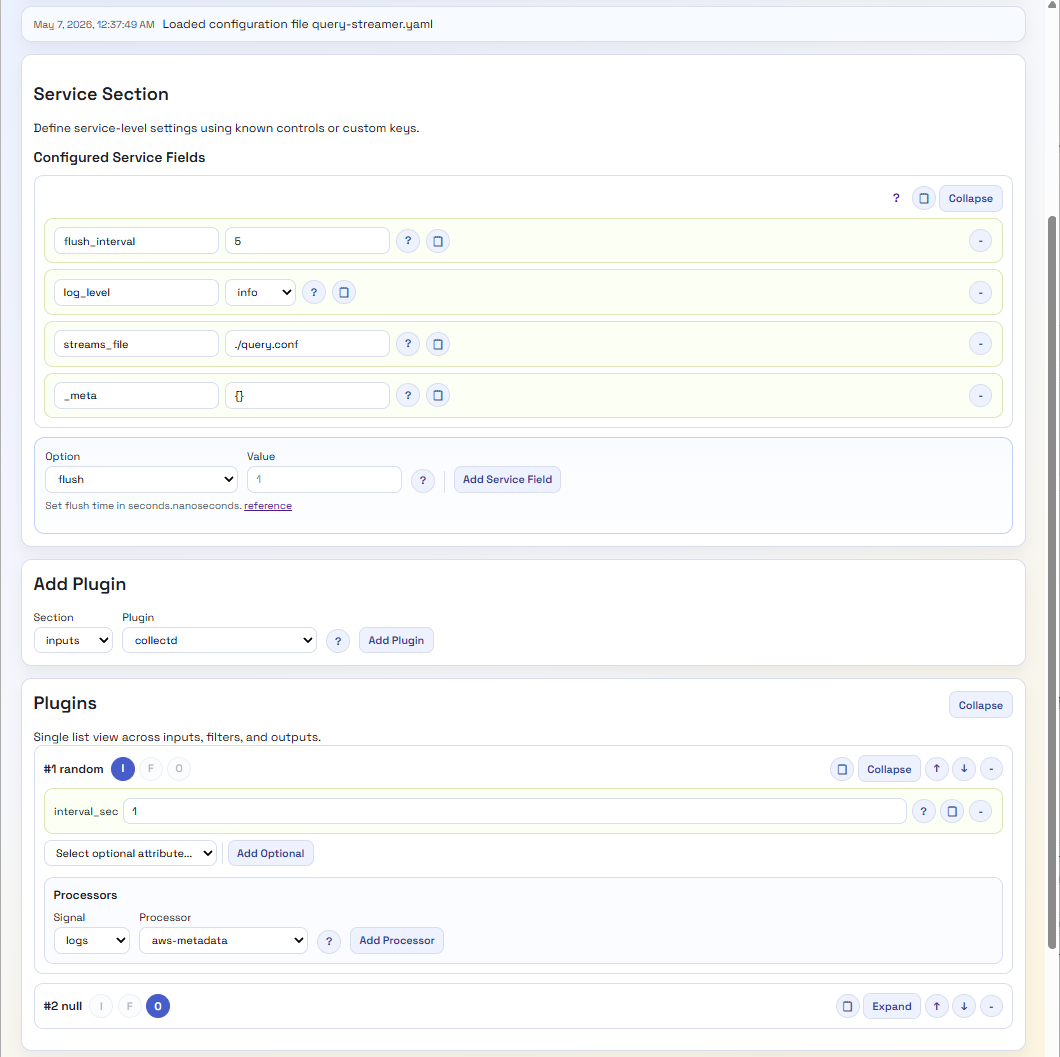
As a result, we very quickly have a UI that can look like this:
A lot easier to view and tweak, with no need to hunt for valid options. Even if we want more information, we’re just a button click away from the open-source data. Perhaps we should provide a version that hyperlinks to the Manning Live Books on Fluent Bit, etc.
There are a few other factors to consider; for example, Fluent Bit configuration is YAML, not JSON, which can be easily resolved given the relationship between the two standards. Then there are processors that can embed Lua code or a SQL-like syntax. As we’ve chosen to provide a Python backend, we’ve addressed this by providing REST endpoints which can query out of the JSON the code or SQL and perform validation using the Python Lua Parser, and the SQL syntax can be addressed using the Lark library for processing the SQL, as the syntax is simple enough to define and maintain the syntax.
Outstanding Gaps for Fluent Bit
We still need to address several features that Fluent Bit has, specifically:
Environment variables
Includes
These issues should be straightforward to overcome, although dynamically including the included elements into the UI view elements can be done. The challenge is: if any changes need to go into something that has been included, how do we push them back to the included file? Particularly if there are multiple layers of inclusion.
What about Fluentd?
Fluentd configuration isn’t JSON-based notation, but it is structured. So, to apply the same mechanism, we’ll need to define a schema and a mapping mechanism. The tricky part of the schema is that Fluentd supports nesting plugins, since the way pipelines are defined for routing differs. While JSON schema will enable this with constructs such as anyOf, oneOf, object nesting, and bounded object arrays, the structure will be more complex.
The second challenge will be the transformer/renderer, so we don’t introduce issues from having to escape and unescape characters, since JSON Schema is stricter about character use.
Then What?
Well, if we get this going, we’ll probably incorporate the capability into our OpAMP project and maybe create a build that lets the configuration tool run independently. Lastly, perhaps we should look to see if we can make the different layers a little more abstract, so we can plug in editors for other configurations, such as OTel Collectors or the ELK Stack.
As a bonus, perhaps transform the Schema into a quick reference web document?




You must be logged in to post a comment.