• Home
  • Site Aliases
    • www.cloud-native.info
  • About
    • Background
    • Presenting Activities
    • Internet Profile
      • LinkedIn
    • About
  • Books & Publications
    • Log Generator
    • Logs and Telemetry using Fluent Bit
      • Fluent Bit book
      • Book Resources in GitHub
      • Fluent Bit Classic to YAML Format configurations
    • Logging in Action with Fluentd, Kubernetes and More
      • Logging in Action with Fluentd – Book
      • Fluentd Book Resources
      • Fluentd & Fluent Bit Additional stuff
    • API & API Platform
      • API Useful Resources
    • Oracle Integration
      • Book Website
      • Useful Reading Sources
    • Publication Contributions
  • Resources
    • GitHub
    • Oracle Integration Site
    • Oracle Resources
    • Mindmaps Index
    • Useful Tech Resources
      • Fluentd & Fluent Bit Additional stuff
      • Recommended Tech Podcasts
      • Official Sources for Product Logos
      • Java and Graal Useful Links
      • Python Setup & related stuff
  • Music
    • Monster On Music
    • Music Listening
    • Music Reading

Phil (aka MP3Monster)'s Blog

~ from Technology to Music

Phil (aka MP3Monster)'s Blog

Tag Archives: node.js

Logging Frameworks that can communicate directly with Fluent Bit

13 Thursday Jun 2024

Posted by mp3monster in Fluentbit, General, Technology

≈ Leave a comment

Tags

.net, Erlang, Fluentbit, Go, Golang, java, languages, libraries, loggiong, node.js, OCAML, perl, PHP, python, Ruby, Scala

While the typical norm is for applications to write their logs to file or to stdout (console), this isn’t the most efficient way to handle logs (particularly given I/O performance for the storage devices). Many logging frameworks have addressed this by providing more direct outputs to commonly used services such as ElasticSearch and OpenSearch. This is fine, but the only downside is that there is no means for an intermediary layer to preprocess, filter, and route (potentially to multiple services). These constraints can be overcome by using an intermediary service such as Fluent Bit or Fluentd.

Many logging frameworks can work with Fluentd by supporting the HTTP or Forward protocols Fluentd supports out of the box. But as both Fluent Bit and Fluentd are interchangeable with these protocols and logging framework that supports Fluentd, by implication also supports Fluent Bit, not to mention Fluent Bit supports OpenTelemetry.

The following table identifies a range of frameworks that can support communicating directly with Fluent Bit. It is not exhaustive but does provide broad coverage. We’ll update the table as we discover new frameworks that can communicate directly.

Latest Version …

Logging Frameworks and Fluent Bit and Fluentd connectivity
LanguageFramework / LibraryProtocol(s)Commentary
JavaLog4J2HTTP AppenderSend JSON payloads over HTTP (use HTTP input plugin)
Javafluent-logger-javaForward
Pythoncore languageHTTP HandlerProvides the means to send logs over HTTP – means Fluent Bit input handler can manage
Pythonfluent-logger-python
Fluent Logger
ForwardUses the Forward protocol meaning it can gain the efficiencies from msgpack.
Maintained by the Fluent community
Node.jsfluent-logger-nodeForwardIt uses the Forward protocol, meaning it can gain efficiencies from msgpack.
Maintained by the Fluent community
Node.jsWinstonHTTP

Forward
Winston is designed as a simple and universal logging library supporting multiple transports.
Winston includes transport support for HTTP in its core. There is also a Transport implementation for native Fluent https://github.com/sakamoto-san/winston-fluent
Node.jsPino (Pino-fluent extension)Logger integrated into the Pino logging framework
Go (Golang)fluent-logger-golangForwardIt uses the Forward protocol, meaning it can gain efficiencies from msgpack.
Maintained by the Fluent community
.Net (C# VB.Net etc)NLog (NLog.Targets.Fluentd)An NLog target – works with .Net
.Net (C# VB.Net etc)Log4NetLog4Net Appender
.NetSerilog (Fluent Sink)Forward and HTTPSupports both HTTP and nativbe Fluentd/FluentBit
Rubyfluent-logger-rubyForwardIt uses the Forward protocol, meaning it can gain efficiencies from msgpack.
Maintained by the Fluent community
PHPfluent-logger-phpForwardIt uses the Forward protocol, meaning it can gain efficiencies from msgpack.
Maintained by the Fluent community
Perlfluent-logger-perlForwardIt uses the Forward protocol, meaning it can gain efficiencies from msgpack.
Maintained by the Fluent community
Scalafluent-logger-scalaForwardIt uses the Forward protocol, meaning it can gain efficiencies from msgpack.
Maintained by the Fluent community
Erlangfluent-logger-erlangForward
It uses the Forward protocol, meaning it can gain efficiencies from msgpack.
Maintained by the Fluent community
OCAMLfluent-logger-ocamlForward
It uses the Forward protocol, meaning it can gain efficiencies from msgpack.
Maintained by the Fluent community
RustRust Logging framework extension for Fluent BitRust crate for logging to Fluent Bit
DelphiQuickloggerHTTP

Share this:

  • Click to share on Facebook (Opens in new window) Facebook
  • Click to share on X (Opens in new window) X
  • Click to share on Pocket (Opens in new window) Pocket
  • Click to share on Reddit (Opens in new window) Reddit
  • Click to email a link to a friend (Opens in new window) Email
  • Click to share on WhatsApp (Opens in new window) WhatsApp
  • Click to print (Opens in new window) Print
  • Click to share on Tumblr (Opens in new window) Tumblr
  • Click to share on Mastodon (Opens in new window) Mastodon
  • Click to share on Pinterest (Opens in new window) Pinterest
  • More
  • Click to share on Bluesky (Opens in new window) Bluesky
  • Click to share on LinkedIn (Opens in new window) LinkedIn
Like Loading...

Node (npm) package licensing

05 Tuesday Jul 2022

Posted by mp3monster in development, General, node.js, Technology

≈ Leave a comment

Tags

code, developer, development, Licensing, node.js, package, Technology

When building Node solutions, even if you’re not going to publish the code to a public repository you’re likely to be using package.json to declare the dependencies for your app. Doing this makes it easier to build and deploy a utility. But if you’re conversant with several languages there is a tendency to just adapt your existing skills to work with others. The downside of this is small tooling nuances can catch you off guard and consume time while figuring them out. The workings of packages with NPM (as shown below) is one possible case.

{
  "name": "graph-svr",
  "version": "1.0.0",
  "description": "packages needed for this service",
  "main": "index.js",
  "type": "module",
  "scripts": {
    "start": "node index.js"
  },
  "dependencies": {
    "@graphql-tools/graphql-file-loader": "^7.3.11",
    "@graphql-tools/load-files": "^6.5.4",
    "@graphql-tools/schema": "^8.3.10",
    "@graphql-yoga/node": "^2.4.1",
    "apollo-datasource-rest": "^3.5.2",
    "apollo-server": "^3.6.7",
    "graphql": "^16.4.0",
    "graphql-tools": "^8.2.8"
  },
  "author": "Phil Wilkins",
  "license": "MIT"
}

If you create the package.json using npm init to create the initial version of the file, it is fairly common to set values to default. In the case of the license, this is an ISC license. This is easily forgotten. The problem here is twofold:

  • Does the license set reflect the constraints of the dependencies and their licenses
  • Does the default license reflect the position you want?

Looking at the latter point first, This is important as organizations have matured (and tooling greatly improved) when it comes to understanding how open source licensing can impact. This is particularly important for any organizations leveraging open source as part of their revenue generating activities either ‘as a service’ but also selling software solutions. If you put the wrong license here the license checking tools often protecting code repositories may reject your code, even in internal only use cases (yes this tripped me up).

To help overcome this issue you can install a tool that will analyze the dependencies and optionally their dependencies and report back on your license exposure. This tool is called license-report. Once installed (npm install -g license-report) we just need to point the tool to the package.json file. e.g. license-report package.json. We can make the results a lot more consumable by outputting the content in a number of formats. For example a simple text value:

From this, you could set your license declaration in package.json or validate that your preferred license won’t conflict,

Share this:

  • Click to share on Facebook (Opens in new window) Facebook
  • Click to share on X (Opens in new window) X
  • Click to share on Pocket (Opens in new window) Pocket
  • Click to share on Reddit (Opens in new window) Reddit
  • Click to email a link to a friend (Opens in new window) Email
  • Click to share on WhatsApp (Opens in new window) WhatsApp
  • Click to print (Opens in new window) Print
  • Click to share on Tumblr (Opens in new window) Tumblr
  • Click to share on Mastodon (Opens in new window) Mastodon
  • Click to share on Pinterest (Opens in new window) Pinterest
  • More
  • Click to share on Bluesky (Opens in new window) Bluesky
  • Click to share on LinkedIn (Opens in new window) LinkedIn
Like Loading...

Apollo GraphQL – some pointers

16 Thursday Jun 2022

Posted by mp3monster in development, General, languages, node.js, Technology

≈ 2 Comments

Tags

API, code, development, GraphQL, javascript, node.js, Technology

I’ve designed a variety of GraphQL schemas and developed microservice backends. But not done much with configuring the Apollo implementation of a GraphQL server until recently. This may reflect the fact my understanding of JavaScript doesn’t extend into the world of Node.JS as much as I’d like (the problem with being a multi-language developer is you’re likely to find your way around many languages but never be a master of one). Anyway, the following content is about the implementation within a GraphQL server part of a solution. It may be these pointers are just for my benefit you might find them helpful as well.

Read more: Apollo GraphQL – some pointers

To make it easy to reference the code, we’ve added entries (n) into the code, where n is a number. This is not part of the code. But there to make the different lines referenceable. Where code should go but is not relevant to the point being made I’ve added ellipsis (…)

Dynamic loading and server configuration

import { ApolloServer } from 'apollo-server';
import { loadFilesSync } from '@graphql-tools/load-files';
import { resolvers } from './resolvers.js';   (1)
import ProviderInternalAPI from './ProviderInternalAPI.js'; (1)
import EventsInternalAPI from './EventsInternalAPI.js';  (1)
const server = new ApolloServer({
  debug : true,    (2)
  typeDefs: loadFilesSync('./schema.graphql'),   (3)
  resolvers,
  dataSources: () => {
    return {
      eventsInternalAPI: new EventsInternalAPI(),    (4)
      providerInternalAPI: new ProviderInternalAPI() (4)
      pro
    };
  }});

There is the potential to dynamically load the resolvers rather than importing each JavaScript file as we see on lines (1). The mechanics to do this is documented here. It would be cool if an opinionated implementation was provided. As shown by (3) we can take a independent schema file being loaded. The Apollo example approach for this didn’t seem to work for us, although both approaches make use of graphql-tools in a synchronous manner.

We can switch on debugging (2) for the GraphQL server, although the level of information published doesn’t appear to be significant. Ideally this setting is changed for production.

Defining the resolvers

The prefix for each resolver (1) must correlate to the name in the schema of the mutator or query (not the type as you would expect with Java). Often we don’t need all the parameters for the resolver. The documentation describes replacing each unused parameter with one or more underscores (i.e _, __ ). The underscore denoting the field not in use. However we can satisfy the indication of not being used, but keep the meaning of each position by using the underscore then a name (i.e. _parent, _args ) as shown in (2).

By taking the response into a variable (3) we can optionally log it. Trying to return using invocation line would result in the handler object rather than the payload itself. By taking the result into a variable we can log the content if desired and return the content.

The use of the backward quote is a node feature. It allows us to incorporate variables into a string by referencing it within ${} (4).

We need to supply the GraphQL server with instances with a layer of code that will interact with the resolvers. We can instantiate the instances in the declaration. The naming of the object is important (4) to the resolver.js (declarations).

import { useLogger } from "@graphql-yoga/node";
...
latestEvent (1): async (_parent, _args, { dataSources }, _info) (2)   => {
      if (log) { console.log("resolvers - get latest event"); }
      let responseValue = await dataSources.eventsInternalAPI.getLatestEvent(); (3)
      if (log) { console.log(`(4)  Resolver response for latest event:\n ${responseValue}`); }
      return responseValue;
    },

Resolver declarations

 Query: {  ...
 },
  
Mutation: {...
},
  Event: {  (1)
    providers: (event, args, { dataSources }, info) => {
      if (log) { console.log(`going to locate ${event.sources}`) }
      let responseValue = await (2) dataSources.providerInternalAPI.getProviders(event.sources);
      return responseValue;
    }

To handle the use of resolvers within a larger resolver we need to declare the resolution outside of the Query and Mutator blocks (but inside the whole declaration block)(1). The name provided needs to match the parent entity that the query resolver contributes to.

To then provide values from the outer resolution we need to prover to the chained resolution use the naming as represented in the GraphQL schema as shown by (2). The GraphQL engine will resolve the mapping values.

Web resolver URL

  // GET
  async getProvider(code) {
    console.log("getProvider (%s) directing to %s",code,this.baseURL);
    return this.get(`provider?code=${code} (1)`);
  }

The URL parameters need to be appended to the base URL path for the parent class to use in the invocation as shown by (1). The Apollo examples showed a setter option but we didn’t see the URI being addressed properly. This approach produces the relevant requirement.

Share this:

  • Click to share on Facebook (Opens in new window) Facebook
  • Click to share on X (Opens in new window) X
  • Click to share on Pocket (Opens in new window) Pocket
  • Click to share on Reddit (Opens in new window) Reddit
  • Click to email a link to a friend (Opens in new window) Email
  • Click to share on WhatsApp (Opens in new window) WhatsApp
  • Click to print (Opens in new window) Print
  • Click to share on Tumblr (Opens in new window) Tumblr
  • Click to share on Mastodon (Opens in new window) Mastodon
  • Click to share on Pinterest (Opens in new window) Pinterest
  • More
  • Click to share on Bluesky (Opens in new window) Bluesky
  • Click to share on LinkedIn (Opens in new window) LinkedIn
Like Loading...

Extracting Dependencies and Versions for a Node Solution

15 Monday Feb 2021

Posted by mp3monster in development, NodeJS Cloud, Technology

≈ Leave a comment

Tags

jason, JQ, node.js, npm, parser

We have had a requirement from a customer to be able define every package including dependencies within a Node solution (as it happens Apollo GraphQL), not only the complete download path but the version numbering as well. There are many ways to solve this problem. But here is an elegant(?) and portable answer. To ensure that we don’t get pollution from a global node space we created a project package in an empty folder using:

 npm init --yes

This defaults all the package,json settings which for our requirements is fine. Then in the same location its npm install <product from the npm registry to pull> e.g. for Apollo GraphQL:

npm install apollo-server graphql

This will bring down to your npm project all the dependencies putting them in the node_modules child folder. We’re now in a position to retrieve all the details of the packages, their dependencies and version information. This can be done by using the command:

npm list --json
Continue reading →

Share this:

  • Click to share on Facebook (Opens in new window) Facebook
  • Click to share on X (Opens in new window) X
  • Click to share on Pocket (Opens in new window) Pocket
  • Click to share on Reddit (Opens in new window) Reddit
  • Click to email a link to a friend (Opens in new window) Email
  • Click to share on WhatsApp (Opens in new window) WhatsApp
  • Click to print (Opens in new window) Print
  • Click to share on Tumblr (Opens in new window) Tumblr
  • Click to share on Mastodon (Opens in new window) Mastodon
  • Click to share on Pinterest (Opens in new window) Pinterest
  • More
  • Click to share on Bluesky (Opens in new window) Bluesky
  • Click to share on LinkedIn (Opens in new window) LinkedIn
Like Loading...

Validating API Platform Policies & Gateway Deployments

01 Thursday Feb 2018

Posted by mp3monster in API Platform CS, APIs & microservices, General, Oracle, Technology

≈ 3 Comments

Tags

API, API Platform, code, development, node.js, Oracle, PlatformTest, policies

When configuring API Policies in the the Oracle API Platform it helps if there is a simple back end that can take the received payload and record the sent values (header & body) as well as reflect the call details back as the response, or possibly respond with a test payload (so that response policies, particularly policies that require payload navigation  can be exercised correctly).  By having this facility it becomes a lot easier to determine whether the policies are executing correctly in terms of routing, transforming, filtering etc. without needing to worry about whether the API implementation is correct. You could say that this is a kind of mock for testing the API Platform.

The added benefit of having a mock back end is that it is easy to ‘smoke test’ a gateway deployment very easily.  Particularly if the mock is happy to receive any form of call.

Whilst implementing such a capability can be done in pretty much any language and platform you like.  We have in the past for example built a Springboot Java application that can have the dependencies configured to then deploy into WebLogic for example.  We have come to refer these test apps/mocks as PlatformTests as that’s exactly what they help do. A Node.js implementation of a PlatformTest such as as the following implementation is particularly appealing as the Node.js footprint is small and simple to deploy and undeploy. A basic Node.js implementation can also consume any URL and operation you choose to use. The nature of JavaScript makes it very quick to adapt the mock if need be. Although in the ideal world, we write the solution once and then use simple configuration to tune behavior.

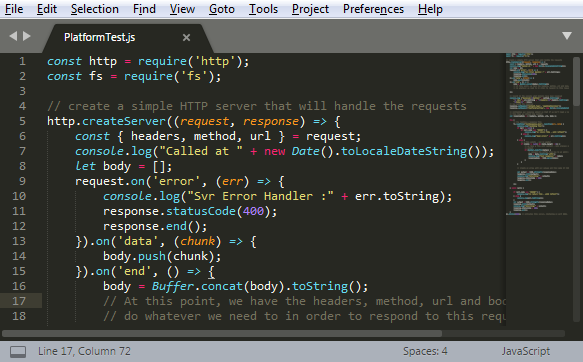
The following code looks for a local file called testResponse.json if found then returns the content of the file (assumed to be JSON) otherwise it reflects back in the body, the received header and body.  This reflection makes it extremely easy to see how the policies have changed the inbound call.  The content is also logged to the console – making it easy to also see what came through to the back end.

The implementation also assumes port 8080, but changing the port is exceptionally easy.

There one enhancement planned, and this is to allow the response test payload to be handled as XML.  This will need a little tweaking of the code as presently a JSON Object is currently stringified.

JavaScriptThe code is also available in my GitHub repository – https://github.com/mp3monster/Utils/blob/master/PlatformTest.js and an example test response file is at https://github.com/mp3monster/Utils/blob/master/testResponse.json

const http = require('http');
const fs = require('fs');

// create a simple HTTP server that will handle the requests
http.createServer((request, response) => {
const { headers, method, url } = request;
console.log("Called at " + new Date().toLocaleDateString());
let body = [];
request.on('error', (err) => {
console.log("Svr Error Handler :" + err.toString);
response.statusCode(400);
response.end();
}).on('data', (chunk) => {
body.push(chunk);
}).on('end', () => {
body = Buffer.concat(body).toString();
// At this point, we have the headers, method, url and body, and can now
// do whatever we need to in order to respond to this request.

});

// record in the console what details have been received
console.log ("Received:\nMethod:" + method.toString() +
"\n URL:"+ url.toString + "\nheaders:\n"+headers.toString() +
"\nBody:\n" + body);
// now build the response
response.setHeader('Content-Type', 'application/json');
response.setHeader('PlatformTestTime', new Date().toLocaleDateString());

// initialise our response object so that if we don't load a response
// file then we reflect the content
var responseBody = { headers, method, url, body };

try {
// try reading a response file
fs.readFile('testResponse.json', function(err, data) {
console.log("handling file");
if (err != null) {
if (err.code === 'ENOENT') {
console.log("on return file - will reflect");
} else {
console.log("Read error:" + err.toString());
}
} else {
// a file exists - but is empty?
if ((data != null) && (data.length > 0)) {
// we have a file with content - lets process so it into a JSON
// object
if (Buffer.isBuffer(data)) {
// convert the buffer from hex to an ASCII string
body = data.toString('utf8');
console.log("test response:" + body);
responseBody = JSON.parse(body);
}
}
}

// create an array with our values and then make it

// JSON with stringfy

var output = JSON.stringify(responseBody);
response.write(output);
console.log("Returning:" + output);
response.statusCode = 200;
response.end();

});

} catch (err) {

if (err.code === 'ENOENT') {
console.log("on return file - will reflect");
} else {
console.log(err.toString());
}
var output = JSON.stringify(responseBody);
response.write(output);
console.log("Returning:" + output);
response.statusCode = 200;
response.end();
}
}).listen(8080); // Activates this server, listening on port 8080.

Share this:

  • Click to share on Facebook (Opens in new window) Facebook
  • Click to share on X (Opens in new window) X
  • Click to share on Pocket (Opens in new window) Pocket
  • Click to share on Reddit (Opens in new window) Reddit
  • Click to email a link to a friend (Opens in new window) Email
  • Click to share on WhatsApp (Opens in new window) WhatsApp
  • Click to print (Opens in new window) Print
  • Click to share on Tumblr (Opens in new window) Tumblr
  • Click to share on Mastodon (Opens in new window) Mastodon
  • Click to share on Pinterest (Opens in new window) Pinterest
  • More
  • Click to share on Bluesky (Opens in new window) Bluesky
  • Click to share on LinkedIn (Opens in new window) LinkedIn
Like Loading...

Oracle Node.js cloud service

31 Thursday Dec 2015

Posted by mp3monster in General, Java Cloud, NodeJS Cloud, Oracle, Technology

≈ 1 Comment

Tags

application contIner cloud, Cloud, java, node.js, Oracle, PaaS

A while back I posted about using the use of Node.js cloud service Oracle had marked as coming soon (Blog post here). Well we have checked back to see if the free trial is openly available and it still appears not yet to be the case.  But more than that, Oracle have reorganised the capability here to form what they are now calling Application Container Cloud (ACC). The application container cloud provides a number of options for running Node.js or a pure play J2SE solution. 
   
The good news is that there is a lot more detail of what the options are with this cloud which includes just Node.js – the details can be seen here. So node 0.10 and 0.12 are supported and JDKs 7 & 8 are supported. With the JDK you also get the use of cruise control. The metering periods go down to the hour as well which is great for PoC activities. The level of detail provided, suggests that these cloud solutions are currently available to partners and paying customers (the JDK service is certainly the case based on discussions I have had with my account manager). So hopefully as Oracle rollout their cloud offerings into data centres and capacity grows we should see public trial access.

Exclamation Mark Note: ACC has now been superseded by Oracle Kubernetes Engine (OKE)

Share this:

  • Click to share on Facebook (Opens in new window) Facebook
  • Click to share on X (Opens in new window) X
  • Click to share on Pocket (Opens in new window) Pocket
  • Click to share on Reddit (Opens in new window) Reddit
  • Click to email a link to a friend (Opens in new window) Email
  • Click to share on WhatsApp (Opens in new window) WhatsApp
  • Click to print (Opens in new window) Print
  • Click to share on Tumblr (Opens in new window) Tumblr
  • Click to share on Mastodon (Opens in new window) Mastodon
  • Click to share on Pinterest (Opens in new window) Pinterest
  • More
  • Click to share on Bluesky (Opens in new window) Bluesky
  • Click to share on LinkedIn (Opens in new window) LinkedIn
Like Loading...

Push Notifications with a bit of Node.js

16 Thursday Apr 2015

Posted by mp3monster in General, NodeJS Cloud, Oracle, Technology

≈ 1 Comment

Tags

API library, HelloWorld, javascript, JDeveloper, Node, node.js, npm, Oracle, prowl, push notifications

So I have written a couple of blogs about Push Notifications with a bit of Java (see here as the post that pulls all of this together). But this time we’re going to do something similar with Node.js. This blog entry is going to position us so we can then take a simple solution and push up to the cloud – as I use Oracle a lot then we’ll be looking at the Oracle cloud as a final step.

To start we need a local instance of node.js.  Given the fact it is a small footprint we can pretty much install anywhere.  So you’ll need to download Node.JS from the official site, and install it. I’m not going to walk through the installation guidance as it is well documented elsewhere (http://blog.teamtreehouse.com/install-node-js-npm-windows for example). You do want ensure you include the NPM capability (node.js packaging & deployment tool). Make sure that Node is on your path so we can reference the binary without a lots of file paths. You also want to ensure that node.js is up and running.

Next up is to the the Prowl API library that makes interacting with prowl simple and helps illustrate the deployment framework (NPM) used by node.js. So following the link from the Prowl website or go directly here  and download the library.  If you download the zip file as I did,  you’ll find it has a folder called node-prowl-master. You need to unpack this and rename to node-prowl.  and run the command

npm install node-prowl

When I first tried to deploy the Prowl API library then I did see an error. This isn’t the API but actually the Node.js installation (atleast on my Windows platform) as you can see:

installErrorI found googling using node.js and ENOENT showed up plenty of help to solve errors. In this situation the solution was purely to create the folder. Then re-running the action without problem.

When the npm command works you’ll see something like:

npm-install

So hopefully in addition to the prerequisites described in this earlier post we should have everything ready to progress.  So I’ve continued to use JDeveloper 12c, but using the general profile and set up a web solution project.  This does create a large directory structure given we’re producing some simple Javascript. But the structure is right for a proper development effort, and lazy habits form poor practises – so lets work with it.

With the project setup, we need craft a little JavaScript.  To we’re good to go – lets just try hello world, with a tiny twist, we’ll get the hostname using a Node library with this code:


// our very first node program

// get info about the OS
var os = require(‘os’);

// say hello world and include the hostname
console.log(“Hello world, we’re running on ” + os.hostname());

Before we do anything else, lets be a bit clever, to allow us to run our Node script within JDeveloper.  This can be done by adding a new Tool through the Tools –> External Tools … menu. Which will display the following screen:

external-tool-setup-0


Asa you can see in this image I have already selected New… and walked through the configuration screens, you’ll probably want to use a configuration similar to what I have in the following steps:

external-tool-setup-1

external-tool-setup-2 external-tool-setup-3

external-tool-setup-4

With this setup in JDeveloper with the Editor focus on our JavaScript, goto the Tools menu and you’ll see your Node entry. Just click on it. We’ll then see the results in the message window, as you can see here:

Hello World in JDeveloper

Alternatively in a command window you just need to run the command from the folder with the JavaScript (or include the path):

node helloworld.js

So lets take things up a notch and send our mobile device a message.  So using the following code, we can use the prowl-api and initiate a message:

var Prowl = require(‘node-prowl’); // pull in the prowl API we deployed with NPM earlier

var prowl = new Prowl(‘your-prowl-key-here‘); //setup your API key

var now = new Date();

// ready to send the message, passing a function reference to handle the response

var message = ‘hello mobile device, the time is ‘+ now.toUTCString();
prowl.push(message, ‘NodeJS App’, prowlReplyHandler);

//function to handle the response from the prowl API lib
function prowlReplyHandler ( err, remaining )
{

if( err )
{
var errorStr = err.message;
console.log( ‘I have an error ‘ + errorStr);
}
else
{
console.log( ‘I said:’ + message+ ‘; I have ‘ + remaining + ‘ calls available’ );
}

}

Note you’ll need to replace your-prowl-key-here in the above code with you genuine API key registered with the Prowl web app. Then we can run the application, and should see:

Node JS Calling Prowl

Our mobile device will show:

prowl-node-js-mobile


Next steps, in the next post – run through through a cloud hosting of node.js and extend the capability to be a simple service, which will mean packaging ourselves up and other exciting things.

Share this:

  • Click to share on Facebook (Opens in new window) Facebook
  • Click to share on X (Opens in new window) X
  • Click to share on Pocket (Opens in new window) Pocket
  • Click to share on Reddit (Opens in new window) Reddit
  • Click to email a link to a friend (Opens in new window) Email
  • Click to share on WhatsApp (Opens in new window) WhatsApp
  • Click to print (Opens in new window) Print
  • Click to share on Tumblr (Opens in new window) Tumblr
  • Click to share on Mastodon (Opens in new window) Mastodon
  • Click to share on Pinterest (Opens in new window) Pinterest
  • More
  • Click to share on Bluesky (Opens in new window) Bluesky
  • Click to share on LinkedIn (Opens in new window) LinkedIn
Like Loading...

Oracle Java & Node.JS Cloud Blogs Coming

23 Tuesday Dec 2014

Posted by mp3monster in General, Java Cloud, NodeJS Cloud, Oracle, Technology

≈ 1 Comment

Tags

Cloud, java, node.js, Oracle

Over the coming months I’m planning on running a series of blogs on getting setup and using Oracle’s Java Cloud and the upcoming Oracle Node.JS Cloud when we can get access to it.

In both cases we’re aiming to demo the capabilities, setup eyc around the classic Hello World – but with a bit of a twist. Rather than simply sending to the console we’re going to use a mobile push notification – without resorting to having to build a mobile app.

By taking this approach to hello world aside from keeping it simple we can see how to bring 3rd party APIs into the mix.  The first couple of posts wont need to much on the Oracle front – as we’ll walk through getting things setup and running a proof without the cloud stuff. As they say keep it simple stupid.

So that you can see the blog entries for each of this two stories, I specifically setup in my blog two entry categories:

  • Oracle Java Cloud
  • Oracle Node.JS Cloud

A few posts will obviously be common to both.

Share this:

  • Click to share on Facebook (Opens in new window) Facebook
  • Click to share on X (Opens in new window) X
  • Click to share on Pocket (Opens in new window) Pocket
  • Click to share on Reddit (Opens in new window) Reddit
  • Click to email a link to a friend (Opens in new window) Email
  • Click to share on WhatsApp (Opens in new window) WhatsApp
  • Click to print (Opens in new window) Print
  • Click to share on Tumblr (Opens in new window) Tumblr
  • Click to share on Mastodon (Opens in new window) Mastodon
  • Click to share on Pinterest (Opens in new window) Pinterest
  • More
  • Click to share on Bluesky (Opens in new window) Bluesky
  • Click to share on LinkedIn (Opens in new window) LinkedIn
Like Loading...

    I work for Oracle, all opinions here are my own & do not necessarily reflect the views of Oracle

    • About
      • Internet Profile
      • Music Buying
      • Presenting Activities
    • Books & Publications
      • Logging in Action with Fluentd, Kubernetes and More
      • Logs and Telemetry using Fluent Bit
      • Oracle Integration
      • API & API Platform
        • API Useful Resources
        • Useful Reading Sources
    • Mindmaps Index
    • Monster On Music
      • Music Listening
      • Music Reading
    • Oracle Resources
    • Useful Tech Resources
      • Fluentd & Fluent Bit Additional stuff
        • Logging Frameworks and Fluent Bit and Fluentd connectivity
        • REGEX for BIC and IBAN processing
      • Java and Graal Useful Links
      • Official Sources for Product Logos
      • Python Setup & related tips
      • Recommended Tech Podcasts

    Oracle Ace Director Alumni

    TOGAF 9

    Logs and Telemetry using Fluent Bit


    Logging in Action — Fluentd

    Logging in Action with Fluentd


    Oracle Cloud Integration Book


    API Platform Book


    Oracle Dev Meetup London

    Blog Categories

    • App Ideas
    • Books
      • Book Reviews
      • manning
      • Oracle Press
      • Packt
    • Enterprise architecture
    • General
      • economy
      • ExternalWebPublications
      • LinkedIn
      • Website
    • Music
      • Music Resources
      • Music Reviews
    • Photography
    • Podcasts
    • Technology
      • AI
      • APIs & microservices
      • chatbots
      • Cloud
      • Cloud Native
      • Dev Meetup
      • development
        • languages
          • java
          • node.js
      • drone
      • Fluentbit
      • Fluentd
      • logsimulator
      • mindmap
      • OMESA
      • Oracle
        • API Platform CS
          • tools
        • Helidon
        • ITSO & OEAF
        • Java Cloud
        • NodeJS Cloud
        • OIC – ICS
        • Oracle Cloud Native
        • OUG
      • railroad diagrams
      • TOGAF
    • xxRetired
    • AI
    • API Platform CS
    • APIs & microservices
    • App Ideas
    • Book Reviews
    • Books
    • chatbots
    • Cloud
    • Cloud Native
    • Dev Meetup
    • development
    • drone
    • economy
    • Enterprise architecture
    • ExternalWebPublications
    • Fluentbit
    • Fluentd
    • General
    • Helidon
    • ITSO & OEAF
    • java
    • Java Cloud
    • languages
    • LinkedIn
    • logsimulator
    • manning
    • mindmap
    • Music
    • Music Resources
    • Music Reviews
    • node.js
    • NodeJS Cloud
    • OIC – ICS
    • OMESA
    • Oracle
    • Oracle Cloud Native
    • Oracle Press
    • OUG
    • Packt
    • Photography
    • Podcasts
    • railroad diagrams
    • Technology
    • TOGAF
    • tools
    • Website
    • xxRetired

    Enter your email address to subscribe to this blog and receive notifications of new posts by email.

    Join 2,555 other subscribers

    RSS

    RSS Feed RSS - Posts

    RSS Feed RSS - Comments

    December 2025
    M T W T F S S
    1234567
    891011121314
    15161718192021
    22232425262728
    293031  
    « Nov    

    Twitter

    Tweets by mp3monster

    History

    Speaker Recognition

    Open Source Summit Speaker

    Flickr Pics

    Turin Brakes Acoustic Tour 24 @ The Maltings FarnhamTurin Brakes Acoustic Tour 24 @ The Maltings FarnhamTurin Brakes Acoustic Tour 24 @ The Maltings FarnhamTurin Brakes Acoustic Tour 24 @ The Maltings Farnham
    More Photos

    Social

    • View @mp3monster’s profile on Twitter
    • View philwilkins’s profile on LinkedIn
    • View mp3monster’s profile on GitHub
    • View mp3monster’s profile on Flickr
    • View mp3muncher’s profile on WordPress.org
    • View philmp3monster’s profile on Twitch
    Follow Phil (aka MP3Monster)'s Blog on WordPress.com

    Blog at WordPress.com.

    • Subscribe Subscribed
      • Phil (aka MP3Monster)'s Blog
      • Join 233 other subscribers
      • Already have a WordPress.com account? Log in now.
      • Phil (aka MP3Monster)'s Blog
      • Subscribe Subscribed
      • Sign up
      • Log in
      • Report this content
      • View site in Reader
      • Manage subscriptions
      • Collapse this bar
     

    Loading Comments...
     

    You must be logged in to post a comment.

      Privacy & Cookies: This site uses cookies. By continuing to use this website, you agree to their use.
      To find out more, including how to control cookies, see here: Our Cookie Policy
      %d