For a long time, I’ve tracked and read articles on Software Engineering Daily. We’ll day represents what is hopefully the first of many articles that we will write for them. The article is about the kind of people that make technical book authors, and the perception we have of authors – so if you’re interested check it out here.
The 12 Factor App definition is now ten years old. In the world of software that is a long time. So perhaps it’s time to revisit and review what it says. As I have spent a lot of time around Logging – I’ve focussed on Factor 11 – Logging.
I have been fortunate enough to present at the hybrid JAX London conference on this subject. It was great to get out and see people at a conference rather than just with a screen and a chat console of online-only events.
Having previously blogged about being a fan of Railroad diagrams (here) as a means to communicate language syntax, I have been asked about some of the ways details should be represented. I’ve looked around and not actually found an easy-to-read for ‘newbies’ guide to reading railroad diagrams. A lot of content either focuses on the generator tools or how the representation compares to BNF (Backus Naur Form) – all very distracting. So, I thought as an advocate, I should help address the gap (the documentation with TabAkins tool does a good job of explaining things, but its focus is on the features provided rather than understanding the notation).
Reading Railroad Diagrams
The following table provides all the information to help you interpret the Railroad Diagrams, and create syntax representations.
If you’re only interested in understanding the notation, read just the first two columns.
If you want to see examples of how to create the diagram, then the 3rd column will help.
Note: Clicking on the diagrams will result in a bigger version of the image being displayed.
The start and end of an expression are shown with vertical bars. The expression is read from left to right following a path defined by the line(s).
Diagram(
Terminal('This '),
Terminal(' is '),
Terminal(' a '),
Terminal(' mp3monster '),
Terminal(' blog ')
)
Larger diagrams may need to be read both across and down the page to make it sensibly fit a page like this.
Diagram( Stack(
Terminal('This '),
Terminal(' is '),
Terminal(' a '),
Terminal(' mp3monster '),
Terminal(' blog '))
)
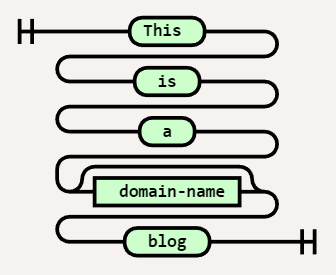
We can differentiate between literal values and ‘variables’ by shape. A square shape should denote a variable, and a lozenge represents a literal. I have to admit to sometimes getting these the wrong way around, but as long as the notation is used consistently in an expression, it isn’t too critical. In this example, we have replaced mp3monster with the name of a variable called domain-name. So if I set the variable domain-name = mp3monster then I’d read the same result.
Diagram( Stack(
Terminal('This '),
Terminal(' is '),
Terminal(' a '),
NonTerminal(' domain-name'),
Terminal(' blog '))
)
We can make parts of an expression optional. This can be seen by following an alternate path around the optional element. In this case, we’ve made the domain-name optional. Assuming domain-name = mp3monster, we could get either: – This is a mp3monster blog OR – This is a blog
Diagram( Stack(
Terminal('This '),
Terminal(' is '),
Terminal(' a '),
Optional(
NonTerminal(' domain-name')), Terminal(' blog ')) )
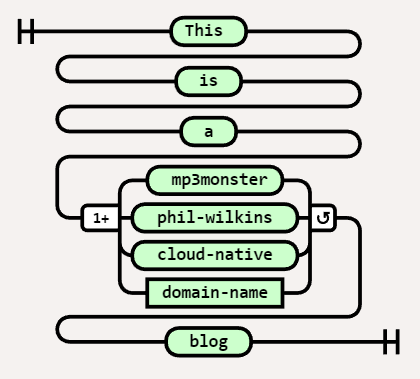
We can represent optionality by having the flow split to multiple values. Those values could be either literal values or variables. In this case, we now have several possible names in the blog with the choices being mp3monster, phil-wilkins, cloud-native, or the contents of the variable domain-name. So the expression here could resolve to (assuming domain-name = something-else): – This is a mp3monster blog OR – This is a phil-wilkins blog OR – This is a cloud-native blog OR – This is a something-else blog It is typical for the option most likely to be selected to be the value that is directly in line with the choice. Here that would mean the default would be phil-wilkins
Diagram( Stack(
Terminal('This '),
Terminal(' is '),
Terminal(' a '),
Choice(1,
' mp3monster', ' phil-wilkins ', ' cloud-native ', NonTerminal('domain-name')), Terminal(' blog ')) )
We can have variations on a choice where we can express the choice as being any of the options (one or more e.g. mp3monster and cloud-native) or all of the choices. These scenarios are differentiated by the additional symbols before and after the choice.
Diagram( Stack(
Terminal('This '),
Terminal(' is '),
Terminal(' a '),
MultipleChoice(1,
'any',' mp3monster', ' phil-wilkins ', ' cloud-native ', NonTerminal('domain-name')), Terminal(' blog ')) )
We can represent the looping with the inclusion of an additional literal(s) or variable(s) by having a second line from the right (exit) of a literal or variable and flowing back into the left (entry) of a literal or variable. Then in the loop of the flow below are the variable(s) or literal(s) that go around between each occurrence of the loop. If our variable was a list now i.e. domain-name = [‘ mp3monster’, ‘cloud-native’] then this would resolve to : This is a mp3monster and cloud-native blog
Diagram( Stack(
Terminal('This '),
Terminal(' is '),
Terminal(' a '),
OneOrMore(
NonTerminal('domain-name'), [' and '])), Terminal(' blog ') )
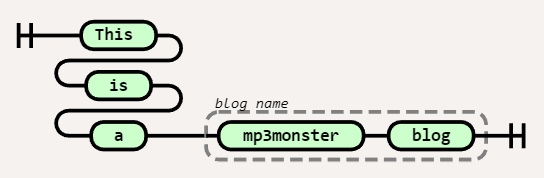
We can group literals and variables together with a label. These groupings are denoted with a dashed line and usually include some sort of label. In our example, we’ve grouped two literal values together and called that group the blog name.
Diagram( Stack(
Terminal('This '),
Terminal(' is '),
Terminal(' a '),),
Group(Sequence(
Terminal(' mp3monster '), Terminal(' blog ')), ['blog name']) )
All of these constructs can be combined so you can do things like making choices optional, and iterate over multiple variables and literals.
Sometimes the number of options in a choice can get impractically large to show in a Railroad diagram. One way to overcome this is to show the first and last options and an ellipsis. We can then wrap it with a comment that directs the reader to the complete list of choices. This way the diagram continues to be readable – the most valuable part of the diagram and easy to locate the specific fine details.
Diagram( Stack( Terminal(‘This ‘), Terminal(‘ is ‘), Terminal(‘ a ‘), Group(Choice(1, ‘ mp3monster’, ‘ … ‘, ‘ cloud-native ‘), [‘ See Section X for full list’]), Terminal(‘ blog ‘)) )
One of the areas I present publicly is the use of Fluentd. including the use of distributed and multiple nodes. As many events have been virtual it has been easy to demo everything from my desktop – everything is set up so I can demo things very easily. While doing this all on one machine does point to how compact and efficient Fluentd is as I can run multiple instances concurrently it does undermine distributed capabilities somewhat.
Add to that I now work for Oracle it makes sense to use OCI resources. With that, I have been developing the scripts to configure Ubuntu VMs to set up the demo environments installing Ruby, Fluentd, and various gems needed and pulling the relevant configurations in. All the assets can be found in the GitHub repository https://github.com/mp3monster/logging-demos. The repository readme includes plenty of information as well.
While I’ve been putting this together using OCI, the fact that everything is based on Ubuntu should mean it can be run locally on VMs, WSL2, and adaptable for MacOS as well. The environment has been configured means you can still run on Ubuntu with a single node if desired.
Additional Log Destinations
As the demo will typically be run on OCI we can not only run the demo with a multinode setup, we have extended the setup with several inclusion files so we can utilize OCI services OpenSearch and OCI Log Analytics. If you don’t want to use these services simply replace the contents of several inclusion files including files with the contents of the dummy_inclusion.conf file provided.
Representation of the Demo setup
The configuration works by each destination having one or two inclusion files. The files with the postfix of label-inclusion.conf contains the configuration to direct traffic to the respective service with a configuration that will push log events at a very high frequency to the destination. The second inclusion file injects the duplication of log events to each service. The inclusion declarations in the main node Fluentd config file references an environment variable that should provide the path to the inclusion file to use. As a result, by changing the environment variable to point to a dummy file it becomes possible o configure out the use of one of the services. The two inclusions mean we can keep the store declarations compact and show multiple labels being used. With the OpenSearch setup, we have a variant of the inclusion file model where the route inclusion can reference the logic that we would use in the label directly within the sore declaration.
The best way to see the use of the inclusions is to experiment with setting the different environment variables to reference the different files and then using the Fluentd dry-run feature (more on this in the book).
Setup script
The setup script performs a number of tasks including:
Pulling from Git all the resources needed in terms of configuration files and folders
Retrieving the necessary plugins against the possibility of their use.
Setting up the various environment variables for:
Slack token
environment variables to reference inclusion files
shortcut environment variables and aliases
network (IP) address for external services such as OpenSearch
Setting up a folder for OCI tokens needed.
Setting up temp folders to be used by OCI Plugins as a file-based cache.
Feeding the log analytics service is a more complex process to set up as the feeds need to have metadata about the events being ingested. The downside is the configuration effort is greater, but the payback is that it becomes easier to extract meaningful information quickly because the service has a greater understanding of the content. For example, attributing the logs to a type of source means the predefined or default log formats are immediately understood, and maximum meaning can be retrieved from the log event.
Going to OCI Log Analytics does cut out the need for the Connections hub, which would allow rules and routing to be defined to different OCI services which functionally can help such as directing log events to PagerDuty.
Infrastructure as Code (IaC) should be treated the same way as any other code. That is to say that we should be considering configuration management, testing, regression, code quality, and coverage. We should be addressing these points for the same reasons we address them with our application code. Such as ensuring that we don’t introduce bugs as things evolve and develop, ensuring that the code is maintainable over a prolonged period etc.
The problem is that the only real way to test IaC is to run it. Particularly with the likes of Terraform where it is largely declarative rather than containing a lot of logic. This point is nicely conveyed by Yevgeniy Brikman’s presentation (below)
The presentation goes on to illustrate Terratest which has the look and feel of JUnit or any other xUnit test framework. Terratest is implemented in Golang, But to be honest, given the nature of Terraform ( largely declarative meaning it enables ideas of composition and not sophisticated logic) it means the writing of the tests isn’t going to demand anything clever like how to achieve polymorphic behavior through Go’s type structures.
While Yevgeniy focussed on testing by invoking an application on the infrastructure deployed something we’ve described though our Platform Test logic (more here). You may wish to test things further by interrogating infrastructure components. For example, do I have the right number of nodes in a dynamic group or are container or server logs going into the cloud monitoring services.
Performing such checks is very easy with OCI as it provides a Golang SDK making it very easy to write tests that can call the OCI APIs and interrogate the setup. Better still when considering whether the Terraform configuration will behave correctly to support dynamic/auto-scaling can be done easily without modifying the Terraform configurations as part of the Terratest logic can include Go API calls to temporarily modify scaling triggers or invoking code that can stimulate OCI dynamic features.
Testing App Configuration
There is an interesting question to be considered. There is a point of separation between when to use Terraform (or Pulumi and others for that matter) and tools better suited to application deployment and configuration like Ansible and Chef. Therefore should we separate the testing of these details? Maybe I am too purist but seeing local and remote execs in Terraform as these actions are very opaque and can be used to conceal things or unwittingly depend on the way Terraform handles its dependency graph.
Of course, Ansible has its test framework ansible_test and has the means to measure test coverage. So one possibility is to treat Ansible as a separate module, independently test it, and then integrate its use in the wider picture of deploying infrastructure.
When building Node solutions, even if you’re not going to publish the code to a public repository you’re likely to be using package.json to declare the dependencies for your app. Doing this makes it easier to build and deploy a utility. But if you’re conversant with several languages there is a tendency to just adapt your existing skills to work with others. The downside of this is small tooling nuances can catch you off guard and consume time while figuring them out. The workings of packages with NPM (as shown below) is one possible case.
If you create the package.json using npm init to create the initial version of the file, it is fairly common to set values to default. In the case of the license, this is an ISC license. This is easily forgotten. The problem here is twofold:
Does the license set reflect the constraints of the dependencies and their licenses
Does the default license reflect the position you want?
Looking at the latter point first, This is important as organizations have matured (and tooling greatly improved) when it comes to understanding how open source licensing can impact. This is particularly important for any organizations leveraging open source as part of their revenue generating activities either ‘as a service’ but also selling software solutions. If you put the wrong license here the license checking tools often protecting code repositories may reject your code, even in internal only use cases (yes this tripped me up).
To help overcome this issue you can install a tool that will analyze the dependencies and optionally their dependencies and report back on your license exposure. This tool is called license-report. Once installed (npm install -g license-report) we just need to point the tool to the package.json file. e.g. license-report package.json. We can make the results a lot more consumable by outputting the content in a number of formats. For example a simple text value:
From this, you could set your license declaration in package.json or validate that your preferred license won’t conflict,
I’ve been a fan of Railroad syntax diagrams for a long time. I’ve always found them an easy way to understand the syntactical options and the reserved/keywords in an efficient manner.
Example of Railroad Syntax diagram
I have been digging around in the documentation to find a keyword in the OCI Policies syntax that the common cases don’t use. After a bit of rooting around, I found what I needed. But a Railroad representation would have helped me get the expression correct effortlessly and without so much effort.
Once I solved my problem, I decided to see if I could find something that could easily create the railroad diagrams and encountered a fantastic bit of code on GitHub from Tab Atkins Jr. It’s a neat bit of JavaScript, which can even be run from their GitHub pages – go here. Tab has taken the time to document the tool well, so working out the syntax to define the diagram is straightforward (not that you need to read it much as the tool is well written).
The following diagrams show the syntax for writing OCI Policies in a single image and with the full syntax broken into 2 images to make it a little easier to read on the screen. But also address the fact often you don’t need the Where clause.
If the diagrams need to be updated the source to use with the tools is in my GitHub repository. But a really cool feature of the utility is that the information to populate the editor view is included in the URL (does make for a long URL) but it means this link will take you directly to the view & editor if you want to tinker with the definition. So the links are:
I’ve designed a variety of GraphQL schemas and developed microservice backends. But not done much with configuring the Apollo implementation of a GraphQL server until recently. This may reflect the fact my understanding of JavaScript doesn’t extend into the world of Node.JS as much as I’d like (the problem with being a multi-language developer is you’re likely to find your way around many languages but never be a master of one). Anyway, the following content is about the implementation within a GraphQL server part of a solution. It may be these pointers are just for my benefit you might find them helpful as well.
To make it easy to reference the code, we’ve added entries (n) into the code, where n is a number. This is not part of the code. But there to make the different lines referenceable. Where code should go but is not relevant to the point being made I’ve added ellipsis (…)
Dynamic loading and server configuration
import { ApolloServer } from 'apollo-server';
import { loadFilesSync } from '@graphql-tools/load-files';
import { resolvers } from './resolvers.js';   (1)
import ProviderInternalAPI from './ProviderInternalAPI.js'; (1)
import EventsInternalAPI from './EventsInternalAPI.js';  (1)
const server = new ApolloServer({
  debug : true,    (2)
  typeDefs: loadFilesSync('./schema.graphql'),   (3)
  resolvers,
  dataSources: () => {
    return {
      eventsInternalAPI: new EventsInternalAPI(),    (4)
      providerInternalAPI: new ProviderInternalAPI() (4)
      pro
    };
  }});
There is the potential to dynamically load the resolvers rather than importing each JavaScript file as we see on lines (1). The mechanics to do this is documented here. It would be cool if an opinionated implementation was provided. As shown by (3) we can take a independent schema file being loaded. The Apollo example approach for this didn’t seem to work for us, although both approaches make use of graphql-tools in a synchronous manner.
We can switch on debugging (2) for the GraphQL server, although the level of information published doesn’t appear to be significant. Ideally this setting is changed for production.
Defining the resolvers
The prefix for each resolver (1) must correlate to the name in the schema of the mutator or query (not the type as you would expect with Java). Often we don’t need all the parameters for the resolver. The documentation describes replacing each unused parameter with one or more underscores (i.e _, __ ). The underscore denoting the field not in use. However we can satisfy the indication of not being used, but keep the meaning of each position by using the underscore then a name (i.e. _parent, _args ) as shown in (2).
By taking the response into a variable (3) we can optionally log it. Trying to return using invocation line would result in the handler object rather than the payload itself. By taking the result into a variable we can log the content if desired and return the content.
The use of the backward quote is a node feature. It allows us to incorporate variables into a string by referencing it within ${}(4).
We need to supply the GraphQL server with instances with a layer of code that will interact with the resolvers. We can instantiate the instances in the declaration. The naming of the object is important (4) to the resolver.js (declarations).
import { useLogger } from "@graphql-yoga/node";
...
latestEvent (1): async (_parent, _args, { dataSources }, _info) (2)   => {
      if (log) { console.log("resolvers - get latest event"); }
      let responseValue = await dataSources.eventsInternalAPI.getLatestEvent(); (3)
      if (log) { console.log(`(4)  Resolver response for latest event:\n ${responseValue}`); }
      return responseValue;
    },
To handle the use of resolvers within a larger resolver we need to declare the resolution outside of the Query and Mutator blocks (but inside the whole declaration block)(1). The name provided needs to match the parent entity that the query resolver contributes to.
To then provide values from the outer resolution we need to prover to the chained resolution use the naming as represented in the GraphQL schema as shown by (2). The GraphQL engine will resolve the mapping values.
Web resolver URL
  // GET
  async getProvider(code) {
    console.log("getProvider (%s) directing to %s",code,this.baseURL);
    return this.get(`provider?code=${code} (1)`);
  }
The URL parameters need to be appended to the base URL path for the parent class to use in the invocation as shown by (1). The Apollo examples showed a setter option but we didn’t see the URI being addressed properly. This approach produces the relevant requirement.
Let’s be honest we’re not all command line warriors when it comes to Kubernetes. I can get around Kubectl but the time it takes to key in a CLI command you can get the same information in a couple of clicks of the UI. For me, Kubectl is for automating my tasks, for example pushing a local build into a image repository, initiating a refresh deployment and ensuring old container instances are flushed out.
Lens view
K8s Dashboard
The only problem is that the K8s dashboard requires a lot of config work to secure its deployment, and do you want to be deploying such tools in a production environment? A colleague suggested I look at Lens. A tool that offers both Personal (free) and Team licensed versions and both versions deploy to Windows, Linux, and Mac natively so installation doesn’t require any messing around.
I have to say I have been very impressed with Lens. Everything useful about the K8s dashboard is here, but without needing to deploy anything to your cluster as lens runs as a local thick app. Just like the K8s dashboard you need the privileges to talk to the K8s APIs. But the Visualization is all local and the way the data is retrieved means the UI is very reactive.
Lens supports extensions, although to date I’ve not tried any of the extensions personally – you can see a list of extensions here. I will be trying out a couple Of extensions in due course. For example:
Network Policy Viewer
Certificate Info (via K8s secrets)
Lens goes further by the fact you can connect to multiple clusters from a single viewer instance. So no need for multiple deployments of the dashboard or creating an additional management cluster.
I only have one minor grumble today with the implementation. When using a console facility to access a container it is not possible to paste into the console any text/script or copy out any of the log contents. The latter can make generating things like JIRA tickets a bit annoying. So far I’ve worked around it by creating screenshots.















 Phil (aka MP3Monster)'s Blog
You must be logged in to post a comment.