
• Home
  • Site Aliases
    • www.cloud-native.info
  • About
    • Background
    • Presenting Activities
    • Internet Profile
      • LinkedIn
    • About
  • Books & Publications
    • Log Generator
    • Logs and Telemetry using Fluent Bit
      • Fluent Bit book
      • Book Resources in GitHub
      • Fluent Bit Classic to YAML Format configurations
    • Logging in Action with Fluentd, Kubernetes and More
      • Logging in Action with Fluentd – Book
      • Fluentd Book Resources
      • Fluentd & Fluent Bit Additional stuff
    • API & API Platform
      • API Useful Resources
    • Oracle Integration
      • Book Website
      • Useful Reading Sources
    • Publication Contributions
  • Resources
    • GitHub
    • Oracle Integration Site
    • Oracle Resources
    • Mindmaps Index
    • Useful Tech Resources
      • Fluentd & Fluent Bit Additional stuff
      • Recommended Tech Podcasts
      • Official Sources for Product Logos
      • Java and Graal Useful Links
      • Python Setup & related stuff
  • Music
    • Monster On Music
    • Music Listening
    • Music Reading

Phil (aka MP3Monster)'s Blog

~ from Technology to Music

Phil (aka MP3Monster)'s Blog

Tag Archives: OpenSearch

Observing the Observer (Fluent Bit monitoring)

25 Thursday Apr 2024

Posted by mp3monster in Fluentbit, General, Technology

≈ Leave a comment

Tags

development, FluentBit, Grafana, Jaeger, logs, metrics, OpenSearch, Prometheus, Traces

In the Fluent Bit book I touch upon the point that we should be observing the observer. After all, if we don’t monitor our observability stack, then we’ll be operating blind and may never know until things go catastrophically wrong, and we’re getting complaints that production business solutions are down. One of the peer review comments was it would be really good to have a visual representation in the book. While I’d love to incorporate such diagrams, for them to be readable, they do use up a lot of space on the printed page, and very long chapters can also put some readers off. So, given the point wasn’t a key theme, we simply couldn’t incorporate the diagram.

But the suggestion is a good one. So we’ve created the visual representation here.
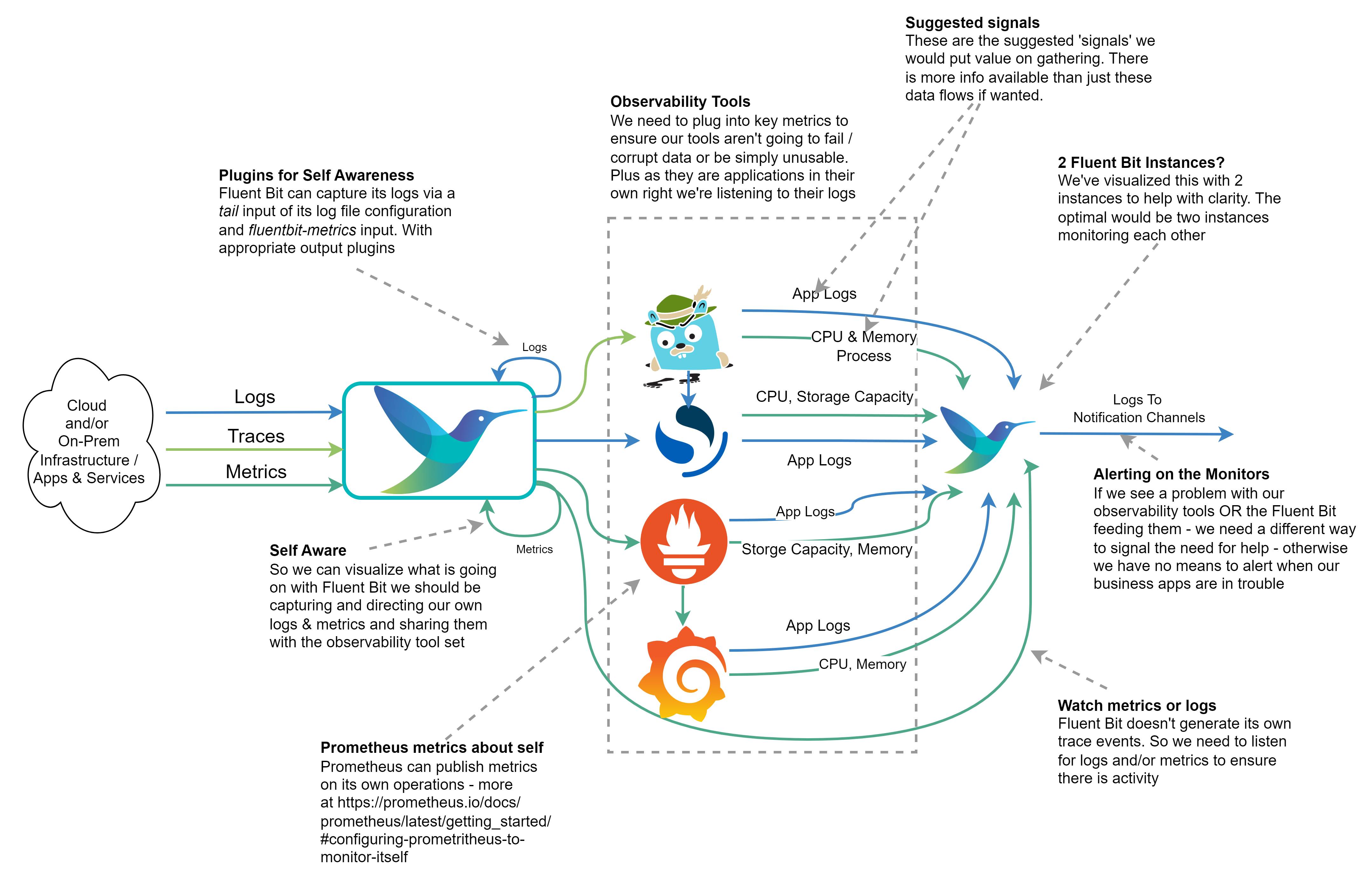
Annotated diagram showing how Fluent Bit could be used to monitor an open-source observation stack.

The diagram shows how we can monitor our observation tech stack so we don’t become ‘blind’ without knowing about it. The Outflow from the right of the diagram would send a signal to a notification service, which could be as simple as email or as user-friendly as Slack. We’ve indicated which kinds of metrics, logs, and traces could offer the most value from our observation tech stack.

If we’re running everything within a Kubernetes cluster, it would be easy to say we don’t need such a sophisticated setup as we can use Kubernetes liveness probes if the containers are well configured. While it is true if one of our services starts to fail, a liveness check should pick it up and recycle the container. But such probes only worry about the HTTP response code, not the cause. If we don’t monitor and capture more information we’ll never understand the problem. At worst we could end up seeing Kubernetes starting and then killing our containers in a vicious cycle and struggling to resolve the cause. So collecting the logs and metrics remains just as important.

How to Publish Fluent Bit Metrics and Logs

To publish Fluent Bit’s metrics to Prometheus, we need to configure the fluentbit-metrics input plugin (it does sound odd as an input, but there are reasons that become clearer in the book). We then route the output that supports using Fluent Bit as a Prometheus node exporter or makes use of the remote write API.

The log output for Fluent Bit can be configured via the command line or in the SERVICE blog (using the attributes log_file and log_level in the configuration file. Today this is setting the log threshold and identifying the log file. We can then, of course, configure a tail input plugin against the file if we want to send the logs to OpenSearch. We can also set plugin-specific logging thresholds as overrides to the Fluent Bit wide setting in the SERVICE block of configuration.

Configuring the other monitoring tools

  • Grafana‘s configuration will allow it to publish Prometheus scrapable metrics and Traces that are OTLP compliant can be found documented here.
  • Prometheus provides metrics on itself (details here) and logging controls as part of its command line and generates logfmt or JSON logs, details here.
  • OpenSearch‘s logs can be accessed as documented here. The Logs are created with Log4j2, which means out of the box, it will be easy to parse them. Configuring the output of slow query reports does need to be switched on. OpenSearch also illustrates a pre OpenTelemetry/OpenMetrics approach to sharing internal metrics by writing them as logs. However, there are ways to convert such log events to OTLP Metrics with Fluent Bit.
  • Jaeger provides metrics endpoints that are Prometheus-compatible, along with JSON-based logs, and are documented here. There is some support for tracing.

Share this:

  • Click to share on Facebook (Opens in new window) Facebook
  • Click to share on X (Opens in new window) X
  • Click to share on Pocket (Opens in new window) Pocket
  • Click to share on Reddit (Opens in new window) Reddit
  • Click to email a link to a friend (Opens in new window) Email
  • Click to share on WhatsApp (Opens in new window) WhatsApp
  • Click to print (Opens in new window) Print
  • Click to share on Tumblr (Opens in new window) Tumblr
  • Click to share on Mastodon (Opens in new window) Mastodon
  • Click to share on Pinterest (Opens in new window) Pinterest
  • More
  • Click to share on Bluesky (Opens in new window) Bluesky
  • Click to share on LinkedIn (Opens in new window) LinkedIn
Like Loading...

Is The 12 Factor App right about Logging?

05 Wednesday Oct 2022

Posted by mp3monster in development, Fluentd, General, Technology

≈ Leave a comment

Tags

12 Factor, 12 Factor App, conference, development, Grafana, JAX, logging, London, OpenSearch, Prometheus, Splunk, stdout

The 12 Factor App definition is now ten years old.  In the world of software that is a long time. So perhaps it’s time to revisit and review what it says.  As I have spent a lot of time around Logging – I’ve focussed on Factor 11 – Logging.

I have been fortunate enough to present at the hybrid JAX London conference on this subject. It was great to get out and see people at a conference rather than just with a screen and a chat console of online-only events.

You can see my presentation here:

Continue reading →

Share this:

  • Click to share on Facebook (Opens in new window) Facebook
  • Click to share on X (Opens in new window) X
  • Click to share on Pocket (Opens in new window) Pocket
  • Click to share on Reddit (Opens in new window) Reddit
  • Click to email a link to a friend (Opens in new window) Email
  • Click to share on WhatsApp (Opens in new window) WhatsApp
  • Click to print (Opens in new window) Print
  • Click to share on Tumblr (Opens in new window) Tumblr
  • Click to share on Mastodon (Opens in new window) Mastodon
  • Click to share on Pinterest (Opens in new window) Pinterest
  • More
  • Click to share on Bluesky (Opens in new window) Bluesky
  • Click to share on LinkedIn (Opens in new window) LinkedIn
Like Loading...

Demo Fluentd using Ubuntu with optional inclusion of OpenSearch and OCI Log Analytics

17 Wednesday Aug 2022

Posted by mp3monster in Cloud, development, Fluentd, General, Oracle, Technology

≈ Leave a comment

Tags

Cloud, demo, Fluentd, GitHub, Log Analytics, log simulator, OCI, OpenSearch, Oracle, Ubuntu

One of the areas I present publicly is the use of Fluentd. including the use of distributed and multiple nodes. As many events have been virtual it has been easy to demo everything from my desktop – everything is set up so I can demo things very easily. While doing this all on one machine does point to how compact and efficient Fluentd is as I can run multiple instances concurrently it does undermine distributed capabilities somewhat.

Add to that I now work for Oracle it makes sense to use OCI resources. With that, I have been developing the scripts to configure Ubuntu VMs to set up the demo environments installing Ruby, Fluentd, and various gems needed and pulling the relevant configurations in. All the assets can be found in the GitHub repository https://github.com/mp3monster/logging-demos. The repository readme includes plenty of information as well.

While I’ve been putting this together using OCI, the fact that everything is based on Ubuntu should mean it can be run locally on VMs, WSL2, and adaptable for MacOS as well. The environment has been configured means you can still run on Ubuntu with a single node if desired.

Additional Log Destinations

As the demo will typically be run on OCI we can not only run the demo with a multinode setup, we have extended the setup with several inclusion files so we can utilize OCI services OpenSearch and OCI Log Analytics. If you don’t want to use these services simply replace the contents of several inclusion files including files with the contents of the dummy_inclusion.conf file provided.

Representation of the Demo setup

The configuration works by each destination having one or two inclusion files. The files with the postfix of label-inclusion.conf contains the configuration to direct traffic to the respective service with a configuration that will push log events at a very high frequency to the destination. The second inclusion file injects the duplication of log events to each service. The inclusion declarations in the main node Fluentd config file references an environment variable that should provide the path to the inclusion file to use. As a result, by changing the environment variable to point to a dummy file it becomes possible o configure out the use of one of the services. The two inclusions mean we can keep the store declarations compact and show multiple labels being used. With the OpenSearch setup, we have a variant of the inclusion file model where the route inclusion can reference the logic that we would use in the label directly within the sore declaration.

The best way to see the use of the inclusions is to experiment with setting the different environment variables to reference the different files and then using the Fluentd dry-run feature (more on this in the book).

Setup script

The setup script performs a number of tasks including:

  • Pulling from Git all the resources needed in terms of configuration files and folders
  • Retrieving the necessary plugins against the possibility of their use.
  • Setting up the various environment variables for:
    • Slack token
    • environment variables to reference inclusion files
    • shortcut environment variables and aliases
    • network (IP) address for external services such as OpenSearch
  • Setting up a folder for OCI tokens needed.
  • Setting up temp folders to be used by OCI Plugins as a file-based cache.

Using OpenSearch

OpenSearch setup is documented in a tutorial here, and a Reference Architecture at the time of writing there isn’t a one-click deploy Terraform available in the Oracle Reference Architecture library on GitHub.

Currently, the setup for OpenSearch means manually adding the node1 index into the configuration.

Useful Links:

  • https://opensearch.org/
  • https://docs.oracle.com/en/solutions/oci-opensearch-application-search/#GUID-C968ACCC-2E79-4C88-A466-F9DF2503E920
  • https://www.opensearch.org/blog/technical/2022/02/getting-started-with-fluentd-and-opensearch/?utm_source=pocket_mylist

Log Analytics

Feeding the log analytics service is a more complex process to set up as the feeds need to have metadata about the events being ingested. The downside is the configuration effort is greater, but the payback is that it becomes easier to extract meaningful information quickly because the service has a greater understanding of the content. For example, attributing the logs to a type of source means the predefined or default log formats are immediately understood, and maximum meaning can be retrieved from the log event.

Going to OCI Log Analytics does cut out the need for the Connections hub, which would allow rules and routing to be defined to different OCI services which functionally can help such as directing log events to PagerDuty.

Useful Links

  • https://docs.oracle.com/en/solutions/oci-opensearch-log-analytics/index.html#GUID-9A3E3E7A-C899-4D43-8DA0-4BA7FA3E44ED
  • https://docs.oracle.com/en/cloud/paas/management-cloud/logcs/install-output-plug.html
  • https://docs.oracle.com/en/learn/oci_logging_analytics_fluentd/index.html

Demo Enhancements to come

There are a few things we’re planning to do with the demo:

  • Create a terraform script to perform all the environment setup
  • Integrate the configuration script into the terraform
  • Provide some simple dashboard insights for OpenSearch – currently, this is all manual
  • Basic setup for OCI Log Analytics

Share this:

  • Click to share on Facebook (Opens in new window) Facebook
  • Click to share on X (Opens in new window) X
  • Click to share on Pocket (Opens in new window) Pocket
  • Click to share on Reddit (Opens in new window) Reddit
  • Click to email a link to a friend (Opens in new window) Email
  • Click to share on WhatsApp (Opens in new window) WhatsApp
  • Click to print (Opens in new window) Print
  • Click to share on Tumblr (Opens in new window) Tumblr
  • Click to share on Mastodon (Opens in new window) Mastodon
  • Click to share on Pinterest (Opens in new window) Pinterest
  • More
  • Click to share on Bluesky (Opens in new window) Bluesky
  • Click to share on LinkedIn (Opens in new window) LinkedIn
Like Loading...

    I work for Oracle, all opinions here are my own & do not necessarily reflect the views of Oracle

    • About
      • Internet Profile
      • Music Buying
      • Presenting Activities
    • Books & Publications
      • Logging in Action with Fluentd, Kubernetes and More
      • Logs and Telemetry using Fluent Bit
      • Oracle Integration
      • API & API Platform
        • API Useful Resources
        • Useful Reading Sources
    • Mindmaps Index
    • Monster On Music
      • Music Listening
      • Music Reading
    • Oracle Resources
    • Useful Tech Resources
      • Fluentd & Fluent Bit Additional stuff
        • Logging Frameworks and Fluent Bit and Fluentd connectivity
        • REGEX for BIC and IBAN processing
      • Java and Graal Useful Links
      • Official Sources for Product Logos
      • Python Setup & related tips
      • Recommended Tech Podcasts

    Oracle Ace Director Alumni

    TOGAF 9

    Logs and Telemetry using Fluent Bit


    Logging in Action — Fluentd

    Logging in Action with Fluentd


    Oracle Cloud Integration Book


    API Platform Book


    Oracle Dev Meetup London

    Blog Categories

    • App Ideas
    • Books
      • Book Reviews
      • manning
      • Oracle Press
      • Packt
    • Enterprise architecture
    • General
      • economy
      • ExternalWebPublications
      • LinkedIn
      • Website
    • Music
      • Music Resources
      • Music Reviews
    • Photography
    • Podcasts
    • Technology
      • AI
      • APIs & microservices
      • chatbots
      • Cloud
      • Cloud Native
      • Dev Meetup
      • development
        • languages
          • java
          • node.js
      • drone
      • Fluentbit
      • Fluentd
      • logsimulator
      • mindmap
      • OMESA
      • Oracle
        • API Platform CS
          • tools
        • Helidon
        • ITSO & OEAF
        • Java Cloud
        • NodeJS Cloud
        • OIC – ICS
        • Oracle Cloud Native
        • OUG
      • railroad diagrams
      • TOGAF
    • xxRetired
    • AI
    • API Platform CS
    • APIs & microservices
    • App Ideas
    • Book Reviews
    • Books
    • chatbots
    • Cloud
    • Cloud Native
    • Dev Meetup
    • development
    • drone
    • economy
    • Enterprise architecture
    • ExternalWebPublications
    • Fluentbit
    • Fluentd
    • General
    • Helidon
    • ITSO & OEAF
    • java
    • Java Cloud
    • languages
    • LinkedIn
    • logsimulator
    • manning
    • mindmap
    • Music
    • Music Resources
    • Music Reviews
    • node.js
    • NodeJS Cloud
    • OIC – ICS
    • OMESA
    • Oracle
    • Oracle Cloud Native
    • Oracle Press
    • OUG
    • Packt
    • Photography
    • Podcasts
    • railroad diagrams
    • Technology
    • TOGAF
    • tools
    • Website
    • xxRetired

    Enter your email address to subscribe to this blog and receive notifications of new posts by email.

    Join 2,555 other subscribers

    RSS

    RSS Feed RSS - Posts

    RSS Feed RSS - Comments

    January 2026
    M T W T F S S
     1234
    567891011
    12131415161718
    19202122232425
    262728293031  
    « Nov    

    Twitter

    Tweets by mp3monster

    History

    Speaker Recognition

    Open Source Summit Speaker

    Flickr Pics

    Gogo Penguin at the BarbicanGogo Penguin at the BarbicanGogo Penguin at the BarbicanGogo Penguin at the Barbican
    More Photos

    Social

    • View @mp3monster’s profile on Twitter
    • View philwilkins’s profile on LinkedIn
    • View mp3monster’s profile on GitHub
    • View mp3monster’s profile on Flickr
    • View mp3muncher’s profile on WordPress.org
    • View philmp3monster’s profile on Twitch
    Follow Phil (aka MP3Monster)'s Blog on WordPress.com

    Blog at WordPress.com.

    • Subscribe Subscribed
      • Phil (aka MP3Monster)'s Blog
      • Join 233 other subscribers
      • Already have a WordPress.com account? Log in now.
      • Phil (aka MP3Monster)'s Blog
      • Subscribe Subscribed
      • Sign up
      • Log in
      • Report this content
      • View site in Reader
      • Manage subscriptions
      • Collapse this bar
     

    Loading Comments...
     

    You must be logged in to post a comment.

      Privacy & Cookies: This site uses cookies. By continuing to use this website, you agree to their use.
      To find out more, including how to control cookies, see here: Our Cookie Policy
      %d