With KubeCon Europe happening this week, it felt like a good moment to break cover on this pet project.
If you are working with Fluent Bit at any scale, one question keeps coming up: how do we consistently control and observe all those edge agents, especially outside a Kubernetes-only world?
This is exactly the problem the OpAMP specification is trying to solve. At its core, OpAMP defines a standard contract between a central server and distributed agents/supervisors, so status, health, commands, and config-related interactions follow one protocol instead of ad-hoc integration per tool.
That is where this project sits. We’re implementing the OpAMP specification to support Fluent Bit (and later Fluentd).
In this implementation, we have:
a provider (the OpAMP server), and
a consumer acting as a supervisor to manage Fluent Bit deployments.
Right now, we are focused on Fluent Bit first. That is deliberate: it keeps scope practical while we validate the framework. The same framework is being shaped so it can evolve to support Fluentd as well.
The provider/server is the control plane endpoint. It tracks clients, accepts status, queues commands, and returns instructions using OpAMP payloads over HTTP or WebSocket.
The consumer/supervisor handles the local execution and reporting. It launches Fluent Bit, polls local health/status endpoints, sends heartbeat and metadata to the provider, and handles inbound commands (including custom ones). The server and supervisor can be deployed independently, which is important for real-world rollout patterns.
Because they follow the OpAMP protocol model, clients and servers can be interchanged with other OpAMP-compliant implementations (although we’ve not yet tested this aspect of the development).
Together, they give us a manageable, spec-aligned path to coordinating distributed Fluent Bit nodes without hard-coding one-off control logic into every environment.
Deployment options and scripts
There are a few practical ways to get started quickly:
Deploy just the server/provider using scripts/run_opamp_server.sh (or scripts/run_opamp_server.cmd on Windows).
Deploy just the client/supervisor using scripts/run_supervisor.sh (or scripts/run_supervisor.cmd on Windows).
Run both components either together in a single environment or independently across different hosts.
The scripts will set up a virtual environment and retrieve the necessary dependencies.
If you want an initial MCP client setup as part of your workflow, there are helper scripts for that too:
mcp/configure-codex-fastmcp.sh and mcp/configure-codex-fastmcp.ps1
mcp/configure-claude-desktop-fastmcp.sh and mcp/configure-claude-desktop-fastmcp.ps1
Server screenshots
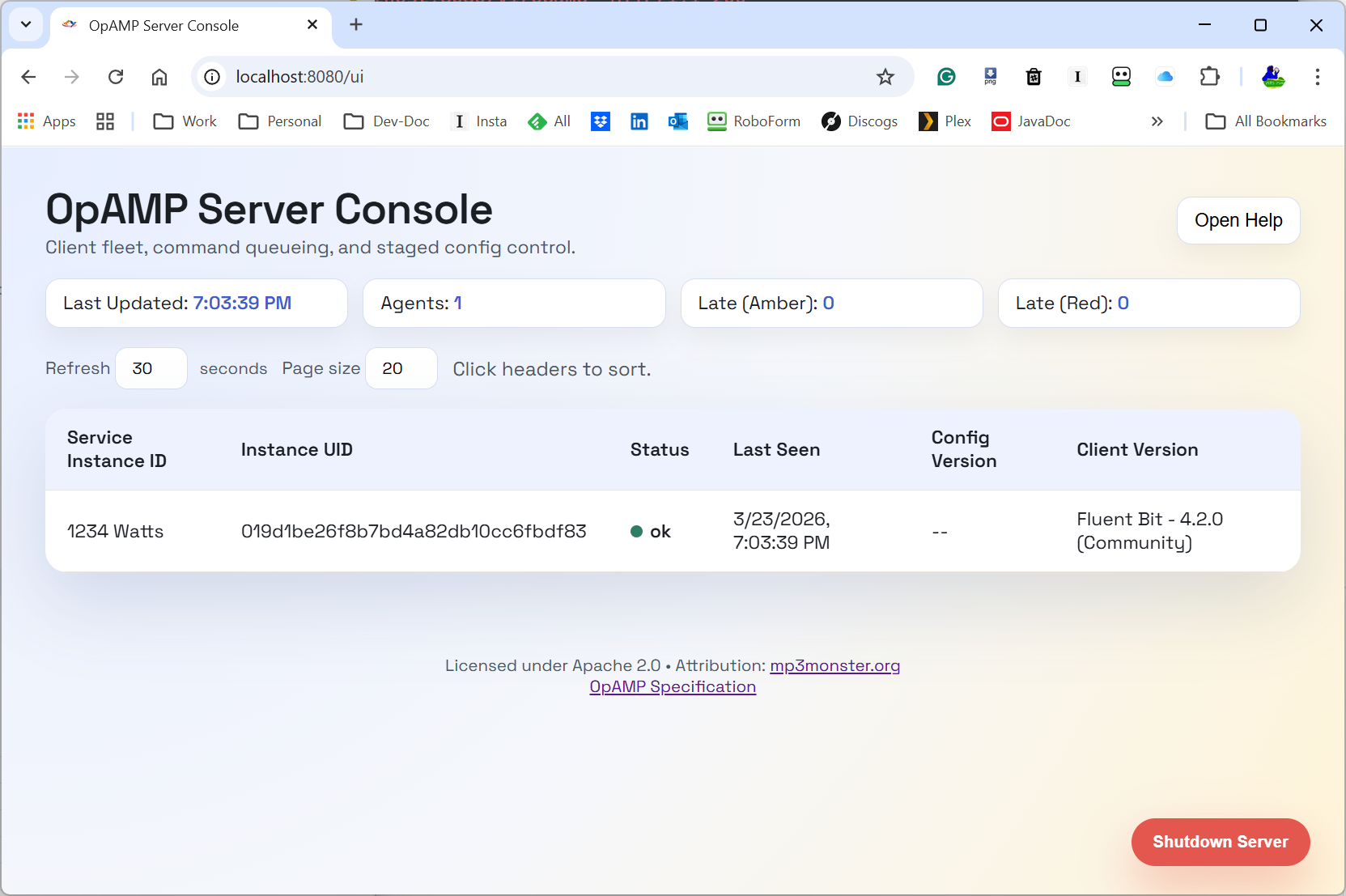
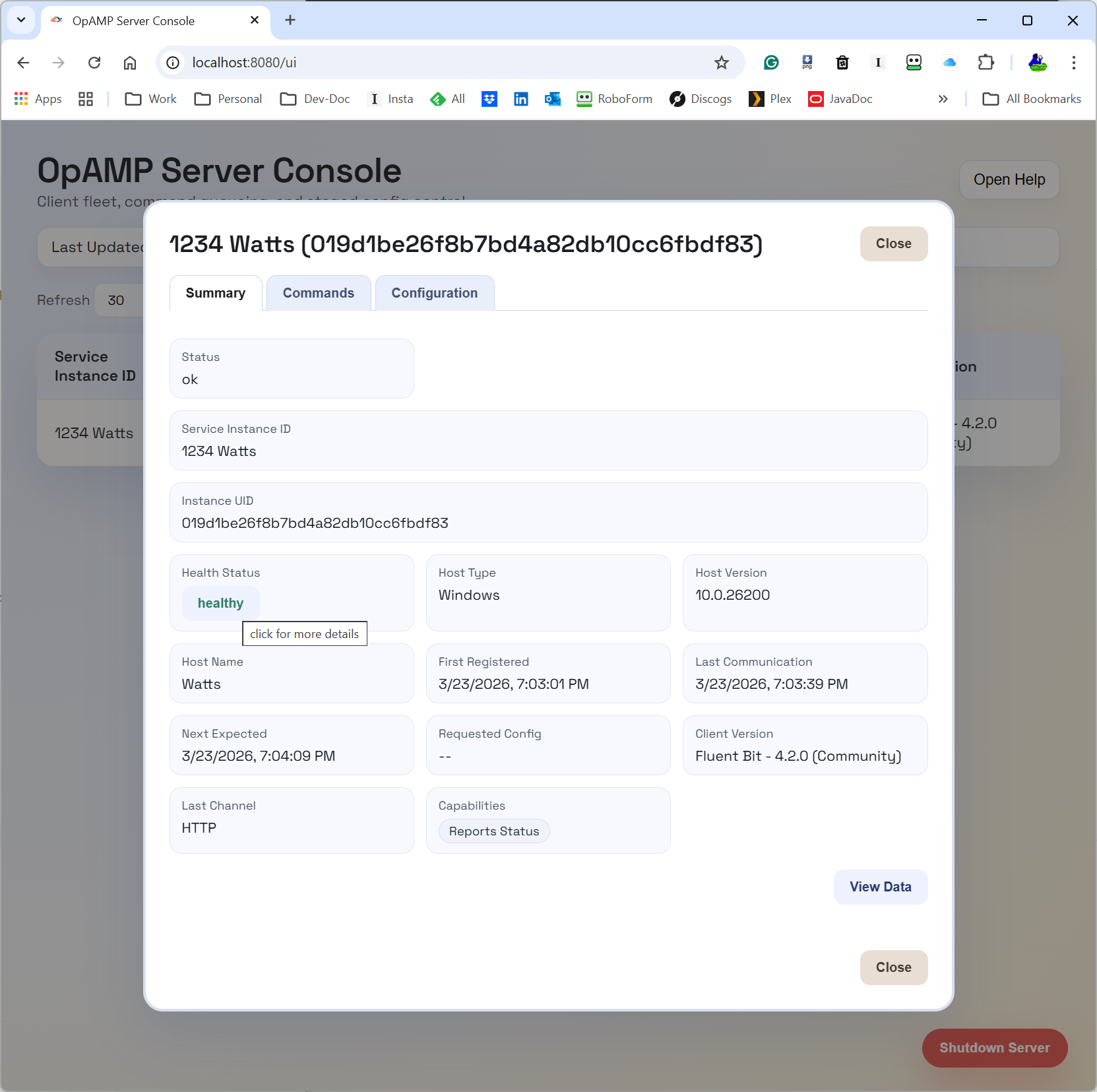
Here is a first server view we can include in the post:
The Server Console with a single Agent
The UI is still evolving, but this gives a concrete picture of the provider side control plane we are discussing.
What the OpAMP server (provider) does
The provider is responsible for the shared view of fleet state and intent.
Today it provides:
OpAMP transport endpoints (/v1/opamp) over HTTP and WebSocket.
API and UI endpoints to inspect clients and queue actions.
In-memory command queueing per client.
Emission of standard command payloads (for example, restart).
Emission of custom message payloads for custom capabilities.
Discovery and publication of custom capabilities supported by the server side command framework.
Operationally, this means we can queue intent once at the server and let the next client poll/connection cycle deliver that action in protocol-native form.
What the supervisor (consumer) does for Fluent Bit
The supervisor is the practical glue between OpAMP and Fluent Bit:
Starts Fluent Bit as a local child process.
Parses Fluent Bit config details needed for status polling.
Polls Fluent Bit local endpoints on a heartbeat loop.
Builds and sends AgentToServer messages (identity, capabilities, health/status context).
Receives ServerToAgent responses and dispatches commands.
Handles custom capabilities and custom messages through a handler registry.
So for Fluent Bit specifically, the supervisor gives us a way to participate in OpAMP now, even before native in-agent OpAMP support is universal.
And to be explicit: this is the current target. Fluentd support is a planned evolution of this same model, not a separate rewrite.
Where ChatOps fits
ChatOps is where this gets interesting for day-2 operations.
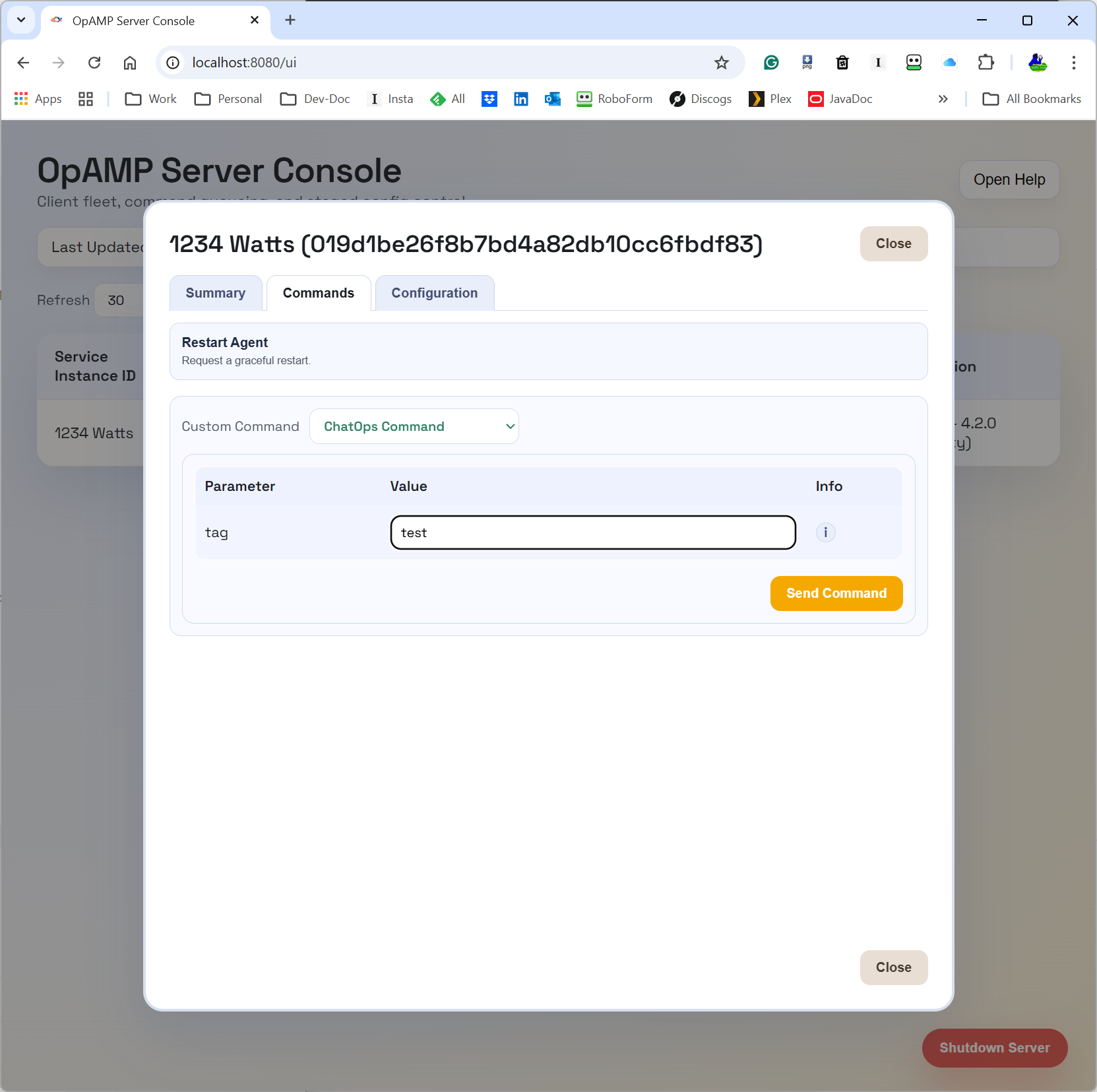
In this implementation, ChatOps commands are carried as OpAMP custom messages (custom capability org.mp3monster.opamp_provider.chatopcommand). The provider queues the custom command, and the supervisor’s ChatOps handler executes it by calling a local HTTP endpoint on the configured chat_ops_port.
That gives us a cleaner control path:
Chat/user intent can go to the central server/API.
The server routes to the right node through OpAMP.
The supervisor performs the local action and can return failure context when local execution fails.
This is a stronger pattern than directly letting chat tooling call every node individually, and it opens the door to better auditability and policy controls around who can trigger what.
Reality check: we are still testing
This is important: we are still actively testing functionality.
Current status is intentionally mixed:
Core identity, sequencing, capabilities, disconnect handling, and heartbeat/status pathways are in place.
Some protocol fields are partial, todo, or long-term backlog.
Custom capabilities/message pathways are implemented as a practical extension point and are still being hardened with test coverage and real-world runs.
So treat this as a working framework with proven pieces, not a finished all-capabilities implementation.
What is coming next (based on docs/features.md)
Near-term priorities include:
stricter header/channel validation,
heartbeat validation hardening,
payload validation against declared capabilities,
server-side duplicate websocket connection control behaviour.
Broader roadmap themes include:
authentication/security model for APIs and UI,
persistence in the provider,
richer UI controls for node/global polling and multi-node config push,
certificate and signing workflows,
packaging improvements.
And yes, a key strategic direction is evolving the framework abstraction so it can support Fluentd in due course, not only Fluent Bit. Some feature areas (like package/status richness) make even more sense in that broader collector ecosystem.
Why this matters
OpAMP gives us a standard envelope for control-plane interactions; the server/supervisor split gives us pragmatic deployment flexibility; and ChatOps provides a human-friendly control surface.
Put together, this becomes a useful pattern for managing telemetry agents in real environments where fleets are mixed, rollout velocity matters, and “just redeploy everything” is not always an option.
If you are evaluating this right now, the right mindset is: useful today, promising for tomorrow, and still under active verification as we close feature gaps.
Using a collaboration or chat platform like Slack could ease and even accelerate the response to operational issues (as systems process more data and faster).
Conversational collaborative platforms are pervasive, usable across many devices, while still being able to enforce security. Taking away the need to log in to laptops, signing in to portals before you can even start considering what the problem is.
The quicker we can understand and resolve things, the better, and the less potential damage that may need to be addressed. Using collaboration platforms does this through collaborative work, and the fact that we can see content quickly and easily because of the push model of tools like Slack.
Any Observability agent tool that can detect issues as data is moved to a backend aggregation and analytics tool gives you a head start. This is something Fluent Bit can do easily.
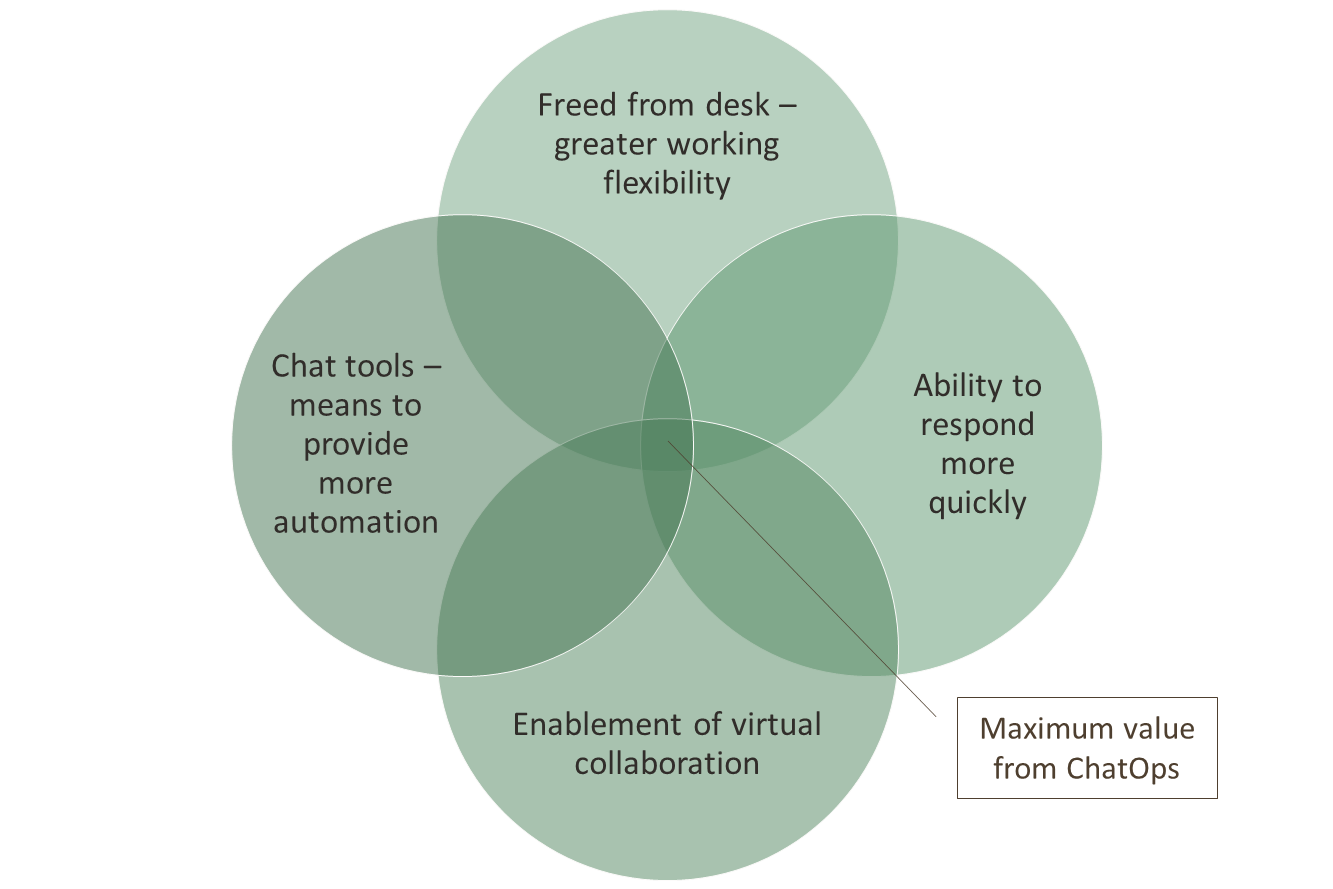
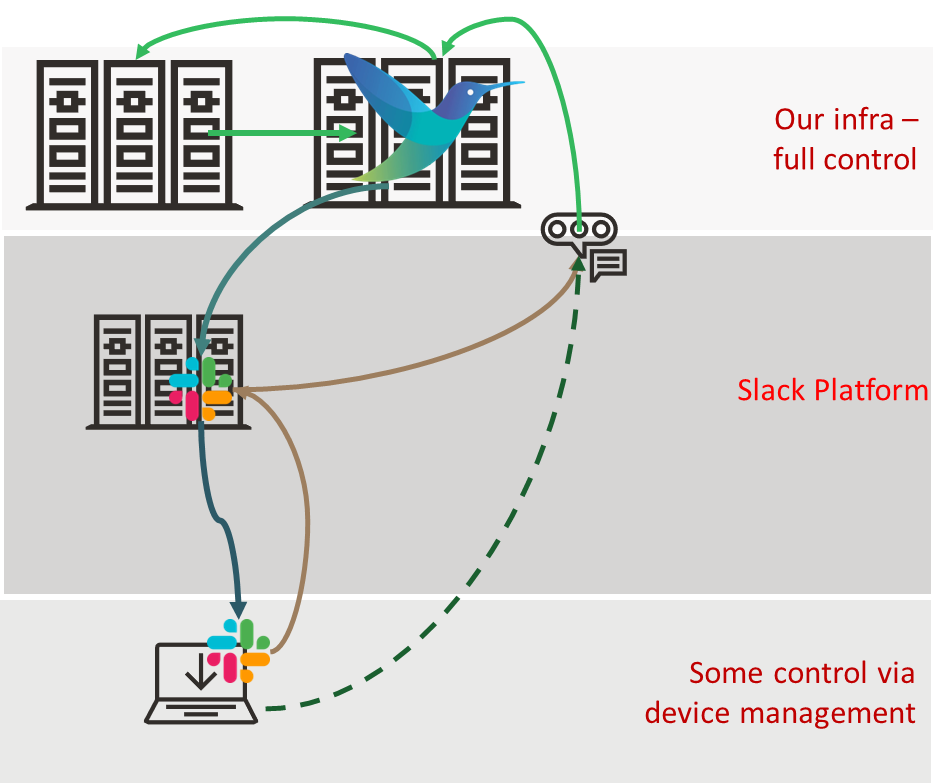
We illustrated it this way:
The ChatOps deployment looked like:
How do we advance this?
The demo was very light-touch to illustrate an idea, but we’ve since heard people pursuing the concept. So the question becomes: what has happened in the observability space that could make it easier to industrialize (e.g., scale, resilience, security, manageability)? One of the key advances being driven by the OpenTelemetry working groups within the CNCF is OpAMP. OpAMP provides a protocol for standardizing the management and control of agents and collectors such as Fluent Bit. I won’t go into the details of OpAMP here, as we covered that in a separate blog (here). But what it means is that we can either tap into the OpAMP protocol more directly as it provides a means to deliver custom commands to agents, or better still simplify by extending the management service so that we can talk to that, and it is responsible to sending on the command to the relevant agents and talk back to us if its knowledge about agent capabilities tells us its not possible.
This improves security (our bot only needs to talk to a single point in our infrastructure). Our agents, like Fluent Bit, can have a trust relationship with a central point. Effectively, we have introduced a better multifaceted trust layer into the answer. Not only that, as the OpAMP server has visibility into more of the agent deployment, we can also leverage its information and ask it to deploy our custom Fluent Bit configurations that help us observe and execute remediation processes.
Let’s look deeper
While industrialization is good, it occurs to me that there is more to collaboration and conversational (or chat) interfaces than we first envisaged.
Collaboration, to a large extent, is not about bringing multiple ideas to the table and choosing the best one; it is actually about knowledge mining. Our ideas and insights are built from individual knowledge banks, or as we might put it, experience. Conversational interfaces also allow us to see what has gone before (in effect, harvesting information to improve our knowledge). So perhaps we should be asking, within the context of a platform that allows us to easily access, share, and interpret knowledge for a specific context (i.e., our current problem), what can we do?
Knowledge is unstructured or semistructured information, and information is a semistructured composition of context and data. So how do we find and leverage information if not knowledge, particularly at 2am when we’re the only person on call? The answer is to facilitate enhanced information retrieval, which could be more Slack bots that we can use to provide structured commands to retrieve relevant data from our metrics tooling, traces, etc. Organizations that follow more ITIL-guided processes will most likely have runbooks, a knowledge base with error-code information, and previous incident logs documenting resolutions. All of which can bring together a wealth of information. Doing this in a collaborative conversational tool like Slack and MS Teams will save time and effort, as you will not have to sign in to different portals to track down the details.
But we can go better, with the rise of LLMs (large language models, Gen AI if you prefer), combined with techniques such as RAG (Retrieval Augmented Generation), MCP (Model Context Protocol), and further accelerate things as we no longer have to make our Slack bot requests use what structured commands. We use natural language, we can easily paste parts of the information we’re given as part of the request – all of which means that while a single LLM may take longer to execute a single request, it is more likely to surface the details faster because we’re not having to worry about getting the notation for the bot request correct, we’re not going to have to repeat requests to narrow data immediately. With agentic techniques, you can have the LLM pull data from multiple systems in a single go.
All of which is very achievable; many vendors (and open-source teams) have been seeking a competitive edge and exposing their APIs through MCP tools. There is the possibility that some of this is ‘AI washing’, but the frameworks to support MCP development are well progressed, so you can always refine or create your own MCP server. Here are just a few examples:
In addition to these, which align with widely used open-source solutions, there are MCP servers for vendor-specific offerings, such as Honeycomb and Chronosphere.
The use of MCP raises an interesting possibility – as it becomes very possible to have a universal MCP client, which can be easily interfaced into any conversational tool – after all, we just need to send the text that is addressed to the client, i.e., the adaptor to Slack, MS Teams, etc. is pretty simple. This means we can start to consider things like the same tooling, supporting tools like Claude Desktop, and its mobile equivalent.
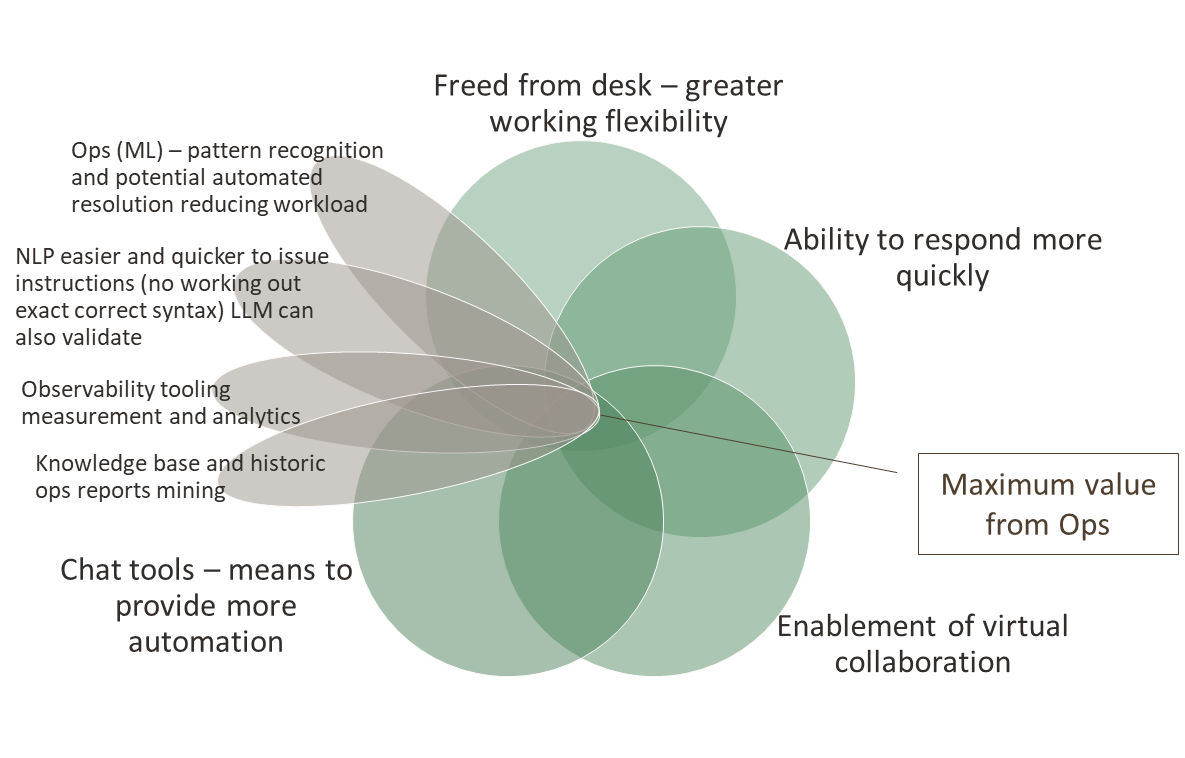
If we bring AI into the equation, consider ML and small models as well, we can start looking at exploiting pattern recognition in the occurrences of issues. This would mean the value diagram becomes more like:
We should also keep in mind the development of the new OpAMP spec from the CNCF OpenTelemetry project that provides a mechanism to centrally track and interact with all our agents, such as Fluent Bit (not to mention Fluentd, OTel Collectors, and others).
Bringing all of this together isn’t a small task, and what of these ideas already exist? Are there building blocks we can lean on to show that the ideas expressed here are achievable? This brought us to IncidentFox.ai (GitHub link – IncidentFox). IncidentFox already exploits MCP servers from several products, such as Grafana, and supports a knowledge base geared towards intelligent searching that can also tap into common sources of operational knowledge, such as Confluence.
But IncidentFox has taken the use of LLMs further with its agentic approach, recommending actions, and once it has access to source code, LLMs can be used to start looking for root causes. To do this, IncidentFox has harnessed the improvements in Gen AI reasoning and the selection and use of the MCP-enabled tools we mentioned, which enable the extraction of data and information from mainstream observability tools.
IncidentFox isn’t the only organization heading in this direction (Resolve.ai, Randoli, and Kloudfuse are building AI SRE tools, but with a fully proprietary business model), but it is supporting an open-source core. All of these solutions come under the banner of AI SRE. Interestingly, a new LLM benchmark has emerged called SRESkillsBench, in addition to the models such as Bird and Spider, which specifically evaluate LLMs against SRE tasks. This kind of information certainly is going to create some interesting debates – do you use the best LLM for specific tasks, or the LLM the vendor has worked with and optimized their prompting to get the best from it?
A lot of these tools focus on detection and diagnostics, and steer you to the relevant runbooks, there seems to be less said about how runbooks can be translated into remediation actions that can be executed. The ability to translate runbooks into executable steps will require either tooling via MCP or custom models with suitable embedded functions. Whichever approach is adopted, having a well-understood control plane, such as Kubernetes, will make it easier. But not everything is native K8s. Lots of organizations still use just virtualization, or even bare metal. We also see this with cloud vendors that offer bare-metal services due to the need for maximum compute horsepower. To address these scenarios from a centralized control, either needs to allow remote access (ssh tunnels) to all the nodes, or a means to work with a distributed tooling mechanism, which is what we had with our original chatops idea and the possibilities offered through OpAMP.
Of course, introducing LLMs opens up another set of challenges in the observability space, which OpenLLMetry (driven by TraceLoop) and LangFuse are working to address. But that’s for another blog.
What does this mean to our ChatOps proof of concept?
Sticking with an open-source/standards-based approach means there is a clear direction of enabling AI Agents to be part of the OTLP (Open Telemetry Protocol) pipeline and leverage the MCP tooling of backend observability platforms. IncidentFox doesn’t yet provide an inline OTLP capability (although some of the proprietary options have gone this way), but that is less of a concern, as Fluent Bit provides a lot of capability to help identify issues (such as timeseries/frequency measurement, error identification, etc.), which can be combined with IncidentFox’ means to instruct it to initiate an incident. We could do this with direct API calls, but what would be more interesting and flexible is that, when our Fluent Bit process notifies the Ops team in Slack of an issue, it also ensures that the IncidentFox Slack agent picks up the message, allowing it to start its own analysis. In effect, a collaboration platform can be as impactful as an integration platform.
Furthermore, now that we have early warning of an issue via Fluent Bit, we can interact with IncidentFox through its tooling to start interrogating the diverse range of tools well before the new problem’s details have been fully ingested into the backend tooling and been detected as an issue. So we can now get a jump start by prompting IncidentFox, which can mine for information and recommendations. This is where, at 2am, we can still work collaboratively, albeit with a collaborator that is not another person but an LLM.
As I’ve mentioned, the challenge is making the runbook executable in environments that don’t provide a strong control plane, such as K8s. Here, we can further develop our ChatOps concept. By providing a set of MCP tools for Fluent Bit (IncidentFox supports providing your own tools), the runbook can describe remediation steps, and the use of the LLM ensures the Fluent Bit tool is invoked appropriately.
This would still mean that the central point of Incident Fox would need to talk with each Fluent Bit deployment, better than just opening up SSH directly. But we could be smarter. OpAMP provides a central coordination point, and through its Supervisor or embedded logic in an observability client, the protocol’s support for custom commands could be exploited. So we expose the way we interact with Fluent Bit via the custom command mechanism, and we have a robust, controlled mechanism. Furthermore, the concept could be extended to exploit the aggregated knowledge of agents and their configuration (or pushing out new configurations to solve operational problems as OpAMP has been designed to enable), we can automate the determination of whether the remediation action needs to be executed across operational nodes.
Let’s walk through a hypothetical (but plausible) scenario. We have manually deployed systems across a load-balanced set of servers in a pre-production environment used for load testing, each with TLS certificates. As it is a pre-production environment, we use self-signed certificates. We are starting to see errors because the certificates have expired, and someone forgot to recycle them. Fluent Bit has been forwarding the various error log messages to Loki, but the high frequency of the errors causes it to send details to Slack for the Ops team. This, in turn, nudges IncidentFox to act, determines the root issue, and finds remediation in a runbook that points to running a script on the host to provide a fresh self-signed certificate. As we have a Fluent Bit ops pipeline that can trigger that script, and it is deemed low risk, we allow IncidentFox to execute the runbook unsupervised. To execute the run book, it uses the OpAMP server to send the custom command to Fluent Bit. But the runbook says other nodes should be checked. As a result, IncidentFox works with the OpAMP server via its MCP tooling to identify which other Fluent Bit deployments are monitoring other nodes and to direct the custom command to those nodes as well.
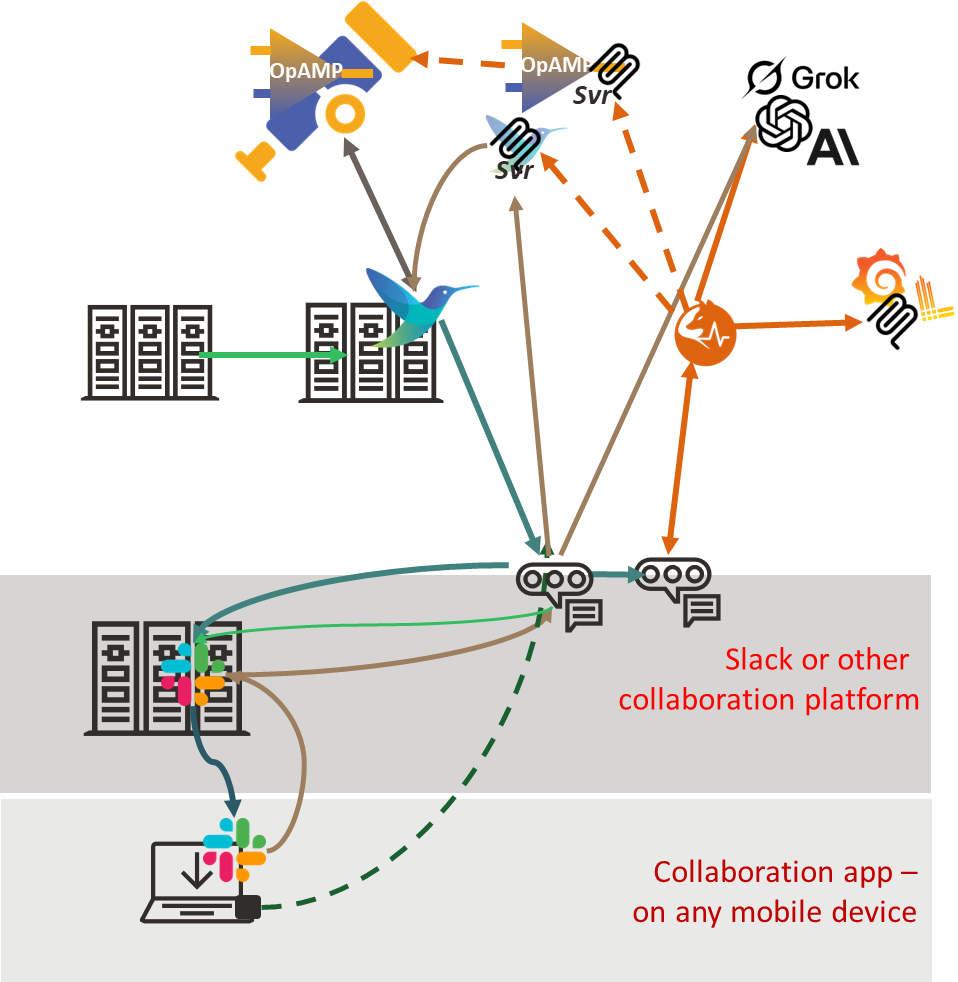
To achieve this, we need an architecture along the following lines, in addition to IncidentFox and the associated MCP tools, we would need to have the OpAMP server, either the OpAMP client embeddable into Fluent Bit or an OpAMP supervisor that understands how to pass custom commands, something it perhaps could do by using another MCP interface to Fluent Bit directly.
Conclusion
As you can see, there has been significant advancement in how LLMs and MCP tooling can be used to enable operational support activities. To turn this into a reality, the core Fluent Bit committers need to ideally press on with supporting OpAMP. A standardized MCP tooling arrangement for an open-source OpAMP server will also make a significant advancement. Although we could get things working directly with MCP using Fluent Bit.
IncidentFox being able to function as an OpAMP server itself would really enable it shift the narrative, particularly if it provided a means to plug into a supervisor to handle custom actions.
Root cause analysis – understanding deployment changes
Looking at all of this, one dimension of operational issues is the ability to correlate an issue with environmental changes. That means understanding not only software versions, but also the live configuration. Again, not too difficult when your control plane is K8s. But trickier outside of that ecosystem. You need to identify when the change was defined and when it was applied. Is it time for some functionality that understands when details such as file stamps for configurations or certain binary files change? Perhaps a proxy service that can spot API calls to configuration endpoints and file system changes to configuration files? Then have that information logged centrally so that problems can be correlated to a system configuration or deployment problem.
Updates
Since writing this, we came across Mezmo, which, like Resolve.ai, is developing a proprietary solution but is looking to make an open-source offering. As part of that journey, they have sponsored an O’Reilly Report on Context Engineering for Observability.
Fluent Bit and OpenTelemetry’s Collector (as well as many other observability tools) are designed to use a distributed/agent model for deployment. This model can pose challenges, including ensuring that all agents are operating healthily and correctly configured. This is particularly true outside of a Kubernetes ecosystem. But even within a Kubernetes ecosystem, more than basic insights are required (for example, is it running flat out or over-resourced). Fluent Bit exposes its own metrics and logs so that you can either configure Fluent Bit to forward the metrics and logs to an endpoint (or allow Prometheus to scrape the metrics).
As we’re usually using Fluent Bit to collect data and route it to tools like Prometheus, Grafana, etc., or perhaps a more commercial product. So it makes sense that Fluent Bit is also sharing its own status and health.
When it comes managing the configuration of Fluent Bit, we have lots of options for Kubernetes deployments (from forcing pod replacement, to sharing configurations via persistent volume claims, and Fluent Bit reloading configs), but given that Observability needs to operate on simple virtualized and bare metal scenarios, and not everything can be treated as dynamically replaceable more general strategies such as GITOps and potentially using Istio (yes, there really good use cases for Istio outside of Kubernetes) are available. But there is also more advanced tooling, such as Puppet, Chef, and Ansible.
The challenge is non of these tools provides out-of-the-box capabilities to fully exploit the control surface that OTel Collectors and Fluent Bit offer. So the OpenTelemetry community has elected to develop a new standard called OpAMP, which fits snuggly into the OTel ecosystem.
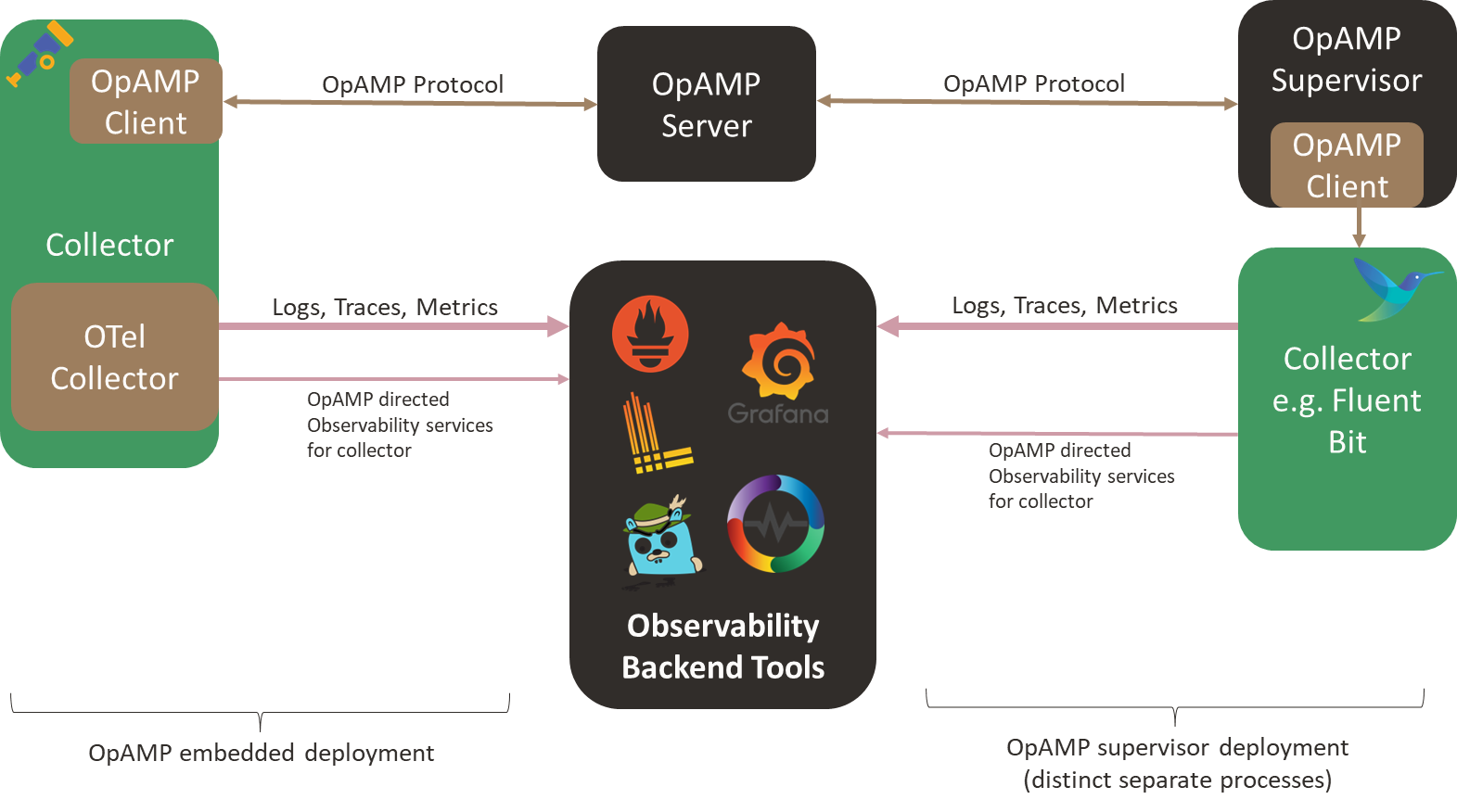
OpAMP defines an agent/client and server model in which the central server provides control, measurement, etc., to all Collectors. The agent/client side can be deployed in two ways: wired directly into a collector or via a separate supervisor tool. Integrating the client-side directly into the client is great, as it avoids introducing a new local process. The heart of OpAMP is the message exchange, which we’ll look at more in a moment.
Today, Fluent Bit would need to use the Supervisor model without modification (although GitHub shows a feature request to support the protocol, we haven’t heard whether or when it will be implemented). But it is early days, and some aspects of the protocol are still classified as ‘development’. That said, it is worth looking more closely at OpAMP as it offers some interesting opportunities, particularly around how we could easily evolve ideas such as chatOps.
While I’m not a fan of having a peer process for Fluent Bit, on the basis that we now have two distinct processes to support observability, we could experiment with the supervisor spawning Fluent Bit as a child process, which would let the supervisor easily spot Fluent Bit failing. At the sametime the supervisor can communicate with Fluent Bit using the localhost loopback adapter and the usual APIs.
Understanding the OpAMP Protocol and what it offers
Lets start with what the OpAMP protocol offers, firstly very little of it is mandatory (this is both good and bad – it means we can build compatibility in a more incremental manner, if certain behaviours are provided elsewhere, then the agent doesn’t have to offer a capability it is also tolerant of what an agent or collector can and can’t do):
Heatbeat and announce the agent’s existence to the server, along with what the agent is capable of/allowed to do regarding OpAMP features.
Status information, including:
environmental information
configuration being run
modules being used
Perform updates to resources, including:
Agent configuration
TLS certificate rotation
Credentials management
module or even an entire agent installation
issuing of custom commands.
directing the agent’s own telemetry to specific services/endpoints.
The heart of this protocol is the contract between the client (agent/collector) and the server, defined using Protobuf3. This means you can easily create the code skeleton to handle the payload objects, which will be transmitted in binary form (giving network traffic efficiency and the price of not being humanly readable or dynamically processable, insofar as you need to know the Protobuf definition to extract any meaning).
In addition to the Protobuf definitions, there are rules for handling messages, specifying when a message or response is required, message sequence numbering, and the default heartbeat frequency. But there aren’t any complex exchanges involved.
The binary payloads are exchanged over Sockets (allowing full-duplex exchanges where the server can send requests at any time) or over HTTP (providing half-duplex, aka polling/client check-in, at which point the server can respond with an instruction) – a strategy that is becoming increasingly common today.
The benefits we see
Regardless of whether you’re in a Kubernetes environment, the ability to ask agents/collectors to quickly tweak their configuration is attractive. If you start suspecting a service or application is not behaving as expected, if Fluent Bit is filtering your logs or sampling traces, you can quickly push a config change out to allow more through, providing further insight into what is going on – you don’t need to wait for a Kubernetes scheduler to roll through with replacing pods.
With the rise of AI, having a central point of contact makes it easier to wrap a central server as an MCP tool and have a natural language command interface. Along with the possibility that you can potentially send custom commands to the agent (or supervisor) to initiate a task. This was part of the functionality we effectively implemented in our original chatops showcase. The problem was that in the original solution, we deployed a small Slack bot that directed HTTP calls to Fluent Bit. With the OpAMP framework, we can direct the request to the server, which will route the command to the correct Fluent Bit node through a more trustworthy channel.
Implementation
The OpAMP protocol is likely to be widely adopted by commercial service providers (Bindplane,OneUpTime, for example), as it allows them to start working with additional agents/collectors that are already deployed (for example, a supervisor could be used to manage a Fluentd fleet, where there isnt the appetite to refactor all the configuration to Fluent Bit or an OTel Collector). Furthermore, it has the potential to simplify by standardizing functionality.
In terms of resource richness in the OpenTelemetry GitHub repo, I suspect (and hope) there will be more to come (a UI and richer details on how a base server can be extended, for example). At the time of writing, within the OpenTelemetry GitHub repository, we can see:
Go implementation of the protocol: the server accepts and responds to messages, and the client includes some test functionality to populate messages.
A supervisor implementation that, through configuration, can be pointed at an agent to observe, and the configuration so that the supervisor is uniquely identifiable to the server. This is also implemented in Go.
With vibe coding (an expression now part of the Collins Dictionary) and tools like Cline, which are penetrating the development process, I thought it would be worthwhile to see how much can be done with an LLM for building configurations. Since our preference for a free LLM has been with Grok (xAI) for development tasks, we’ve used that. We found that beyond the simplest of tasks, we needed to use the Expert level to get reliable results.
This hasn’t been a scientific study, as you might find in natural language-to-SQL research, such as the Bird, Archer, and Spider benchmarks. But I have explained below what I’ve tried and the results. Given that LLMs are non-deterministic, we tried the same question from different browser sessions to see how consistent the results were.
Ask the LLM to list all the plugins it knows about
To start simply, it is worth seeing how many plugins the LLM might recognize. To evaluate this, we asked the LLM to answer the question:
list ALL fluent bit input plugins and a total count
Grok did a pretty good job of saying it counted around 40. But the results did show some variation: on one occasion, it identified some plugins as special cases, noting the influence of compilation flags; on another attempt, no references were made to this. In the first attempts, it missed the less commonly discussed plugins such as eBPF. Grok has the option to ask it to ‘Think Harder’ (which switches to Exper mode) when we applied this, it managed to get the correct count, but in another session, it also dramatically missed the mark, reporting only 28 plugins.
Ask the LLM about all the attributes for a Plugin
To see if the LLM could identify all the attributes of a plugin, we used the prompt:
list all the known configuration attributes for the Fluent Bit Tail plugin
Again, here we saw some variability, with the different sessions providing between 30 and 38 attributes (again better results when in Expert mode). In all cases, the main attributes have been identified, but what is interesting is that there were variations in how they have been presented, some in all lowercase, others with leading capitalization.
Ask the LLM to create a regular expression
Regular expressions are a key way of teasing out values that may appear in semi-structured or unstructured logs. To determine if the LLM could do this, we used the following prompt:
Create a regular expression that Fluent Bit could execute that will determine if the word fox appears in a single sentence, such as 'the quick brown fox jumped over the fence'
The result provided offered variations on the expression \bfox\b (sometimes allowing for the possibility that Fox might be capitalized). In each of the cases where we went back to the LLM and added to the prompt that Note that the expression should be case sensitive – It was consistently correct.
The obvious takeaway here is that to avoid any errors, we do need to be very explicit.
Ask the LLM to create a simple filter and output
Given that we can see the LLM understands the most commonly used Fluent Bit plugins, let’s provide a simple scenario with a source log that will have some rotation, and see how it processes it. The prompt provided is:
create a classic configuration for fluent bit that will read an input from a file called myApp which has a post fix with the date. The input needs to take into account that the file extension will change at midnight. Any log entries that show an error and reference an IP need to be filtered to go to a CSV file with columns in the order tag, IP, log, timestamp
The handling of this question differed significantly across sessions: one response implemented filtering and output structuring via a Lua function, while another maximized the use of multiple filters. None of the solutions recognized that the output could reference standard Fluent Bit attributes for the tag and timestamp.
What was interesting was that the LLM also picked up on the possibility of externalizing the parser expressions, such as finding the IP. Interestingly, Fluent Bit includes a predefined set of filters, including an IPv4 filter.
Ask the LLM to use a stream processor
Stream Processors are a less commonly used feature of Fluent Bit, so it would be interesting to see how well the LLM can handle such use cases.
create a Fluent Bit YAML configuration which takes an NGINX log file input and uses a SQL stream processor to count the number of calls identified and the average time between these calls as coming from IP addresses starting 10. every minute. The NGINX logs need to be forwarded to a fluent bit node on the server named ops.myCorp.com and the output of the stream processing needs to go to a local log file called counter.txt and written to a Prometheus end point called ops_prometheus.myCorp.com
The result of this prompt comes in two parts. A main configuration:
The configuration for the second node provided is:
service:
  log_level: info

pipeline:
  inputs:
    - name: tail
      path: /path/to/nginx/access.log  # Adjust to your NGINX access log path
      tag: nginx
      db: /var/log/fluent-bit-tail.db  # For position tracking

  outputs:
    - name: forward
      match: nginx
      host: ops.myCorp.com
      port: 24224
As you can see, while the configuration is well-formed, the LLM has confused the input and output requirements. This is because we have not been explicit enough about the input. The thing to note is that if we tweak the prompt to be more explicit and resubmit it, we get the same mistake, but submitting the same revised prompt produces the correct source. We can only assume that this is down to the conversational memory yielding a result that takes precedence over anything older. For transparency, here is the revised prompt with the change underlined.
create a Fluent Bit YAML configuration which takes an NGINX log file as an input. The NGINX input uses a SQL stream processor to count the number of calls identified and the average time between these calls as coming from IP addresses starting 10. every minute. The input NGINX logs need to be output by forwarding them to a fluent bit node on the server named ops.myCorp.com and the output of the stream processing needs to go to a local log file called counter.txt and written to a Prometheus end point called ops_prometheus.myCorp.com
The other point of note in the generated configuration provided is that there doesn’t appear to be a step that matches the nginx tag, but results in events with the tag ip10.stats. This is a far more subtle problem to spot.
What proved interesting is that, with a simpler calculation for the stream, the LLM in an initial session ignored the directive to use the stream processor and instead used the logs_to_metrics filter, which is a simpler, more maintainable approach.
Creating Visualizations of Configurations
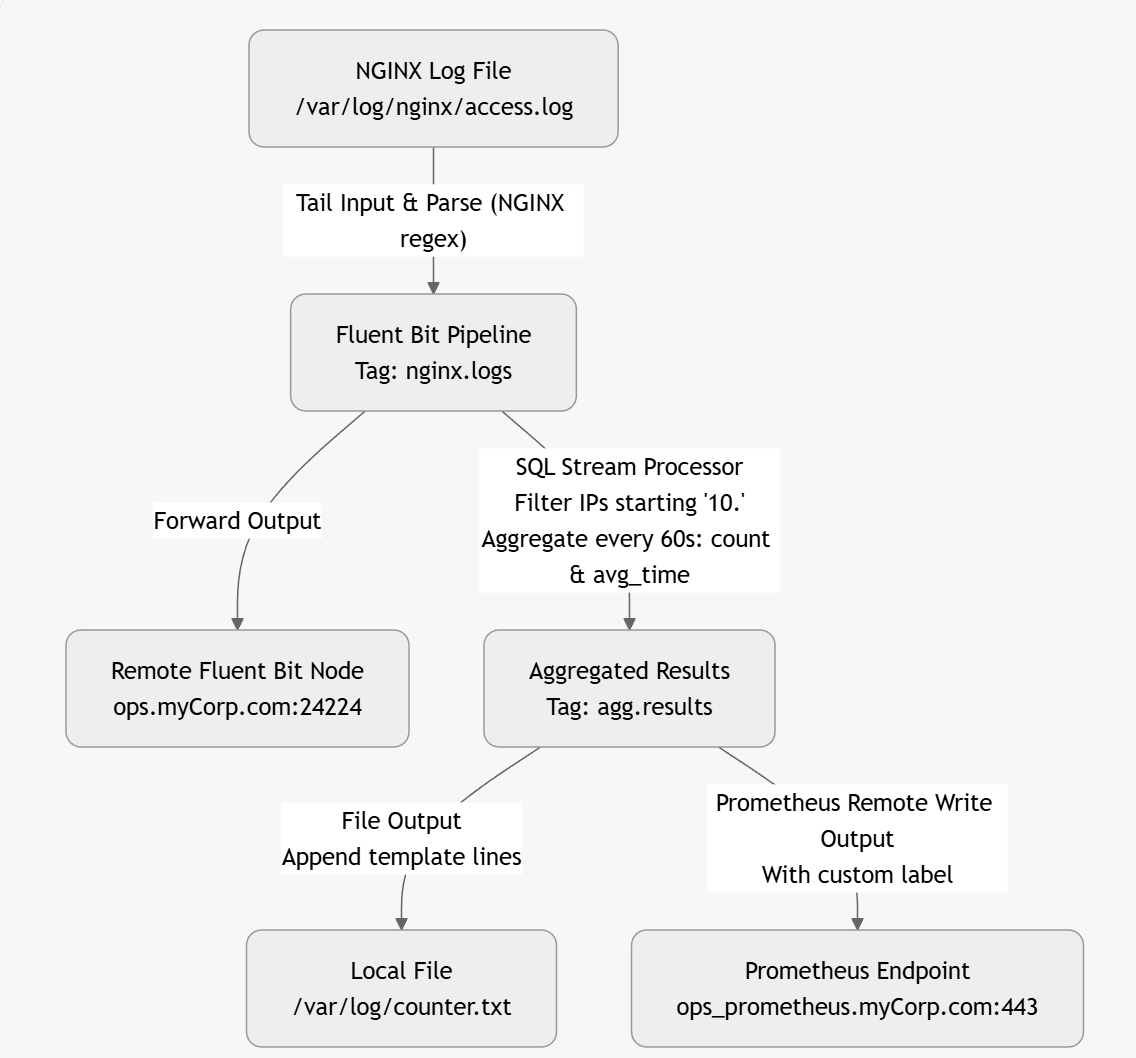
One of the nice things about using an LLM is that, given a configuration, it can create a visual representation (directly) or in formats such as Graphviz, Mermaid, or D2. This makes it easier to follow diagrams immediately. Here is an example based on a corrected Fluent Bit configuration:
The above diagram was created by the LLM as a mermaid file as follows
graph TD
A[NGINX Log File
/var/log/nginx/access.log] -->|"Tail Input & Parse (NGINX regex)"| B[Fluent Bit Pipeline
Tag: nginx.logs]
B -->|Forward Output| C[Remote Fluent Bit Node
ops.myCorp.com:24224]
B -->|"SQL Stream Processor
Filter IPs starting '10.'
Aggregate every 60s: count & avg_time"| D[Aggregated Results
Tag: agg.results]
D -->|"File Output
Append template lines"| E[Local File
/var/log/counter.txt]
D -->|"Prometheus Remote Write Output
With custom label"| F[Prometheus Endpoint
ops_prometheus.myCorp.com:443]
Lua and other advanced operations
When it comes to other advanced features, the LLM appears to handle this well, but given that there is plenty of content available on the use of Lua, the LLM could have been trained on. The only possible source of error would be the passing of attributes in and out of the Lua script, which it handled correctly.
We experimented with handling open telemetry traces, which were handled without any apparent issues. Although advanced options like compression control weren’t included (and neither were they requested).
We didn’t see any hallucinations when it came to plugin attributes. When we tried to ‘bait’ the LLM into hallucinating an attribute by asking it to use an attribute that doesn’t exist, it responded by adding the attribute along with a configuration comment that the value was not a valid Fluent Bit attribute.
General observations
One thing that struck me about this is that describing what is wanted with sufficient detail for the LLM requires a higher level of focus (albeit for a shorter period) than manually creating the configuration. The upside is that we are, in effect, generating part of a detailed design document. Today, I’d go so far as to suggest including the prompt(s) used in the configuration header(s) to help people understand what is needed from the configuration.
When the LLM generates the configuration, there will be no escaping the need to understand what the plugins do and the options they offer to determine whether the LLM has got it right. If the LLM gets it wrong, we would recommend starting a fresh session.
This does raise a bit of an interesting challenge. If you need to have a fair handle on how Fluent Bit works and common ways plugins work, then actually writing your own configuration files may be better anyway, as that approach will provide more reinforcement to learning. We, of course, can use the LLM to help ‘peer review’ our configurations in the sense of checking syntax, and generating visual representations can help confirm the configuration is as we expect.
This may be a personal thing, as I find myself working with Fluent Bit in small bursts rather than continually. As a result, I remember what I can do with a plugin, but I often forget the exact names of the less commonly used attributes to effect the desired behavior. Looking up, and keying in the attribute names can take time. One thing that we have tried was to include in the prompt statements, such as:
In the configuration include all the attributes even if they are only populated with their default or example values. Add a comment for each attribute to show its surpose and whether it is mandatory or not.
What you get then is all the possible options, with the correct names (something that is easy for the LLM, as it is essentially asking it to reformat the documentation for you). Then it becomes a case of removing the attributes that aren’t needed line by line—a lot quicker and easier than manually adding them.
LLM generated plugin with all attributes described (slightly modified output to make the point clearer).
[INPUT]
   Name tail
     # Purpose: Specifies the input plugin to use. Mandatory: yes
   buffer_chunk_size 32k
     # Purpose: Set the initial buffer size to read file data. The value must be according to the Unit Size specification. Mandatory: no
   buffer_max_size 32k
    # Purpose: Set the limit of the buffer size per monitored file. If reading a file exceeds this limit, the file is removed from the monitored file list. The value must be according to the Unit Size specification. Mandatory: no
   path /var/log/blah.txt
    # Purpose: Pattern specifying a specific log file or multiple ones through the use of common wildcards. Allows multiple patterns separated by commas. Mandatory: yes
    path_key filename
     # Purpose: If enabled, it appends the name of the monitored file as part of the record. The value assigned becomes the key in the map. Mandatory: no
  exclude_path *.gz,*.zip
     # Purpose: Set one or multiple shell patterns separated by commas to exclude files matching certain criteria, e.g., *.gz,*.zip. Mandatory: no
  offset_key offset
     # Purpose: If enabled, Fluent Bit appends the offset of the current monitored file as part of the record. The value assigned becomes the key in the map. Mandatory: no
  read_from_head false
    # Purpose: For new discovered files on start (without a database offset/position), read the content from the head of the file, not tail. Mandatory: no
  refresh_interval 60
    # Purpose: The interval of refreshing the list of watched files in seconds. Mandatory: no
  rotate_wait 5
    # Purpose: Specify the number of extra time in seconds to monitor a file once it is rotated in case some pending data is flushed. Mandatory: no
  ignore_older 1d
    # Purpose: Ignores files older than ignore_older. Supports m, h, d (minutes, hours, days) syntax. Mandatory: no
  ignore_active_older_files  false
    # Purpose: Ignore files that are older than the value set in ignore_older even if the file is being ingested. Mandatory: no
  skip_long_lines off
    # Purpose: When a monitored file reaches its buffer capacity due to a very long line (buffer_max_size), the default behavior is to stop monitoring that file. skip_long_lines alters that behavior and instructs Fluent Bit to skip long lines and continue processing other lines that fit into the buffer size. Mandatory: no
  skip_empty_lines off
    # Purpose: Skips empty lines in the log file from any further processing or output. Mandatory: no
  db /fluent-bit/tail/blah.db
    # Purpose: Specify the database file to keep track of monitored files and offsets. Recommended to be unique per plugin. Mandatory: no
  db.sync normal
    # Purpose: Set a default synchronization (I/O) method. Affects how the internal SQLite engine synchronizes to disk. Values: extra, full, normal, off. Mandatory: no
  db.locking false
    # Purpose: Specify that the database will be accessed only by Fluent Bit. Enabling this increases performance but restricts external tools from querying the content. Mandatory: no
  db.journal_mode wal
    # Purpose: Sets the journal mode for databases (wal). Enabling wal provides higher performance. Not compatible with shared network file systems. Mandatory: no
  db.compare_filename false
    # Purpose: Determines whether to review both inode and filename when retrieving stored file information from the database. true verifies both; false checks only the inode. Mandatory: no
  mem_buf_limit 10MB
    # Purpose: Set a memory limit that the Tail plugin can use when appending data to the engine. If the limit is reached, it will be paused. When the data is flushed, it resumes. Mandatory: no
  exit_on_eof false
    # Purpose: When reading a file, exit as soon as it reaches the end of the file. Used for bulk load and tests. Mandatory: no
  parser none
    # Purpose: Specify the name of a parser to interpret the entry as a structured message. Mandatory: no
  key log
   # Purpose: When a message is unstructured (no parser applied), it's appended as a string under the key name log. This option lets you define an alternative name for that key. Mandatory: no
  inotify_watcher true
   # Purpose: Set to false to use file stat watcher instead of inotify. Mandatory: no
  tag blah.logs
   # Purpose: Set a tag with regexextract fields that will be placed on lines read. Supports tag expansion: if the tag includes an asterisk (*), that asterisk will be replaced with the absolute path of the monitored file, with slashes replaced by dots. Mandatory: no
  tag_regex (?<pod_name>[a-z0-9](?:[-a-z0-9]*[a-z0-9])?(?:\\.[a-z0-9]([-a-z0-9]*[a-z0-9])?)*)_(?<namespace_name>[^_]+)_(?<container_name>.+)-(?<container_id>[a-z0-9]{64})\.log$
    # Purpose: Set a regular expression to extract fields from the filename. Mandatory: no
  static_batch_size 50M
    # Purpose: Set the maximum number of bytes to process per iteration for the monitored static files (files that already exist upon Fluent Bit start). Mandatory: no
  file_cache_advise on
    # Purpose: Set the posix_fadvise in POSIX_FADV_DONTNEED mode. This reduces the usage of the kernel file cache. This option is ignored if not running on Linux. Mandatory: no
  threaded false
    # Purpose: Indicates whether to run this input in its own thread. Mandatory: no
  Unicode.Encoding none
    # Purpose: Set the Unicode character encoding of the file data. Requests two-byte aligned chunk and buffer sizes. Supported values: UTF-16LE, UTF-16BE, and auto. Mandatory: no
  Generic.Encoding none
    # Purpose: Set the non-Unicode encoding of the file data. Supported values: ShiftJIS, UHC, GBK, GB18030, Big5, Win866, Win874, Win1250, Win1251, Win1252, Win1254, Win1255, Win1256. Mandatory: no
  multiline.parser docker,cri
    # Purpose: Specify one or multiple Multiline Parser definitions to apply to the content. When using a new multiline.parser definition, you must disable the old configuration from your tail section (e.g., parser, parser_firstline, parser_N, multiline, multiline_flush, docker_mode). Mandatory: no
  multiline off
    # Purpose: If enabled, the plugin will try to discover multiline messages and use the proper parsers to compose the outgoing messages. When this option is enabled, the parser option isn't used. Mandatory: no
  multiline_flush 4
    # Purpose: Wait period time in seconds to process queued multiline messages. Mandatory: no
  parser_firstline none
    # Purpose: Name of the parser that matches the beginning of a multiline message. The regular expression defined in the parser must include a group name (named capture), and the value of the last match group must be a string. Mandatory: no
  parser_1 example_parser
    # Purpose: Optional. Extra parser to interpret and structure multiline entries. This option can be used to define multiple parsers. For example, parser_1 ab1, parser_2 ab2, parser_N abN. Mandatory: no
  docker_mode off
    # Purpose: If enabled, the plugin will recombine split Docker log lines before passing them to any parser. This mode can't be used at the same time as Multiline. Mandatory: no
  docker_mode_flush 4
   # Purpose: Wait period time in seconds to flush queued unfinished split lines. Mandatory: no
  docker_mode_parser none
    # Purpose: Specify an optional parser for the first line of the Docker multiline mode. The parser name must be registered in the parsers.conf file. Mandatory: no

[OUTPUT]
  Name   stdout
  Match  *
  Format json_lines
[OUTPUT] Name stdout Match * Format json_lines
I would also suggest it is worth trying the same prompt is separate conversations/sessions to see how much variability in approach to using Fluent Bit is thrown up. If the different sessions yield very similar solutions, then great. If the approaches adopted are different, then it is worth evaluating the options, but also considering what in your prompt might need clarifying (and therefore the problem being addressed).
Generating a diagram to show the configuration is also a handy way to validate whether the flow of events through it will be as expected.
The critical thing to remember is that the LLM won’t guarantee that what it provides is good practice. The LLM is generating a configuration based on what it has seen, which can be both good and bad. Not to mention applying good practice demands that we understand why a particular practice is good, and when it is to our benefit. It is so easy to forget that LLMs are primarily exceptional probability engines with feedback loops, and their reasoning is largely probabilities, feedback loops, and some deterministic tooling.
MCP (Model Context Protocol) has really taken off as a way to amplify the power of AI, providing tools for utilising data to supplement what a foundation model has already been trained on, and so on.
With the rapid uptake of a standard and technology that has been development/implementation led aspects of governance and security can take time to catch up. While the use of credentials with tools and how they propagate is well covered, there are other attack vectors to consider. On the surface, it may seem superficial until you start looking more closely. A recent paper Model Context Protocol (MCP): Landscape, Security Threats, and Future Research Directions highlights this well, and I thought (even if for my own benefit) to explain some of the vectors.
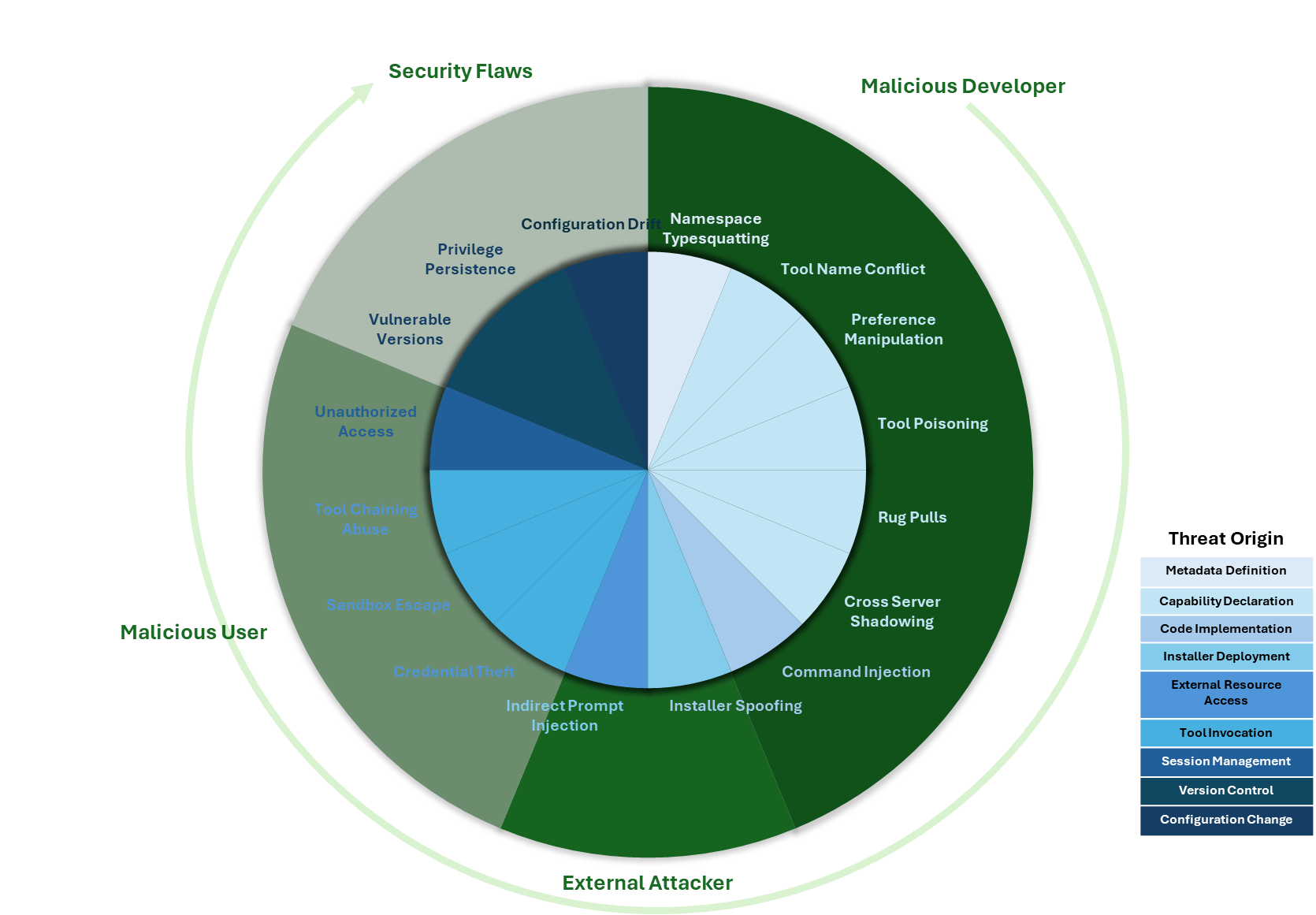
I’ve also created a visual representation based on the paper of the vectors described.
The inner ring represents each threat, with its color denoting the likely origin of the threat. The outer ring groups threats into four categories, reflecting where in the lifecycle of an MCP solution the threat could originate.
I won’t go through all the vectors in detail, though I’ve summarized them below (the paper provides much more detail on each vector). But let’s take a look at one or two to highlight the unusual nature of some of the issues, where the threat in some respects is a hybrid of potential attack vectors we’ve seen elsewhere. It will be easy to view some of the vectors as fairly superficial until you start walking through the consequences of the attack, at which point things look a lot more insidious.
Several of the vectors can be characterised as forms of spoofing, such as namespace typosquatting, where a malicious tool is registered on a portal of MCP services, appearing to be a genuine service — for example, banking.com and bankin.com. Part of the problem here is that there are a number of MCP registries/markets, but the governance they have and use to mitigate abuse varies, and as this report points out, those with stronger governance tend to have smaller numbers of services registered. This isn’t a new problem; we have seen it before with other types of repositories (PyPI, npm, etc.). The difference here is that the attacker could install malicious logic, but also implement identity theft, where a spoofed service mimics the real service’s need for credentials. As the UI is likely to be primarily textual, it is far easier to deceive (compared to, say, a website, where the layout is adrift or we inspect URIs for graphics that might give clues to something being wrong). A similar vector is Tool Name Conflict, where the tool metadata provided makes it difficult for the LLM to distinguish the correct tool from a spoofed one, leading the LLM to trust the spoof rather than the user.
Another vector, which looks a little like search engine gaming (additional text is hidden in web pages to help websites improve their search rankings), is Preference Manipulation Attacks, where the tool description can include additional details to prompt the LLM to select one solution over another.
The last aspect of MCP attacks I wanted to touch upon is that, as an MCP tool can provide prompts or LLM workflows, it is possible for the tool to co-opt other utilities or tools to action the malicious operations. For example, an MCP-provided prompt or tool could ask the LLM to use an approved FTP tool to transfer a file, such as a secure token, to a legitimate service, such as Microsoft OneDrive, but rather than an approved account, it is using a different one for that task. While the MCP spec says that such external connectivity actions should have the tool request approval, if we see a request coming from something we trust, it is very typical for people to just say okay without looking too closely.
Even with these few illustrations, tooling interaction with an LLM comes with deceptive risks, partially because we are asking the LLM to work on our behalf, but we have not yet trained LLMs to reason about whether an action’s intent is in the user’s best interests. Furthermore, we need to educate users on the risks and telltale signs of malicious use.
Attack Vector Summary
The following list provides a brief summary of the attack vectors. The original paper examines each in greater depth, illustrating many of the vectors and describing possible mitigation strategies. While many technical things can be done. One of the most valuable things is to help potential users understand the risks, use that to guide which MCP solutions are used, and watch for signs that things aren’t as they should be.
Now that details of the product I’ve been involved with for the last 18 months or so are starting to reach the public domain (such as the recent announcement at the UN General Assembly on September 25), I can talk to a bit about what we’ve been doing. Oracle’s Digital Government Global Industry Unit has been working on a solution that can help governments address the questions of food security.
Food security exists when people have access to enough safe and nutritious food for normal growth and development, and an active and healthy life. By contrast, food insecurity refers to when the aforementioned conditions don’t exist. Chronic food insecurity is when a person is unable to consume enough food over an extended period to maintain a normal, active and healthy life. Acute food insecurity is any type that threatens people’s lives or livelihoods.
By referencing the World Food Programme, it would be easy to interpret this as a 3rd world problem. But in reality, it applies to just about every nation. We can see this, with the effect the war in Ukraine has had on crops like Wheat, as reported by organizations such as CGIAR, European Council, and World Development journal. But global commodities aren’t the only driver for every nation to consider food security. Other factors such as Food Miles (an issue that perhaps has been less attention over the last few years) and national farming economics (a subject that comes up if you want to it through a humour filter with Clarkson’s Farm to dry UK government reports and US Department of Agriculture.
Looking at it from another perspective, some countries will have a notable segment of their export revenue coming from the production of certain crops. We know this from simple anecdotes like ‘for all the tea in China’, coffee variants are often referred to by their country of origin (Kenyan, Columbian etc.). For example, Palm Oil is the fourth-largest economic contributor in Malaysia (here).
So, how is Oracle helping countries?
One of the key means of managing food security is understanding food production and measuring the factors that can impact it (both positively and negatively), which range from the obvious—like weather (and its relationship to soil, water management, etc.) —to what crop is being planted and when. All of which can then be overlayed with government policies for land management and farming subsidies (paying farmers to help them diversify crops, periodically allowing fields to go fallow, or subsidizing the cost of fertilizer).
Oracle is a technology company capable of delivering systems that can operate at scale. Technology and the recent progress in using AI to help solve problems are not new to agriculture; in fact, several trailblazing organizations in this space run on Oracle’s Cloud (OCI), such as Agriscout. Before people start assuming that this is another story of a large cloud provider eating their customers’ lunch, far from it, many of these companies operate at the farm or farm cooperative level, often collecting data through aerial imagery from drones and aircraft, along with ground-based sensors. Some companies will also leverage satellite imagery for localized areas to complement these other sources. This is where Oracle starts to differentiate itself – by taking high-resolution imagery (think about the resolution level needed to differentiate Wheat and Maize, or spot rice and carrots, differentiate an orchard from a natural copse of trees). To get an idea, look at Google Earth and try to identify which crops are growing.
We take the satellite multi-spectral images from each ‘satellite over flight’ and break it down, working out what the land is being used for (ruling out roads, tracks, buildings, and other land usage). To put the effort to do this into context, the UK is 24,437,600,000 square meters and is only 78th in the list of countries by area (here). It’s this level of scale that makes it impractical to use more localized data sources (imagine how many people and the number of drones needed to fly over every possible field in a country, even at a monthly frequency).
This only solves the 1st step of the problem, which is to tell us the total crop growing area. It doesn’t tell us whether the crop will actually grow well and produce a good yield. For this, you’re going to need to know about weather (current, forecast, and historic trends), soil chemical composition and structure, and information such as elevation, angle, etc. Combined with an understanding of optimal crop growing needs (water levels, sun light duration, atmospheric moisture, soil types and health) – good crops can be ruined by it simply being too wet to harvest them, or store them dryly. All these factors need to be taken into account for each ‘cell’ we’re detecting, so we can calculate with any degree of confidence what can be produced.
If this isn’t hard enough, we need to account for the fact that some crops may have several growing seasons per year, or succession planting is used, where Carrots may be grown between March and June, followed by Cucumbers through to August, and so on.
Using technology
Hopefully, you can see there are tens of millions of data points being processed every day, and Oracle’s data products can handle that. As a cloud vendor, we’re able to provide the computing scale and, importantly, elasticity, so we can crunch the numbers quickly enough that users benefit from the revised numbers and can work out mitigation actions to communicate to farmers. As mentioned, this could be planning where to best use fertilizer or publishing advice on when to plant which crops for optimal growing conditions. In the worst cases recognizing there is going to be a national shortage of a staple crop and start purchasing crops from elsewhere and ensure when the crops arrive in ports they get moved out to the markets (like all large operations – as we saw with the Covid crises – if you need to react quickly, more mistakes can be made, costs grow massively driven by demand).
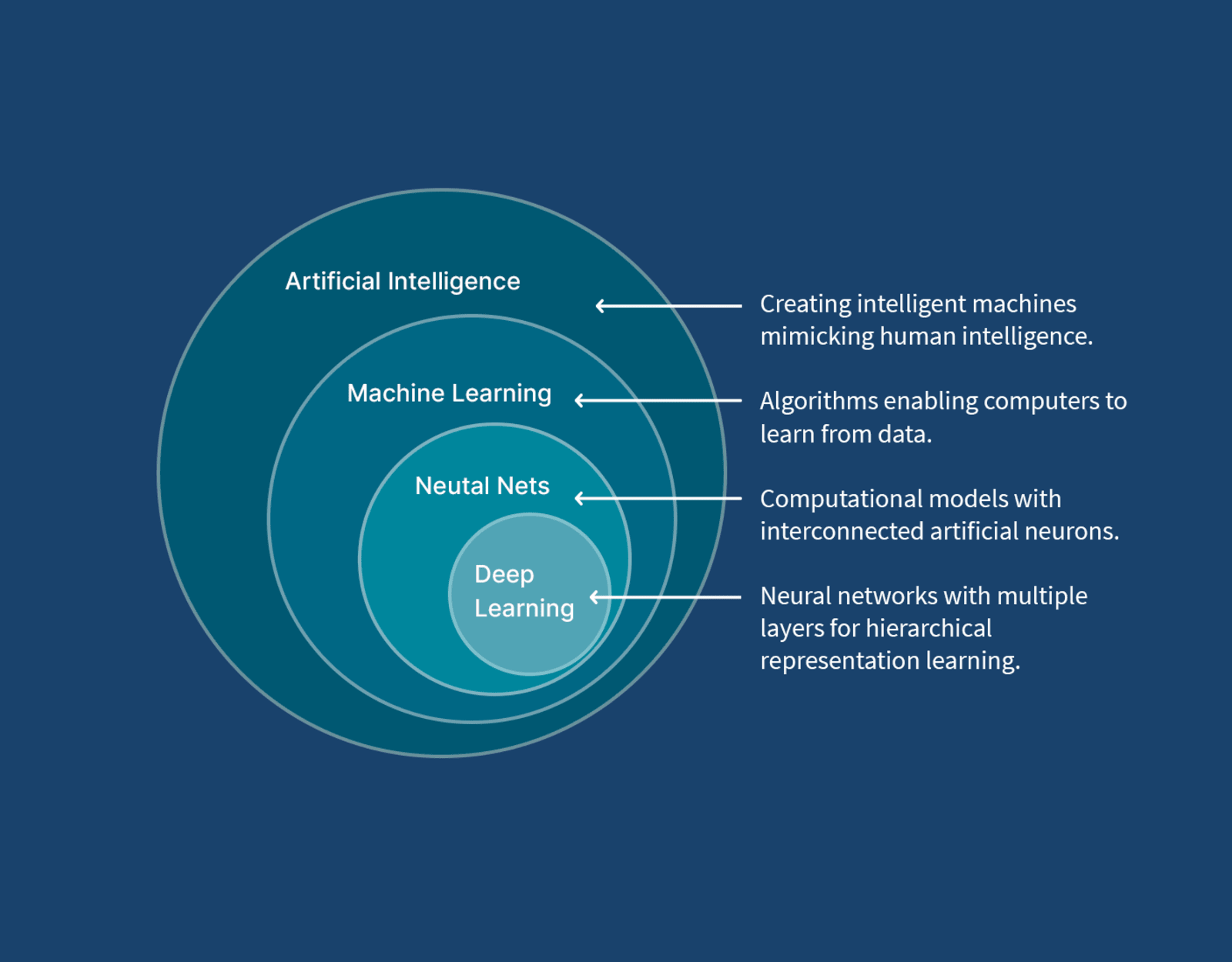
I mentioned AI, if you have more than the most superficial awareness of AI, you will probably be wondering how we use it, and the problems of AI hallucination – the last thing you want is a being asked to evaluate something and hallucinating (injecting data/facts that are not based on the data you have collected) to create a projection. At worst, this would mean providing an indication that everything is going well, when things are about to really go wrong. So, first, most of the AI discussed today is generative, and that is where we see issues like hallucinations. We’re have and are adopting this aspect of AI where it fits best, such as explainability and informing visualization, but Oracle is making heavy use of the more traditional ideas of AI in the form of Machine Learning and Deep Learning which are best suited to heavy numerical computational uses, that is not to say there aren’t challenges to be ddressed with training the AI.
Conclusion
When it comes to Oracle’s expertise in the specialized domains of agriculture and government, Oracle has a strong record of working with governments and government agencies from its inception. But we’ve also worked closely with the Tony Blair Institute for Global Change, which works with many national government agencies, including the agriculture sector.
My role in this has been as an architect, focused primarily on applying integration techniques (enabling scaling and operational resilience, data ingestion, and how our architecture can work as we work with more and more data sources) and on applying AI (in the generative domain). We’re fortunate to be working alongside two other architects who cover other aspects of the product, such as infrastructure needs and the presentation tier. In addition, there is a specialist data science team with more PhDs and related awards than I can count.
Oracle’s Digital Government business is more than just this agriculture use case; we’ve identified other use cases that can benefit from the data and its volume being handled here. This is in addition to bringing versions of its better-known products, such as ERP, Healthcare (digital health records management, vaccine programmes, etc.), national Energy and Water (metering, infrastructure management, etc).
AI, specifically Generative AI, has been dominating IT for a couple of years now. If you’re a software vendor with services that interact with users, you’ll probably have been considering how to ensure you’re not left behind, or perhaps even how to use AI to differentiate yourself. The answer to this can be light-touch AI to make the existing application a little easier to use (smarter help documentation, auto formatting, and spelling for large text fields). Then, at the other end of the spectrum, is how do we make AI central to our application? This can be pretty radical. Both ends of the spectrum carry risks – light touch use can be seen as ‘AI whitewashing’ – adding something cosmetic so you can add AI enablement to the product marketing. At the other end of the spectrum, rejecting chunks of traditional menus and form-based UI that allow users in a couple of quick clicks or keystrokes to access or create content can result in increasing the product cost (AI consumes more compute cycles, thereby incurring a cost along the way) for at best a limited gain.
While AI whitewashing is harmful and can impact a brand image, at least the features can be ignored by the user. However, the latter requires a significant investment and can easily lead to the perception that he product isn’t as capable as it could/should be.
At the heart of this are a couple of basic considerations that UX design has identified for a long time:
For a user to get the most out of a solution, they need a mental model of the capabilities your product can provide and the data it has. These mental models come from visual hints – those hints come from menus, right-click operations, and other visual clues. UI specialists don’t do eye tracking studies just for the research grant money.
UI best practices provide simple guidance stating that there should be at least three ways to use an application, supporting novice users, the average user, and the power user. We can see this in straightforward things, such as multiple locations for everyday tasks (right-click menus, main menu, ribbon with buttons), not to mention keyboard shortcuts. Think I’m over-stating things? I see very knowledgeable, technically adept users still type and then navigate to the menu ribbon to embolden text (rather than simply use the near-universal Ctrl+B). Next time you’re on a Zoom/Teams call, working with someone on a document, just watch how people are using the tools. On the other end of the spectrum, some tools allow us to configure accelerator key combinations to specific tasks, so power users can complete actions very quickly.
Users are impatient – the technology industry has prided itself on making things quicker, faster, more responsive (we see this with Moore’s law with computer chips to mobile networks … Edge, 3G … 5G (and 6G in development). So if things drop out of those norms, there is an exponential chance of the user abandoning an action (or worse, trying to make it happen again, multiplying the workload). AI is computationally expensive, so by its nature, it is slower.
Switching input devices incurs a time cost when transitioning between devices, such as a keyboard and mouse. Over the years, numerous studies have been conducted on this topic, identifying ways to reduce or eliminate such costs. Therefore, we should minimize such switching. Simple measures, such as being able to table through UI widgets, can help achieve this.
User tolerance to latency has been an ongoing challenge – we’re impatient creatures. There are well-researched guidelines on this topic, and if you take a moment to examine some of the techniques available in UI, particularly web UIs, you will see that they reflect this. For example, prefetching content, particularly images, rendering content as it is received, and infinite scrolling.
All of this could be interpreted as being anti-AI, and even as someone wanting to protect jobs by advocating that we continue the old way. Far from it, AI can really help, and I have been a long-standing advocate of the idea that AI could significantly simplify tasks such as report generation in products that rely heavily on structured data capture. Why, well, using structured form capture processes will help with a mental model of the data held, the relationships, and the terminology in the system, enabling us to formulate queries more effectively.
The point is, we should empower users to use different modes to achieve their goals. In the early days of web search, the search engines supported the paradigm of navigating using cataloguing of websites. Only as the understanding of search truly became a social norm did we see those means to search disappear from Yahoo and Google because the mental models of using search engines established themselves. But even now, if you look, those older models of searching/navigating still exist. Look at Amazon, particularly for books, which still offers navigation to find books by classification. This isn’t because Amazon’s site is aging, anything but. It is a recognition that to maximize sales, you need to support as many ways of achieving a goal as are practical.
Navigation categories for historical books, demonstrating various time periods and regions – Amazon.
If there is a call to arms here, it is this – we should complement traditional UX with AI, not try to replace it. When we look at an AI-driven interaction, we use it to enable users to solve problems faster, solve problems that can’t be easily expressed with existing interactions and paradigms. For example, replacing traditional reporting tools that require an understanding of relational databases or reducing/removing the need to understand how data is distributed across systems.
Some of the better uses of AI as part of UX are subtle – for example, the use of Grammarly, Google’s introduction to search looks a lot like an oversized search result. But we can, and should consider the use of AI, not just as a different way to drive change into traditional UX, but to open up other interaction models – enabling their use in new ways, for example rather than watching or reading how to do something, we can use AI to translate to audio, and talk us through a task as we complete it. For example, a mechanical engineering task requires both hands to work with the necessary tools. Burt is also using different interaction models to help overcome disabilities.
Don’t take my word for it; here are some useful resources:
The rapid development of generative AI in traditional code development (third-generation language use) has had a lot of impact, with claims of massive productivity improvements. Given that developer productivity has historically been the domain of low-code tooling, this has led me to wonder whether the gap is shrinking and whether we are approaching a point where the benefits of low-code tools are being eroded for mainstream development.
To better understand this, let’s revisit how both technologies help.
AI-supported development
Delivered value in several ways:
Code refactoring and optimization
Code documentation generation
Unit test generation
Next generation of auto-complete
This can include creating code in a green field context. If you’ve been following reports on the value of services like Copilot, AWS Q Developer, and Code Assist, you’ll see that these tools are delivering a significant productivity boost. A recent ACM article pointed to benefits as high as a threefold boost for more routine activities, tapering off as tasks became more complex.
Low Code
Low-code tools have been around for a long time, while they have evolved and progressed, and have come in a number of forms, such as:
UI applications that map databases to screens.
Business process is defined with a visual tool support for BPM.
Connecting different data sources by using visual notations to leverage representations of sources and sinks and link them together.
The central value proposition of low-code development is speed and agility. This performance comes with the constraint that your development has to fit into the framework, which may have constraints such as how it can scale, elasticity for rapid scaling, and performance optimization. ACM conducted some research into the productivity gains here.
Development acceleration narrowing
Low-code/no-code tools are often associated with the idea of citizen developers, where people with primarily a business background and a broad appreciation of IT are able to develop applications (personal experience points to more developers being able to focus less on code, and more on usability of apps). KPMG shares a view on this here.
Evolution of AI that could change low-code?
It would be easy to be a doom monger and say that this will be the end of highly paid software engineering jobs. But we have said this many times over in the last twenty or thirty years (e.g Future of Development).
Looking at the figures, the gains of Gen AI for code development aren’t going to invalidate Low/no code tooling. Where it really benefits is where a low-code tool is not going to offer a good fit to the needs being developed, such as complex graphical UI.
What if …
If Low-Code and Generative AI assistive technologies coalesce, then we’ll see a new generation of citizen developers who can accomplish a lot more. Typical business solutions will be built more rapidly. For example, I can simply describe the UI, and the AI generates a suitable layout that incorporates all the UX features, supporting the W3C guidelines. Furthermore, it may also be able to escape the constraints of low-code frameworks.
The work of developing very efficient, highly scalable Ui building blocks, with libraries to use them will still demand talented developers. Such work is likely to also involve AI model and agent development skills, so the AI can work out how to use such building blocks.
To build such capabilities, we’re going to need to help iron out issues of hallucination from the models. Some UX roles could well be impacted as well, as how we impose consistency in a user’s experience probably needs to be approached differently to defining templates.
Merging of assistive technologies
To truly leverage AI for low-code development, we will likely need to bring multiple concepts together, including describing UIs, linking application logic to leverage other services, and defining algorithms. Bringing these together will require work to harmonize how we communicate with the different AI elements so they can leverage a common context and interact with the user if using a single voice.
Conclusion
So the productivity gap between traditional development and low/no-code has shrunk a bit, I suspect we’ll see this grow quickly if generative AI can be harnessed and is applied, not just as a superficial enhancement, but from a ground-up revisit of how the load-code tooling works. Although the first wave, like everywhere else, will be superficial in the rush for everyone to say their service or tool is AI-enabled.
These days, everywhere you look, there are references to Generative AI, to the point that what have Fluent Bit and GenAI got to do with each other? GenAI has the potential to help with observability, but it also needs observation to measure its performance, whether it is being abused, etc. You may recall a few years back that Microsoft was trailing new AI features for Bing, and after only having it in use for a couple of days, it had been recorded generating abusive comments and so on (Microsoft’s Tay is such an example).
But this isn’t the aspect of GenAI (or the foundations of AI with Machine Learning (ML)) I was thinking about. Fluent Bit can be linked to GenAI through its TensorFlow plugin. Is this genuinely of value or just a bit of ‘me too’?
There are plenty of backend use cases once the telemetry has been incorporated into an analytics platform, for example:
Making it easy to query and mine the observability data, such as natural language searching – to simplify expressing what is being looked for.
Outlier / Anomaly detection – when signals, particularly metrics, diverge from the normal patterns of behavior, we have the first signs of a problem. This is more Machine Learning than generative AI.
Using AI agents to tune monitoring thresholds and alerting scenarios
But these are all backend, big data style use cases and do not center on Fluent Bit’s core value of getting data sources to appropriate destination systems for such analysis or visualization.
To incorporate AI into Fluent Bit pipelines, we need to overcome a key issue – AI tends to be computationally heavy – making it potentially too slow for streams of signals being generated by our applications and too expensive given that most logs reflecting ‘business as usual’ are, in effect, low value.
There are some genuine use cases where lightweight AI can deliver value. First, we should be a little more precise. The TensorFlow plugin is the TensorFlow Lite version, also known as LiteRT. The name comes from the fact that it is a lite-weight solution intended to be deployable using small devices (by AI standards). This fits the Fluent Bit model of having a small footprint.
So, where can we put such a use case:
Translating stack traces into actionable information can be challenging. A trained ML or AI model can help classify and characterize the cause of a stack trace. As a result, we can move from the log to triggering appropriate actions.
Targeted use cases where we’ve filtered out most signal data to help analyze specific events – for example, we want to prevent the propagation of PII data downstream. Some PII data can be easily isolated through patterns using REGEX. For example, credit card IDs are a pattern of 4 digits in 4 groups. Phone numbers and email addresses can also be easily identified. However, postal addresses aren’t easy, particularly when handling multinational addresses, where the postal code/zip code can’t be used as an indicative pattern. Using AI to help with such checks means we must filter out signals to only examine messages that could accidentally carry such information.
When adopting AI into such scenarios, we have to be aware of the problems that can impact the use of ML and AI. These use cases are less high profile than the issues of hallucinations but just as important. As we’re observing software, which will change over time. As a result, payloads or data shifts (technically referred to as data drift) and the detection rate can drop. So, we need to measure the efficacy of the model. However, issues such as data drift need to be taken into account, as the scenario being detected may change in volume, reflecting changes in software usage and/or changes in how the solution works.
There are ways to help address such considerations, such as tracking false positive outcomes, and if the model can provide confidence scoring, is there a trend in the score?
Conclusion
There are good use cases for using Machine Learning (and, to an extent, Artificial Intelligence) within an observability pipeline – but we have to be selective in its application as:
The cost of the computation can outweigh the benefits
The execution time for such computation can be notably slower than our pipeline, leading to risks of back pressure if applied to every event in the pipeline.
The effectiveness and how much data drift might occur (we might initially see very good results, but then things can fall off).
Possibly, the most useful application is when the AI/ML engine has been trained to recognize patterns of events that preceded a serious operational issue (strictly, this is the use of ML).
Forward-looking
The true potential for Gen AI is when we move beyond isolating potential faults based on pattern recognition to using AI to help recommend or even trigger remediation processes.



 Phil (aka MP3Monster)'s Blog
You must be logged in to post a comment.