
• Home
  • Site Aliases
    • www.cloud-native.info
  • About
    • Background
    • Presenting Activities
    • Internet Profile
      • LinkedIn
    • About
  • Books & Publications
    • Log Generator
    • Logs and Telemetry using Fluent Bit
      • Fluent Bit book
      • Book Resources in GitHub
      • Fluent Bit Classic to YAML Format configurations
    • Logging in Action with Fluentd, Kubernetes and More
      • Logging in Action with Fluentd – Book
      • Fluentd Book Resources
      • Fluentd & Fluent Bit Additional stuff
    • API & API Platform
      • API Useful Resources
    • Oracle Integration
      • Book Website
      • Useful Reading Sources
    • Publication Contributions
  • Resources
    • GitHub
    • Oracle Integration Site
    • Oracle Resources
    • Mindmaps Index
    • Useful Tech Resources
      • Fluentd & Fluent Bit Additional stuff
      • Recommended Tech Podcasts
      • Official Sources for Product Logos
      • Java and Graal Useful Links
      • Python Setup & related stuff
  • Music
    • Monster On Music
    • Music Listening
    • Music Reading

Phil (aka MP3Monster)'s Blog

~ from Technology to Music

Phil (aka MP3Monster)'s Blog

Tag Archives: logs

Fluent Bit v4 the big news

17 Thursday Apr 2025

Posted by mp3monster in Books, Fluentbit, General, Technology

≈ Leave a comment

Tags

book, CNCF, development, eBPF, Fluent Bit, logs, OpenTelemetry, processors, sampling, Security, Trace, zig

With the announcement of Fluent Bit v4 at Kubecon Europe, we thought it worthwhile to take a look at what it means, aside from celebrating 10 years of Fluent Bit.

Firstly, normally using Semantic Versioning would suggest likely breaking (or incompatible changes to use SemVer wording) changes. The good news is that, like all the previous version changes for Fluent Bit the numbering change only reflects the arrival of major new features.

This is good news for me as the author of Logs and Telemetry with Fluent Bit, as it means the book remains entirely relevant. The book obviously won’t address the latest features, but we’ll try to cover those here as supplemental content.

Let’s reflect upon the new features, their benefits, and their implications.

  • New features in Processors allowing:
    • Conditionality to be included.
    • Trace sampling.
  • More flexible support for TLS (v1.3, choosing ciphers to enable)
  • New language for custom plugins in the form of Zig

Security Improvements

While security for many is not something that will get most developers excited about, there are things here that will make a CSO (Chief Security Officer) smile. Any developer who knows implementing security behaviors because it is a good thing, rather than because you have been told to do it, makes a CSO happy, puts them in a good place, to be given some more lianency when there is a need to do something that would get the CSO hot under the collar. Given this, we can now win those points with CSOs by using new Fluent Bit configurations that control TLS versions (1.1 – 1.3) and ciphers to support in use.

But even more fundamental than that are the improvements around basic credentials management. Historically, credentials and tokens had to be explicit in a configuration file or referenced back to an environment variable. Now, such values can come from a file, and as a result, there is no explicitness in the configuration. File security can manage access and visibility of such details. This will also make credentials rotation a lot easier to implement.

Processor Improvements

The processor improvements are probably the most exciting changes. Processors allow us to introduce additional activities within the pipeline as part of a process such as an input, rather than requiring additional buffer fetch and return which we see in standard plugin operations.

Of course, the downside is that if the processor introduces a lot of effort, we can create unexpected problems, such as back pressure, for example, as a result of a processor working hard on an input.

The other factor that extending processors bring is that they are not supported in classic format, meaning that to exploit such formats, you do need to define your configuration using YAML. The only thing I’m not a fan of, is that the configuration for these features does make me think I’m having to read algorithms expressed with Backus Naur form (BNF).

Trace Sampling

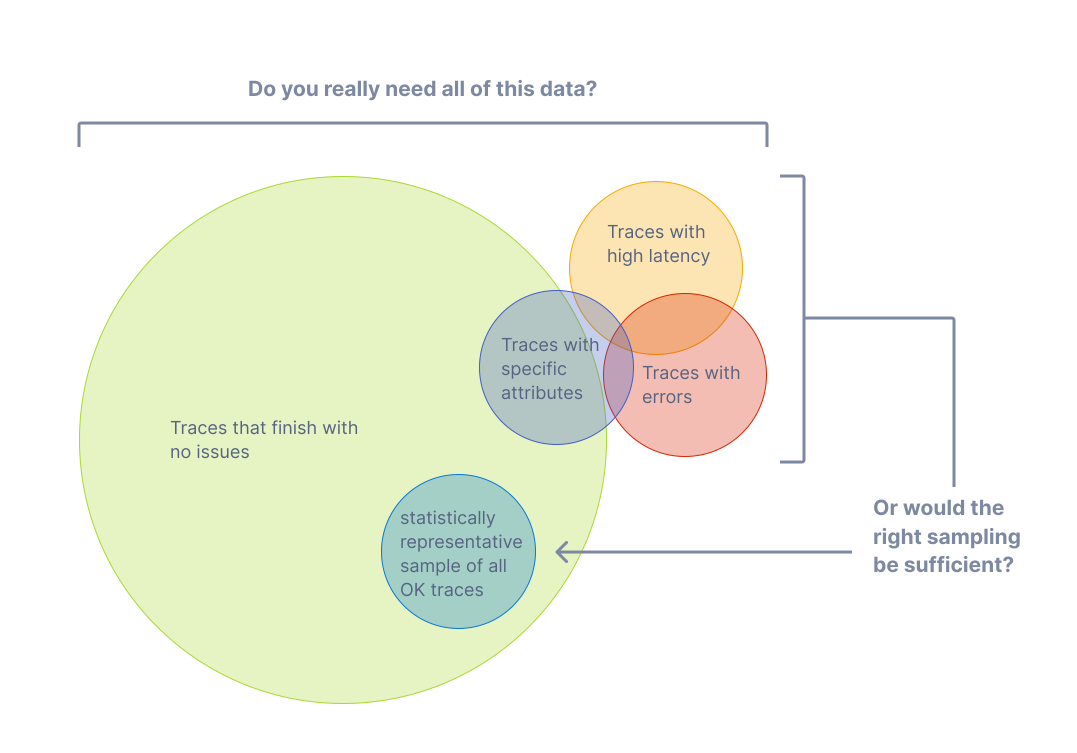
Firstly, the processors supporting OpenTelemetry Tracing can now sample. This is probably Fluent Bit’s only weakness in the Open Telemetry domain until now. Sampling is essential here as traces can become significant as you track application executions through many spans. When combined with each new transaction creating a new trace, traces can become voluminous. To control this explosion on telemetry data, we want to sample traces, collecting a percentage of typical traces (performance, latency, no errors, etc) and the outliers, where tracing will show us where a process is suffering, e.g., an end-to-end process is slowing because of a bottleneck. We can dictate how the sampling is applied based on values of existing attributes, the trace status, status codes, latencies, the number of spans, etc.
Conditionality in Processors

Conditionality makes it easier to respond to aspects of logs. For example, only when the logging payload has several attributes with specific values do we want to filter the event out for more attention. For example, an application reporting that it is starting up, and logs are classified as representing an error – then we may want to add a tag to the event so it can be easily filtered and routed to the escalation process.

Plugins with Zig

The enablement of Zig for plugin development (input, output and filters) is strictly an experimental feature. The contributors are confident they have covered all the typical use cases. But the innate flexibility supporting a language always represents potential edge cases never considered and may require some additional work to address.

Let’s be honest: Zig isn’t a well-known language. So, let’s start by looking briefly at it and why the community has adopted it for custom plugin development as an alternative to the existing options with Lua and WASM.

So Zig has a number of characteristics that align with the Fluent Bit ethos better than Lua and WASM, specifically:

  • It is a compiled rather than interpreted language, meaning that we reduce the runtime overheads of an interpreter or JIT compiler such as Lua and the proxy layer of WASM. This aligns to be very fast/minimal compute overhead to do its job, – ideal for IoT and minimising the cost of side-care container deployments.
  • The footprint for the Zig executable is very, very small—smaller than even a C-generated binary! As with the previous point, this lends itself to common Fluent Bit deployments.
  • The language definition is formally defined, compact, and freely available. This means you should be able to take a tool chain from anyone, and it is easy for specialist chip vendors to provide compilers.
  • Based on those who have tried, cross-compiling is far easier to deal with than working with GCC, MSVC, etc. Making it a lot easier to develop with the benefits we want from Go. Unlike Go – to connect to the C binary of Fluent Bit doesn’t require the use of a translation layer.

One of Zig’s characteristics that differs from C is its stronger typing and its approach of, rather than prescribing how edge cases are handled, e.g., null pointers, working to prevent you from entering those conditions.

Zig has been around for a few years (the first pre-release was in 2017, and the first non-pre-release was in August 2023). This is long enough for the supporting tooling to be pretty well fleshed out with package management, important building blocks such as the HTTP server, etc.

While asking a large enterprise with more conservative approaches to development (particularly when IT is seen as an overhead, and source of risk rather than a differentiator/revenue generator) to consider adopting Zig could be challenging compared to adopting, say Go. The different potential values here, make for some interesting potential.

Not Only, but Also

While we have made some significant advancements, each Fluent Bit release brings a variety of improvements in its plugins. For example, working with it with eBPF, HTTP output supports more compression techniques, such as Snappy and ZSTD, and Exit having a configurable delay.

The Plus version of library dependencies is being updated to exploit new capabilities or ensure Fluent Bit isn’t using libraries with vulnerabilities.
Additional resources

    • Chronosphere announcement

    • Announcement YouTube video

    • book
    • My links to technical resources – we’ve extended to include Zig related resources

Share this:

  • Click to share on Facebook (Opens in new window) Facebook
  • Click to share on X (Opens in new window) X
  • Click to share on Pocket (Opens in new window) Pocket
  • Click to share on Reddit (Opens in new window) Reddit
  • Click to email a link to a friend (Opens in new window) Email
  • Click to share on WhatsApp (Opens in new window) WhatsApp
  • Click to print (Opens in new window) Print
  • Click to share on Tumblr (Opens in new window) Tumblr
  • Click to share on Mastodon (Opens in new window) Mastodon
  • Click to share on Pinterest (Opens in new window) Pinterest
  • More
  • Click to share on Bluesky (Opens in new window) Bluesky
  • Click to share on LinkedIn (Opens in new window) LinkedIn
Like Loading...

Checking your OpenTelemetry pipeline with Telemetrygen

30 Tuesday Apr 2024

Posted by mp3monster in Fluentbit, Fluentd, General, Technology

≈ Leave a comment

Tags

Docker, docker compose, FluentBit, Go, logs, metrics, OpenTelemetry, signals, Telemetrygen, Traces

Testing OpenTelemetry configuration pipelines without resorting to instrumented applications, particularly for traces, can be a bit of a pain. Typically, you just want to validate you can get an exported/generated signal through your pipeline, which may not be the OpenTelemetry Collector (e.g., FluentBit or commercial solutions such as DataDog). This led to the creation of Tracegen, and then the larger Telementrygen.

You can use Tracegen or Telemetrygen by either downloading and running the Go app from GitHub or using the Docker file. But there are a couple of challenges:

  • On initial investigation, these utilities appear wrapped up in the larger opentelemetry-collector-contrib. While potentially useful, shaking out your OTel pipelining is somewhat overkill.
  • We can install the app locally with the following command, but then we need to set up Golang in the environment.
go install github.com/open-telemetry/opentelemetry-collector-contrib/cmd/telemetrygen@latest
  • Fortunately, there is a Docker image that just contains the tool, but to use it, we need to know what the parameters are to override the container defaults. The only irritant is that you either need to mess about with the container to get at the information (i.e., run the — help options) or install the utility (the parameters are not in the GitHub docs), so we’ve teased out all the options into the following table.

The following table’s Signal column All means it can be applied to Metrics, Traces, or Logs. Otherwise we’ve named the signal type that the parameter can be used with.

SignalParameter/FlagDescription
Trace–batchWhether to batch traces (default true)
All–ca-cert stringTrusted Certificate Authority to verify server certificate
Traces–child-spans intClient certificate file

All
–client-key stringClient private key file
All–duration durationFor how long to run the test
All-h, –help {traces|metrics|logs}help – with give you the basic help if no parameter is passed. Or the signal type help when used with the signal name e.g. telemetrygen traces --help
All–interval durationReporting interval (default 1s)
Traces–marshalWhether to marshal trace context via HTTP headers
All–mtlsWhether to require client authentication for mTLS
All–otlp-attributes map[string]stringCustom resource attributes to use. The value is expected in the format key=”value”. Note you may need to escape the quotes when using the tool from a cli. Flag may be repeated to set multiple attributes (e.g --otlp-attributes key1=\"value1\" --otlp-attributes key2=\"value2\")
All–otlp-endpoint stringDestination endpoint for exporting logs, metrics and traces
All–otlp-header map[string]stringCustom header to be passed along with each OTLP request. The value is expected in the format key=”value”. Note you may need to escape the quotes when using the tool from a cli. Flag may be repeated to set multiple headers (e.g --otlp-header key1=\"value1\" --otlp-header key2=\"value2\")
All–otlp-httpWhether to use HTTP exporter rather than a gRPC one
All–otlp-http-url-path stringWhich URL path to write to (default "/v1/traces")
All–otlp-insecureWhether to enable client transport security for the exporter’s grpc or http connection
All–rate intApproximately how many metrics per second each worker should generate. Zero means no throttling.
Traces–service stringService name to use (default "telemetrygen")
Traces–size intDesired minimum size in MB of string data for each trace generated. This can be used to test traces with large payloads, i.e. when testing the OTLP receiver endpoint max receive size.
Traces–span-duration durationThe duration of each generated span. (default 123µs)
Traces–status-code stringStatus code to use for the spans, one of (Unset, Error, Ok) or the equivalent integer (0,1,2) (default “0”)
All–telemetry-attributes map[string]stringNumber of traces to generate in each worker (ignored if the duration is provided) (default 1)
Traces–traces intNumber of traces to generate in each worker (ignored if duration is provided) (default 1)
All–workers intNumber of workers (goroutines) to run (default of 1)
Metrics–metric-type metricTypeNumber of metrics to generate in each worker (ignored if the duration is provided) (default 1)
Metrics–metrics intNumber of logs to generate in each worker (ignored if the duration is provided) (default 1)
Logs–body stringBody of the log (default “the message”)
Logs–logs intThe severity number of the log ranges from 1 to 24 (inclusive) (default 9)
Logs–severity-number int32The severity number of the log ranges from 1 to 24 (inclusive) (default 9)
Logs–severity-text stringSeverity text of the log (default “Info”)
All the configuration parameters for Telemetrygen

It is worth noting that while Tracegen has similar configuration parameters, they aren’t exactly the same in the CLI, often one dash rather than two in the name for example.

The following is a simple Docker compose file that can help you use the container to conduct local testing of your collector. In this configuration, we’re sending a trace to the host machine with HTTPS disabled.

services:
  web:
    image: ghcr.io/open-telemetry/opentelemetry-collector-contrib/telemetrygen:latest
    network_mode: host
    entrypoint:
      [
        "/telemetrygen",
        "traces",
        "--otlp-insecure",
        "--otlp-endpoint",
        "host.docker.internal:4317",
      ]

Share this:

  • Click to share on Facebook (Opens in new window) Facebook
  • Click to share on X (Opens in new window) X
  • Click to share on Pocket (Opens in new window) Pocket
  • Click to share on Reddit (Opens in new window) Reddit
  • Click to email a link to a friend (Opens in new window) Email
  • Click to share on WhatsApp (Opens in new window) WhatsApp
  • Click to print (Opens in new window) Print
  • Click to share on Tumblr (Opens in new window) Tumblr
  • Click to share on Mastodon (Opens in new window) Mastodon
  • Click to share on Pinterest (Opens in new window) Pinterest
  • More
  • Click to share on Bluesky (Opens in new window) Bluesky
  • Click to share on LinkedIn (Opens in new window) LinkedIn
Like Loading...

Observing the Observer (Fluent Bit monitoring)

25 Thursday Apr 2024

Posted by mp3monster in Fluentbit, General, Technology

≈ Leave a comment

Tags

development, FluentBit, Grafana, Jaeger, logs, metrics, OpenSearch, Prometheus, Traces

In the Fluent Bit book I touch upon the point that we should be observing the observer. After all, if we don’t monitor our observability stack, then we’ll be operating blind and may never know until things go catastrophically wrong, and we’re getting complaints that production business solutions are down. One of the peer review comments was it would be really good to have a visual representation in the book. While I’d love to incorporate such diagrams, for them to be readable, they do use up a lot of space on the printed page, and very long chapters can also put some readers off. So, given the point wasn’t a key theme, we simply couldn’t incorporate the diagram.

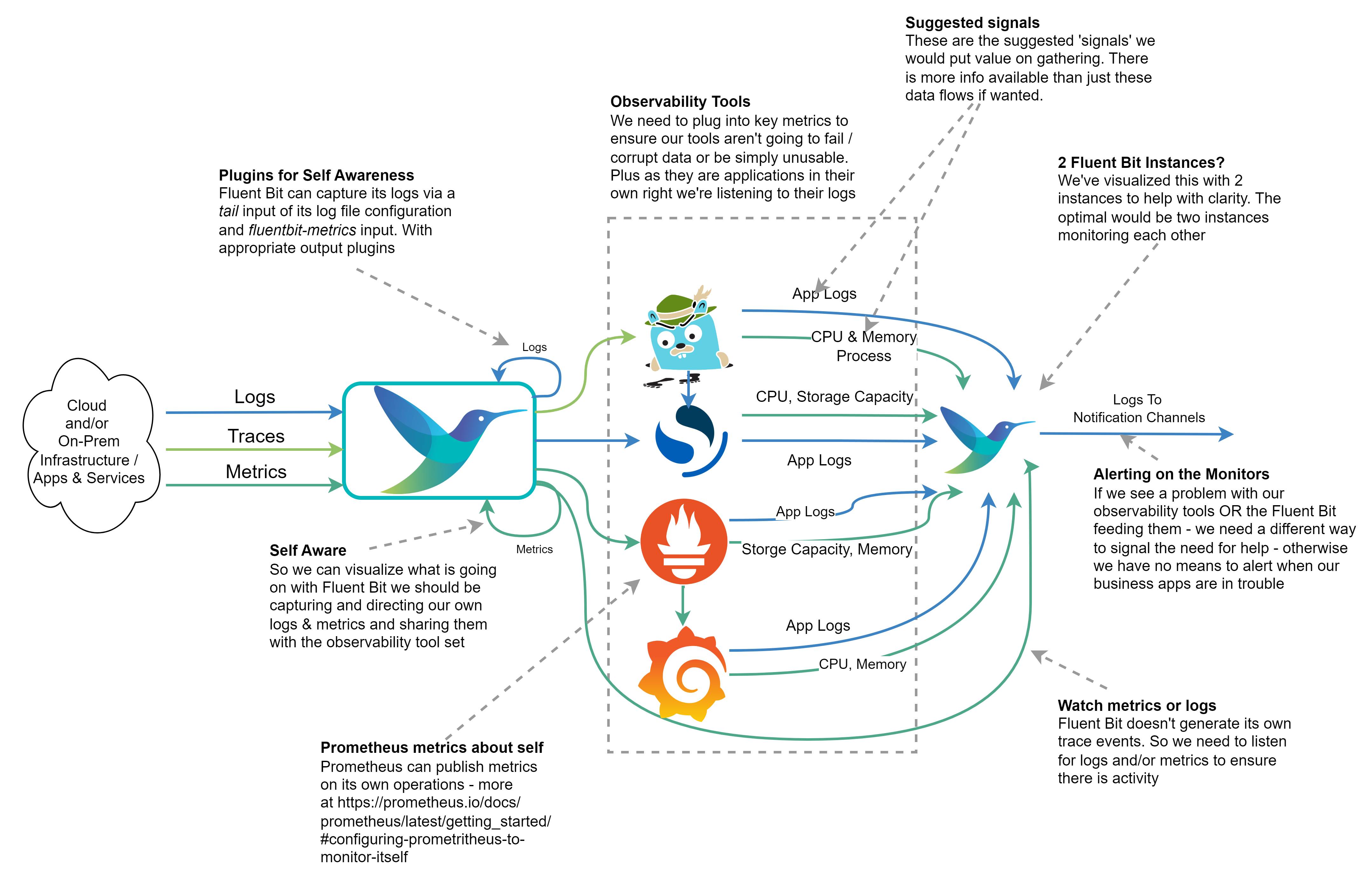
But the suggestion is a good one. So we’ve created the visual representation here.

Annotated diagram showing how Fluent Bit could be used to monitor an open-source observation stack.

The diagram shows how we can monitor our observation tech stack so we don’t become ‘blind’ without knowing about it. The Outflow from the right of the diagram would send a signal to a notification service, which could be as simple as email or as user-friendly as Slack. We’ve indicated which kinds of metrics, logs, and traces could offer the most value from our observation tech stack.

If we’re running everything within a Kubernetes cluster, it would be easy to say we don’t need such a sophisticated setup as we can use Kubernetes liveness probes if the containers are well configured. While it is true if one of our services starts to fail, a liveness check should pick it up and recycle the container. But such probes only worry about the HTTP response code, not the cause. If we don’t monitor and capture more information we’ll never understand the problem. At worst we could end up seeing Kubernetes starting and then killing our containers in a vicious cycle and struggling to resolve the cause. So collecting the logs and metrics remains just as important.

How to Publish Fluent Bit Metrics and Logs

To publish Fluent Bit’s metrics to Prometheus, we need to configure the fluentbit-metrics input plugin (it does sound odd as an input, but there are reasons that become clearer in the book). We then route the output that supports using Fluent Bit as a Prometheus node exporter or makes use of the remote write API.

The log output for Fluent Bit can be configured via the command line or in the SERVICE blog (using the attributes log_file and log_level in the configuration file. Today this is setting the log threshold and identifying the log file. We can then, of course, configure a tail input plugin against the file if we want to send the logs to OpenSearch. We can also set plugin-specific logging thresholds as overrides to the Fluent Bit wide setting in the SERVICE block of configuration.

Configuring the other monitoring tools

  • Grafana‘s configuration will allow it to publish Prometheus scrapable metrics and Traces that are OTLP compliant can be found documented here.
  • Prometheus provides metrics on itself (details here) and logging controls as part of its command line and generates logfmt or JSON logs, details here.
  • OpenSearch‘s logs can be accessed as documented here. The Logs are created with Log4j2, which means out of the box, it will be easy to parse them. Configuring the output of slow query reports does need to be switched on. OpenSearch also illustrates a pre OpenTelemetry/OpenMetrics approach to sharing internal metrics by writing them as logs. However, there are ways to convert such log events to OTLP Metrics with Fluent Bit.
  • Jaeger provides metrics endpoints that are Prometheus-compatible, along with JSON-based logs, and are documented here. There is some support for tracing.

Share this:

  • Click to share on Facebook (Opens in new window) Facebook
  • Click to share on X (Opens in new window) X
  • Click to share on Pocket (Opens in new window) Pocket
  • Click to share on Reddit (Opens in new window) Reddit
  • Click to email a link to a friend (Opens in new window) Email
  • Click to share on WhatsApp (Opens in new window) WhatsApp
  • Click to print (Opens in new window) Print
  • Click to share on Tumblr (Opens in new window) Tumblr
  • Click to share on Mastodon (Opens in new window) Mastodon
  • Click to share on Pinterest (Opens in new window) Pinterest
  • More
  • Click to share on Bluesky (Opens in new window) Bluesky
  • Click to share on LinkedIn (Opens in new window) LinkedIn
Like Loading...

Book Project Unveiled – Unified Logging with Fluentd

03 Wednesday Jun 2020

Posted by mp3monster in Books, Fluentd, General, Technology

≈ Leave a comment

Tags

book, development, Fluentd, logs, manning, MEAP, monitoring, writing

Fluentd is both an open source solution for making log management so much easier to work with, particularly for distributed / multi component solutions. But not only that it is supported by many log analytics tools, and central to several cloud vendors log management services.

The goal of the book is to explain how Fluentd can help us and to use the tool. We can’t cover every possible plugin, so we walk through the use of enough plugins and the way features interact you can extrapolate to other plugins.

Share this:

  • Click to share on Facebook (Opens in new window) Facebook
  • Click to share on X (Opens in new window) X
  • Click to share on Pocket (Opens in new window) Pocket
  • Click to share on Reddit (Opens in new window) Reddit
  • Click to email a link to a friend (Opens in new window) Email
  • Click to share on WhatsApp (Opens in new window) WhatsApp
  • Click to print (Opens in new window) Print
  • Click to share on Tumblr (Opens in new window) Tumblr
  • Click to share on Mastodon (Opens in new window) Mastodon
  • Click to share on Pinterest (Opens in new window) Pinterest
  • More
  • Click to share on Bluesky (Opens in new window) Bluesky
  • Click to share on LinkedIn (Opens in new window) LinkedIn
Like Loading...

    I work for Oracle, all opinions here are my own & do not necessarily reflect the views of Oracle

    • About
      • Internet Profile
      • Music Buying
      • Presenting Activities
    • Books & Publications
      • Logging in Action with Fluentd, Kubernetes and More
      • Logs and Telemetry using Fluent Bit
      • Oracle Integration
      • API & API Platform
        • API Useful Resources
        • Useful Reading Sources
    • Mindmaps Index
    • Monster On Music
      • Music Listening
      • Music Reading
    • Oracle Resources
    • Useful Tech Resources
      • Fluentd & Fluent Bit Additional stuff
        • Logging Frameworks and Fluent Bit and Fluentd connectivity
        • REGEX for BIC and IBAN processing
      • Java and Graal Useful Links
      • Official Sources for Product Logos
      • Python Setup & related tips
      • Recommended Tech Podcasts

    Oracle Ace Director Alumni

    TOGAF 9

    Logs and Telemetry using Fluent Bit


    Logging in Action — Fluentd

    Logging in Action with Fluentd


    Oracle Cloud Integration Book


    API Platform Book


    Oracle Dev Meetup London

    Blog Categories

    • App Ideas
    • Books
      • Book Reviews
      • manning
      • Oracle Press
      • Packt
    • Enterprise architecture
    • General
      • economy
      • ExternalWebPublications
      • LinkedIn
      • Website
    • Music
      • Music Resources
      • Music Reviews
    • Photography
    • Podcasts
    • Technology
      • AI
      • APIs & microservices
      • chatbots
      • Cloud
      • Cloud Native
      • Dev Meetup
      • development
        • languages
          • java
          • node.js
      • drone
      • Fluentbit
      • Fluentd
      • logsimulator
      • mindmap
      • OMESA
      • Oracle
        • API Platform CS
          • tools
        • Helidon
        • ITSO & OEAF
        • Java Cloud
        • NodeJS Cloud
        • OIC – ICS
        • Oracle Cloud Native
        • OUG
      • railroad diagrams
      • TOGAF
    • xxRetired
    • AI
    • API Platform CS
    • APIs & microservices
    • App Ideas
    • Book Reviews
    • Books
    • chatbots
    • Cloud
    • Cloud Native
    • Dev Meetup
    • development
    • drone
    • economy
    • Enterprise architecture
    • ExternalWebPublications
    • Fluentbit
    • Fluentd
    • General
    • Helidon
    • ITSO & OEAF
    • java
    • Java Cloud
    • languages
    • LinkedIn
    • logsimulator
    • manning
    • mindmap
    • Music
    • Music Resources
    • Music Reviews
    • node.js
    • NodeJS Cloud
    • OIC – ICS
    • OMESA
    • Oracle
    • Oracle Cloud Native
    • Oracle Press
    • OUG
    • Packt
    • Photography
    • Podcasts
    • railroad diagrams
    • Technology
    • TOGAF
    • tools
    • Website
    • xxRetired

    Enter your email address to subscribe to this blog and receive notifications of new posts by email.

    Join 2,555 other subscribers

    RSS

    RSS Feed RSS - Posts

    RSS Feed RSS - Comments

    December 2025
    M T W T F S S
    1234567
    891011121314
    15161718192021
    22232425262728
    293031  
    « Nov    

    Twitter

    Tweets by mp3monster

    History

    Speaker Recognition

    Open Source Summit Speaker

    Flickr Pics

    Turin Brakes Acoustic Tour 24 @ The Maltings FarnhamTurin Brakes Acoustic Tour 24 @ The Maltings FarnhamTurin Brakes Acoustic Tour 24 @ The Maltings FarnhamTurin Brakes Acoustic Tour 24 @ The Maltings Farnham
    More Photos

    Social

    • View @mp3monster’s profile on Twitter
    • View philwilkins’s profile on LinkedIn
    • View mp3monster’s profile on GitHub
    • View mp3monster’s profile on Flickr
    • View mp3muncher’s profile on WordPress.org
    • View philmp3monster’s profile on Twitch
    Follow Phil (aka MP3Monster)'s Blog on WordPress.com

    Blog at WordPress.com.

    • Subscribe Subscribed
      • Phil (aka MP3Monster)'s Blog
      • Join 233 other subscribers
      • Already have a WordPress.com account? Log in now.
      • Phil (aka MP3Monster)'s Blog
      • Subscribe Subscribed
      • Sign up
      • Log in
      • Report this content
      • View site in Reader
      • Manage subscriptions
      • Collapse this bar
     

    Loading Comments...
     

    You must be logged in to post a comment.

      Privacy & Cookies: This site uses cookies. By continuing to use this website, you agree to their use.
      To find out more, including how to control cookies, see here: Our Cookie Policy
      %d