Fluent Bit’s processors were introduced in version 3. But we have seen the capability continue to advance, with the introduction of the ability to conditionally execute processors. Until the ability to define conditionality directly with the processor, the control has had to be fudged around (putting processors further downstream and controlling it with filters and routing, etc).
In the Logs and Telemetry book, we go through the basic Processor capabilities and constraints, such as:
Configuration file constraints
Performance differences compared to using filter plugins
So we’re not going to revisit those points here.
We can chain processors to run in a sequence by directly defining the processors in the order in which they need to be executed. You can see the chaining in the example below.
Scenario
In the following configuration, we have created several input plugins using both the Dummy plugin and the HTTP plugin. Using the HTTP plugin makes it easy for us to control execution speed and change test data values, which helps us see different filter behaviours. To make life easy we’ve provided several payloads, and a simple caller.[bat|sh] script which takes a single parameter [1, 2, 3, …] which identifies the payload file to send.
All of these resources are available in the Book’s GitHub repository as part of the extras folder, which can be found here. This saves us from embedding everything into this blog.
Filters as Processors and Chaining
Filters can be used as processors as well as the dedicated processor types such as SQL asnd content modifier. The Filters just need to be referenced using the name attribute e.g. name: regex would use the REGEX filter.
Processor Conditions
If you’re familiar with Kubernetes selectors syntax, then the definition conditions for a processor will feel familiar. The condition is made up of a condition (#–A–) and the condition will contain one or more rules (#–B–). The rule defines an expression which will yield a Boolean outcome by identifying:
An element of the payload (for example, a field/element in the log structure, or a metric, etc).
The value to evaluate the field against
The evaluation operator, which can be one of the typical operators e.g eq (equals), (see below for the full list).
Since the rules are a list, you can include as many as needed. The condition, in addition to the rule , has its own operator (#–C–), which tells the condition how to combine the results of each of the rules together. As we need a Boolean value, we can only use a logical and or a logical or. When we have a single rule then the operation is tested with itself.
In the following example, we have two inputs with processors to help demonstrate the different behavior. In the dummy source, we can see how a nested element can be accessed (i.e. $<element name>[‘<child element name>‘]), performing a string comparison. Here we’re using a normal filter plugin as a processor.
With our HTTP source, we’re demonstrating that we can have two processors with their own conditions. The first processor is interesting, as it illustrates an exception to the convention; we can express conditionality within the Lua code (#–D–), but it ignores the condition construct. It is obviously debatable as to the value of a condition for the Lua processor, but it is worth considering, as there is an overhead when calling the LuaJIT if the condition can be quickly resolved internally.
To run the demonstration, we’ve provided several test payloads and a simple script that will call the Fluent Bit HTTP input plugin with the correct file. We just need to pass the number associated with the log file e.g. <Log>1<.json> is caller.[bat|sh] 1, and so on. The script is a variation of:
set fn=log%1%.json
echo %fn
curl -X POST --location 127.0.0.1:9881 --header Content-Type:application/json --data @%fn%
With KubeCon North America just wrapped up, the team behind Fluent Bit has announced a new major release -version 4.2. According to the release notes, there are some interesting new features for routing strategies in Fluent Bit. We also have a Dead Letter Queue (DLQ) mechanism to handle some operational edge scenarios. As with all releases, there are continued improvements in the form of optimizations and feature additions to exploit the capabilities of the connected technology. The final aspect is ensuring that any dependencies are up to date to exploit any improvements and ensure that there are no unnecessary vulnerabilities.
At the time of writing, the Fluent Bit document website is currently only showing 4.1, but I think at least some of the 4.2 details have been included. So we’re working out what exactly is or isn’t part of 4.2.
Dead Letter Queue
Ideally, we should never need to use the DLQ feature as it is very much focused on ensuring that in the event of errors processing the chunks of events in the buffer, the chunks are not lost, so the logs, metrics, and traces can be recovered. The sort of scenarios that could trigger the use of the DLQ are, for example:
The buffer is being held in storage, and the storage is corrupted for some reason (from a mount failure, to failing to write a full chunk because storage has been exhausted).
A (custom) plugin has a memory pointer error that corrupts chunks in the buffer. I mention customer plugins, anecdotally, they will not have been exercised as much as the standard plugins; therefore, a higher probability of an unexpected scenario occurring.
The control of the DLQ is achieved through the configuration of several service configuration attributes …
storage.keep.rejected – this enables the DLQ behavior and needs to be set to On (by default, it is Off).
storage.path – is used to define where the storage of streams and chunks is handled. This is not specific to the DLQ. But by default a DLQ is created as a folder called rejected as a child of this location.
storage.rejected.path allows us to define an alternate subfolder for the DLQ to use based on storage.path.
Trying to induce behavior that needs this feature to trigger is not going to be trivial, for example if we dynamically set a tag, and there is no corresponding match this won’t get trapped in the DLQ. Although arguably this is just as good a scenario for using the DLQ (if you receive events with tags that you don’t wish to retain, it would be best to be matched to a null output plugin, so it is obvious from the configuration that dropping events is a deliberate action).
Other 4.2 (and 4.x) features
As we work out exactly what and how the new features work we’ll add additional posts. For example, we have a well-developed post to illustrate 4.x features for conditional control of processors (with demo configurations etc).
Kube Con Content
While there isn’t a huge amount of technical content from sessions at Kube Con available yet, particularly in the Telemetry and Fluent space, one blog article resulting from the conference did catch my eye: New Stack covering OpenAI’s use of Fluent Bit. The figures involved are staggering, such as the 10 petabytes of logs being handled daily.
18th Nov Update
More content showing up – will update the list below as we encounter more:
With vibe coding (an expression now part of the Collins Dictionary) and tools like Cline, which are penetrating the development process, I thought it would be worthwhile to see how much can be done with an LLM for building configurations. Since our preference for a free LLM has been with Grok (xAI) for development tasks, we’ve used that. We found that beyond the simplest of tasks, we needed to use the Expert level to get reliable results.
This hasn’t been a scientific study, as you might find in natural language-to-SQL research, such as the Bird, Archer, and Spider benchmarks. But I have explained below what I’ve tried and the results. Given that LLMs are non-deterministic, we tried the same question from different browser sessions to see how consistent the results were.
Ask the LLM to list all the plugins it knows about
To start simply, it is worth seeing how many plugins the LLM might recognize. To evaluate this, we asked the LLM to answer the question:
list ALL fluent bit input plugins and a total count
Grok did a pretty good job of saying it counted around 40. But the results did show some variation: on one occasion, it identified some plugins as special cases, noting the influence of compilation flags; on another attempt, no references were made to this. In the first attempts, it missed the less commonly discussed plugins such as eBPF. Grok has the option to ask it to ‘Think Harder’ (which switches to Exper mode) when we applied this, it managed to get the correct count, but in another session, it also dramatically missed the mark, reporting only 28 plugins.
Ask the LLM about all the attributes for a Plugin
To see if the LLM could identify all the attributes of a plugin, we used the prompt:
list all the known configuration attributes for the Fluent Bit Tail plugin
Again, here we saw some variability, with the different sessions providing between 30 and 38 attributes (again better results when in Expert mode). In all cases, the main attributes have been identified, but what is interesting is that there were variations in how they have been presented, some in all lowercase, others with leading capitalization.
Ask the LLM to create a regular expression
Regular expressions are a key way of teasing out values that may appear in semi-structured or unstructured logs. To determine if the LLM could do this, we used the following prompt:
Create a regular expression that Fluent Bit could execute that will determine if the word fox appears in a single sentence, such as 'the quick brown fox jumped over the fence'
The result provided offered variations on the expression \bfox\b (sometimes allowing for the possibility that Fox might be capitalized). In each of the cases where we went back to the LLM and added to the prompt that Note that the expression should be case sensitive – It was consistently correct.
The obvious takeaway here is that to avoid any errors, we do need to be very explicit.
Ask the LLM to create a simple filter and output
Given that we can see the LLM understands the most commonly used Fluent Bit plugins, let’s provide a simple scenario with a source log that will have some rotation, and see how it processes it. The prompt provided is:
create a classic configuration for fluent bit that will read an input from a file called myApp which has a post fix with the date. The input needs to take into account that the file extension will change at midnight. Any log entries that show an error and reference an IP need to be filtered to go to a CSV file with columns in the order tag, IP, log, timestamp
The handling of this question differed significantly across sessions: one response implemented filtering and output structuring via a Lua function, while another maximized the use of multiple filters. None of the solutions recognized that the output could reference standard Fluent Bit attributes for the tag and timestamp.
What was interesting was that the LLM also picked up on the possibility of externalizing the parser expressions, such as finding the IP. Interestingly, Fluent Bit includes a predefined set of filters, including an IPv4 filter.
Ask the LLM to use a stream processor
Stream Processors are a less commonly used feature of Fluent Bit, so it would be interesting to see how well the LLM can handle such use cases.
create a Fluent Bit YAML configuration which takes an NGINX log file input and uses a SQL stream processor to count the number of calls identified and the average time between these calls as coming from IP addresses starting 10. every minute. The NGINX logs need to be forwarded to a fluent bit node on the server named ops.myCorp.com and the output of the stream processing needs to go to a local log file called counter.txt and written to a Prometheus end point called ops_prometheus.myCorp.com
The result of this prompt comes in two parts. A main configuration:
The configuration for the second node provided is:
service:
log_level: info
pipeline:
inputs:
- name: tail
path: /path/to/nginx/access.log # Adjust to your NGINX access log path
tag: nginx
db: /var/log/fluent-bit-tail.db # For position tracking
outputs:
- name: forward
match: nginx
host: ops.myCorp.com
port: 24224
As you can see, while the configuration is well-formed, the LLM has confused the input and output requirements. This is because we have not been explicit enough about the input. The thing to note is that if we tweak the prompt to be more explicit and resubmit it, we get the same mistake, but submitting the same revised prompt produces the correct source. We can only assume that this is down to the conversational memory yielding a result that takes precedence over anything older. For transparency, here is the revised prompt with the change underlined.
create a Fluent Bit YAML configuration which takes an NGINX log file as an input. The NGINX input uses a SQL stream processor to count the number of calls identified and the average time between these calls as coming from IP addresses starting 10. every minute. The input NGINX logs need to be output by forwarding them to a fluent bit node on the server named ops.myCorp.com and the output of the stream processing needs to go to a local log file called counter.txt and written to a Prometheus end point called ops_prometheus.myCorp.com
The other point of note in the generated configuration provided is that there doesn’t appear to be a step that matches the nginx tag, but results in events with the tag ip10.stats. This is a far more subtle problem to spot.
What proved interesting is that, with a simpler calculation for the stream, the LLM in an initial session ignored the directive to use the stream processor and instead used the logs_to_metrics filter, which is a simpler, more maintainable approach.
Creating Visualizations of Configurations
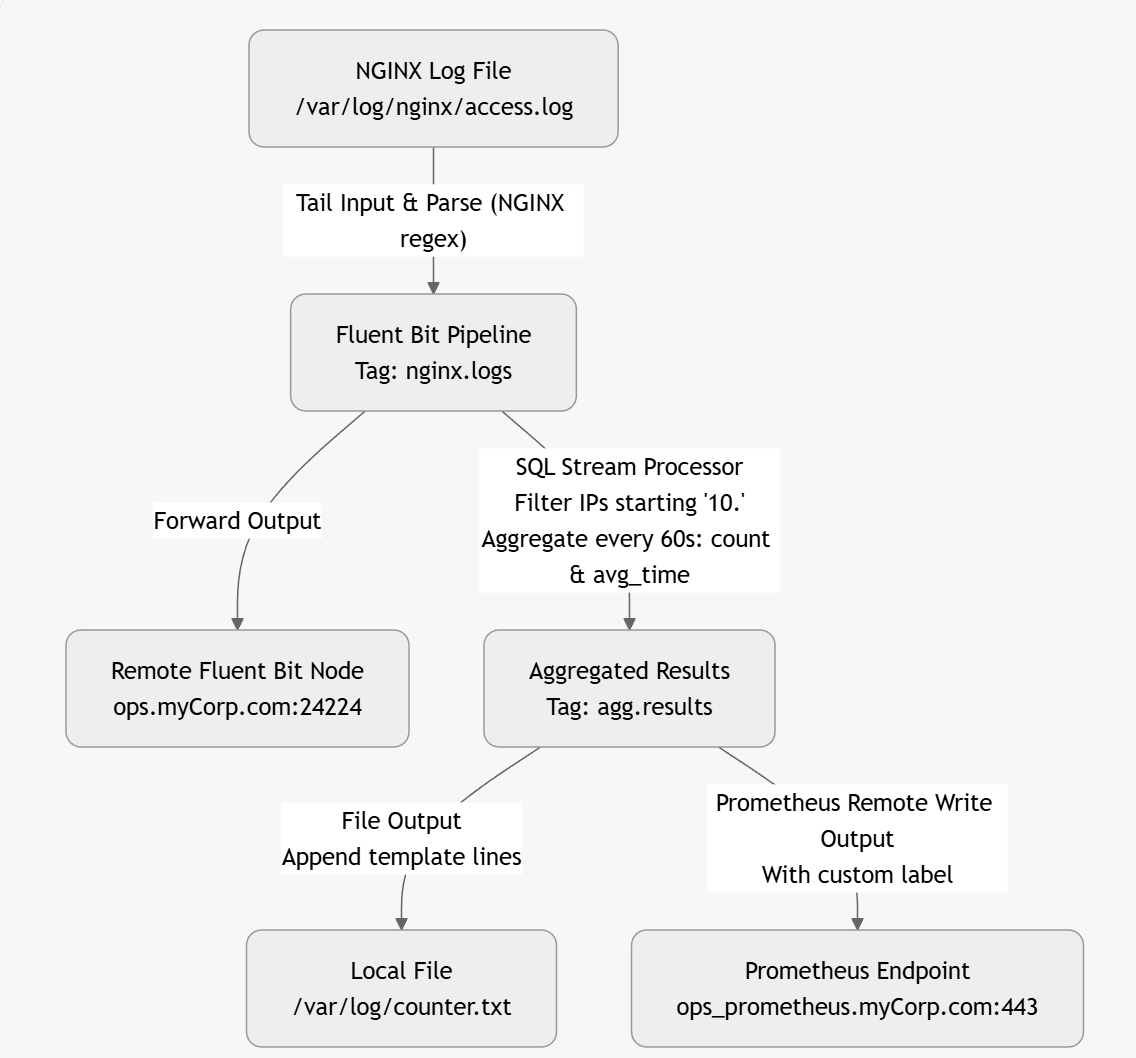
One of the nice things about using an LLM is that, given a configuration, it can create a visual representation (directly) or in formats such as Graphviz, Mermaid, or D2. This makes it easier to follow diagrams immediately. Here is an example based on a corrected Fluent Bit configuration:
The above diagram was created by the LLM as a mermaid file as follows
graph TD
A[NGINX Log File
/var/log/nginx/access.log] -->|"Tail Input & Parse (NGINX regex)"| B[Fluent Bit Pipeline
Tag: nginx.logs]
B -->|Forward Output| C[Remote Fluent Bit Node
ops.myCorp.com:24224]
B -->|"SQL Stream Processor
Filter IPs starting '10.'
Aggregate every 60s: count & avg_time"| D[Aggregated Results
Tag: agg.results]
D -->|"File Output
Append template lines"| E[Local File
/var/log/counter.txt]
D -->|"Prometheus Remote Write Output
With custom label"| F[Prometheus Endpoint
ops_prometheus.myCorp.com:443]
Lua and other advanced operations
When it comes to other advanced features, the LLM appears to handle this well, but given that there is plenty of content available on the use of Lua, the LLM could have been trained on. The only possible source of error would be the passing of attributes in and out of the Lua script, which it handled correctly.
We experimented with handling open telemetry traces, which were handled without any apparent issues. Although advanced options like compression control weren’t included (and neither were they requested).
We didn’t see any hallucinations when it came to plugin attributes. When we tried to ‘bait’ the LLM into hallucinating an attribute by asking it to use an attribute that doesn’t exist, it responded by adding the attribute along with a configuration comment that the value was not a valid Fluent Bit attribute.
General observations
One thing that struck me about this is that describing what is wanted with sufficient detail for the LLM requires a higher level of focus (albeit for a shorter period) than manually creating the configuration. The upside is that we are, in effect, generating part of a detailed design document. Today, I’d go so far as to suggest including the prompt(s) used in the configuration header(s) to help people understand what is needed from the configuration.
When the LLM generates the configuration, there will be no escaping the need to understand what the plugins do and the options they offer to determine whether the LLM has got it right. If the LLM gets it wrong, we would recommend starting a fresh session.
This does raise a bit of an interesting challenge. If you need to have a fair handle on how Fluent Bit works and common ways plugins work, then actually writing your own configuration files may be better anyway, as that approach will provide more reinforcement to learning. We, of course, can use the LLM to help ‘peer review’ our configurations in the sense of checking syntax, and generating visual representations can help confirm the configuration is as we expect.
This may be a personal thing, as I find myself working with Fluent Bit in small bursts rather than continually. As a result, I remember what I can do with a plugin, but I often forget the exact names of the less commonly used attributes to effect the desired behavior. Looking up, and keying in the attribute names can take time. One thing that we have tried was to include in the prompt statements, such as:
In the configuration include all the attributes even if they are only populated with their default or example values. Add a comment for each attribute to show its surpose and whether it is mandatory or not.
What you get then is all the possible options, with the correct names (something that is easy for the LLM, as it is essentially asking it to reformat the documentation for you). Then it becomes a case of removing the attributes that aren’t needed line by line—a lot quicker and easier than manually adding them.
LLM generated plugin with all attributes described (slightly modified output to make the point clearer).
[INPUT]
Name tail
# Purpose: Specifies the input plugin to use. Mandatory: yes
buffer_chunk_size 32k
# Purpose: Set the initial buffer size to read file data. The value must be according to the Unit Size specification. Mandatory: no
buffer_max_size 32k
# Purpose: Set the limit of the buffer size per monitored file. If reading a file exceeds this limit, the file is removed from the monitored file list. The value must be according to the Unit Size specification. Mandatory: no
path /var/log/blah.txt
# Purpose: Pattern specifying a specific log file or multiple ones through the use of common wildcards. Allows multiple patterns separated by commas. Mandatory: yes
path_key filename
# Purpose: If enabled, it appends the name of the monitored file as part of the record. The value assigned becomes the key in the map. Mandatory: no
exclude_path *.gz,*.zip
# Purpose: Set one or multiple shell patterns separated by commas to exclude files matching certain criteria, e.g., *.gz,*.zip. Mandatory: no
offset_key offset
# Purpose: If enabled, Fluent Bit appends the offset of the current monitored file as part of the record. The value assigned becomes the key in the map. Mandatory: no
read_from_head false
# Purpose: For new discovered files on start (without a database offset/position), read the content from the head of the file, not tail. Mandatory: no
refresh_interval 60
# Purpose: The interval of refreshing the list of watched files in seconds. Mandatory: no
rotate_wait 5
# Purpose: Specify the number of extra time in seconds to monitor a file once it is rotated in case some pending data is flushed. Mandatory: no
ignore_older 1d
# Purpose: Ignores files older than ignore_older. Supports m, h, d (minutes, hours, days) syntax. Mandatory: no
ignore_active_older_files false
# Purpose: Ignore files that are older than the value set in ignore_older even if the file is being ingested. Mandatory: no
skip_long_lines off
# Purpose: When a monitored file reaches its buffer capacity due to a very long line (buffer_max_size), the default behavior is to stop monitoring that file. skip_long_lines alters that behavior and instructs Fluent Bit to skip long lines and continue processing other lines that fit into the buffer size. Mandatory: no
skip_empty_lines off
# Purpose: Skips empty lines in the log file from any further processing or output. Mandatory: no
db /fluent-bit/tail/blah.db
# Purpose: Specify the database file to keep track of monitored files and offsets. Recommended to be unique per plugin. Mandatory: no
db.sync normal
# Purpose: Set a default synchronization (I/O) method. Affects how the internal SQLite engine synchronizes to disk. Values: extra, full, normal, off. Mandatory: no
db.locking false
# Purpose: Specify that the database will be accessed only by Fluent Bit. Enabling this increases performance but restricts external tools from querying the content. Mandatory: no
db.journal_mode wal
# Purpose: Sets the journal mode for databases (wal). Enabling wal provides higher performance. Not compatible with shared network file systems. Mandatory: no
db.compare_filename false
# Purpose: Determines whether to review both inode and filename when retrieving stored file information from the database. true verifies both; false checks only the inode. Mandatory: no
mem_buf_limit 10MB
# Purpose: Set a memory limit that the Tail plugin can use when appending data to the engine. If the limit is reached, it will be paused. When the data is flushed, it resumes. Mandatory: no
exit_on_eof false
# Purpose: When reading a file, exit as soon as it reaches the end of the file. Used for bulk load and tests. Mandatory: no
parser none
# Purpose: Specify the name of a parser to interpret the entry as a structured message. Mandatory: no
key log
# Purpose: When a message is unstructured (no parser applied), it's appended as a string under the key name log. This option lets you define an alternative name for that key. Mandatory: no
inotify_watcher true
# Purpose: Set to false to use file stat watcher instead of inotify. Mandatory: no
tag blah.logs
# Purpose: Set a tag with regexextract fields that will be placed on lines read. Supports tag expansion: if the tag includes an asterisk (*), that asterisk will be replaced with the absolute path of the monitored file, with slashes replaced by dots. Mandatory: no
tag_regex (?<pod_name>[a-z0-9](?:[-a-z0-9]*[a-z0-9])?(?:\\.[a-z0-9]([-a-z0-9]*[a-z0-9])?)*)_(?<namespace_name>[^_]+)_(?<container_name>.+)-(?<container_id>[a-z0-9]{64})\.log$
# Purpose: Set a regular expression to extract fields from the filename. Mandatory: no
static_batch_size 50M
# Purpose: Set the maximum number of bytes to process per iteration for the monitored static files (files that already exist upon Fluent Bit start). Mandatory: no
file_cache_advise on
# Purpose: Set the posix_fadvise in POSIX_FADV_DONTNEED mode. This reduces the usage of the kernel file cache. This option is ignored if not running on Linux. Mandatory: no
threaded false
# Purpose: Indicates whether to run this input in its own thread. Mandatory: no
Unicode.Encoding none
# Purpose: Set the Unicode character encoding of the file data. Requests two-byte aligned chunk and buffer sizes. Supported values: UTF-16LE, UTF-16BE, and auto. Mandatory: no
Generic.Encoding none
# Purpose: Set the non-Unicode encoding of the file data. Supported values: ShiftJIS, UHC, GBK, GB18030, Big5, Win866, Win874, Win1250, Win1251, Win1252, Win1254, Win1255, Win1256. Mandatory: no
multiline.parser docker,cri
# Purpose: Specify one or multiple Multiline Parser definitions to apply to the content. When using a new multiline.parser definition, you must disable the old configuration from your tail section (e.g., parser, parser_firstline, parser_N, multiline, multiline_flush, docker_mode). Mandatory: no
multiline off
# Purpose: If enabled, the plugin will try to discover multiline messages and use the proper parsers to compose the outgoing messages. When this option is enabled, the parser option isn't used. Mandatory: no
multiline_flush 4
# Purpose: Wait period time in seconds to process queued multiline messages. Mandatory: no
parser_firstline none
# Purpose: Name of the parser that matches the beginning of a multiline message. The regular expression defined in the parser must include a group name (named capture), and the value of the last match group must be a string. Mandatory: no
parser_1 example_parser
# Purpose: Optional. Extra parser to interpret and structure multiline entries. This option can be used to define multiple parsers. For example, parser_1 ab1, parser_2 ab2, parser_N abN. Mandatory: no
docker_mode off
# Purpose: If enabled, the plugin will recombine split Docker log lines before passing them to any parser. This mode can't be used at the same time as Multiline. Mandatory: no
docker_mode_flush 4
# Purpose: Wait period time in seconds to flush queued unfinished split lines. Mandatory: no
docker_mode_parser none
# Purpose: Specify an optional parser for the first line of the Docker multiline mode. The parser name must be registered in the parsers.conf file. Mandatory: no
[OUTPUT]
Name stdout
Match *
Format json_lines
[OUTPUT] Name stdout Match * Format json_lines
I would also suggest it is worth trying the same prompt is separate conversations/sessions to see how much variability in approach to using Fluent Bit is thrown up. If the different sessions yield very similar solutions, then great. If the approaches adopted are different, then it is worth evaluating the options, but also considering what in your prompt might need clarifying (and therefore the problem being addressed).
Generating a diagram to show the configuration is also a handy way to validate whether the flow of events through it will be as expected.
The critical thing to remember is that the LLM won’t guarantee that what it provides is good practice. The LLM is generating a configuration based on what it has seen, which can be both good and bad. Not to mention applying good practice demands that we understand why a particular practice is good, and when it is to our benefit. It is so easy to forget that LLMs are primarily exceptional probability engines with feedback loops, and their reasoning is largely probabilities, feedback loops, and some deterministic tooling.
Fluent Bit version 4’s first major release dropped a couple of weeks ago (September 24, 2025). The release’s feature list isn’t as large as 4.0.4 (see my blog here). It would therefore be easy to interpret the change as less profound. But that isn’t the case. There are some new features, which we’ll come to shortly, but there are some significant improvements under the hood.
Under the hood
Fluent Bit v4.1 has introduced significant enhancements to its processing capabilities, particularly in the handling of JSON. This is really important as handling JSON is central to Fluent Bit. As many systems are handling JSON, there is at the lowest levels, continuous work happening in different libraries to make it as fast as possible. Fluent Bit has amended its processing to use a mechanism based on a yyjson, without going into the deep technical details. If you examine the benchmarking of yyjson and other comparable libraries, you’ll see that its throughput is astonishing. So accelerating processing by even a couple of percentage points can have a profound performance enhancement.
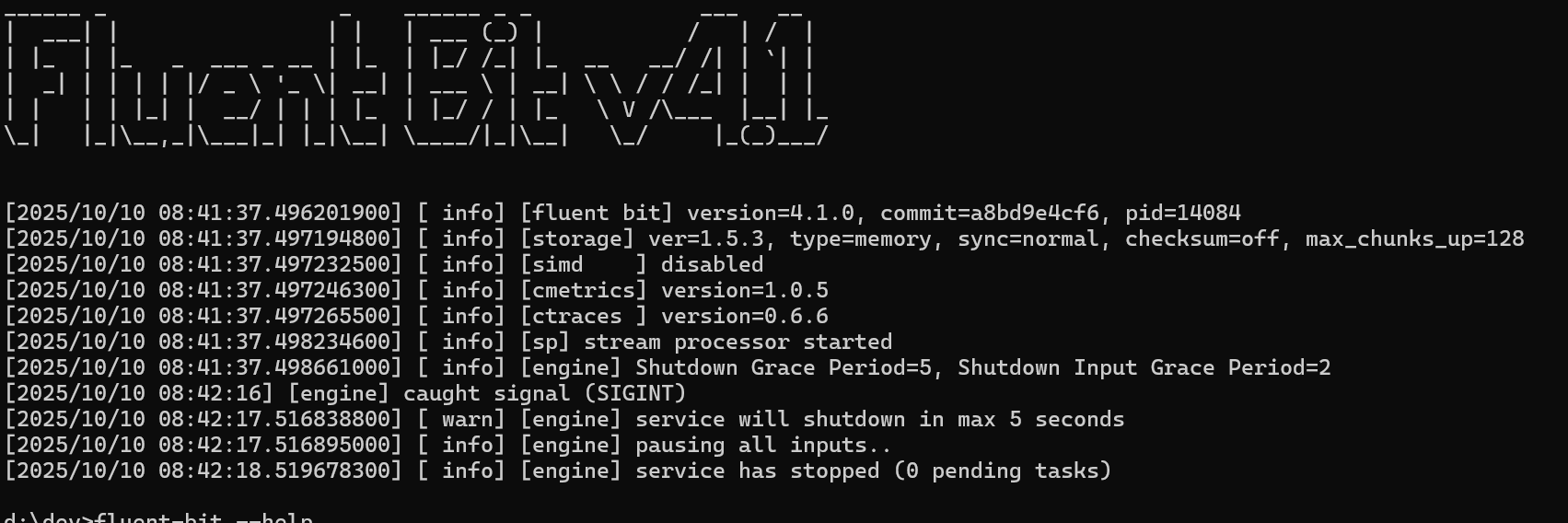
The next improvement in this area is the use of SIMD (Single Instruction, Multiple Data). This is all about how our code can exploit microprocessor architecture to achieve faster processing. As logs often need characters like new line, quotes, and other special characters encoding, and logs often carry these characters (and we tend to overlook this – consider a stack trace, where each step of the stack chain is provided on a new line, or embedding a stringified XML or JSON block in the log, which will hve multiple uses of quotes etc. As a result, any optimization of string encoding will quickly yield performance benefits. As SIMD takes advantage of CPU characteristics, not every build will have the feature. You can check to see if SIMD is being used by checking the output during startup, like tthis:
This build for Windows x86-64 as shown in the 3rd info statement doesn’t have SIMD enabled.
Other backend improvements have been made with TLS handling. The ability to collect GPU metrics with AMD hardware (significant as GPUs are becoming ever more critical not only in large AI arrays, but also for AI at the edge).
So, how do we as app developers benefit?
If Fluent Bit’s performance improves, we benefit from reduced risk of backpressure-related issues. We can either complete more work with the same compute (assuming we’re at maximum demand all the time), or we can reduce our footprint – saving money either as capital expenditure (capex) or operational expenditure (opex) (not something that most developers are typically seeking until systems are operating at hyperscale). Alternatively, we can further utilize Fluent Bit to make our operational life easier, for example, by reducing sampling slightly, implementing additional filtering/payload load logic, and streaming to detect scenarios as they occur rather than bulk processing on a downstream platform.
Functional Features
In terms of functionality, which as a developer we’re very interested in as it can make our day job easier, we have a few features.
AWS
In terms of features, there are a number of enhancements to support AWS services. This isn’t unusual; as the AWS team appears to have a very active and team of contributors for their plugins. Here the improvement is for supporting Parquet files in S3.
Supervisory Process
As our systems go ever faster, and become more complex, particularly when distributed it becomes harder to observe and intervene if a process appears to fail or worse becomes unresponsive. As a result, we need tools to have some ‘self awareness’. Fluen bit introduces the idea of an optional supervisor process. This is a small, relatively simple process that spawns the core of Fluent Bit and has the means to check the process and act as necessary. To enable the supervisor , we can add to the command line –supervisor. This feature is not available on all platforms, and the logic should report back to you during startup if you can’t use the feature. Unfortunately, the build I’m trying doesn’t appear to have the supervisor correctly wired in (it returns an error message saying it doesn’t recognize the command-line parameter).
If you want to see in detail what the supervisor is doing – you can find its core in /src/flb_supervisor.c with the supervisor_supervise_loop function, specifically.
Conclusion
With the number of differently built and configured systems, we’ll see a 4.1.x releases as these edge case gremlins are found and resolved.
The latest release of Fluent Bit is only considered a patch release (based on SemVer naming). But given the enhancements included it would be reasonable to have called it a minor change. There are some really good enhancements here.
Character Encoding
As all mainstream programming languages have syntaxes that lend themselves to English or Western-based languages, it is easy to forget that a lot of the global population use languages that don’t have this heritage, and therefore can’t be encoded using UTF-8. For example, according to the World Factbook, 13.8% speak Mandarin Chinese. While this doesn’t immediately translate into written communication or language use with computers, it is a clear indicator that when logging, we need to support log files that can be encoded to support idiomatic languages, such as Simplified Chinese, and recognized extensions, such as GSK and BIG5. However, internally, Fluent Bit transmits the payload as JSON, so the encoding needs to be handled. This means log file ingestion with the Tail plugin ideally needs to support such encodings. To achieve this, the plugin features a native character encoding engine that can be directed using a new attribute called generic. encoding, which is used to specify the encoding the file is using.
The Win**** encodings are Windows-based formats that predate the adoption of UTF-8 by Microsoft.
Log Rotation handling
The Tail plugin, has also seen another improvement. Working with remote file mounts has been challenging, as it is necessary to ensure that file rotation is properly recognized. To improve the file rotation recognition, Fluent Bit has been modified to take full advantage of fstat. From a configuration perspective, we’ll not see any changes, but from the viewpoint of handling edge cases the plugin is far more robust.
Lua scripting for OpenTelemetry
In my opinion, the Lua plugin has been an underappreciated filter. It provides the means to create customized filtering and transformers with minimal overhead and effort. Until now, Lua has been limited in its ability to interact with OpenTelemetry payloads. This has been rectified by introducing a new callback signature with an additional parameter, which allows access to the OLTP attributes, enabling examination and, if necessary, return of a modified set. The new signature does not invalidate existing Lua scripts with the older three or four parameters. So backward compatibility is retained.
The most challenging aspect of using Lua scripts with OpenTelemetry is understanding the attribute values. Given this, let’s just see an example of the updated Lua callback. We’ll explore this feature further in future blogs.
function cb(tag, ts, group, metadata, record)
if group['resource']['attributes']['service.name'] then
record['service_name'] = group['resource']['attributes']['service.name']
end
if metadata['otlp']['severity_number'] == 9 then
metadata['otlp']['severity_number'] = 13
metadata['otlp']['severity_text'] = 'WARN'
end
return 1, ts, metadata, record
end
Other enhancements
With nearly every release of Fluent Bit, you can find plugin enhancements to improve performance (e.g., OpenTelemetry) or leverage the latest platform enhancements, such as AWS services.
Like many developers and architects, I track the news feeds from websites such as The New Stack and InfoQ. I’ve even submitted articles to some of these sites and saw them published. However, in the last week, something rather odd occurred: articles in The New Stack (TNS) appeared, attributed to me, although I had no involvement in the publication process with TNS; yet, the content is definitely mine. So what appears to be happening?
To help answer this, let me provide a little backstory. Back in October and November last year, we completed the publication of my book about Fluent Bit (called Logs and Telemetry with a working title of Fluent Bit with Kubernetes), a follow-up from Logging In Action (which covered Fluent Bit’s older sibling, Fluentd). During the process of writing these books, I have had the opportunity to get to know members of the team behind these CNCF projects and consider them as engineering friends. Through several changes, the core team has primarily come to work for Chronosphere. To cut a long story short, I connected the Fluent Bit team to Manning, and they sponsored my book (giving them the privilege of giving away a certain number of copies of the book, cover branding, and so on).
It appears that, as part of working with Manning’s marketing team, authors are invited to submit articles and agree to have them published on Manning’s website. Upon closer examination, the articles appear to have been sponsored by Chronosphere, with an apparent reference to Manning publications. So somewhere among the marketing and sales teams, an agreement has been made, and content has been reused. Sadly, no one thought to tell the author.
I don’t in principle have an issue with this, after all, I wrote the book, and blog on these subjects because I believe enabling an understanding of technologies like Fluent Bit is valuable and my way of contributing to the IT community (Yes, I do see a little bit of money from sales, but the money-to-time and effort ratio works out to be less than minimum wage).
The most frustrating bit of all of this is that one of the articles links to a book I’ve not been involved with, and the authors of Effective Platform Engineering aren’t being properly credited. It turns out that Chronosphere is sponsoring Effective Platform Engineering (Manning’s page for this is here).
With the announcement of Fluent Bit v4 at Kubecon Europe, we thought it worthwhile to take a look at what it means, aside from celebrating 10 years of Fluent Bit.
Firstly, normally using Semantic Versioning would suggest likely breaking (or incompatible changes to use SemVer wording) changes. The good news is that, like all the previous version changes for Fluent Bit the numbering change only reflects the arrival of major new features.
This is good news for me as the author of Logs and Telemetry with Fluent Bit, as it means the book remains entirely relevant. The book obviously won’t address the latest features, but we’ll try to cover those here as supplemental content.
Let’s reflect upon the new features, their benefits, and their implications.
More flexible support for TLS (v1.3, choosing ciphers to enable)
New language for custom plugins in the form of Zig
Security Improvements
While security for many is not something that will get most developers excited about, there are things here that will make a CSO (Chief Security Officer) smile. Any developer who knows implementing security behaviors because it is a good thing, rather than because you have been told to do it, makes a CSO happy, puts them in a good place, to be given some more lianency when there is a need to do something that would get the CSO hot under the collar. Given this, we can now win those points with CSOs by using new Fluent Bit configurations that control TLS versions (1.1 – 1.3) and ciphers to support in use.
But even more fundamental than that are the improvements around basic credentials management. Historically, credentials and tokens had to be explicit in a configuration file or referenced back to an environment variable. Now, such values can come from a file, and as a result, there is no explicitness in the configuration. File security can manage access and visibility of such details. This will also make credentials rotation a lot easier to implement.
Processor Improvements
The processor improvements are probably the most exciting changes. Processors allow us to introduce additional activities within the pipeline as part of a process such as an input, rather than requiring additional buffer fetch and return which we see in standard plugin operations.
Of course, the downside is that if the processor introduces a lot of effort, we can create unexpected problems, such as back pressure, for example, as a result of a processor working hard on an input.
The other factor that extending processors bring is that they are not supported in classic format, meaning that to exploit such formats, you do need to define your configuration using YAML. The only thing I’m not a fan of, is that the configuration for these features does make me think I’m having to read algorithms expressed with Backus Naur form (BNF).
Trace Sampling
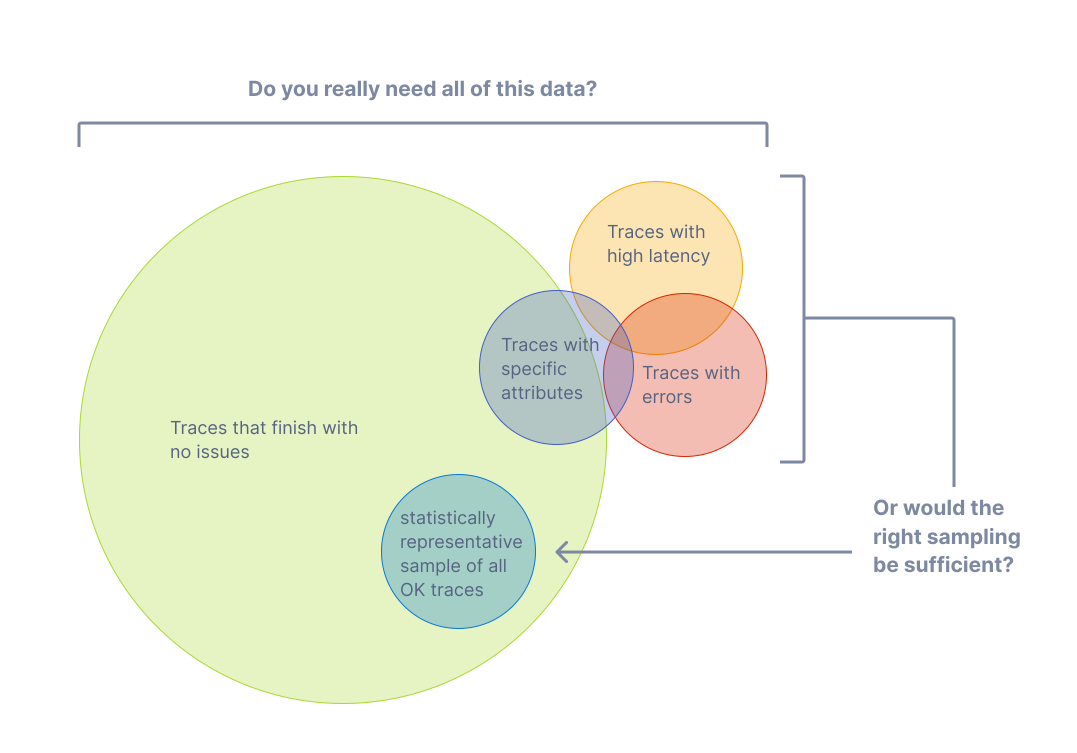
Firstly, the processors supporting OpenTelemetry Tracing can now sample. This is probably Fluent Bit’s only weakness in the Open Telemetry domain until now. Sampling is essential here as traces can become significant as you track application executions through many spans. When combined with each new transaction creating a new trace, traces can become voluminous. To control this explosion on telemetry data, we want to sample traces, collecting a percentage of typical traces (performance, latency, no errors, etc) and the outliers, where tracing will show us where a process is suffering, e.g., an end-to-end process is slowing because of a bottleneck. We can dictate how the sampling is applied based on values of existing attributes, the trace status, status codes, latencies, the number of spans, etc.
Conditionality in Processors
Conditionality makes it easier to respond to aspects of logs. For example, only when the logging payload has several attributes with specific values do we want to filter the event out for more attention. For example, an application reporting that it is starting up, and logs are classified as representing an error – then we may want to add a tag to the event so it can be easily filtered and routed to the escalation process.
Plugins with Zig
The enablement of Zig for plugin development (input, output and filters) is strictly an experimental feature. The contributors are confident they have covered all the typical use cases. But the innate flexibility supporting a language always represents potential edge cases never considered and may require some additional work to address.
Let’s be honest: Zig isn’t a well-known language. So, let’s start by looking briefly at it and why the community has adopted it for custom plugin development as an alternative to the existing options with Lua and WASM.
So Zig has a number of characteristics that align with the Fluent Bit ethos better than Lua and WASM, specifically:
It is a compiled rather than interpreted language, meaning that we reduce the runtime overheads of an interpreter or JIT compiler such as Lua and the proxy layer of WASM. This aligns to be very fast/minimal compute overhead to do its job, – ideal for IoT and minimising the cost of side-care container deployments.
The footprint for the Zig executable is very, very small—smaller than even a C-generated binary! As with the previous point, this lends itself to common Fluent Bit deployments.
The language definition is formally defined, compact, and freely available. This means you should be able to take a tool chain from anyone, and it is easy for specialist chip vendors to provide compilers.
Based on those who have tried, cross-compiling is far easier to deal with than working with GCC, MSVC, etc. Making it a lot easier to develop with the benefits we want from Go. Unlike Go – to connect to the C binary of Fluent Bit doesn’t require the use of a translation layer.
One of Zig’s characteristics that differs from C is its stronger typing and its approach of, rather than prescribing how edge cases are handled, e.g., null pointers, working to prevent you from entering those conditions.
Zig has been around for a few years (the first pre-release was in 2017, and the first non-pre-release was in August 2023). This is long enough for the supporting tooling to be pretty well fleshed out with package management, important building blocks such as the HTTP server, etc.
While asking a large enterprise with more conservative approaches to development (particularly when IT is seen as an overhead, and source of risk rather than a differentiator/revenue generator) to consider adopting Zig could be challenging compared to adopting, say Go. The different potential values here, make for some interesting potential.
Not Only, but Also
While we have made some significant advancements, each Fluent Bit release brings a variety of improvements in its plugins. For example, working with it with eBPF, HTTP output supports more compression techniques, such as Snappy and ZSTD, and Exit having a configurable delay.
The Plus version of library dependencies is being updated to exploit new capabilities or ensure Fluent Bit isn’t using libraries with vulnerabilities.
Recently, a question came up on the Fluent Bit Slack group about how the Fluentd Label feature and the associated relabel plugin map from Fluentd to Fluent Bit.
Fluentd Labels are a way to implement event routing, and we’ll look more closely at them in a moment. Both Fluent Bit and Fluentd support the control of which plugins respond to an event by using tags, which are based on a per-plugin basis.
To address this, let’s take a moment to see what Fluentd’s labels do.
What do Fluentd’s Labels Do?
Fluentd introduced the concept of labels, where one or more plugins could be grouped, creating a pipeline of plugins. Events can also be labeled, effectively putting them into a pipeline that can be defined with that label.
As a result, we would see something like:
<input>
Label myLabel
</input>
<input>
Label myOtherLabel
</input>
<label myLabel>
<filter>
-- do something to the log event
</filter>
<filter>
-- do something to the log event
</filter>
<output>
</output>
</label>
<label myOtherLabel>
<filter>
-- do something to the log event
</filter>
<output>
</output>
</label>
<output tagName>
</output>
Fluentd’s labelling essentially tries to simplify the routing of events within a Fluentd deployment, particularly when multiple plugins are needed, aka a pipeline.
Fluent Bit’s routing
Fluent Bit doesn’t support the concept of labels. While both support tags can include wildcards within the tag name, Fluent Bit has an extension that adds power to the routing using tags. Rather than introducing an utterly separate routing control, it extended how tags can be used by allowing the matching to be achieved through regular expressions, which is far more flexible. This could look like (using classic format):
[INPUT]
Name plugin-name
Tag myTag
[INPUT]
Name another-plugin-name
Tag myOtherTag
[INPUT]
Name alternate-plugin-name
Tag myAlternateTag
[OUTPUT]
Name output-plugin-name
Match myTag
[OUTPUT]
Name another-output-plugin
Match_regex my[Other|Alternate]Tag
The only downsides to processing regular expressions this way are the potentially greater computational effort (depending on the sophistication of the regular expression) and the use of the match on every plugin.
Migration options
The original question was prompted by the idea of migrating from Fluentd to Fluent Bit. When considering this, Labels don’t have a natural like-for-like transition path.
Often, tags originate from a characteristic or direct attribute of the event message (payload). Instead, treat a tag purely as a routing mechanism, design a hierarchical routing strategy based on domains, and then use your tags for just this purpose. Aligning tags to domains rather than technical characteristics will help.
This creates the opportunity to progressively refactor out the need for labels. this will then make the transition through
REGEX
An alternative to this is to adopt regular expressions to select appropriate tags regardless of their structure, naming convention, or use of case. While this is very flexible, the expressions can be harder to maintain, and if some tags are driven by event data, there is an element of risk (although likely small) of an unexpected event being caught and processed by a plugin as it unwittingly matches a regular expression.
Multiple Fluent Bit Instances
Fluent Bit’s footprint is very small, notably smaller than that of Fluentd, as no runtime components like Ruby are involved. This means we could deploy multiple instances, with each instance acting as an implicit pipeline for events to be processed. The downside is that the equivalent of relabelling is more involved, as you’ll have to have a plugin to explicitly redirect the event to another instance. We also need to ensure that the events start with the correct Fluent Bit node.
Conclusion
When we try to achieve the same behaviour in two differing products that do have feature differences, trying to force a new product to produce exactly the same behaviour can result in decisions that can feel like compromises. In these situations, we tend to forget that we may have made trade-off decisions that led to the use of a feature in the first place.
When we find ourselves in such situations, while it may feel more costly, it may be worth reflecting on whether it is more cost-effective to return to the original problem, design the solution based on the new product’s features, and maximize the benefit.
Fluentd to Fluent Bit Portability a possibility?
This may start to sound like Fluentd to Fluent Bit portability is impossible and requires us to build our monitoring stack from scratch. Based on my experiences, these tools are siblings, not direct descendants, so there will be differences. In the work on building a migration tool (a project I’ve not had an opportunity to conclude), I’d suggest there is an 85/15 match, and migration is achievable, and the bulk of such a task can be automated. But certainly not all, and just seeking a push-button cutover means you’ll miss the opportunity to take advantage of the newer features.
Do you need a migration?
Fluentd may not be on the bleeding edge feature-wise now, but if your existing systems aren’t evolving and demanding or able to benefit from switching to Fluent Bit, then why force the migration? Let your core product path drive the transition from one tool to another. Remember, the two have interoperable protocols – so a mixed estate is achievable, and for the most part will be transparent.
These days, everywhere you look, there are references to Generative AI, to the point that what have Fluent Bit and GenAI got to do with each other? GenAI has the potential to help with observability, but it also needs observation to measure its performance, whether it is being abused, etc. You may recall a few years back that Microsoft was trailing new AI features for Bing, and after only having it in use for a couple of days, it had been recorded generating abusive comments and so on (Microsoft’s Tay is such an example).
But this isn’t the aspect of GenAI (or the foundations of AI with Machine Learning (ML)) I was thinking about. Fluent Bit can be linked to GenAI through its TensorFlow plugin. Is this genuinely of value or just a bit of ‘me too’?
There are plenty of backend use cases once the telemetry has been incorporated into an analytics platform, for example:
Making it easy to query and mine the observability data, such as natural language searching – to simplify expressing what is being looked for.
Outlier / Anomaly detection – when signals, particularly metrics, diverge from the normal patterns of behavior, we have the first signs of a problem. This is more Machine Learning than generative AI.
Using AI agents to tune monitoring thresholds and alerting scenarios
But these are all backend, big data style use cases and do not center on Fluent Bit’s core value of getting data sources to appropriate destination systems for such analysis or visualization.
To incorporate AI into Fluent Bit pipelines, we need to overcome a key issue – AI tends to be computationally heavy – making it potentially too slow for streams of signals being generated by our applications and too expensive given that most logs reflecting ‘business as usual’ are, in effect, low value.
There are some genuine use cases where lightweight AI can deliver value. First, we should be a little more precise. The TensorFlow plugin is the TensorFlow Lite version, also known as LiteRT. The name comes from the fact that it is a lite-weight solution intended to be deployable using small devices (by AI standards). This fits the Fluent Bit model of having a small footprint.
So, where can we put such a use case:
Translating stack traces into actionable information can be challenging. A trained ML or AI model can help classify and characterize the cause of a stack trace. As a result, we can move from the log to triggering appropriate actions.
Targeted use cases where we’ve filtered out most signal data to help analyze specific events – for example, we want to prevent the propagation of PII data downstream. Some PII data can be easily isolated through patterns using REGEX. For example, credit card IDs are a pattern of 4 digits in 4 groups. Phone numbers and email addresses can also be easily identified. However, postal addresses aren’t easy, particularly when handling multinational addresses, where the postal code/zip code can’t be used as an indicative pattern. Using AI to help with such checks means we must filter out signals to only examine messages that could accidentally carry such information.
When adopting AI into such scenarios, we have to be aware of the problems that can impact the use of ML and AI. These use cases are less high profile than the issues of hallucinations but just as important. As we’re observing software, which will change over time. As a result, payloads or data shifts (technically referred to as data drift) and the detection rate can drop. So, we need to measure the efficacy of the model. However, issues such as data drift need to be taken into account, as the scenario being detected may change in volume, reflecting changes in software usage and/or changes in how the solution works.
There are ways to help address such considerations, such as tracking false positive outcomes, and if the model can provide confidence scoring, is there a trend in the score?
Conclusion
There are good use cases for using Machine Learning (and, to an extent, Artificial Intelligence) within an observability pipeline – but we have to be selective in its application as:
The cost of the computation can outweigh the benefits
The execution time for such computation can be notably slower than our pipeline, leading to risks of back pressure if applied to every event in the pipeline.
The effectiveness and how much data drift might occur (we might initially see very good results, but then things can fall off).
Possibly, the most useful application is when the AI/ML engine has been trained to recognize patterns of events that preceded a serious operational issue (strictly, this is the use of ML).
Forward-looking
The true potential for Gen AI is when we move beyond isolating potential faults based on pattern recognition to using AI to help recommend or even trigger remediation processes.
Among the exciting announcements for Fluent Bit 3.2 is the support for YAML configuration is now complete. Until now, there have been some outliers in the form of details, such as parser and streamer configurations, which hadn’t been made YAML compliant until now.
As a result, the definitions for parsers and streams had to remain separate files. That is no longer the case, and it is possible to incorporate parser definitions within the same configuration file. While separate configuration files for parsers make for easier re-use, it is more troublesome when incorporating the configuration into a Kubernetes deployment configuration, particularly when using a side-car deployment.
Parsers
With this advancement, we can define parsers like this:
Classic Fluent Bit
[PARSER]
name myNginxOctet1
format regex
regex (?<octet1>\d{1,3})
As the examples show, we swap [PARSER] for a parsers object. Then, each parser is an array of attributes starting with the parser name. The names follow a one-to-one mapping in most cases. This does break down when it comes to parsers where we can define a series of values, which in classic format would just be read in order.
Multiline Parsers
When using multiline parsers, we must provide different regular expressions for different lines. In this situation, we see each set of attributes become a list entry, as we can see here:
In addition to how the rules are nested, we have moved from several parameters within a single attribute(rule) to each rule having several discrete elements (regex, next_state). In addition to this, we have also changed the use of single and double quote marks.
If you want to keep the configurations for parsers and streams separate, we can continue to do so, referencing the file and name from the main configuration file. While converting the existing conf to a YAML format is the bulk of the work, in all likelihood, you’ll change the file extension to be .YAML will means you must also modify the referencing parsers_file reference in the server section of the main configuration file.
Streams
Streams follow very much the same path as parsers. However, we do have to be a lot more aware of the query syntax to remain within the YAML syntax rules.
Classic Fluent Bit
[STREAM_TASK]
name selectTaskWithTag
exec SELECT record_tag(), rand_value FROM STREAM:random.0;
[STREAM_TASK]
name selectSumTask
exec SELECT now(), sum(rand_value) FROM STREAM:random.0;
[STREAM_TASK]
name selectWhereTask
exec SELECT unix_timestamp(), count(rand_value) FROM STREAM:random.0 where rand_value > 0;
YAML Configuration
stream_processor:
- name: selectTaskWithTag
exec: "SELECT record_tag(), rand_value FROM STREAM:random.0;"
- name: selectSumTask
exec: "SELECT now(), sum(rand_value) FROM STREAM:random.0;"
- name: selectWhereTask
exec: "SELECT unix_timestamp(), count(rand_value) FROM STREAM:random.0 where rand_value > 0;"
Note, it is pretty common for Fluent Bit YAML to use the plural form for each of the main blocks, although stream definition is an exception to the case. Additionally, both stream_processor and stream_task are accepted (although stream_task is not recognized in the main configuration file)..
Incorporating Configuration directly into the core configuration file
To support directly incorporating these definitions into a single file, we can lift the YAML file contents and apply them as root elements (i.e., at the same level as the pipeline, and service, for example).
Fluent Bit book examples
Our Fluent Bit book (Manning, Amazon UK, Amazon US, and everywhere else) has several examples of using parsers and streams in its GitHub repo. We’ve added the YAML versions of the configurations illustrating parsers and stream processing to its repository in the Extras folder.
You must be logged in to post a comment.