Testing OpenTelemetry configuration pipelines without resorting to instrumented applications, particularly for traces, can be a bit of a pain. Typically, you just want to validate you can get an exported/generated signal through your pipeline, which may not be the OpenTelemetry Collector (e.g., FluentBit or commercial solutions such as DataDog). This led to the creation of Tracegen, and then the larger Telementrygen.
You can use Tracegen or Telemetrygen by either downloading and running the Go app from GitHub or using the Docker file. But there are a couple of challenges:
On initial investigation, these utilities appear wrapped up in the larger opentelemetry-collector-contrib. While potentially useful, shaking out your OTel pipelining is somewhat overkill.
We can install the app locally with the following command, but then we need to set up Golang in the environment.
go install github.com/open-telemetry/opentelemetry-collector-contrib/cmd/telemetrygen@latest
Fortunately, there is a Docker image that just contains the tool, but to use it, we need to know what the parameters are to override the container defaults. The only irritant is that you either need to mess about with the container to get at the information (i.e., run the — help options) or install the utility (the parameters are not in the GitHub docs), so we’ve teased out all the options into the following table.
The following table’s Signal column All means it can be applied to Metrics, Traces, or Logs. Otherwise we’ve named the signal type that the parameter can be used with.
Signal
Parameter/Flag
Description
Trace
–batch
Whether to batch traces (default true)
All
–ca-cert string
Trusted Certificate Authority to verify server certificate
Traces
–child-spans int
Client certificate file
All
–client-key string
Client private key file
All
–duration duration
For how long to run the test
All
-h, –help {traces|metrics|logs}
help – with give you the basic help if no parameter is passed. Or the signal type help when used with the signal name e.g. telemetrygen traces --help
All
–interval duration
Reporting interval (default 1s)
Traces
–marshal
Whether to marshal trace context via HTTP headers
All
–mtls
Whether to require client authentication for mTLS
All
–otlp-attributes map[string]string
Custom resource attributes to use. The value is expected in the format key=”value”. Note you may need to escape the quotes when using the tool from a cli. Flag may be repeated to set multiple attributes (e.g --otlp-attributes key1=\"value1\" --otlp-attributes key2=\"value2\")
All
–otlp-endpoint string
Destination endpoint for exporting logs, metrics and traces
All
–otlp-header map[string]string
Custom header to be passed along with each OTLP request. The value is expected in the format key=”value”. Note you may need to escape the quotes when using the tool from a cli. Flag may be repeated to set multiple headers (e.g --otlp-header key1=\"value1\" --otlp-header key2=\"value2\")
All
–otlp-http
Whether to use HTTP exporter rather than a gRPC one
All
–otlp-http-url-path string
Which URL path to write to (default "/v1/traces")
All
–otlp-insecure
Whether to enable client transport security for the exporter’s grpc or http connection
All
–rate int
Approximately how many metrics per second each worker should generate. Zero means no throttling.
Traces
–service string
Service name to use (default "telemetrygen")
Traces
–size int
Desired minimum size in MB of string data for each trace generated. This can be used to test traces with large payloads, i.e. when testing the OTLP receiver endpoint max receive size.
Traces
–span-duration duration
The duration of each generated span. (default 123µs)
Traces
–status-code string
Status code to use for the spans, one of (Unset, Error, Ok) or the equivalent integer (0,1,2) (default “0”)
All
–telemetry-attributes map[string]string
Number of traces to generate in each worker (ignored if the duration is provided) (default 1)
Traces
–traces int
Number of traces to generate in each worker (ignored if duration is provided) (default 1)
All
–workers int
Number of workers (goroutines) to run (default of 1)
Metrics
–metric-type metricType
Number of metrics to generate in each worker (ignored if the duration is provided) (default 1)
Metrics
–metrics int
Number of logs to generate in each worker (ignored if the duration is provided) (default 1)
Logs
–body string
Body of the log (default “the message”)
Logs
–logs int
The severity number of the log ranges from 1 to 24 (inclusive) (default 9)
Logs
–severity-number int32
The severity number of the log ranges from 1 to 24 (inclusive) (default 9)
Logs
–severity-text string
Severity text of the log (default “Info”)
All the configuration parameters for Telemetrygen
It is worth noting that while Tracegen has similar configuration parameters, they aren’t exactly the same in the CLI, often one dash rather than two in the name for example.
The following is a simple Docker compose file that can help you use the container to conduct local testing of your collector. In this configuration, we’re sending a trace to the host machine with HTTPS disabled.
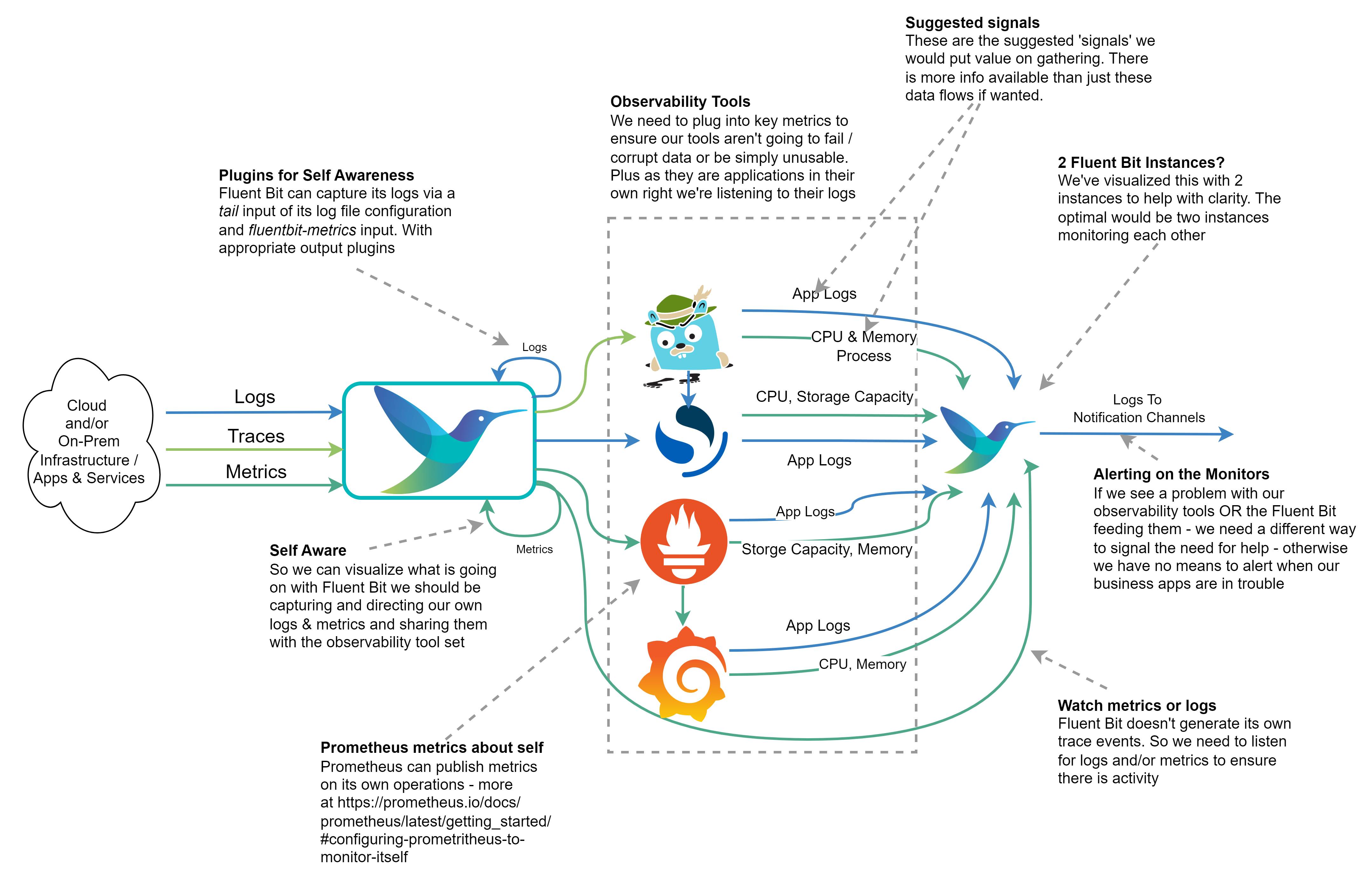
In the Fluent Bit book I touch upon the point that we should be observing the observer. After all, if we don’t monitor our observability stack, then we’ll be operating blind and may never know until things go catastrophically wrong, and we’re getting complaints that production business solutions are down. One of the peer review comments was it would be really good to have a visual representation in the book. While I’d love to incorporate such diagrams, for them to be readable, they do use up a lot of space on the printed page, and very long chapters can also put some readers off. So, given the point wasn’t a key theme, we simply couldn’t incorporate the diagram.
But the suggestion is a good one. So we’ve created the visual representation here.
The diagram shows how we can monitor our observation tech stack so we don’t become ‘blind’ without knowing about it. The Outflow from the right of the diagram would send a signal to a notification service, which could be as simple as email or as user-friendly as Slack. We’ve indicated which kinds of metrics, logs, and traces could offer the most value from our observation tech stack.
If we’re running everything within a Kubernetes cluster, it would be easy to say we don’t need such a sophisticated setup as we can use Kubernetes liveness probes if the containers are well configured. While it is true if one of our services starts to fail, a liveness check should pick it up and recycle the container. But such probes only worry about the HTTP response code, not the cause. If we don’t monitor and capture more information we’ll never understand the problem. At worst we could end up seeing Kubernetes starting and then killing our containers in a vicious cycle and struggling to resolve the cause. So collecting the logs and metrics remains just as important.
How to Publish Fluent Bit Metrics and Logs
To publish Fluent Bit’s metrics to Prometheus, we need to configure the fluentbit-metrics input plugin (it does sound odd as an input, but there are reasons that become clearer in the book). We then route the output that supports using Fluent Bit as a Prometheus node exporter or makes use of the remote write API.
The log output for Fluent Bit can be configured via the command line or in the SERVICE blog (using the attributes log_file and log_level in the configuration file. Today this is setting the log threshold and identifying the log file. We can then, of course, configure a tail input plugin against the file if we want to send the logs to OpenSearch. We can also set plugin-specific logging thresholds as overrides to the Fluent Bit wide setting in the SERVICE block of configuration.
Configuring the other monitoring tools
Grafana‘s configuration will allow it to publish Prometheus scrapable metrics and Traces that are OTLP compliant can be found documented here.
Prometheus provides metrics on itself (details here) and logging controls as part of its command line and generates logfmt or JSON logs, details here.
OpenSearch‘s logs can be accessed as documented here. The Logs are created with Log4j2, which means out of the box, it will be easy to parse them. Configuring the output of slow query reports does need to be switched on. OpenSearch also illustrates a pre OpenTelemetry/OpenMetrics approach to sharing internal metrics by writing them as logs. However, there are ways to convert such log events to OTLP Metrics with Fluent Bit.
Jaeger provides metrics endpoints that are Prometheus-compatible, along with JSON-based logs, and are documented here. There is some support for tracing.
As you may have guessed from the title, the article is about how Fluent Bit can support multi-cloud use cases. As part of the introduction, I walked through some of the challenges that aren’t so obvious when operating with a multi-cloud scenario. The following diagram illustrates that.
The book is now in its final peer review process with updates also being sent to the Early Access Program as well (MEAP).
12th April Update – The last chapter, a use case Appendix, and a couple of chapter updates are heading to the MEAP release.
We’ve not been blogging too much as we’ve been very focused on the book. For the keen readers who have signed up for the MEAP (Manning Early Access Programme) of the book, another 2 chapters are in the process of being made available.
The last chapter has been submitted to our editor along with the appendix, which includes an enterprise use case that outlines a business scenario and illustrates how Fluent Bit can be applied.
We’ve received the feedback from the second peer review and have started to address it. I’m sure that every Manning author will testify as to how helpful the process is. While I recommended some of the reviewers to my editor, I didn’t know others. All the feedback comes back anomalously. So publicly, thank you to the reviewers. Constructive feedback is key to how we ensure that we are getting our points across, but also how details we may have overlooked or thought obvious get put right.
Unfortunately, authors can’t always address every comment. Sometimes, that is down to the fact that the layout has to work within the publisher’s guidelines. Sometimes, we simply can’t fit in suggested content, as we’re ultimately working to an agreed timeline, and people can be put off by 800-page books. For me, and I suspect other authors, those extras aren’t ignored; they’re fuel for blog ideas and content.
We’ve one more peer review cycle where the reviewers get pretty much the entire book, and once any edits for that are needed, we move into the copy editing, which is done by Manning, and I just need to confirm edits don’t accidentally change the meaning and emphasis. This will be a time when we can start blogging and sharing more.
In addition, if you want to see the presentation and hear us discuss the solution and explain how it works, we recorded part of the presentation dry run, which can be heard here (Demo) and here (Code overview).
I couldn’t be in Paris in person, so Patrick took the job of presenting in Paris, we tried to enable my remote participation but had audio issues. Hopefully, you’ll see the recording of Pat’s physical presentation here. But I did manage to collaborate in the demo:
This means that the original repo I mentioned can be viewed as a beta or upstream version (it’s cluttered with some generated code from Helidon, which we will eventually get around to exploiting and making the utility a native binary executable).
A quick update on the book – very early this morning or late last night (depending on your perspective), we sent our development editor the final chapter of the Fluent Bit with Kubernetes book. There is still a way to go before we’re completed (with multiple reviews to happen, appropriate edits to be made, copy editing, etc. Still, it is an important milestone from an author’s perspective.
For the keen readers who have signed up for the MEAP (Manning Early Access Programme) of the book, I can confirm that the editorial team (preparation for eBook and website formatting, checking the edits to address the Technical Editor and Development Editor haven’t introduced any obvious issues) are working on the preparation of Chapter 7 – so that should be available soon. When this chapter is available, the content covering all the foundational aspects of Fluent Bit will be available. The remaining chapters reflect the advanced features.
When it comes to observability, particularly logs, and traces, there is a historical tendency to process things in a batch manner or even only once the need to determine the root cause of an outage, often only using something in the metrics to indicate something might not be right. This misses a real opportunity given Fluent Bit can capture observability events in near real-time, whether that is a log, metric, or trace indicating something unhealthy; why not present the issue to those performing an ops role as soon as it is recognized by Fluent Bit. Not once the data is processed by a back end?
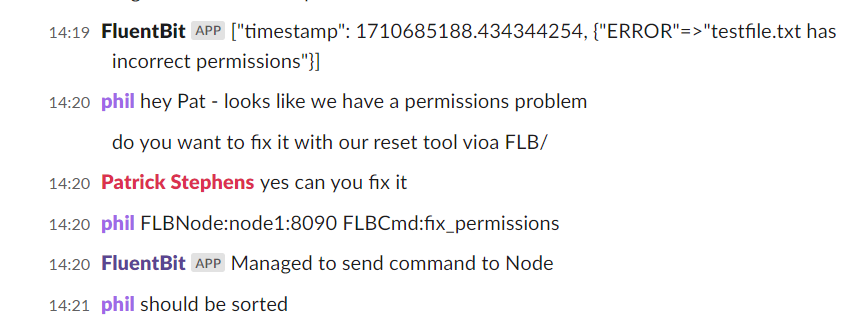
While we have solutions like PagerDuty, they tend to be integrated with back-end event analytics tools. Fluent Bit can talk to social channels such as Slack – so why not direct critical events to Slack and interact with the Ops team more directly. After all, if we’re told quickly about an imminent issue or as soon after something wrong occurs, the impact and effort involved in remediation and recovery are smaller. This is the basis of a presentation that Patrick Stephens (from Chronosphere and a committer to the Fluent Bit project) and I have put together. Patrick will be leading the session at the Cloud Native Rejekts conference in Paris (the ‘b side’ to Kube Con Europe), which takes place on the two days before Kubecon itself.
The session looks at the idea of what has been called ChatOps, why and how it can bring value, facilitated with a demo of using Fluent Bit to detect and share an event with Fluent Bit and also pick up and handle directions from the Ops team in the Slack channel.
We hope you’ll see from the session why we think the approach is worthy of consideration and how the potential security considerations can be mitigated. The MVP code is currently here but may, in due course, actually be migrated to the Fluent repos here.
We’ve bundled readme content and scripts to build and help test the additional functionality created to facilitate part of the operation.
We don’t want to spoil the presentation, so we won’t share too much. But it’ll also be worth checking with the blog, seeing as we’ll record a video and eventually record a session explaining the MVP’s ins and outs.
The exciting news is that Manning have released several more chapters of our Fluent Bit with Kubernetes book into the MEAP (Manning Early Access Program) – which means about two-thirds of the book is now available in MEAP form.
We’ve also been beefing up the supporting and related information on this website – as we can’t get everything into the book – for the static pages, the most relevant are here and here, and the blog post content can be seen here.
The sample configurations are in our GitHub repo here, and additional demos can be found here. We’ve got a pretty cool demo being built, which takes Fluent Bit into the world of ChatOps (and it isn’t just sending notifications) – it will eventually become visible in the repo – but to see it sooner, keep an eye out for our conference presentations.
The hyper scaler cloud vendors all offer Logging and monitoring capabilities. But they tend to focus on supporting their native services. If you’re aware of Oracle’s Cloud (OCI) messaging, then you’ll know that there is a strong recognition of the importance of multi-cloud. This extends not only to connecting apps across clouds but also to be able to observe and manage cloud-spanning solutions. Ultimately, most organizations want to headline observability-related views of their solutions.
Late last year, I presented these ideas, illustrating the ideas with the use of Fluent Bit and OCI’s Observability and Management products to visualize and analyze what is happening. I finally found the time to write how the very basic demo was built from a clean sheet over on the Oracle Devs blog on Medium.
This also highlights the fact that the Fluent Bit book, while I believe, once completed, will be through, can’t cover everything – and certainly not build end-to-end use cases like the Oracle Observability & Management example. To help address this, the book includes an appendix of helpful additional information, some of which I have included here, along with other content that we encounter – all of which can be found at Fluentd & Fluent Bit Additional stuff.


/filters:no_upscale()/articles/multi-cloud-observability-fluent-bit/en/resources/1fig1T-1713532832144.jpg)





You must be logged in to post a comment.